Producte acabatview
The EasySMX X05 is a versatile wireless gamepad designed for an enhanced gaming experience across multiple platforms. It features Hall Effect joysticks and triggers for precise control, customizable RGB lighting, and multiple connectivity options including 2.4GHz wireless, Bluetooth, and wired modes.
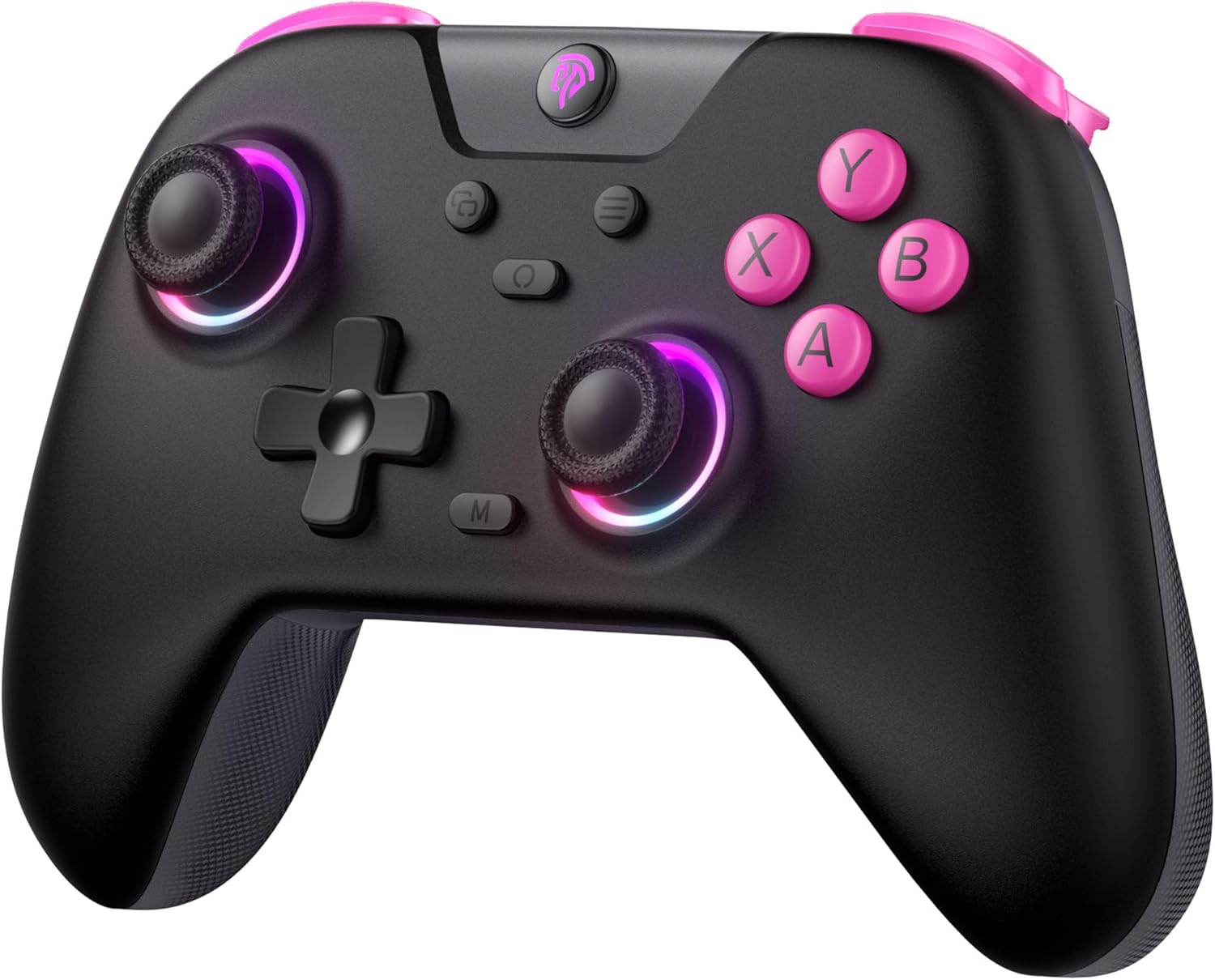
Imatge: Frontal view of the EasySMX X05 Wireless Gamepad in black with pink accents and illuminated joysticks.
Característiques clau
- Compatibilitat multiplataforma: Works with PC Windows, Switch, Android, iOS, Tablets, and Tesla.
- Il·luminació RGB: Features cool RGB lighting on joysticks and grips with 7 color combinations and 5 lighting modes (Brightness, Breathing, Colorful, Fade, Off).
- Modes de triple connectivitat: Supports 2.4GHz wireless (via dongle for PC), Bluetooth (for Switch, Android, iOS, Tablet), and wired USB connection.
- Hall Effect Technology: Equipped with Hall Effect joysticks and triggers for precise control, eliminating physical wear and stick drift, and providing a response time of less than 0.1ms.
- Llarga vida útil de la bateria: Built-in 750mAh lithium battery offers over 20 hours of gameplay.
- Botons programables: Two programmable buttons (M1, M2) at the bottom for custom macros.
- Disseny ergonòmic: Comfortable grip suitable for extended gaming sessions.
- Vibració ajustable: 5 levels of vibration intensity for immersive feedback.
- Funció turbo: Customizable turbo settings for rapid button presses.
Contingut del paquet
Si us plau, comproveu el paquet per veure si hi ha els elements següents:
- EasySMX X05 Wireless Gamepad
- Dongle USB de 2.4 GHz
- Cable de càrrega USB-C
- Manual d'usuari
Disseny del controlador
Familiarize yourself with the buttons and features of your EasySMX X05 Gamepad.
Imatge: Detallada view of the EasySMX X05 Gamepad, highlighting its various buttons and joysticks.
- Botons A/B/X/Y: Botons d'acció estàndard.
- D-Pad: Coixinet direccional per a un moviment precís.
- Manets analògics esquerre/dret: Hall Effect joysticks for smooth, drift-free control.
- LB/RB Buttons: Left and Right Bumper buttons.
- LT/RT Triggers: Left and Right Hall Effect Triggers for accurate pressure sensing.
- Botó HOME: Power on/off, system menu access.
- Botons +/-: System specific functions (e.g., Start/Select).
- Botó de captura de pantalla: Capture screenshots (Switch).
- Botó M: Macro/Programmable button.
- Botons M1/M2: Botons de retrocés programables.
- Mode Switch Toggle: Located on the back, for switching between NS (Switch), BT (Bluetooth), and 2.4G modes.
Carregant el controlador
The EasySMX X05 Gamepad comes with a built-in 750mAh rechargeable lithium battery. Before first use, it is recommended to fully charge the controller.
- Connect the supplied USB-C charging cable to the controller's USB-C port and the other end to a USB power source (e.g., PC, USB wall adapter).
- The LED indicators on the controller will show charging status. Typically, they will blink while charging and turn solid when fully charged.
- Una càrrega completa triga aproximadament entre 2 i 3 hores.
- The controller can be used in wired mode while charging.

Image: Illustration highlighting the 750mAh battery capacity of the gamepad.
Connectivity Modes and Setup
The EasySMX X05 supports three connection methods: 2.4GHz wireless, Bluetooth, and wired.

Image: Diagram showing the multi-platform compatibility of the EasySMX X05 gamepad, including Switch, PC, Android, iOS, and Tesla.
1. 2.4GHz Wireless Mode (for PC, Tesla, Smart TV)
- Set the mode switch toggle on the back of the controller to "2.4G".
- Insert the 2.4GHz USB dongle into an available USB port on your PC, Tesla, or Smart TV.
- Press the HOME button on the controller to power it on. The controller will automatically connect to the dongle. The indicator lights will become solid once connected.
2. Bluetooth Mode (for Switch, Android, iOS, Tablets)
- Set the mode switch toggle on the back of the controller to "BT".
- Per a Nintendo Switch:
- On your Switch, go to "System Settings" > "Controllers and Sensors" > "Change Grip/Order".
- Press and hold the HOME button on the EasySMX X05 controller for 3 seconds until the indicator lights start flashing rapidly.
- The Switch will detect the controller. Once paired, the indicator light will become solid.
- For Android/iOS/Tablets:
- Activa el Bluetooth al teu dispositiu.
- Press and hold the HOME button on the EasySMX X05 controller for 3 seconds until the indicator lights start flashing rapidly.
- On your device's Bluetooth settings, search for "EasySMX X05" (or similar) and select it to pair.
- Un cop emparellat, l'indicador lluminós s'il·luminarà fixament.
3. Wired Mode (for PC, Android TV, Steam Deck)
- Set the mode switch toggle on the back of the controller to "NS" (or any mode, as wired connection overrides wireless).
- Connect the USB-C charging cable to the controller's USB-C port and the other end to a USB port on your PC, Android TV, or Steam Deck.
- The controller will be automatically recognized as a wired gamepad.
Instruccions de funcionament
Ajust d'il·luminació RGB
The EasySMX X05 features customizable RGB lighting on its joysticks and grips.

Image: Visual representation of the gamepad's stylish RGB lighting effects, showing 7 color combinations and 5 diverse lighting modes.
- Premeu el botó Botó RGB (usually a dedicated button near the HOME button or a combination) to cycle through different lighting modes (e.g., Brightness, Breathing, Colorful, Fade, Off).
- Refer to the specific button combination in your physical manual for detailed RGB control.
Ajust de vibració
Adjust the intensity of the vibration feedback for a personalized gaming experience.
- The controller supports 5 levels of vibration intensity (0%, 25%, 50%, 75%, 100%).
- Typically, vibration intensity can be adjusted by holding a specific button (e.g., Turbo or M button) and pressing the D-pad Up/Down. Consult your physical manual for the exact combination.
Turbo Function Setup
The Turbo function allows for rapid, automatic pressing of a button, useful for certain in-game actions.

Image: Instructions on how to set up and disable the Turbo function for various buttons (A/B/X/Y/LB/LT/RB/RT).
- Per activar el Turbo: Manteniu premut el botó Botó M., then press the desired action button (A/B/X/Y/LB/LT/RB/RT) once. The button will now continuously activate when held down.
- Per desactivar el Turbo: Manteniu premut el botó Botó M.i, a continuació, torneu a prémer el mateix botó d'acció. La funció Turbo d'aquest botó es desactivarà.
Gestió d'energia
- Apagat manual: Press and hold the HOME button for 5 seconds to turn off the controller.
- Apagat automàtic: The controller will automatically power off after 5 minutes of inactivity to conserve battery.

Image: Illustration showing the automatic power-off feature of the gamepad after 5 minutes of inactivity.
Funcions avançades
Hall Effect Joysticks and Triggers
The EasySMX X05 utilizes Hall Effect technology for its joysticks and triggers, providing superior durability and precision compared to traditional potentiometer-based components.
- Eliminates Physical Damage: Magnetic sensors replace physical contacts, reducing wear and tear.
- Prevents Stick Drift: Ensures consistent and accurate input over time.
- Temps de resposta ràpid: Triggers offer a response time of less than 0.1ms.

Imatge: Explosió view illustrating the internal components of a Hall Effect joystick, emphasizing its durability and precision.

Imatge: Secció transversal view of a Hall Effect trigger, showing its magnetic sensing mechanism and precise response.
Botons programables per a la part posterior (M1/M2)
The M1 and M2 buttons on the back of the controller can be programmed to perform complex actions with a single press.
- Per programar: Press and hold the M button, then press the M1 or M2 button. The indicator light will blink. Now press the sequence of buttons you wish to assign (e.g., A, B, X). Press M1 or M2 again to save the macro.
- Per esborrar: Press and hold the M button, then press the M1 or M2 button twice.
- Refer to your physical manual for specific programming steps and limitations.
Rocker Caps
The controller may come with or support additional rocker caps to enhance joystick feel and precision.

Image: Close-up of the joysticks with optional rocker caps, designed to increase precision and smoothness of operation.
- Increase precision and smoothness of operation.
- Reduce the difficulty of manipulating the joystick.
- Extend the life of the joystick.
Manteniment i cura
- Neteja: Feu servir un drap suau i sec per netejar el controlador. No utilitzeu productes químics agressius ni materials abrasius.
- Emmagatzematge: Guardeu el controlador en un lloc fresc i sec, allunyat de la llum solar directa i de temperatures extremes.
- Cura de la bateria: Per allargar la durada de la bateria, eviteu descarregar-la completament amb freqüència. Carregueu el controlador regularment, fins i tot si no l'utilitzeu durant períodes prolongats.
- Eviteu les gotes: Protegiu el controlador de caigudes i impactes, que poden danyar els components interns.
Resolució de problemes
| Problema | Possible solució |
|---|---|
| El controlador no s'encén. | Assegura't que el comandament estigui carregat. Connecta'l a una font d'alimentació amb el cable USB-C. |
| El controlador no es connecta sense fil. |
|
| Input lag or disconnections. |
|
| Els botons o els joysticks no responen. |
|
| La vibració no funciona. |
|
Especificacions
| Característica | Detall |
|---|---|
| Número de model | X05 |
| Marca | EasySMX |
| Connectivitat | Sense fil de 2.4 GHz, Bluetooth, amb cable (USB-C) |
| Dispositius compatibles | PC (Windows), Nintendo Switch, Android, iOS, Tablets, Tesla, Android TV |
| Capacitat de la bateria | Bateria de liti de 750 mAh |
| Durada de la bateria | > 20 hours (approx.) |
| Temps de càrrega | 2-3 hores (aprox.) |
| Tipus de palanca de control | Joysticks d'efecte Hall |
| Tipus de disparador | Disparadors d'efecte Hall |
| Il·luminació RGB | 7 colors, 5 modes |
| Vibració | Adjustable (5 levels) |
| Botons programables | M1, M2 (back buttons) |
| Dimensions (L x A x A) | 7.5 x 11.9 x 16.5 cm (aprox.) |
| Nombre de botons | 14 |
Garantia i Suport
EasySMX products typically come with a manufacturer's warranty. For specific warranty details, return policies, or technical support, please refer to the official EasySMX weblloc web o contacteu directament amb el seu servei d'atenció al client.
- Oficial Weblloc: Visita el EasySMX Official Weblloc per al registre de productes, preguntes freqüents i recursos d'assistència.
- Atenció al client: Contact EasySMX customer support for any issues not covered in this manual.
- Suport de la plataforma de compra: For return or exchange inquiries, please contact the retailer where you purchased the product.


