Producte acabatview
The WUBEN E1 is a compact and versatile EDC (Everyday Carry) flashlight designed for various lighting needs, including use as a selfie light for mobile phones. It features adjustable brightness and color temperature, magnetic attachment, and convenient USB Type-C charging.
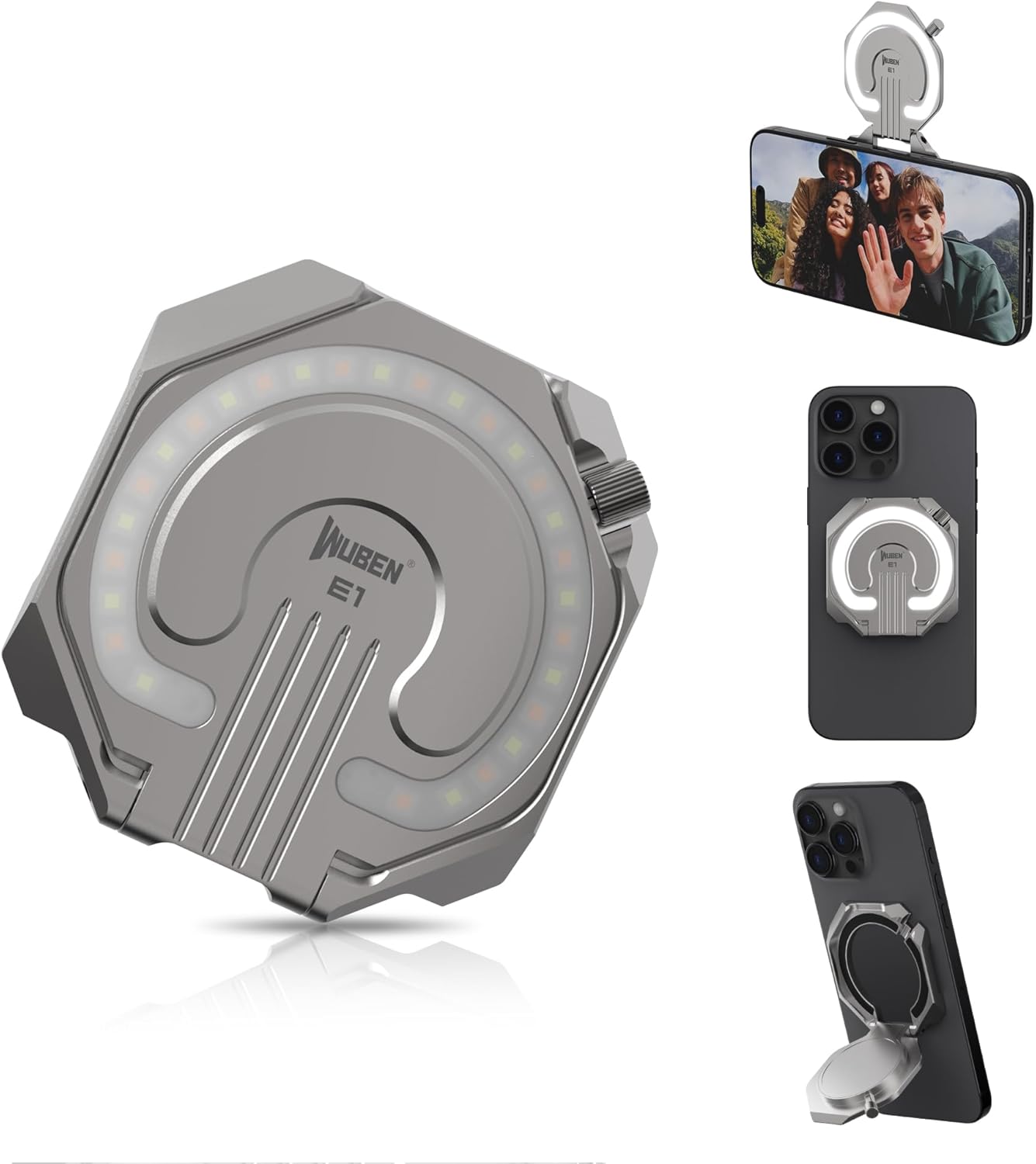
This image displays the WUBEN E1 flashlight in titanium color, showcasing its compact design and how it can be attached to a smartphone for various lighting purposes, including a selfie light and a phone stand.
Contingut del paquet
Si us plau, verifiqueu que tots els elements siguin presents al paquet:
- Llanterna WUBEN E1
- Cable USB
- Magnetic Suction Ring (for non-MagSafe phones)
- Manual d'usuari (aquest document)
This video demonstrates the unboxing of the WUBEN E1 flashlight, showing all included components such as the flashlight unit, USB-C charging cable, and the magnetic ring.
Configuració
Càrrega inicial
Before first use, fully charge the WUBEN E1.
- Connect the provided USB Type-C cable to the charging port on the WUBEN E1.
- Connect the other end of the cable to a compatible USB power source (e.g., computer, wall adapter).
- The indicator light will show red during charging and turn blue when fully charged. A full charge takes approximately 50 minutes.

This image illustrates the WUBEN E1 connected to a USB-C cable for charging, with an indicator light showing the charging status.
Attaching to a Phone
The WUBEN E1 features a magnetic design for easy attachment to smartphones.
- For MagSafe-compatible phones (iPhone 12 series and above): Simply align the WUBEN E1 with the MagSafe area on the back of your phone. The strong N54 magnets will securely attach the device.
- For non-MagSafe phones or phones with non-magnetic cases: Use the included magnetic suction ring.
- Clean the back surface of your phone or phone case where you intend to attach the magnetic ring.
- Peel off the protective film from the adhesive side of the magnetic suction ring.
- Carefully center and press the magnetic ring onto the desired location on your phone or case. Ensure it is firmly adhered.
- Once the magnetic ring is attached, the WUBEN E1 can be magnetically mounted to it.

This image demonstrates the compatibility of the WUBEN E1 with various smartphones, showing direct attachment to MagSafe iPhones, use with MagSafe cases, and the application of a metal plate for non-MagSafe phones.
Instruccions de funcionament
Encès/Apagat
To power on the WUBEN E1, press and hold the power button located on the side.
Per apagar, premeu i manteniu premut el botó d'engegada de nou.
Ajust de la brillantor (atenuació continua)
While the light is on, press and hold the power button to adjust the brightness. The brightness will cycle smoothly from 10% to 100%. Release the button at your desired brightness level.
Canvi de temperatura de color
The WUBEN E1 offers three color temperature modes: Warm Tone (3000K-3500K), Natural Tone (3500K-5000K), and Cool Tone (5000K-6000K).
To switch between modes, quickly double-press the power button.
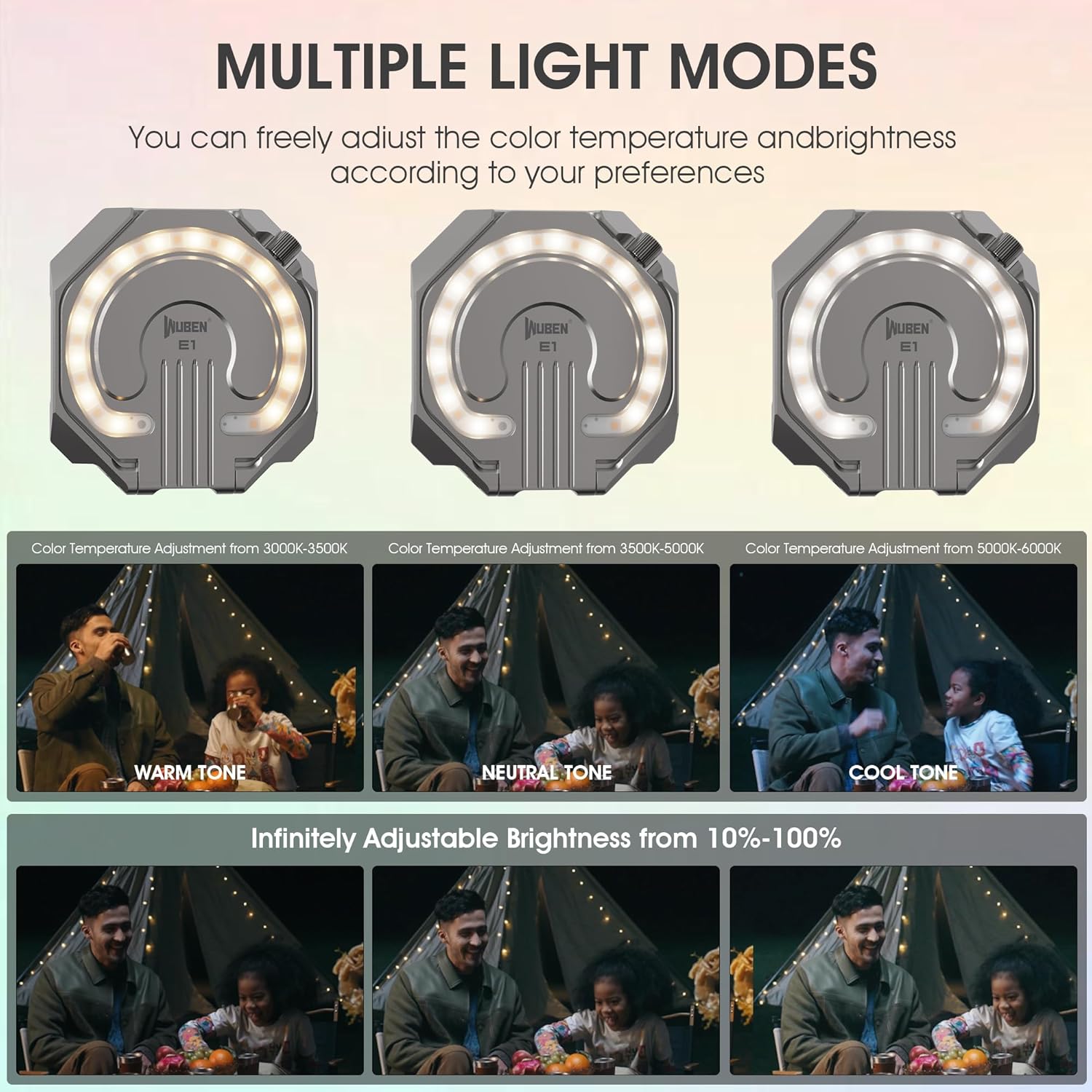
This image illustrates the three different light modes (Warm, Natural, Cool) available on the WUBEN E1, demonstrating how the color temperature can be adjusted.
Ús com a suport de telèfon
The WUBEN E1 features a flexible flip design that allows it to function as an adjustable phone stand.
Once attached to your phone, simply flip out the integrated stand to position your phone at various angles for viewing or video calls. The flip angle can exceed 270 degrees.

This image demonstrates the WUBEN E1's "Flip Design" feature, showing how it can be used as an adjustable phone stand with a flip angle greater than 270 degrees.
Magnetic Attachment to Iron Surfaces
The strong N54 magnets also allow the WUBEN E1 to be attached to any iron surface, providing hands-free lighting.

This image shows the WUBEN E1 magnetically attached to a metal surface, highlighting its ability to provide hands-free illumination.
Manteniment
Neteja
To clean the WUBEN E1, wipe it with a soft, damp tela. No utilitzeu netejadors abrasius ni dissolvents.
Emmagatzematge
When not in use for extended periods, store the WUBEN E1 in a cool, dry place. It is recommended to fully charge the device every 3-6 months to maintain battery health.
The included pouch can be used for safe storage and transport.
This video segment shows the WUBEN E1 being placed into its protective pouch, demonstrating a recommended storage method.
Resolució de problemes
| Problema | Causa possible | Solució |
|---|---|---|
| La llum no s'encén | Bateria baixa; Funcionament incorrecte | Charge the device fully; Ensure power button is pressed and held for activation. |
| La llum és tènue | Low battery; Brightness set too low | Charge the device; Adjust brightness by pressing and holding the power button. |
| La fixació magnètica és feble | Phone not MagSafe compatible; Magnetic ring not properly installed | Ensure phone has MagSafe or use the included magnetic suction ring. Re-install magnetic ring if necessary, ensuring clean surface. |
If the issue persists after trying these solutions, please contact WUBEN customer support.
Especificacions
| Característica | Detall |
|---|---|
| Model | E1-M06 |
| Lúmens màxims | 300 lúmens |
| Durada màxima de la bateria | 70 hours (in Low mode) |
| Interfície de càrrega | USB tipus C |
| Temperatura de color | 3000K-6000K (Warm, Natural, Cool Tones) |
| Atenuació | Stepless Dimming (10%-100%) |
| Pes | 38 grams (1.34 unces) |
| Dimensions | 63 x 61 mm (aprox. 2.48 x 2.40 polzades) |
| Gruix | 6.1 mm (aprox. 0.24 polzades) |
| Resistència a l'aigua | Impermeable IP65 |
| Resistència a l'impacte | 1.5 metres |
Garantia i Suport
For warranty information, product registration, or technical support, please visit the official WUBEN weblloc o poseu-vos en contacte amb el seu servei d'atenció al client.
WUBEN Official Store: Visit the WUBEN Store on Amazon
Conserveu el vostre comprovant de compra per a reclamacions de garantia.


