1. Introducció
This manual provides detailed instructions for the BENFEI CFexpress Type A Card Reader. This device is designed for high-speed data transfer from CFexpress Type A memory cards to your computer or other compatible devices. It features a versatile 2-in-1 USB-C and USB-A connector, supporting USB 3.2 Gen 2 (10Gbps) for efficient workflow.
The BENFEI CFexpress Type A Card Reader is compact and portable, making it an ideal accessory for photographers and videographers who need to quickly offload large fileestà en marxa.

Image 1.1: The BENFEI CFexpress Type A Card Reader is designed for portability, easily fitting into a bag alongside other devices.
2. Informació de seguretat
- No exposeu el dispositiu a l'aigua ni a una humitat excessiva.
- Avoid extreme temperatures. Operate within a temperature range of 0°C to 45°C (32°F to 113°F).
- No intenteu desmuntar ni modificar el dispositiu. Això anul·larà la garantia.
- Mantenir fora de l'abast dels nens.
- Use only with compatible CFexpress Type A cards. Inserting incompatible cards may damage the reader or the card.
3. Contingut del paquet
Si us plau, verifiqueu que tots els elements siguin presents al vostre paquet:
- 1 x BENFEI CFexpress Type A Card Reader with integrated USB-C/USB-A 2-in-1 cable
4. Producte acabatview
The BENFEI CFexpress Type A Card Reader features a durable aluminum alloy shell and an integrated braided nylon cable for enhanced longevity. The unique 2-in-1 connector allows for flexible connectivity.

Image 4.1: The BENFEI CFexpress Type A Card Reader with its integrated 2-in-1 USB-C and USB-A cable, ready for use with a CFexpress Type A card.
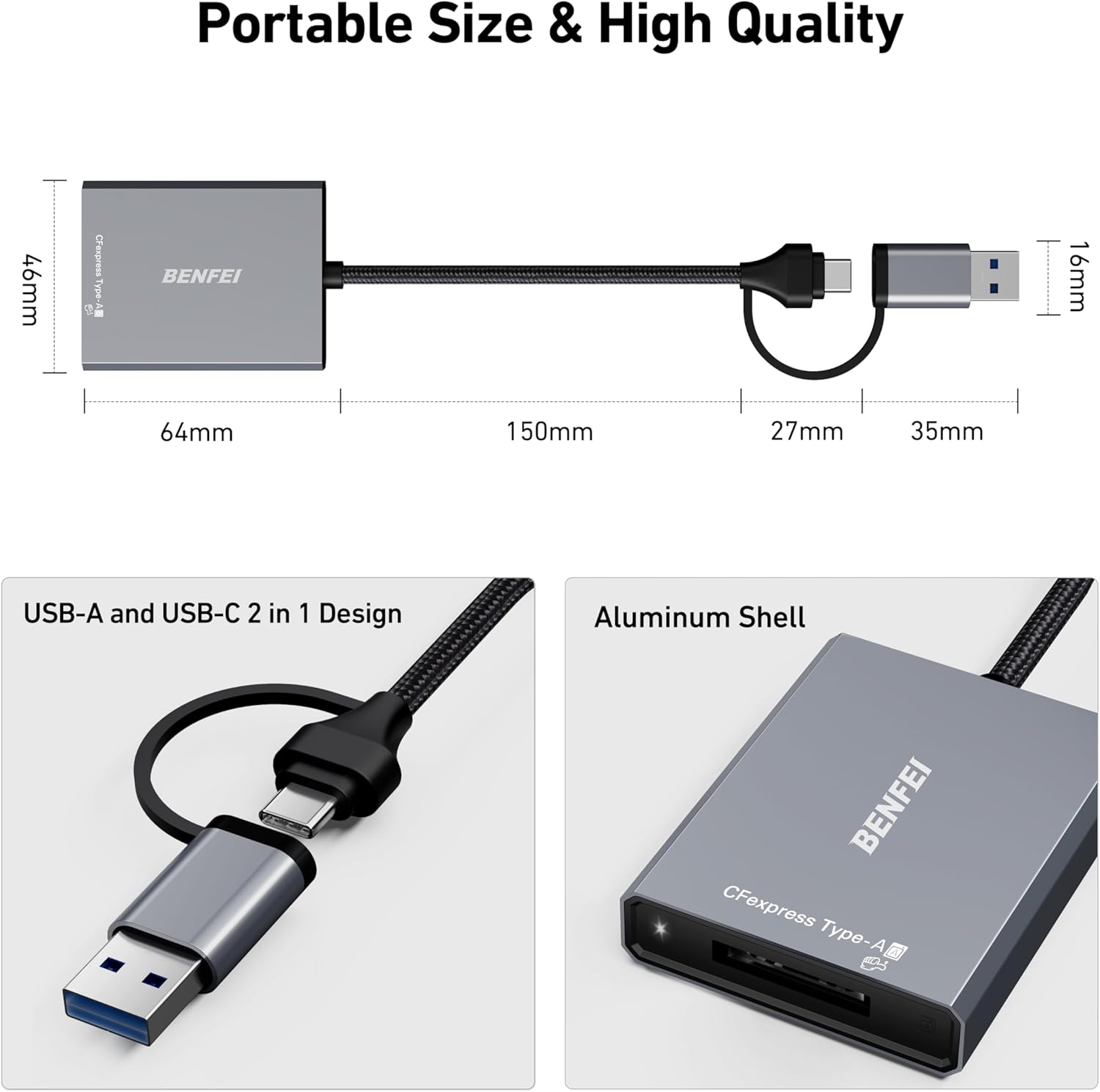
Image 4.2: Physical features of the card reader, highlighting its compact dimensions, the dual USB-A and USB-C connector, and the robust aluminum casing.
5. Configuració
The BENFEI CFexpress Type A Card Reader is a plug-and-play device, requiring no driver installation for most operating systems.
5.1 Connexió del lector de targetes
- Identify the appropriate USB port on your computer or device (USB-A or USB-C).
- Connect the integrated 2-in-1 USB cable from the card reader to your device's USB port. The USB-C connector is located at the end of the cable, and the USB-A connector slides over the USB-C connector.
- Ensure the connection is secure. The device should be recognized automatically by your operating system.
5.2 Inserting a CFexpress Type A Card
- Locate the CFexpress Type A slot on the card reader.
- Gently insert your CFexpress Type A card into the slot with the contacts facing down (or as indicated by the card's orientation).
- Push the card in until it clicks into place. Do not force the card.
6. Instruccions de funcionament
6.1 Transferència de dades
Once the card reader is connected and the CFexpress Type A card is inserted, your computer will recognize it as an external storage device.
- Obriu el del vostre ordinador file explorer (Windows) or Finder (Mac).
- Locate the newly mounted drive corresponding to your CFexpress card.
- Arrossegueu i deixeu anar files to and from the card as you would with any other external drive.
- For optimal performance, ensure your device's USB port supports USB 3.2 Gen 2 (10Gbps). The final data transfer speed depends on the card's speed and the USB port's capabilities.

Image 6.1: The card reader supports Super-speed USB 3.2 Gen 2, offering data transfer rates up to 10Gbps, significantly faster than USB 2.0.
6.2 Ejecting the Card
Always safely eject the CFexpress card before physically removing it to prevent data corruption.
- Windows: Right-click on the drive icon in File Explorer and select "Eject."
- Mac: Drag the drive icon to the Trash or click the Eject button next to the drive in Finder.
7. Compatibilitat
The BENFEI CFexpress Type A Card Reader offers broad compatibility with various devices and operating systems.
7.1 Sistemes operatius compatibles
- Windows XP/Vista/7/8/8.1/10/11
- Mac OS
- Linux
- Chrome OS
- Android (with compatible devices)
7.2 Dispositius compatibles
- MacBook Pro
- Surface Pro/GO
- Portàtils
- Ordinadors d'escriptori
- Smartphones (with USB-C connectivity and OTG support)

Image 7.1: The card reader is compatible with a wide range of devices and operating systems, ensuring broad usability.
7.3 Card Type Compatibility
- Compatible: CFexpress Type A memory cards.
- No compatible: CFexpress Type B, CFexpress Type C, SD cards, XQD cards.

Image 7.2: The card reader is specifically designed for CFexpress Type A cards and is not compatible with other card formats.
The card reader supports CFexpress Type A cards up to 2TB capacity.

Image 7.3: The card reader supports CFexpress Type A cards with capacities up to 2TB, suitable for large photo and video files.
8. Manteniment
- Mantingueu el lector de targetes net i sense pols. Feu servir un drap suau i sec per netejar-lo.
- Avoid bending or twisting the integrated cable excessively.
- Guardeu el dispositiu en un lloc fresc i sec quan no l'utilitzeu.
9. Solució De Problemes
| Problema | Causa possible | Solució |
|---|---|---|
| Card reader not recognized by computer. | Loose connection, incompatible USB port, card not inserted correctly. | Ensure the USB cable is securely connected. Try a different USB port. Verify the card is fully inserted. Restart your computer. |
| Velocitats de transferència de dades lentes. | USB 2.0 port used, slow CFexpress card, background processes. | Connect to a USB 3.2 Gen 2 (10Gbps) port. Ensure your CFexpress card supports high speeds. Close unnecessary applications. |
| CFexpress card not detected. | Card not fully inserted, incompatible card type, damaged card. | Re-insert the card firmly. Confirm it is a CFexpress Type A card. Test with another CFexpress Type A card if available. |
| El dispositiu s'escalfa durant l'ús. | Normal operation during high-speed data transfer. | This is normal for high-speed devices. The aluminum casing helps dissipate heat. If it becomes excessively hot, disconnect and allow it to cool. |
10. Especificacions
- Model: 000367
- Interfície: USB 3.2 Gen 2 (10 Gbps)
- Connector: USB-C & USB-A 2-in-1
- Compatible Card Type: CFexpress tipus A
- Max Card Capacity: Fins a 2 TB
- Material: Aluminum Alloy Shell, Braided Nylon Cable
- Dimensions: Approximately 64mm (L) x 46mm (W) x 16mm (H) for the reader body (excluding cable)
- Longitud del cable: Uns 150 mm
- Pes: 60 g
- Sistemes operatius: Windows, Mac OS, Linux, Chrome OS, Android
11. Garantia i Suport
BENFEI provides an 18-month warranty for this product, guaranteeing long-term satisfaction. For any issues or inquiries, please contact BENFEI customer service. Our friendly and accessible customer service team is available to assist you in a timely manner.
For support, please refer to the contact information provided with your purchase or visit the official BENFEI weblloc.


