1. Introducció
Thank you for choosing the Bextgoo Clip-01 1080P FHD Body Camera. This compact and versatile device is designed for capturing high-quality video and photos in various scenarios, from personal safety to outdoor activities. Please read this manual carefully to ensure proper use and optimal performance of your camera.

Image 1.1: Bextgoo Clip-01 1080P FHD Body Camera overview.
2. Què hi ha a la caixa
- 1 x Bextgoo Clip-01 Mini Body Camera
- 1 x 32GB Micro SD Card (pre-installed)
- 1 x Pin de restabliment
- 1 x Manual d'usuari
- 1 x cable de càrrega
3. Producte acabatview
The Bextgoo Clip-01 features a sleek design with essential controls and ports for easy operation.

Image 3.1: Detailed diagram of the Bextgoo Clip-01 Body Camera components and controls.
Característiques principals:
- 1080P Full HD Footage: Captures clear details at 1080P Ultra HD at 30fps with a 90° wide-angle lens.
- 12MP Photo Quality: High-resolution 12MP photos for vivid and clear details.
- Detecció intel·ligent de moviment PIR: Built-in sensor activates recording when motion is detected.
- 32GB Micro SD Card with Loop Storage: Footage is saved directly to the included 32GB micro SD card. Supports loop recording, overwriting oldest footage when full.
- 3-7 Hours Wireless Usage: Built-in 560mAh rechargeable battery provides 3-7 hours of wireless use. Can operate continuously while charging.
- Portable Clip Design: Slim and light design with a built-in clip for easy attachment to backpacks, belt loops, etc.
- No WiFi, No App Needed: Ready to use out of the box with the pre-installed memory card.
4. Configuració
4.1 Càrrega de la càmera
Before first use, fully charge the camera. Connect the provided charging cord to the camera's USB port and to a power source (e.g., computer USB port or USB wall adapter). The indicator light will show charging status and turn off when fully charged.

Image 4.1: Charging the camera and expected battery life.
4.2 Inserting/Removing Micro SD Card
The camera comes with a 32GB Micro SD card pre-installed. If you need to replace or remove it:
- Localitza la ranura per a targetes Micro SD a la càmera.
- To insert, gently push the card into the slot until it clicks into place. Ensure the correct orientation.
- To remove, gently push the card inwards again until it springs out slightly, then pull it out.
5. Instruccions de funcionament
5.1 Encès/Apagat
- Encès: Press and hold the power button for a few seconds until the indicator light illuminates.
- Apagar: Press and hold the power button for a few seconds until the indicator light flashes and then turns off.
5.2 Enregistrament de vídeo
Once powered on, the camera is typically in standby mode. To start video recording, press the video record button. The indicator light will change to indicate recording is in progress. Press the button again to stop recording.

Image 5.1: Comparison of 1080P FHD video quality.
5.3 Fer fotos
In standby mode, press the photo button once to capture a still image. The indicator light may flash briefly to confirm the photo has been taken.
5.4 Smart PIR Motion Detection
The camera features a PIR (Passive Infrared) motion detection function. When enabled, the camera will automatically start recording when it detects movement in its field of view, conserving battery and storage space.

Image 5.2: Illustration of Smart PIR Motion Detection in use.
5.5 Loop Storage
The camera supports loop recording. When the 32GB Micro SD card is full, the camera will automatically overwrite the oldest video files to make space for new recordings. This ensures continuous recording without manual storage management.
5.6 Accés Files
A view o transferència registrada files:
- Connexió directa: Connect the camera to your computer using the provided USB cable. The camera should appear as a removable disk, allowing you to access the files.
- Lector de targetes SD: Remove the Micro SD card from the camera and insert it into an SD card reader (not included) connected to your computer.
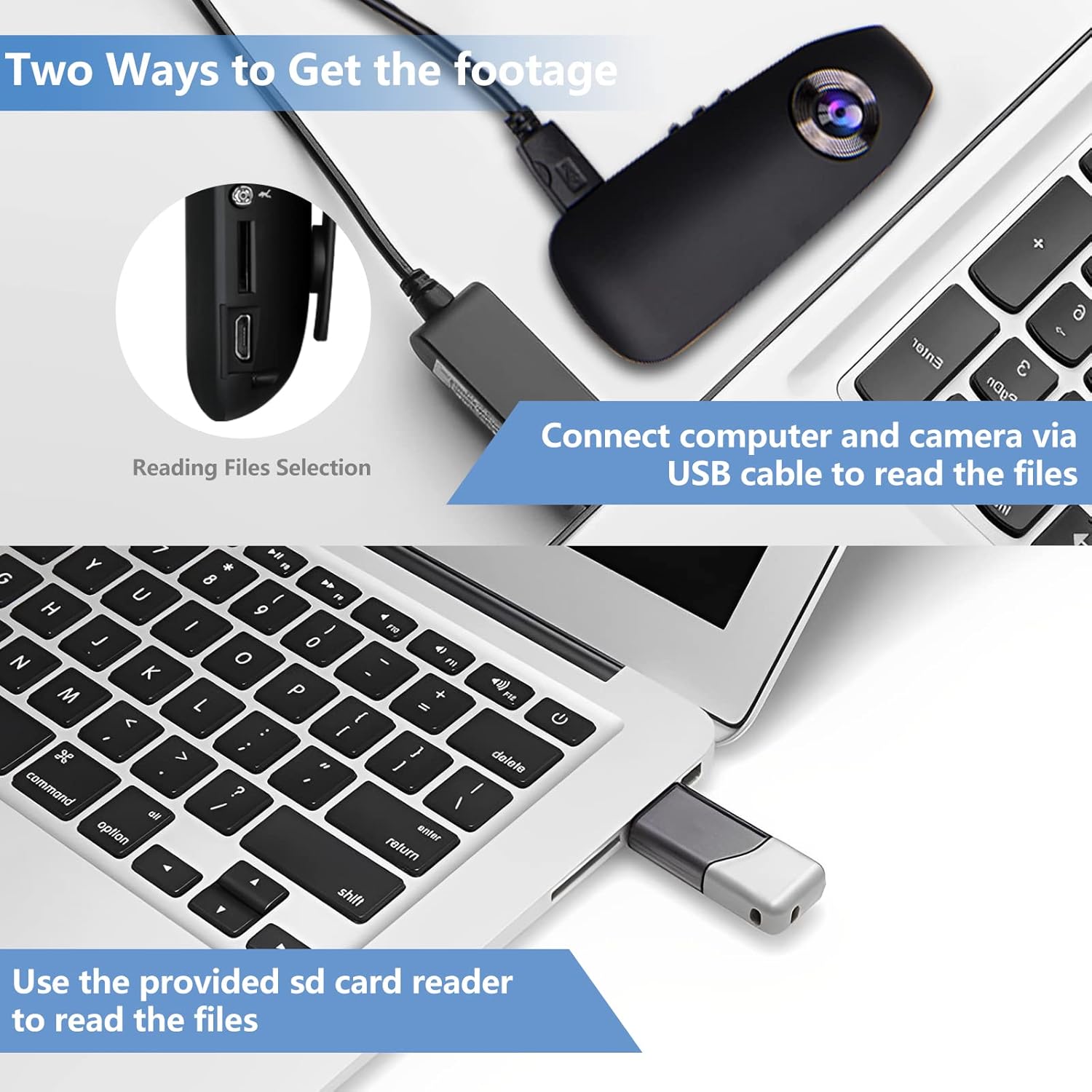
Image 5.3: Two methods for accessing recorded footage de la càmera.
5.7 Temps Stamp
The camera can embed a time stamp on your recordings. To set or adjust the time stamp, connect the camera to a computer. Open the file named <<settime>> (or similar) and edit the text file to set the correct date and time. Save the file per aplicar els canvis.
6. Manteniment
- Keep the camera clean. Use a soft, dry cloth to wipe the lens and body. Avoid abrasive cleaners.
- Guardeu la càmera en un lloc fresc i sec, allunyat de la llum solar directa i de temperatures extremes.
- Eviteu deixar caure la càmera ni sotmetre-la a impactes forts.
- Feu còpies de seguretat regulars dels aliments importantstage from the Micro SD card to prevent data loss.
- Assegureu-vos que el port de càrrega estigui lliure de pols i deixalles.
7. Solució De Problemes
- La càmera no s'encén: Ensure the battery is charged. Connect to a power source and try again. If unresponsive, use the reset pin to press the reset button.
- No es pot gravar: Check if the Micro SD card is properly inserted and has sufficient free space. If loop recording is enabled, older files es sobreescriurà.
- Poor video/photo quality: Ensure the lens is clean and free from smudges. Check lighting conditions.
- Computer not recognizing camera: Try a different USB port or cable. Ensure the camera is powered on when connected.
8. Especificacions
| Característica | Detall |
|---|---|
| Marca | Bextgoo |
| Nom del model | Clip-01 |
| Resolució de captura de vídeo | 1080p |
| Tecnologia del sensor fotogràfic | CMOS |
| Tipus de memòria flash | Micro SD (32GB included) |
| Durada de la bateria | 3-7 Hours (wireless usage) |
| Tecnologia de connectivitat | No WiFi Need |
| Pes de l'article | 3.84 unces |
| Dimensions del paquet | 5.31 x 3.5 x 1.46 polzades |
9. Garantia i assistència
For warranty information and customer support, please refer to the contact details provided with your product packaging or visit the official Bextgoo weblloc. Conserveu el rebut de compra per a reclamacions de garantia.


