1. Introducció
The LAUNCH X431 PRO Star is an advanced automotive intelligent diagnostic tool designed for comprehensive vehicle analysis. This device features an 8-inch touch screen, runs on Android 10.0, and is powered by a 2.0GHz 4-Core processor with 4GB RAM and 64GB ROM. It includes a 6000mAh battery for extended operation. The PRO Star supports fault diagnosis for a wide range of vehicle models and systems, offering functions such as code reading, code clearing, data stream analysis, reset functions, action testing, coding, and matching.

Figure 1.1: LAUNCH X431 PRO Star Diagnostic Scanner with key features highlighted.
2. Configuració i primer ús
2.1 Desembalatge i contingut del paquet
Carefully unpack all items from the carrying box. Verify that all components listed below are present.

Figure 2.1: Contents of the LAUNCH X431 PRO Star package.
- LAUNCH X-431 PRO STAR Tablet
- Caixa de Transport
- Diagnostic Cable (OBDII)
- Cable USB tipus C
- Adaptador de CA
- US Plug, UK Plug, EU Plug
- Manual d'usuari
- Guia ràpida
- Llista d'embalatge
- PIN Envelope
2.2 Configuració inicial del dispositiu
- Carregueu el dispositiu: Fully charge the LAUNCH X431 PRO Star tablet using the provided AC adapter and Type-C USB cable before first use.
- Encès: Manteniu premut el botó d'engegada per encendre el dispositiu.
- Idioma i zona horària: Segueix les instruccions que apareixen a la pantalla per seleccionar l'idioma i la zona horària que prefereixis.
- Connecta't a Wi-Fi: Connect the device to a stable Wi-Fi network (supports 2.4GHz and 5.0GHz). Internet access is required for registration and software updates.
- Registre del compte: Register an account on the manufacturer's website using the serial number provided with your device.
- Actualització de programari: After registration, you will be prompted to update the software. Perform all available updates to ensure optimal functionality and access to the latest vehicle data. This process may take some time.
3. Instruccions de funcionament
3.1 Connexió a un vehicle
- Locate the vehicle's OBDII port, typically under the dashboard on the driver's side.
- Connect the diagnostic cable to the LAUNCH X431 PRO Star tablet.
- Connect the other end of the diagnostic cable to the vehicle's OBDII port.
- Turn the vehicle's ignition to the 'ON' position (do not start the engine).
3.2 Funcions de diagnòstic bàsiques
Once connected, the device will attempt to auto-detect the vehicle's VIN. If auto-detection fails, you can manually enter the vehicle information.
- Informe de salut: After identifying the vehicle, the system can generate a comprehensive health report.
- Escaneig complet del sistema: Perform a complete scan of all available vehicle systems.
- Llegir/Esborrar codis: View diagnostic trouble codes (DTCs) and clear them after repairs.
- Dades en directe: Monitor real-time data streams from various sensors and components.
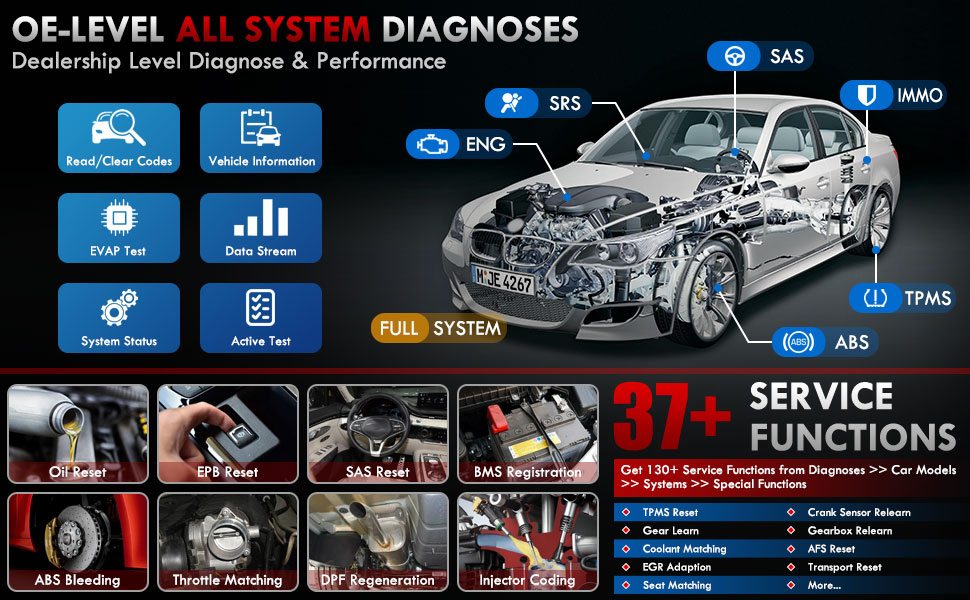
Figura 3.1: Mésview of OE-level all system diagnostic capabilities.
3.3 Advanced Maintenance Services (37+)
The LAUNCH X431 PRO Star offers over 37 advanced maintenance and reset functions, with the potential to expand to over 130 types depending on the vehicle's make, model, and year. These services include:
- Restabliment d’oli
- Sagnat de l’ABS
- Registre de bateries
- Restabliment de l'EPB (fre d'estacionament electrònic)
- Regeneració del DPF (filtre de partícules dièsel)
- Codificació d'injectors
- Restabliment SAS (sensor d'angle de direcció)
- Coincidència de l'accelerador
- Restabliment del TPMS (sistema de control de la pressió dels pneumàtics)
- Reinicialització de la caixa de canvis
- Restabliment de la suspensió
- Capçalera AFSamp Restableix

Figura 3.2: Examples of the 37+ maintenance service functions.
3.4 Control bidireccional (prova activa)
This feature allows the technician to send commands to vehicle systems and components to test their functionality. This helps in quickly identifying faulty components without manual disassembly. Examples inclouen:
- Turning the radiator fan on/off
- Prova dels actuadors de pany de porta
- Energizing injectors
- Miralls operatius
- Obrir/tancar finestres

Figure 3.3: Illustration of bi-directional control capabilities.
3.5 Codificació de la ECU
ECU Coding enables the matching, relearning, and coding of newly installed ECU modules after repairs or replacements. It also allows for the activation of higher-level vehicle functions. This includes:
- Flash/Match/Calibration
- Recode and Relearn
- Alter Configuration
- Reprogram Adaptive Data
- Recognize New CPU
- Match Current Settings
- Customize Car Features (e.g., automatic lock, reverse rearview mirror down, windows close when rain)

Figura 3.4: Examples of ECU coding applications.
3.6 FCA SGW Vehicle Access & Quick Guided Functions
- FCA SGW: The X431 PRO Star is AutoAuth certified, allowing secure diagnosis of SGW (Security Gateway) vehicles without limitations.
- Quick Guided: Provides step-by-step guidance for Volkswagen group vehicles, simplifying complex diagnostic procedures.
3.7 Mòduls d'extensió
The device supports various optional add-on tools to expand its capabilities, including:
- Battery Tester (e.g., BST360)
- Videoscope (e.g., VSP-600)
- Oscilloscope (e.g., O2-2)
- TPMS Detector (e.g., TSGUN, i-TPMS)
- WiFi Thermal Printer (e.g., X-431)
- Eina de calibratge ADAS
- XPROG 3 (Immobilizer Programmer)

Figure 3.5: Various optional extension modules for the X431 PRO Star.
4. Manteniment
4.1 Actualitzacions de programari
The LAUNCH X431 PRO Star includes 2 years of free software updates. After this period, the device will continue to function, but new software releases and vehicle data updates will require a subscription. Regular updates ensure compatibility with new vehicle models and access to the latest diagnostic features.
4.2 Atenció general
- Mantingueu el dispositiu net i lliure de pols i humitat.
- Store the device in its protective carrying case when not in use.
- Eviteu exposar el dispositiu a temperatures extremes o a la llum solar directa durant períodes prolongats.
- Use only the provided charging accessories to prevent damage.
5. Solució De Problemes
If you encounter issues with your LAUNCH X431 PRO Star, consider the following:
- Problemes de connexió: Ensure the diagnostic cable is securely connected to both the scanner and the vehicle's OBDII port. Verify the vehicle's ignition is in the 'ON' position.
- Avaries de programari: Ensure the device's software is up to date. A factory reset may resolve persistent software issues (note: this will erase user data).
- Compatibilitat de vehicles: While the device covers over 99% of vehicles, specific advanced functions may vary by make, model, and year. Consult the vehicle coverage list or contact support for details.
- Rendiment del dispositiu: Si el dispositiu va lent o no respon, prova de reiniciar-lo. Assegura't que la bateria estigui prou carregada.
6. Especificacions
| Característica | Especificació |
|---|---|
| Model | LAUNCH X-431 PRO STAR |
| Sistema operatiu | Android 10.0 |
| Processador | 2.0GHz 4-Core |
| RAM | 4 GB |
| ROM (emmagatzematge) | 64 GB |
| Mostra | 8-inch Touch Screen (1280x800 resolution) |
| Bateria | 6000 mAh |
| Connectivitat | Wi-Fi (2.4/5.0 GHz), CANFD, DoIP |
| Càmera | 8.0 MP Rear-facing |
| Pes de l'article | 8.4 lliures |
| Dimensions del paquet | 13.6 x 13.2 x 6.1 polzades |
| Tipus d'ajust d'automòbil | Ajuste universal |
7. Garantia i Suport
7.1 Informació de la garantia
The LAUNCH X431 PRO Star comes with a 2 any de garantia covering manufacturing defects and hardware malfunctions.
7.2 Suport tècnic
LAUNCH provides Assistència tècnica 7*24 for any post-sales issues or technical assistance. For support, please refer to the contact information provided in your product packaging or visit the official LAUNCH weblloc.


