1. Introducció
This manual provides essential information for the safe and effective use of your Aufero Laser Engraver AL3-20A. This powerful 20W laser engraver and cutter is designed for precision work on a variety of materials, including wood, metal, acrylic, and leather. It features a large working area and comes equipped with a 40L air assist pump to enhance performance and safety.
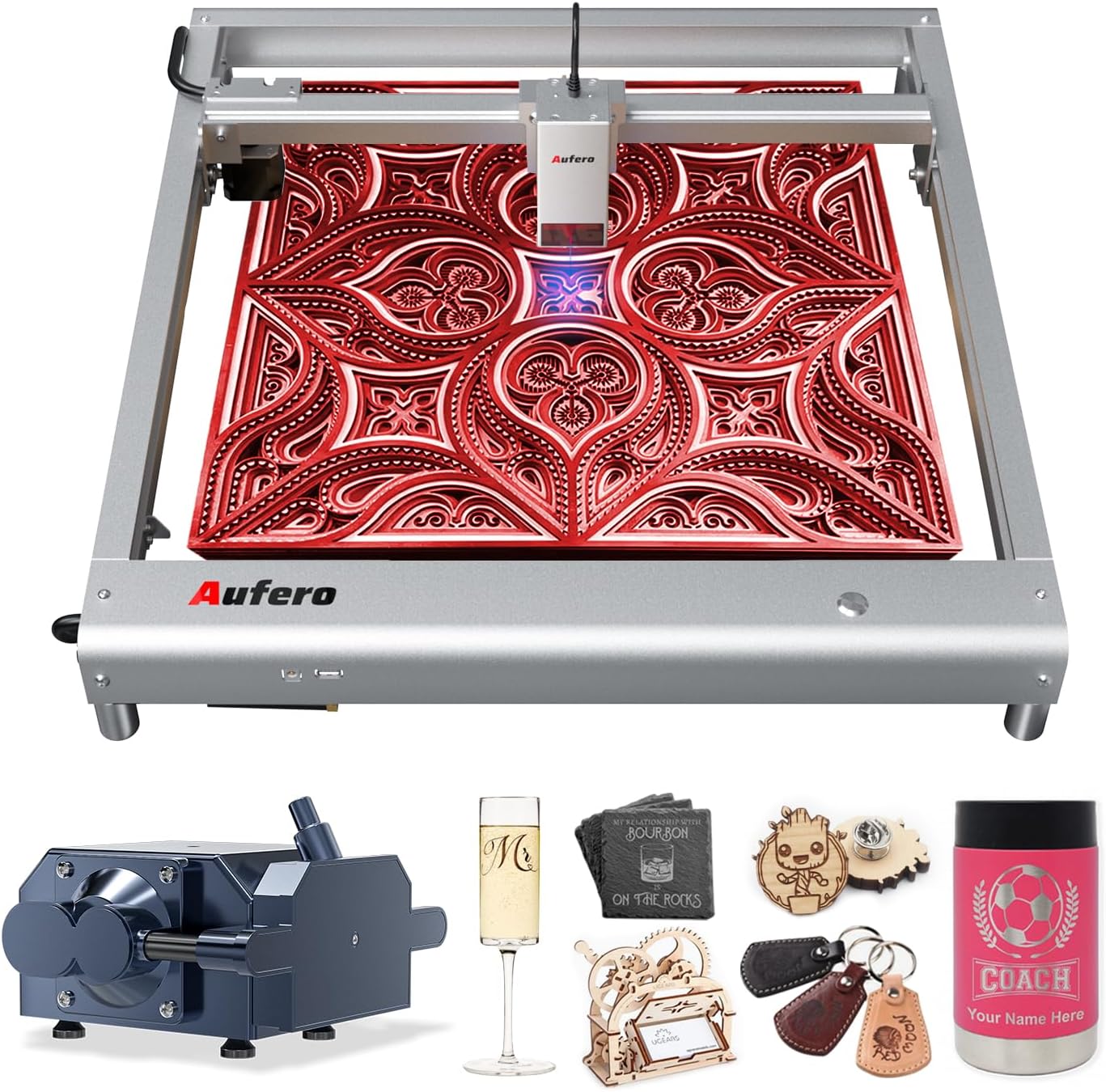
Figure 1.1: The Aufero Laser Engraver AL3-20A with examples d'objectes gravats.
Please read this manual thoroughly before operating the machine to ensure proper setup, operation, and maintenance, and to understand all safety precautions.
2. Informació de seguretat
WARNING: This product is a Class 4 laser device. Direct exposure to the laser beam can cause severe eye damage and skin burns. Always wear appropriate laser safety goggles (OD6+) when operating the machine. Never look directly into the laser beam.
2.1 Precaucions generals de seguretat
- Operate the machine in a well-ventilated area to dissipate fumes and smoke produced during engraving/cutting.
- Keep a fire extinguisher nearby. Materials can ignite during laser processing.
- No deixeu la màquina sense vigilància durant el funcionament.
- Ensure the work area is clear of flammable materials.
- Mantingueu els nens i les mascotes allunyats de la màquina en funcionament.
- Desconnecteu l'alimentació abans de realitzar qualsevol manteniment o ajust.
2.2 Enhanced Safety Features
The Aufero AL3-20A incorporates six protective measures to enhance user safety:
- Motherboard Program Monitoring: Monitors voltage and current to prevent electrical issues.
- USB Connection Monitoring: Detects and alerts if the USB connection is interrupted during operation.
- Actual i Voltage Seguiment: Continuously checks power supply stability.
- Laser Exposure Monitoring: Filters 97% of ultraviolet rays and limits laser exposure duration for a secure working environment.
- Protecció de posició activa: Detects unexpected movement or tilting of the machine and stops laser output.
- Protecció de posició inclinada: Automatically halts operation if the machine is tilted beyond a safe angle.
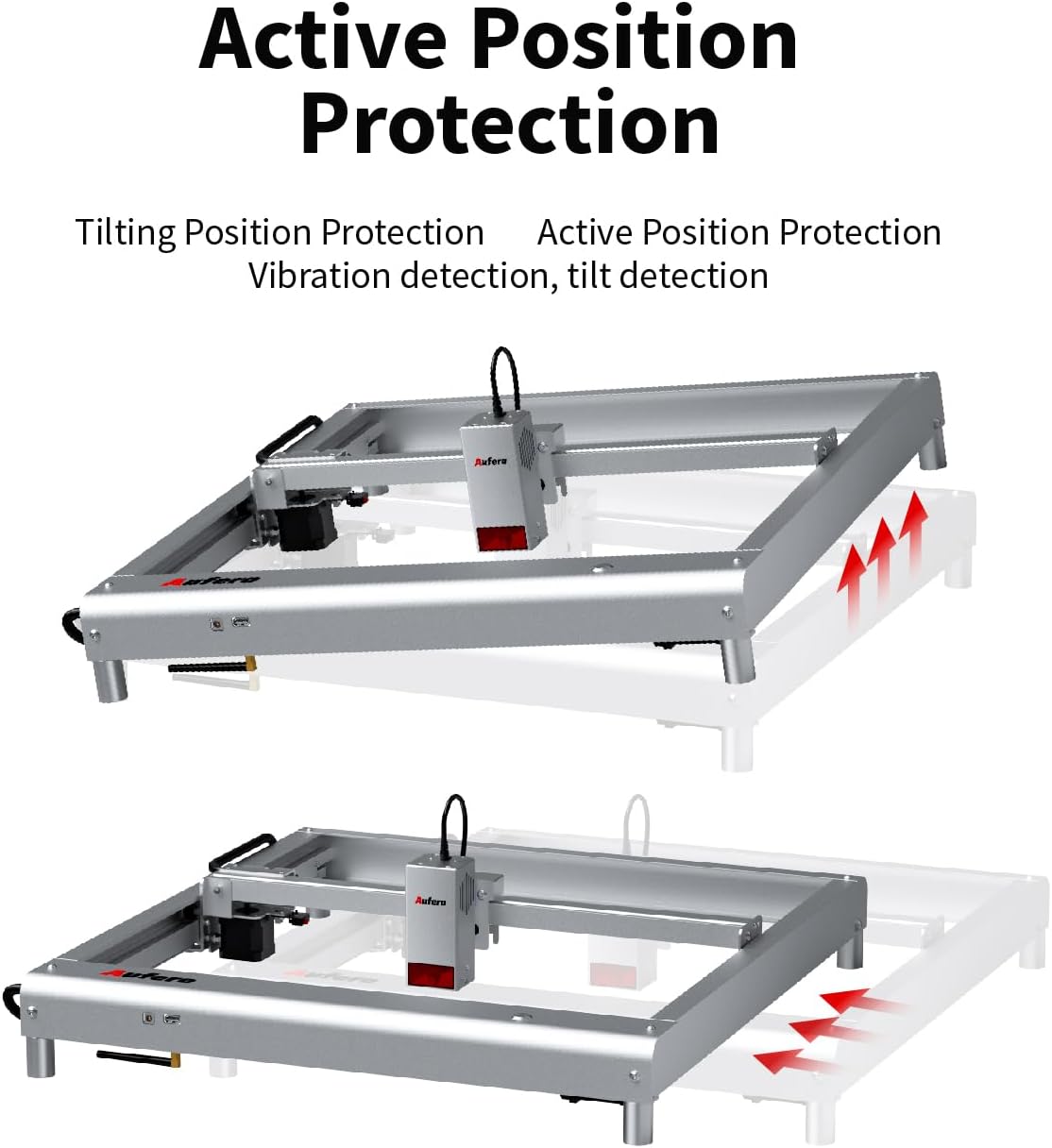
Figure 2.1: Active Position Protection mechanism, detecting and responding to tilting.

Figure 2.2: Laser Beam Safety Guard, featuring USB watchdog detection function.

Figure 2.3: Exposure Duration Detection and Limitation, ensuring a secure working environment.

Figure 2.4: Motherboard Program Monitoring, part of the voltage and current safety control system.
3. Components del producte
The Aufero AL3-20A laser engraver consists of the following main components:
- Laser Module (AL3-20A): The core component responsible for laser emission, featuring a 20W output power and a precise spot size of 0.08mm*0.18mm. It includes integrated fixed focus, dual fans for cooling, and supports air assist.
- Machine Frame: A uni-body frame design made of superior aluminum alloy, providing stability and durability.
- Tauler de control: Manages the machine's operations, supporting high baud rates up to 921600.
- 40L Air Assist Pump: An adjustable air assist device that blows away fumes and cutting residues, significantly improving engraving and cutting performance and preventing material ignition.
- Adaptador d'alimentació: Supplies power to the machine.
- Cable USB: For connecting the engraver to a computer.
- Ulleres de seguretat: Essential eye protection for operation.
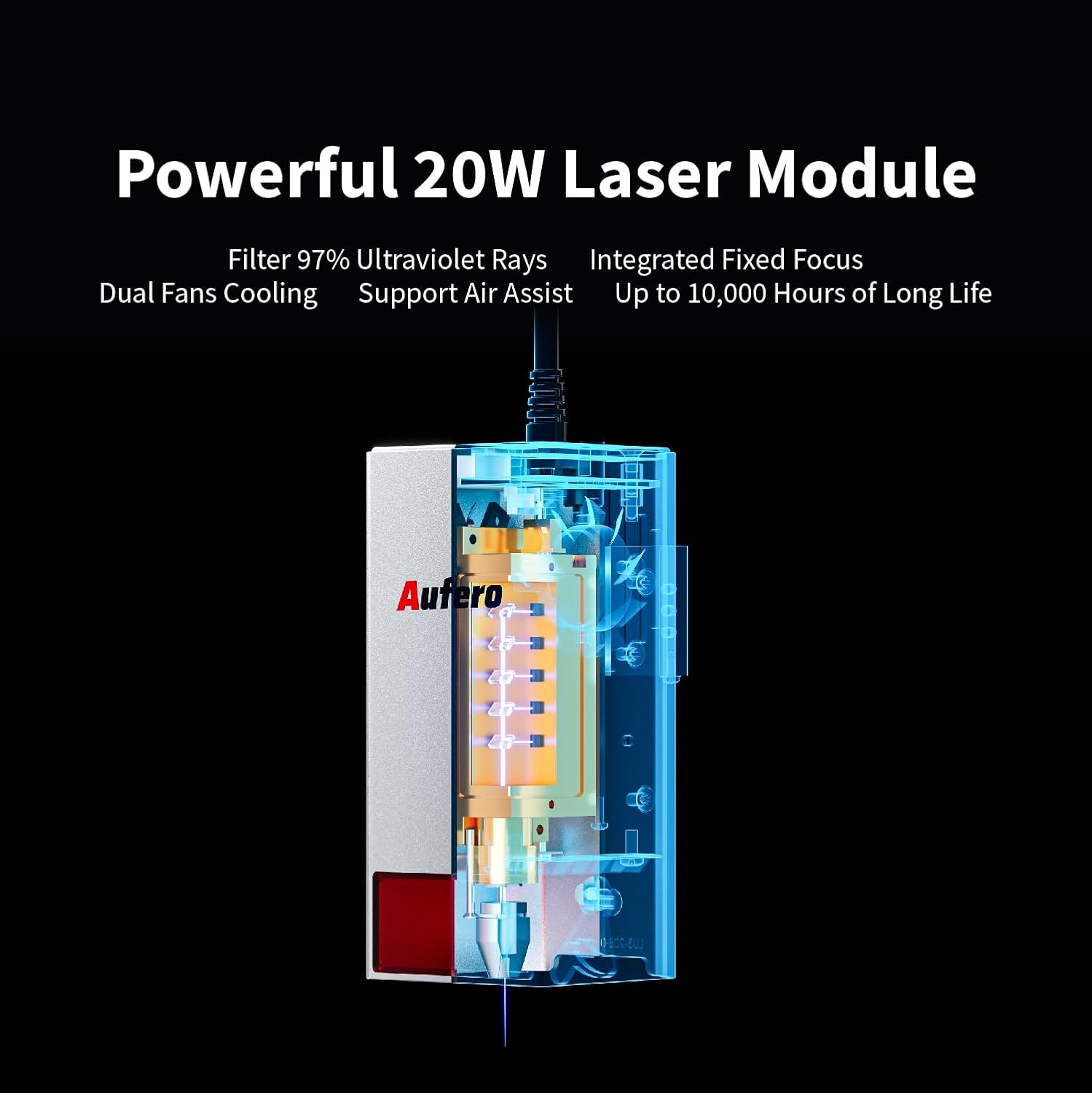
Figure 3.1: The powerful 20W Laser Module, featuring UV ray filtration, integrated fixed focus, dual fan cooling, and air assist support.

Figure 3.2: Comprehensive Air Assist Solution, demonstrating how the air assist pump improves engraving and cutting performance.
4. Muntatge i muntatge
The Aufero AL3-20A is designed for easy installation. Follow these general steps for initial setup:
- Desempaquetar components: Traieu amb cura totes les peces de l'embalatge. Verifiqueu que hi hagi tots els components que figuren a la llista d'embalatge.
- Muntatge del marc: The machine features a uni-body frame. If any minor assembly is required (e.g., attaching feet), follow the detailed instructions in the included quick start guide.
- Instal·leu el mòdul làser: Securely attach the laser module to the gantry according to the provided diagrams. Ensure it is firmly seated.
- Connect Air Assist: Connect the 40L air assist pump to the designated port on the laser module and ensure the air hose is properly routed.
- Connexió d'alimentació: Connecteu l'adaptador de corrent a la màquina i després a una presa de corrent adequada.
- Connexió USB: Connecteu el gravador a l'ordinador amb el cable USB proporcionat.
- Instal·lació de programari: Install the necessary engraving software (e.g., LaserGRBL, LightBurn, or Laser Explorer APP) on your computer or mobile device.

Figure 4.1: The Aufero AL3 20W Laser Engraver, ready for operation after assembly.
Refer to the detailed product installation guide included in your package for specific step-by-step instructions and diagrams.
5. Guia de funcionament
5.1 Software Compatibility and Connection
The Aufero AL3-20A supports various professional engraving software, including LaserGRBL and LightBurn. It also offers its own Laser Explorer application. You can connect the machine via four convenient modes:
- WIFI: For wireless control and file transferència.
- APP: Control via the Laser Explorer mobile application.
- USB: Direct connection to a computer for real-time control.
- Targeta TF: For offline engraving by loading G-code files directly onto the machine.

Figure 5.1: The Aufero engraver adapts to common software like Laser Explorer, LightBurn, and LaserGRBL.
5.2 Procés de gravat i tall
- Preparació del material: Place the material to be engraved or cut on the working area. Ensure it is flat and securely positioned.
- Design and Load File: Create or load your design in the chosen software. Adjust parameters such as power, speed, and passes based on the material type and desired outcome.
- Posicionament: Use the software to precisely position your design on the material. The machine supports automatic homing for consistent positioning.
- Start Air Assist: Ensure the 40L air assist pump is active, especially for cutting or engraving materials that produce significant smoke or residue.
- Comença el gravat/tall: Inicia el procés des del programari. Supervisa l'operació de prop.
5.3 Performance and Capabilities
- Precisió: With a spot size of only 0.08mm*0.18mm, the AL3-20A can achieve highly detailed and intricate engravings.
- Velocitat: The engraving speed can reach up to 20000 mm/min, significantly improving efficiency.
- Cutting Ability: The 20W laser module allows for excellent cutting capabilities, such as cutting 20mm pine board and 30mm acrylic.
- Compatibilitat de materials: Engrave and cut a wide range of materials including plywood, hardwood, metal, leather, glass, paper, dark acrylic, fabric, and more.
- Y-axis Rotation Engraving: Suitable for engraving cylindrical objects like mugs, wine bottles, and goblets (requires optional rotary attachment).

Figure 5.2: Precision Spot Size for Detailed Engraving, capturing intricate details.

Figure 5.3: Overall Speed Improvement, with maximum speed increased to 20,000 mm/min.

Figure 5.4: Automatic Homing, ensuring precise positioning and consistency.

Figure 5.5: Excellent Cutting Ability, demonstrating cuts through 20mm pine and 30mm acrylic.

Figure 5.6: Y-axis Rotation Engraving, suitable for cylindrical objects.
6. Manteniment
Regular maintenance ensures the longevity and optimal performance of your Aufero laser engraver.
- Neteja de la lent: Periodically clean the laser lens with a specialized lens cleaning solution and a lint-free cloth. A dirty lens can reduce laser power and engraving quality.
- Neteja de la màquina: Use a soft, dry cloth to wipe down the machine frame and gantry. Remove any dust, debris, or residue from the working area.
- Lubricació: Check the guide rails and moving parts for smooth operation. Apply a small amount of appropriate lubricant if necessary, as per the manufacturer's recommendations.
- Air Assist Pump Maintenance: Ensure the air assist pump is free from blockages and operating efficiently. Clean or replace filters if applicable.
- Actualitzacions de firmware: Check the official Aufero weblloc web per obtenir actualitzacions de firmware disponibles per assegurar-vos que la vostra màquina tingui les darreres funcions i correccions d'errors.
Always disconnect the power supply before performing any cleaning or maintenance tasks.
7. Solució De Problemes
This section addresses common issues you might encounter with your Aufero AL3-20A laser engraver.
| Problema | Causa possible | Solució |
|---|---|---|
| La màquina no s'encén | Power cable loose; Power adapter faulty; Outlet issue. | Check all power connections. Try a different outlet. Test power adapter if possible. |
| El làser no dispara o la sortida és feble | Laser lens dirty; Incorrect power settings; Laser module faulty; Material too far from laser. | Clean the laser lens. Adjust power settings in software. Ensure material is at correct focal distance. Contact support if module is suspected faulty. |
| Engraving/Cutting quality is poor | Incorrect speed/power settings; Material not flat; Laser focus incorrect; Air assist not active. | Adjust speed and power settings. Ensure material is flat. Verify laser focus. Activate air assist for cleaner cuts. |
| Machine not connecting to software | USB cable faulty; Driver not installed; Incorrect COM port selected; WIFI/APP connection issues. | Try a different USB cable. Install necessary drivers. Select correct COM port in software. Check WIFI connection and APP settings. |
| La màquina s'atura de manera inesperada | Safety feature triggered (e.g., tilt, vibration); USB connection lost; Overheating. | Check for machine movement or tilting. Verify USB connection. Allow machine to cool down. Review safety feature alerts in software. |
If the problem persists after attempting these solutions, please contact Aufero customer support.
8. Especificacions
Key technical specifications for the Aufero Laser Engraver AL3-20A:
| Característica | Especificació |
|---|---|
| Model | AL3-20A |
| Potència de sortida làser | 20W |
| Classe làser | Classe 4 |
| Àrea de gravat | 15.7 x 15.7 polzades (400 mm x 400 mm) |
| Velocitat de gravat | Fins a 20000 mm/min |
| Mida del punt làser | 0.08 mm * 0.18 mm |
| Bomba d'assistència d'aire | Adjustable 40L |
| Placa base | Supports up to 921600 baud rate |
| Connectivitat | WIFI, APP, USB, TF Card |
| Programari compatible | LaserGRBL, LightBurn, Laser Explorer APP |
| Pes de l'article | 17.21 lliures |
| Dimensions del paquet | 31.4 x 9 x 8.1 polzades |
9. Garantia i Suport
9.1 Informació de la garantia
The Aufero Laser Engraver AL3-20A comes with a standard manufacturer's warranty. For detailed information regarding warranty terms, duration, and coverage, please refer to the warranty card included with your product packaging or visit the official Aufero weblloc.
9.2 Atenció al client
For technical assistance, troubleshooting, or any inquiries regarding your Aufero laser engraver, please contact Aufero customer support. You can typically find contact information on the official Aufero weblloc web o dins de la documentació del producte.
Fabricant: Aufero
Recursos en línia: Visit the official Aufero weblloc web per a preguntes freqüents, descàrregues de programari i materials de suport addicionals.


