Introducció
This user manual provides detailed instructions for setting up, operating, and maintaining your NuPhy Halo96 V2 Wireless Mechanical Keyboard. Please read this manual thoroughly to ensure optimal performance and longevity of your device.

Figure 1: NuPhy Halo96 V2 Wireless Mechanical Keyboard. This image shows the full keyboard from a top-down perspective, highlighting its 96% layout and keycap colors.
Configuració
Contingut del paquet
- Teclat mecànic NuPhy Halo96 V2
- Cable USB-C a USB-A
- Receptor USB de 2.4 GHz
- Extractor de tecles
- Tirador de commutació
- Additional Keycaps (for Mac/Windows layouts)
- Manual d'usuari (aquest document)
Càrrega inicial
Before first use, it is recommended to fully charge the keyboard. Connect the provided USB-C cable to the keyboard's USB-C port and the other end to a powered USB-A port on your computer or a wall adapter. The keyboard features a 4000mAh battery.
Opcions de connectivitat
The Halo96 V2 offers three modes of connection: Bluetooth 5.0, 2.4GHz wireless, and USB-C wired.

Figure 2: Connectivity options for the NuPhy Halo96 V2. This image illustrates the three primary connection methods: USB-C wired, Bluetooth, and 2.4GHz wireless, along with icons for each.
Connexió sense fils a 2.4 GHz
- Localitza el receptor USB de 2.4 GHz.
- Plug the receiver into an available USB-A port on your computer.
- On the keyboard, switch the mode selector to 2.4GHz. The keyboard will automatically connect.
Connexió Bluetooth 5.0
- On the keyboard, switch the mode selector to Bluetooth.
- Mantén premut Fn + 1 (or 2, 3, 4) for 3 seconds until the indicator light flashes rapidly, indicating pairing mode.
- On your device (computer, tablet, smartphone), go to Bluetooth settings and select "NuPhy Halo96 V2" from the list of available devices.
- Once connected, the indicator light will become solid. The keyboard can store up to 4 Bluetooth profiles.
Connexió per cable USB-C
- Connecteu el cable USB-C proporcionat al port USB-C del teclat.
- Connect the USB-A end of the cable to your computer's USB-A port.
- On the keyboard, switch the mode selector to USB-C. The keyboard will function immediately.
Interruptor del sistema operatiu
The keyboard supports both macOS and Windows/Linux/Android/iOS systems. Use the dedicated switch on the side of the keyboard to toggle between Mac and PC modes for optimized key mappings and shortcuts.

Figura 3: lateral view of the NuPhy Halo96 V2 keyboard. This image displays the side profile of the keyboard, including the USB-C port, mode switches, and the semi-transparent bottom case.
Funcionament
Personalització de QMK/VIA
The NuPhy Halo96 V2 supports QMK/VIA firmware, allowing for extensive customization of key mappings, macros, and lighting effects. Download the VIA software from the official QMK/VIA weblloc web per accedir a aquestes funcions.

Figure 4: QMK/VIA customization interface for Halo96 V2. This image demonstrates how users can remap keys and customize functions.
RGB Backlighting and Halolight
The keyboard features per-key RGB backlighting and a unique "Halolight" RGB strip around the base. Both can be customized for color, brightness, and animation effects. The semi-transparent bottom case enhances the Halolight's visual impact.
- Ús Fn + [key] combinations to cycle through preset lighting effects and colors.
- Adjust brightness and speed of effects using dedicated function keys.
- For advanced customization, use the QMK/VIA software.

Figure 5: Keyboard demonstrating SignalRGB support. This image highlights the vibrant RGB lighting capabilities of the keyboard, including the Halolight strip, and mentions compatibility with SignalRGB for broader lighting control.
Interruptors intercanviables en calent
The Halo96 V2 features hot-swappable switch sockets, allowing you to change mechanical switches without soldering. This enables users to customize the typing feel and sound to their preference.
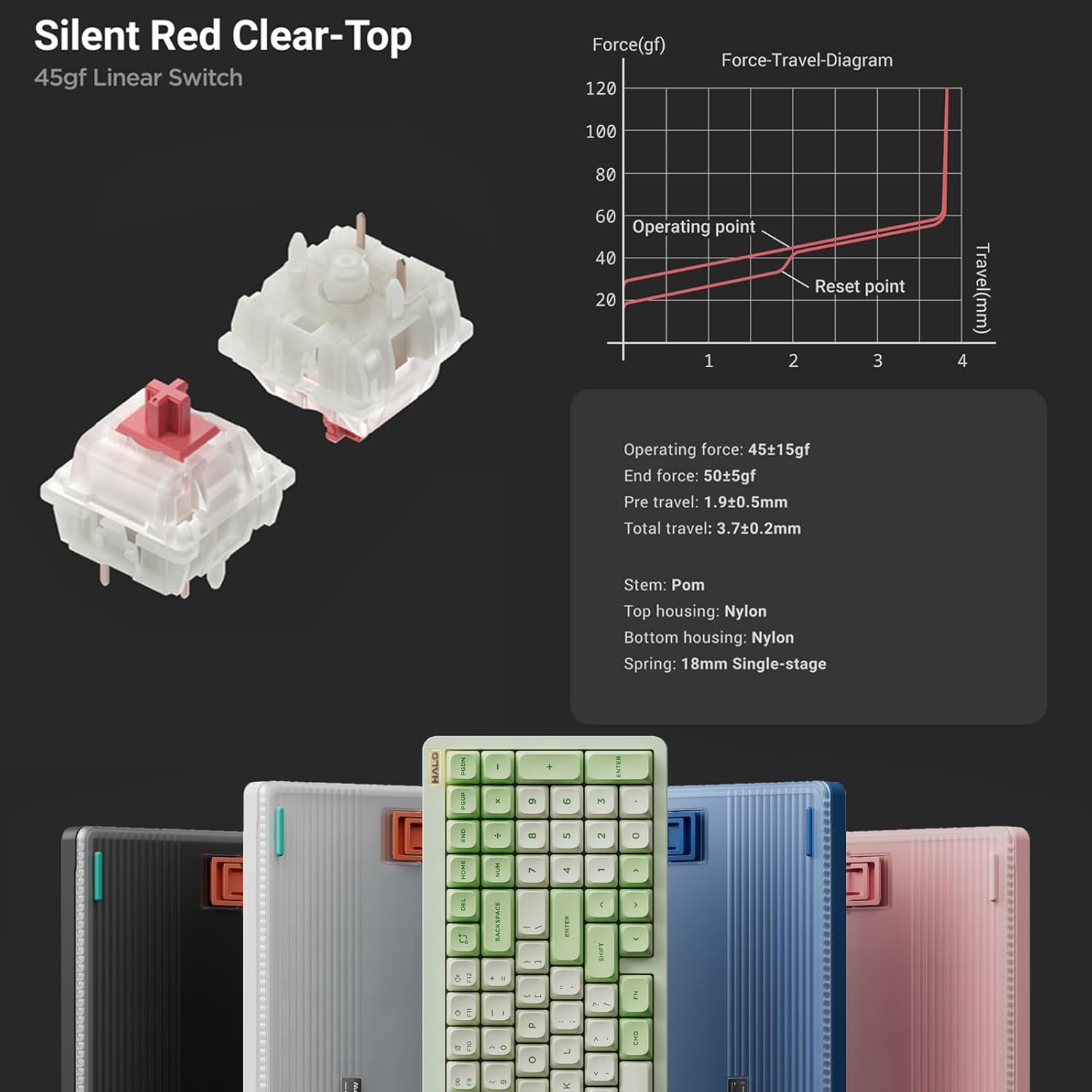
Figura 6: Detallada view of Silent Red Clear-Top switches. This image provides a close-up of the mechanical switches, including their force-travel diagram and specifications, emphasizing the hot-swappable feature.
Per substituir un interruptor:
- Gently remove the keycap using the provided keycap puller.
- Use the switch puller to carefully grip the switch and pull it straight up.
- Align the pins of the new switch with the holes on the PCB and press down firmly until it clicks into place. Ensure pins are not bent.
- Substitueix la tapa de les tecles.
S'han acabat les funcions clauview
- Il·luminació millorada: Semi-transparent bottom case and double-shot moulding for superior RGB light transmission.
- Improved Acoustics: Gasket mount style replaces top mount for better sound and feel.
- Connectivitat multidispositiu: Seamlessly switch between up to 4 devices via Bluetooth 5.0, 2.4GHz, or USB-C wired modes.
- Full Customization: QMK/VIA support for endless key mapping, macro creation, and light customization.
- Àmplia compatibilitat: Supports macOS, Windows, Linux, Android, and iOS operating systems.
- Latència baixa: Achieves a 1000Hz polling rate in both wired and 2.4GHz modes for responsive performance.
- Mac-Specific Functions: Dedicated switch for Mac system, providing access to Mac-specific function keys like Do Not Disturb and Spotlight.
- Llarga vida útil de la bateria: Built-in 4000mAh battery for extended wireless use.
- Disseny compacte: 96% layout with 99 keys, saving desktop space while retaining essential arrow keys and number pad.

Figure 7: Collage of NuPhy Halo96 V2 features. This image visually summarizes several key aspects including Halolight 2.0, 1000Hz polling rate, QMK/VIA support, PCB Gasket Mount, LED Homing Bars, Hot-Swappable switches, Sidelight, and South-Facing Backlight.
Manteniment
Neteja del teclat
- Turn off the keyboard and disconnect it from all devices.
- Feu servir una llauna d'aire comprimit per eliminar la pols i les restes que hi ha entre les tecles.
- For stubborn dirt, carefully remove keycaps using the keycap puller and clean the switch area.
- Wipe the keycaps and keyboard surface with a soft, lint-free cloth lightly dampEsbandiu amb aigua o una solució de neteja suau. Eviteu productes químics agressius.
- Ensure the keyboard is completely dry before reconnecting or turning it on.
Cura de la bateria
- Eviteu descarregar completament la bateria amb freqüència.
- Charge the keyboard regularly, especially if not in use for extended periods.
- Guardeu el teclat en un lloc fresc i sec quan no l'utilitzeu.
Resolució de problemes
Problemes de connectivitat
- Keyboard not connecting via 2.4GHz:
- Ensure the keyboard is in 2.4GHz mode.
- Proveu de connectar el receptor USB a un port USB diferent.
- Assegureu-vos que el teclat estigui carregat.
- Error d'emparellament Bluetooth:
- Ensure the keyboard is in Bluetooth mode and in pairing state (flashing indicator).
- Remove "NuPhy Halo96 V2" from your device's Bluetooth list and try pairing again.
- Try a different Bluetooth channel (Fn+1, Fn+2, etc.).
- Assegureu-vos que el Bluetooth del vostre dispositiu estigui activat i es pugui detectar.
- La connexió per cable no funciona:
- Ensure the keyboard is in USB-C mode.
- Prova un altre cable USB-C o port USB de l'ordinador.
Problemes d'il·luminació
- Els llums no s'encenen:
- Comproveu el nivell de la bateria.
- Ensure backlighting is enabled via keyboard shortcuts or VIA software.
- Inconsistent lighting:
- Perform a factory reset (refer to QMK/VIA documentation for your specific firmware version).
- Update keyboard firmware via NuPhy's official weblloc.
Key Functionality Issues
- Les tecles no responen:
- Ensure the switch is properly seated in its socket. Remove and re-insert the switch.
- Test with a different switch if available.
- Check key mappings in VIA software for accidental reassignments.
- Incorrect key output (e.g., Greek letters):
- This may indicate a firmware issue. Check NuPhy's official weblloc web per obtenir les darreres actualitzacions de firmware i instruccions d'instal·lació.
- Realitzeu un restabliment de fàbrica.
Especificacions
| Nom del model | Halo96 V2 |
| Marca | NuPhy |
| Disseny | 96% (99 tecles) |
| Connectivitat | Bluetooth 5.0, sense fil de 2.4 GHz, USB-C amb cable |
| Taxa de votació | 1000Hz (Wired & 2.4GHz) |
| Capacitat de la bateria | 4000 mAh |
| Tipus de canvi | Hot-Swappable Mechanical Switches (e.g., Silent Red Clear-Top 45gf Linear) |
| Il·luminació de fons | RGB (Per-key & Halolight) |
| Suport de firmware | QMK/VIA |
| Sistema operatiu compatible | macOS, Windows, Linux, Android, iOS |
| Dimensions del producte | 125.2 x 44.88 x 7.28 polzades |
| Pes de l'article | 1.74 lliures |

Figure 8: Technical drawing showing the dimensions and weight of the NuPhy Halo96 V2. This image provides precise measurements and weight specifications for the keyboard.
Garantia i Suport
For warranty information and technical support, please refer to the official NuPhy weblloc web o contacteu directament amb el servei d'atenció al client. Conserveu el rebut de compra com a comprovant de compra per a reclamacions de garantia.
Visit the official NuPhy Store: Botiga NuPhy a Amazon


