1. Introducció
The GMKTec NucBox M4 is a high-performance mini PC designed for demanding tasks such as video editing, 3D rendering, complex simulations, professional applications, and light gaming. It features an 11th Generation Intel Core i9-11900H processor, Intel Iris Xe Graphics, 32GB DDR4 RAM, and a 1TB PCIe 3.0 SSD. This manual provides detailed instructions for setting up, operating, maintaining, and troubleshooting your NucBox M4 Mini PC.
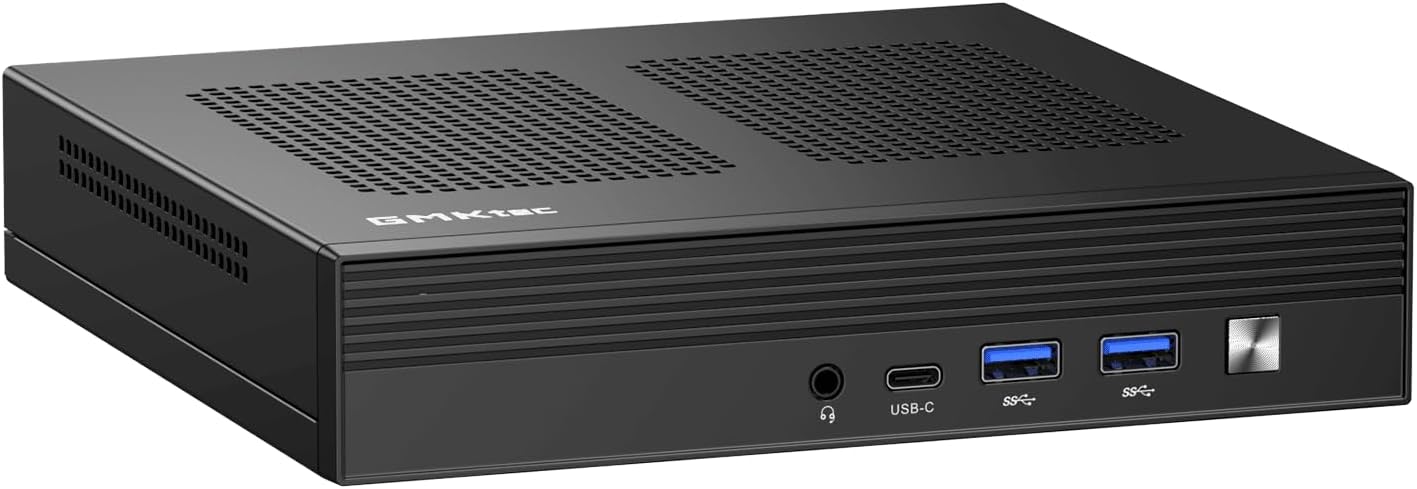
Figure 1.1: The GMKTec NucBox M4 Mini PC, showcasinel seu disseny compacte i el panell frontal.
2. Contingut del paquet
Si us plau, comproveu el contingut del paquet en desembalar-lo. Si falta algun article o hi ha algun malmès, poseu-vos en contacte amb el servei d'atenció al client.
- GMKTec NucBox M4 Mini PC
- Adaptador d'alimentació
- Manual d'usuari (aquest document)
- (Optional) VESA Mount Kit
3. Producte acabatview
Familiarize yourself with the ports and features of your NucBox M4 Mini PC.

Figure 3.0: Key features and components of the GMKTec NucBox M4 Mini PC.

Figure 3.1: Front and Rear Port Layout of the NucBox M4 Mini PC.
Ports del panell frontal:
- Conector d'àudio de 3.5 mm: Per a auriculars o altaveus.
- USB-C Port (DP/DATA): Full-featured USB4.0 Type-C port supporting DisplayPort and data transfer.
- Ports USB 3.2 Gen 2 (x2): High-speed data transfer for peripherals.
- Botó d'encesa: Per encendre/apagar el dispositiu.
Ports del panell posterior:
- DisplayPort 1.4 (x1): Supports up to 4096 x 2304 @ 60Hz.
- Ports HDMI 2.0 (x2): Supports 4K @ 60Hz.
- Ports USB 3.2 Gen 2 (x2): High-speed data transfer for peripherals.
- 2.5G Giga LAN (RJ45) Ports (x2): Per a connexions de xarxa per cable d'alta velocitat.
- DC Power Input (19V/6.32A): Connecteu l'adaptador de corrent aquí.
The NucBox M4 supports up to three displays simultaneously via its HDMI, DisplayPort, and Type-C outputs, enabling an extended desktop experience.

Figura 3.2: Example of a triple screen display setup with the NucBox M4 Mini PC.
4. Guia de configuració
4.1 Connexió inicial
- Place the NucBox M4 on a stable, flat surface with adequate ventilation.
- Connect your monitor(s) to the HDMI, DisplayPort, or USB-C video outputs.
- Connect a USB keyboard and mouse to the available USB 3.2 ports.
- (Optional) Connect an Ethernet cable to one of the 2.5G LAN ports for a wired network connection.
- Connect the power adapter to the DC power input port on the rear panel, then plug the adapter into a power outlet.
4.2 Encès
Press the power button located on the front panel. The power indicator light will illuminate, and the system will begin to boot.
4.3 Configuració del sistema operatiu
The NucBox M4 comes pre-installed with Windows 11 Pro. Upon first boot, you will be guided through the initial Windows setup process, which includes:
- Selecció de regió i disposició de teclat.
- Network connection setup (Wi-Fi 6 or Ethernet).
- Microsoft account sign-in or local account creation.
- Configuració de la privadesa.
Seguiu les indicacions a la pantalla per completar la configuració.
5. Instruccions de funcionament
5.1 Funcionament bàsic
Once Windows 11 Pro is set up, you can begin using your NucBox M4 like any standard desktop computer.
- Apagar/Reiniciar/Repòs: Accediu a aquestes opcions mitjançant el menú Inici de Windows.
- Connectivitat: Utilize Wi-Fi 6 for wireless internet or the 2.5G LAN ports for wired connections. Bluetooth 5.2 allows connection to wireless peripherals.
- Ports USB: Connect external drives, USB hubs, printers, and other USB devices to the available USB 3.2 Gen 2 ports.
- Àudio: Use the 3.5mm audio jack for headphones or external speakers.
5.2 Expansió d'emmagatzematge
The NucBox M4 includes a 1TB M.2 2280 PCIe 3.0 SSD. For additional storage, the device supports:
- Up to 2TB M.2 2280 PCIe 3.0 SSD (ready for PCIe 4.0 compatibility).
- A 2.5-inch HDD (not included).
Refer to the internal component diagram for slot locations. Installation of additional storage requires opening the device and is recommended for experienced users.

Figura 5.1: Explotat view illustrating internal components and upgrade options.
6. Manteniment
6.1 Neteja
To ensure optimal performance and longevity, regularly clean your NucBox M4.
- Feu servir un drap suau i sec per netejar l'exterior.
- For dust accumulation in vents, use compressed air. Ensure the device is powered off and unplugged before cleaning.
- Do not use liquid cleaners directly on the device.
6.2 Actualitzacions de programari
Keep your Windows 11 Pro operating system and device drivers updated to ensure system stability, security, and performance.
- Actualitzacions de Windows: Vés a Configuració > Actualització de Windows per comprovar i instal·lar actualitzacions.
- Actualitzacions de controladors: Drivers are typically updated through Windows Update. For specific component drivers (e.g., Intel graphics), visit the official Intel or GMKTec support webllocs.
6.3 Sistema de refrigeració
The NucBox M4 features a Super Cooling Fan system. Ensure that the ventilation holes on the device are not obstructed to allow for proper airflow and prevent overheating.
7. Solució De Problemes
This section addresses common issues you might encounter with your NucBox M4 Mini PC.
| Problema | Causa possible | Solució |
|---|---|---|
| Sense alimentació / El sistema no s'encén | L'adaptador de corrent no està connectat o està defectuós; Problema amb la presa de corrent. | Ensure power adapter is securely connected to the PC and a working power outlet. Try a different outlet. |
| No es mostra al monitor | Monitor not connected or turned on; Incorrect input source on monitor; Faulty cable. | Check monitor power and cable connections. Ensure monitor input source matches the port used (HDMI, DP, USB-C). Try a different cable or monitor. |
| No hi ha connexió Wi-Fi | Wi-Fi desactivat; Problema amb l'encaminador; Problema amb el controlador. | Check Wi-Fi settings in Windows. Restart your router. Ensure Wi-Fi drivers are updated. |
| El sistema és lent o no respon | Too many applications running; Low disk space; Overheating. | Close unnecessary applications. Free up disk space. Ensure proper ventilation and clean vents. Check Task Manager for resource usage. |
Si el problema persisteix després de provar aquestes solucions, poseu-vos en contacte amb l'atenció al client.
8. Especificacions tècniques
Detailed specifications for the GMKTec NucBox M4 Mini PC.
| Característica | Especificació |
|---|---|
| Processador | Intel Core i9-11900H (8 Cores, 16 Threads, up to 4.9 GHz, 24MB Intel Smart Cache) |
| Gràfics | Intel Iris Xe Graphics (up to 1.45 GHz, 80 Execution Units) |
| RAM | 32GB DDR4 3200MHz (2x SO-DIMM slots, expandable up to 128GB) |
| Emmagatzematge | 1TB M.2 2280 PCIe 3.0 SSD (supports up to 2TB, PCIe 4.0 compatible); Supports 2.5-inch HDD (not included) |
| Sistema operatiu | Windows 11 Pro (supports Linux) |
| Connectivitat sense fil | Wi-Fi 6 (802.11ax), Bluetooth 5.2 |
| Connectivitat per cable | 2x 2.5G Giga LAN (RJ45) ports |
| Sortides de vídeo | 2x HDMI 2.0 (4K@60Hz), 1x DisplayPort 1.4 (4096x2304@60Hz), 1x USB4.0 Type-C (full-feature) |
| Ports USB | 4x USB 3.2 Gen 2 ports (total) |
| Port d'àudio | 1 presa d'àudio de 3.5 mm |
| Dimensions (L x A x A) | Aprox. 7.3 x 7.1 x 3.7 polzades (18.5 x 18 x 9.4 cm) |
| Pes | Aprox. 959 g (2.1 lliures) |
9. Garantia i Suport
Per obtenir informació sobre la garantia, assistència tècnica o consultes sobre el servei tècnic, consulteu el lloc web oficial del fabricant. weblloc web o poseu-vos en contacte amb el vostre punt de venda.
- Disponibilitat de peces de recanvi: No es proporciona informació sobre la disponibilitat de peces de recanvi.
- Garantia d'actualitzacions de programari: No es proporciona informació sobre les actualitzacions de programari garantides.
Es recomana guardar el tiquet de compra com a comprovant de compra per a reclamacions de garantia.


