1. Introducció
Thank you for choosing the Phomemo LT12 Bluetooth Portable Label Printer. This device offers two convenient methods for label creation: direct keyboard input and mobile app connectivity via Bluetooth. Designed for ease of use, it is suitable for various labeling needs in home, office, and school environments. This manual provides essential information for setting up, operating, maintaining, and troubleshooting your label printer.
2. Informació de seguretat
- Keep the device away from water and high humidity to prevent electric shock or damage.
- Do not expose the printer to extreme temperatures or direct sunlight.
- Use only the specified charging cable and power adapter to avoid battery damage.
- No intenteu desmuntar ni reparar el dispositiu vosaltres mateixos. Poseu-vos en contacte amb el servei d'assistència si sorgeixen problemes.
- Mantenir fora de l'abast dels nens.
3. Contingut del paquet
Verifiqueu que tots els elements siguin presents al vostre paquet:
- Phomemo LT12 Label Printer
- 1 x 12mm x 4m Adhesive Label Tape Roll (pre-installed or included separately)
- Cable de càrrega tipus C.
- Manual d'usuari
4. Producte acabatview
The Phomemo LT12 is a compact and portable thermal label printer featuring a QWERTY keyboard for direct input and Bluetooth connectivity for mobile editing. It utilizes inkless thermal printing technology, eliminating the need for ink cartridges or ribbons.

Image: Phomemo LT12 Label Printer highlighting its 203dpi print resolution and built-in rechargeable battery.
Les característiques clau inclouen:
- Alta resolució: 203 dpi for clear and crisp labels.
- Impressió sense tinta: Uses thermal technology, no ink or toner required.
- Bateria recarregable: Integrated 1200mAh lithium battery with Type-C charging.
- Dual Editing Modes: Keyboard input and Bluetooth app control (iOS/Android compatible).
- Pantalla LCD: Backlit LCD for improved visibility in various lighting conditions.
- Disseny portàtil: Compact dimensions (22.2P x 10l x 6.7H cm) and lightweight (292 grams) for easy carrying.
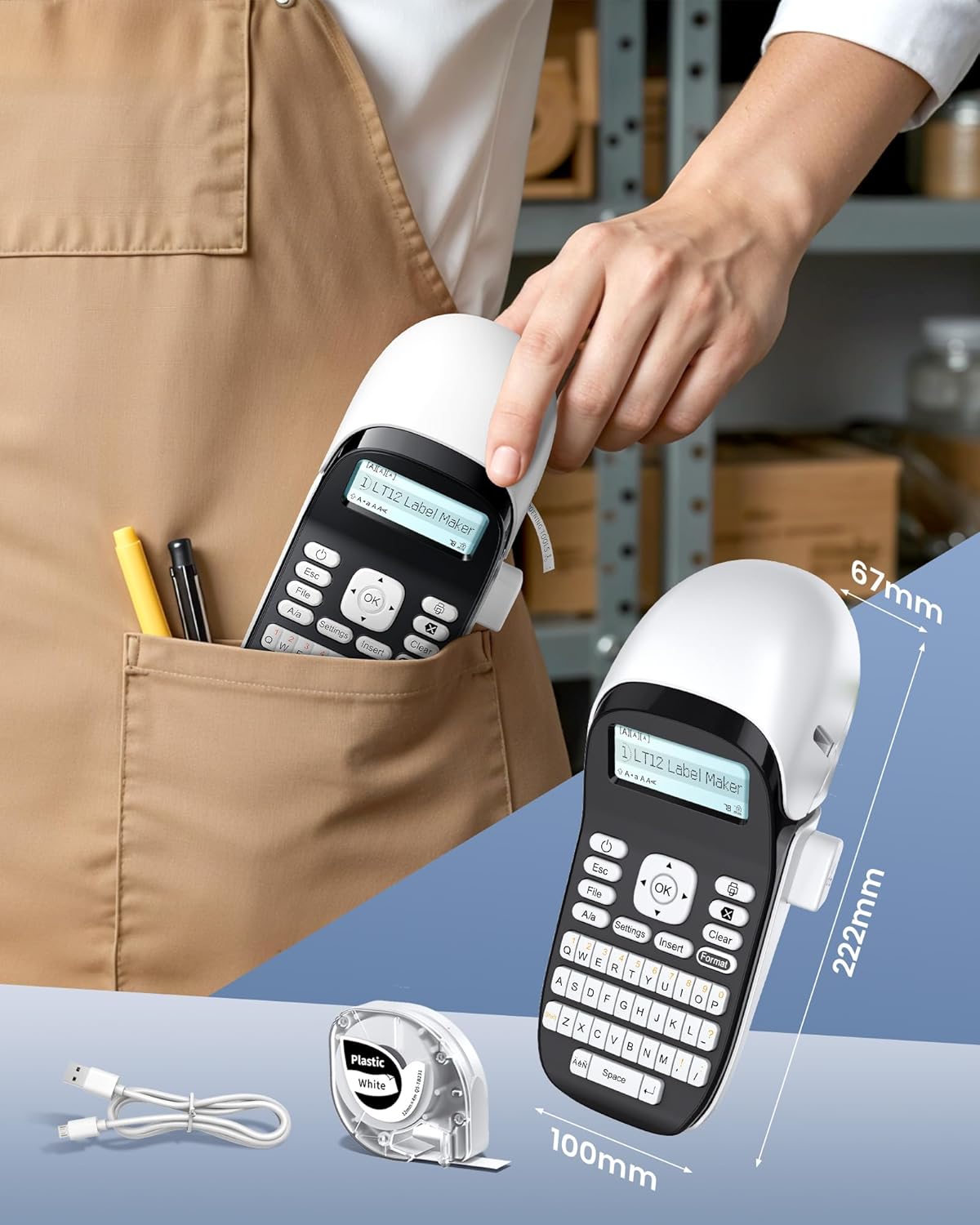
Image: The Phomemo LT12 Label Printer demonstrating its compact size and portability, fitting easily into a pocket.
5. Configuració
5.1 Càrrega del dispositiu
Before first use, fully charge the label printer. Connect the provided Type-C charging cable to the printer's charging port and the other end to a USB power adapter (not included) or a computer's USB port.

Image: The Phomemo LT12 Label Printer being charged via its Type-C port, highlighting its 1200mAh built-in battery and inkless operation.
5.2 Càrrega de la cinta d'etiquetes
- Obriu la tapa del compartiment d'etiquetes.
- Insert the label tape roll with the label side facing down, ensuring the tape feeds smoothly through the guide.
- Tanqueu la coberta de manera segura.
5.3 Engegada/apagada
- To power on: Press and hold the power button until the LCD screen illuminates.
- To power off: Press and hold the power button until the LCD screen turns off.
5.4 Installing the "Print Master" App
For mobile editing, download the free "Print Master" app from your device's app store (available for iOS and Android).
5.5 Connexió mitjançant Bluetooth
To connect your label printer to a smartphone or tablet:
- Assegureu-vos que la impressora estigui engegada.
- Activa el Bluetooth al teu dispositiu mòbil.
- Open the "Print Master" app.
- Within the app, search for and select your Phomemo LT12 printer to establish a connection.

Image: Step-by-step guide on how to connect the label maker: Download the 'Print Master' app, connect via Bluetooth, and then proceed with editing and printing.
6. Instruccions de funcionament
6.1 Editing Labels via Keyboard
Use the integrated QWERTY keyboard to type your desired text directly onto the label. The backlit LCD screen provides real-time preview and allows for basic formatting adjustments.
6.2 Editing Labels via Mobile App
The "Print Master" app offers advanced editing capabilities:
- Extensive Resources: Access over 1600 symbols, 280 frames, and 160 fonts.
- Multi-line Text: Supports printing 1 to 3 lines of text.
- Template Saving: Save your custom label designs for future use.
- Suport multi-idioma: Available in 14 languages.

Image: Demonstrating the two editing methods: directly using the keyboard on the device or through the mobile app via Bluetooth connection.

Image: The 'Print Master' app interface showcasing its intelligent functions, including numerous built-in templates, icons, borders, and fonts.
6.3 Impressió d'etiquetes
After editing your label, press the print button on the device or within the app to generate your label. The printer will automatically cut the label.
6.4 Compatible Label Types and Applications
The Phomemo LT12 supports a maximum label width of 12mm and is compatible with various Phomemo Q5 series label tapes, including:
- Plastic Labels
- Satin Ribbons
- Luminous Labels
- Iron-on Fabric Labels
- Thermal Transfer Labels (Outdoor)
- Standard Thermal Labels (Indoor)
- Glittering Plastic Labels
- Flexible Nylon Labels
- Clear Labels

Image: A selection of compatible label types, such as Thermal Transfer, Luminous, Glittering Plastic, Fabric Iron-on, and Satin Ribbon, illustrating their varied uses.
7. Manteniment
7.1 Neteja de la impressora
- Assegureu-vos que la impressora estigui apagada abans de netejar-la.
- Feu servir un drap suau i sec per netejar l'exterior de la impressora.
- Netegeu suaument el capçal d'impressió amb un bastonet de cotóampened with isopropyl alcohol if print quality degrades. Allow to dry completely before use.
7.2 Cura de la bateria
- Charge the battery regularly, even if the printer is not in frequent use, to maintain battery health.
- Eviteu descarregar completament la bateria amb freqüència.
- Guardeu la impressora en un lloc fresc i sec quan no la feu servir.
7.3 Durabilitat de l'etiqueta
Phomemo labels are designed for durability and resistance to various conditions:

Image: Infographic detailing the durability features of Phomemo labels, including resistance to water, oil, fading, extreme temperatures, scratches, and being BPA-Free.
8. Solució De Problemes
| Problema | Causa possible | Solució |
|---|---|---|
| La impressora no s'encén | Bateria baixa; el botó d'engegada no s'ha premut correctament | Charge the printer; Press and hold the power button firmly. |
| No es pot connectar mitjançant Bluetooth | Bluetooth off; App not open; Printer too far; Interference | Ensure Bluetooth is on for both devices; Open "Print Master" app; Move devices closer; Restart printer and phone. |
| Poca qualitat d'impressió | Dirty print head; Incorrect label tape; Low battery | Clean the print head; Ensure correct 12mm Phomemo label tape is used; Charge the printer. |
| Etiquetes que no s'alimenten correctament | Label tape improperly loaded; Obstruction | Re-load label tape, ensuring it's straight; Check for any obstructions in the feed path. |
9. Especificacions
| Característica | Detall |
|---|---|
| Nom del model | LT12 |
| Tecnologia d'impressió | Tèrmica |
| Resolució d'impressió | 203 ppp |
| Connectivitat | Bluetooth |
| Dispositius compatibles | Telèfon intel·ligent, tauleta (Android, iOS) |
| Max Label Width | 12 mm |
| Tipus de bateria | Lithium-polymer (1200mAh) |
| Interfície de càrrega | Tipus-C |
| Consum d'energia | 5 watts |
| Pes de l'article | 292 grams |
| Dimensions del producte (L x A x A) | 22.2 x 10 x 6.7 cm |
| País d'origen | Xina |
10. Garantia i Suport
Garantia del fabricant: Cap
Disponibilitat de peces de recanvi: Informació no disponible
For any product inquiries or technical assistance, please refer to the contact information provided with your purchase or visit the official Phomemo weblloc.


