1. Introducció
Welcome to the instruction manual for your new SUNLUX 12-Digit Electronic Calculator. This manual provides essential information on how to set up, operate, maintain, and troubleshoot your device. Please read it thoroughly to ensure optimal performance and longevity of your calculator.
2. Contingut del paquet
Si us plau, comproveu el paquet per veure si hi ha els elements següents:
- SUNLUX 12-Digit Electronic Calculator
- Manual d'instruccions (aquest document)
3. Producte acabatview
The SUNLUX 12-Digit Electronic Calculator is designed for ease of use and reliability, featuring a clear display and responsive keys. It operates on a dual power system, utilizing both solar energy and a backup battery.
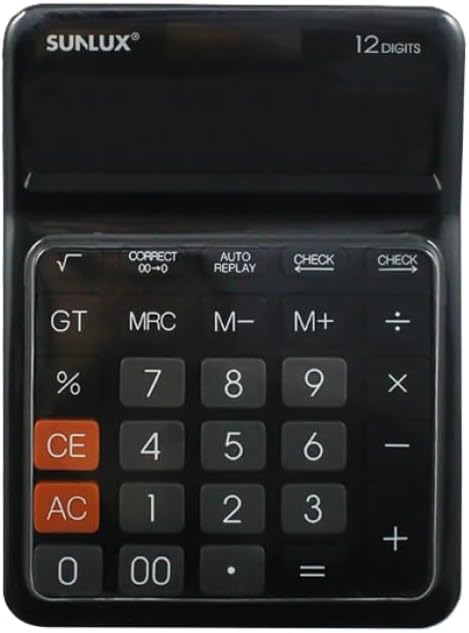
This image shows the front of the SUNLUX 12-digit electronic calculator, highlighting its display, numeric keypad, and function buttons. The calculator features a black casing with clearly labeled keys for various operations.
Funcions clau
- 0-9, 00: Tecles d'entrada numèriques.
- +: Addition.
- -: Subtraction.
- *: Multiplication.
- /: Division.
- =: Equals key, displays the result of a calculation.
- %: Percenttage càlcul.
- √: Square root function.
- GT (Gran Total): Recalls the grand total of all calculations.
- MRC (Recuperació/Esborrat de memòria): Recalls memory content (first press), clears memory (second press).
- M+ (Memòria Plus): Afegeix el valor mostrat a la memòria.
- M- (menys de memòria): Resta el valor mostrat de la memòria.
- CE (Entrada clara): Clears the last entered number or calculation.
- AC (Tot clar): Clears all entries and memory, resetting the calculator.
- COMPROVAR: Permet reviewing previous calculation steps.
- AUTO REPLAY: Automatically replays the calculation steps.
- CORRECT (00->0): Corregeix l'últim dígit introduït.
4. Configuració
Font d'alimentació
Your SUNLUX calculator features a dual power system: solar power and battery power. Under sufficient light, the calculator will operate using solar power. In low light conditions, it will automatically switch to battery power.
Instal·lació de la bateria
While the calculator primarily uses solar power, a battery ensures operation in all lighting conditions. If the display is dim or unresponsive in low light, the battery may need replacement.
- Localitzeu la tapa del compartiment de la bateria a la part posterior de la calculadora.
- Traieu la coberta amb cura.
- Insert a new battery (type typically AG10 or LR1130, check compartment for specific type if indicated) with the correct polarity (+/-).
- Col·loqueu la coberta del compartiment de la bateria amb seguretat.
5. Instruccions de funcionament
Càlculs bàsics
- Addició: Enter first number, press +, enter second number, press =.
- Resta: Enter first number, press -, enter second number, press =.
- Multiplicació: Enter first number, press *, enter second number, press =.
- Divisió: Enter first number, press /, enter second number, press =.
Funcions de memòria
- M+: Afegeix el número que es mostra actualment a la memòria.
- M-: Resta de la memòria el número que es mostra actualment.
- MRC: Premeu una vegada per recuperar el valor emmagatzemat a la memòria. Premeu dues vegades per esborrar la memòria.
- GT: Displays the grand total of all results obtained since the last AC press.
Funcions especials
- Percenttage (%): Per example, to calculate 10% of 200: Enter 200, press *, introduïu 10, premeu %.
- Arrel quadrada (√): Introduïu un número i, a continuació, premeu √.
- COMPROVAR: After a series of calculations, press CHECK to review the entered operations step-by-step.
- AUTO REPLAY: Press AUTO REPLAY to automatically cycle through the calculation steps.
- CORRECT (00->0): If you enter a wrong digit, press CORRECT to delete the last digit without clearing the entire entry.
6. Manteniment
Neteja
To clean your calculator, use a soft, dry cloth. Do not use liquid cleaners, abrasive pads, or chemical solvents, as these can damage the display or casing.
Emmagatzematge
Store the calculator in a cool, dry place away from direct sunlight and extreme temperatures. Avoid placing heavy objects on top of the calculator to prevent damage to the display or keys.
7. Solució De Problemes
- La pantalla està en blanc o té poca llum:
Ensure the calculator is in a well-lit area for solar power. If the issue persists, the battery may need replacement. Refer to the "Battery Installation" section. - Resultats de càlcul incorrectes:
Premeu AC to clear all previous entries and memory. Re-enter your calculation carefully. Check if any memory functions (M+, M-, MRC) are active. - Les tecles no responen:
Ensure the calculator is clean and free from debris around the keys. If the problem persists, try replacing the battery.
8. Especificacions
Detalls tècnics
- Marca: SUNLUX
- Model: 7886116
- Nombre de dígits: 12
- Dimensions: 17.5 cm x 12.5 cm (approximately)
- Font d'alimentació: Doble alimentació (solar i bateria)
- Material: Plàstic i Metall
- Pes de l'article: 300 grams
- País d'origen: Xina
9. Garantia i Suport
Informació de la garantia
This product is covered by the standard manufacturer's warranty. Please refer to your purchase documentation or contact your retailer for specific warranty terms and conditions.
Atenció al client
For any questions, technical assistance, or support regarding your SUNLUX calculator, please contact the retailer from whom you purchased the product. They will be able to provide the most accurate and timely assistance.


