1. Introducció
Thank you for choosing the johgee 4-Zone Watering Timer. This programmable garden outdoor hose faucet timer is designed to automate your irrigation system, providing precise control over watering schedules for up to four independent zones. With features like rain delay, child-lock mode, and manual watering, it offers flexibility and efficiency for various watering needs, including drip irrigation, lawn sprinklers, and greenhouse systems.
Please read this manual thoroughly before installation and operation to ensure proper use and longevity of your device.
2. Informació important de seguretat
- Seguretat de la bateria: Use only two 1.5V AA alkaline batteries. Do not use lithium batteries. Ensure correct polarity when inserting batteries. Remove batteries if the timer will not be used for an extended period to prevent leakage.
- Pressió de l'aigua: The timer is designed to withstand water pressure between 0.05-0.8Mpa. Exceeding this range may cause damage or leaks.
- Temperatura: Do not expose the timer to freezing temperatures. Remove the timer from the faucet and store indoors during winter months to prevent damage from ice.
- Instal·lació: Ensure all connections are tight to prevent leaks. Do not overtighten.
- Bloqueig per a nens: Utilize the child-lock feature to prevent accidental changes to programming or unintended water usage by children or pets.
- Desmuntatge: Do not attempt to disassemble or repair the timer yourself. Refer all servicing to qualified personnel.
3. Contingut del paquet
Si us plau, verifiqueu que hi hagi tots els components:
- 1 x johgee 4-Zone Watering Timer Unit
- 1 x Manual d'usuari
Nota: Les piles alcalines AA d'1.5 V no estan incloses i s'han de comprar per separat.
4. Instal·lació i configuració inicial
4.1. Instal·lació de la bateria
- Localitzeu el compartiment de les piles a la part posterior de la unitat temporitzadora.
- Slide the battery cover open. The cover is designed with a seal to protect against water ingress.
- Insert two (2) new 1.5V AA alkaline batteries, ensuring the correct positive (+) and negative (-) orientation as indicated inside the compartment.
- Securely close the battery cover until it clicks into place, ensuring the seal is properly seated.

Figura 4.1: Inserting 2 AA batteries into the timer's battery compartment.
4.2. Connecting the Timer to a Faucet
- Assegureu-vos que l'aixeta exterior estigui tancada.
- Screw the timer's inlet connector (top part) onto your standard outdoor garden faucet. Hand-tighten only. The connector is made of reinforced nylon material for durability.
- Ensure the connection is secure but do not overtighten, as this can damage the threads or internal components.

Figura 4.2: The johgee 4-Zone Watering Timer ready for connection.
4.3. Connecting Hoses/Irrigation Lines
- Connect your garden hoses or irrigation lines to the four independent outlets at the bottom of the timer. Each outlet corresponds to a specific zone (A, B, C, D).
- Hand-tighten each connection to ensure a leak-free seal.

Figura 4.3: Timer connected to faucet and irrigation lines.
5. Instruccions de funcionament
5.1. LCD Display Overview
The large LCD screen provides all necessary information for programming and monitoring. Familiarize yourself with the display elements:

Figura 5.1: LCD Display Elements.
- ARA: Mostra l'hora actual.
- Indicador de bateria: Mostra la durada restant de la bateria.
- A, B, C, D: Indicators for the four independent watering zones.
- HORA D'INICI: The programmed start time for irrigation.
- QUANT DE TEMPS: La durada de cada cicle de reg (d'1 segon a 360 minuts).
- CADA QUAN: La freqüència de reg (d'1 hora a 15 dies).
- PRÒXIM INICI: Time remaining until the next scheduled watering cycle.
- Icona de bloqueig: Indicates Child-Lock mode is active.
- Rain Drop Icon: Indicates Rain Delay mode is active.
5.2. Funcions del botó
- ARA: Premeu per view or set the current time.
- ABCD: Press to cycle through and select individual watering zones (A, B, C, D) for programming.
- ESC/OFF: Exits the current setting mode or turns off the selected zone's watering.
- D'ACORD: Confirms selection or enters setting mode.
- - / +: Adjusts values (decrease/increase).
- RETARD: Activates or deactivates the Rain Delay function.
- Gear Icon (under OK): Enters programming mode for watering schedules.
- Faucet Icon (under OK): Activates or deactivates Manual Watering.
- Lock Icon (side): Press and hold to activate/deactivate Child-Lock.
5.3. Configuració de l'hora actual
- Premeu el botó ARA botó. La pantalla de temps parpellejarà.
- Utilitza el + i - botons per ajustar l'hora.
- Premeu OK per confirmar l'hora i passar als minuts.
- Ús + i - botons per ajustar els minuts.
- Premeu OK per desar l'hora actual.
5.4. Programming Watering Schedules (Zones A, B, C, D)
Each of the four zones can be programmed independently.
- Premeu el botó ABCD button to select the zone you wish to program (A, B, C, or D). The selected zone indicator will flash.
- Premeu el botó OK button (or the Gear icon) to enter programming mode for the selected zone. The 'START TIME' will begin flashing.
- Establir hora d'inici: Ús + i - to set the desired start time for watering. Press OK per confirmar.
- Configura la durada del reg (QUANT DE TEMPS): The 'HOW LONG' display will flash. Use + i - to set the watering duration from 1 second to 360 minutes. Press OK per confirmar.
- Configura la freqüència de reg (AMB QUANTA FREQÜÈNCIA): The 'HOW OFTEN' display will flash. Use + i - to set the watering frequency from 1 hour to 15 days. Press OK per confirmar.
- The timer will now display the 'NEXT START' time, indicating when the next watering cycle for this zone will begin.
- Repeat steps 1-5 for other zones (B, C, D) as needed.

Figura 5.2: Independent programming for each zone.
5.5. Mode de reg manual
Manual watering allows you to water immediately without affecting your programmed schedules.
- Premeu el botó ABCD button to select the zone you wish to water manually.
- Premeu el botó Faucet Icon (under the OK button). The display will show a default manual watering duration.
- Ús + i - to adjust the desired manual watering duration.
- Premeu OK to start manual watering for the selected zone.
- Per aturar el reg manual, premeu el botó Faucet Icon de nou o ESC/OFF.

Figura 5.3: Activating Manual Watering.
5.6. Funció de retard per pluja
The rain delay function allows you to pause your watering schedule for a set period, preventing overwatering during rainy weather.
- Premeu el botó RETARD button. The display will show a default delay period (e.g., 24H).
- Ús + i - to adjust the rain delay duration (e.g., 24H, 48H, 72H).
- Premeu OK to confirm the rain delay. The rain drop icon will appear on the screen, and the 'NEXT START' time will update accordingly.
- To cancel rain delay, press the RETARD button again and set the delay to 0, or press ESC/OFF.
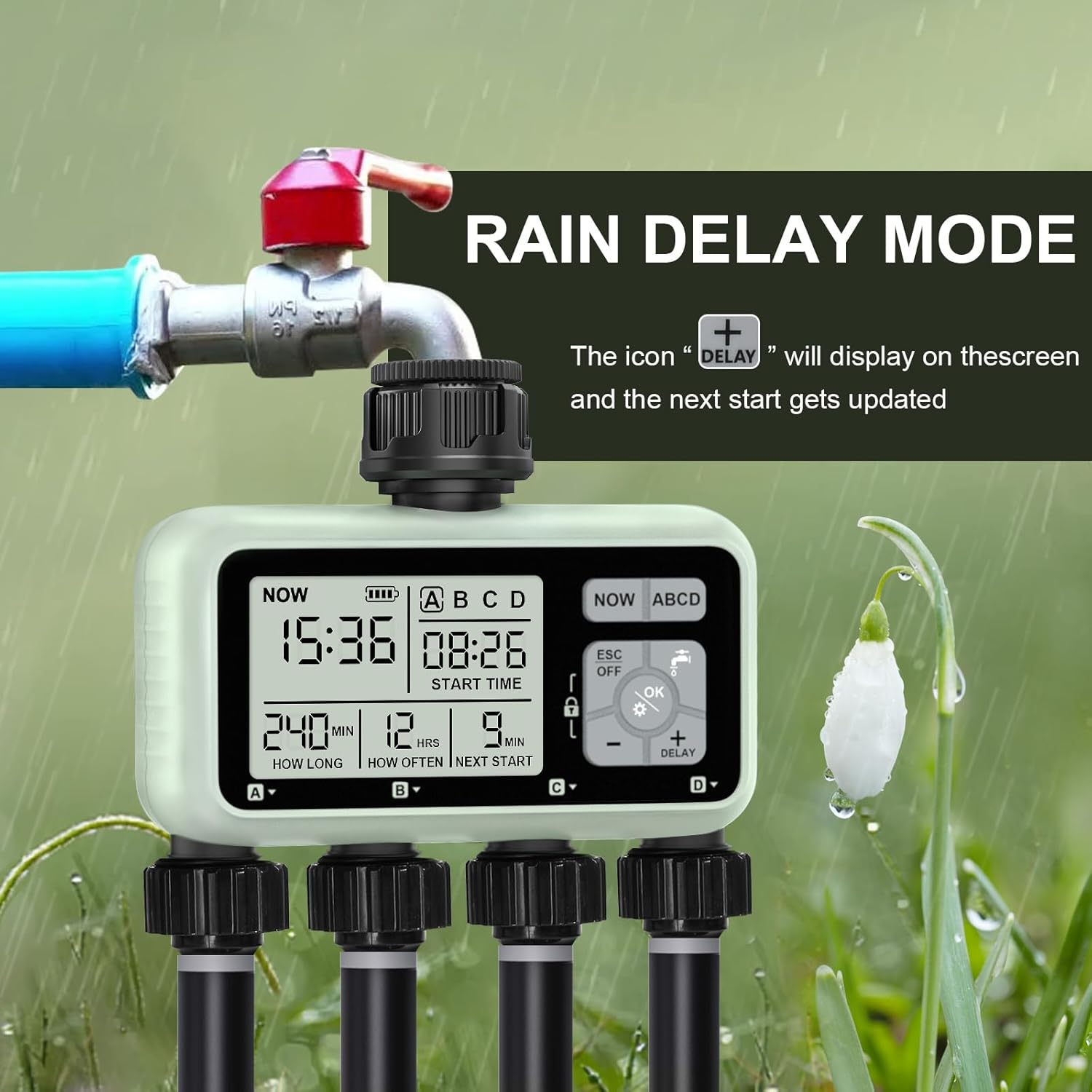
Figura 5.4: Activating Rain Delay Mode.
5.7. Mode de bloqueig infantil
The child-lock mode prevents accidental changes to your programmed settings.
- To activate Child-Lock, press and hold the Icona de bloqueig button on the side of the timer for 3 seconds. A lock icon will appear on the display.
- When Child-Lock is active, no buttons will respond to presses.
- To deactivate Child-Lock, press and hold the Icona de bloqueig button again for 3 seconds. The lock icon on the display will disappear.
6. Cura i Manteniment
- Neteja: Netegeu el temporitzador amb l’anunciamp cloth to remove dirt or debris. Do not use abrasive cleaners or immerse the unit in water.
- Substitució de la bateria: Replace batteries when the low battery indicator appears on the display. Always use fresh 1.5V AA alkaline batteries.
- Prevenció de fuites: Periodically check all connections for tightness. The timer features an upgraded leakproof design with reinforced nylon material and a durable aluminum alloy filter to prevent leakage.
- Hivernització: Before the first frost, remove the timer from the faucet, drain any remaining water, remove the batteries, and store the unit indoors in a dry, protected area. Freezing water inside the timer can cause irreparable damage.

Figura 6.1: Durable and Waterproof Design Features.
7. Solució De Problemes
| Problema | Causa possible | Solució |
|---|---|---|
| La pantalla del temporitzador està en blanc o tènue. | Low or dead batteries; incorrect battery insertion. | Replace with fresh 1.5V AA alkaline batteries. Ensure correct polarity. |
| No surt aigua de les sortides. | Faucet is off; low water pressure; timer not programmed; manual mode not activated; clogged filter. | Turn on faucet. Check water pressure. Verify programming or activate manual mode. Check and clean the inlet filter. |
| Timer not turning off. | Stuck valve; programming error; manual mode still active. | Press ESC/OFF. Check programmed duration. If issue persists, contact customer support. |
| Fuita d'aigua per les connexions. | Loose connections; damaged washer/seal; excessive water pressure. | Tighten connections. Check rubber washers for damage and replace if necessary. Ensure water pressure is within specified limits (0.05-0.8Mpa). |
| El temporitzador no rega a l'hora programada. | Incorrect programming; rain delay active; child-lock active; low battery. | Review and correct programming (start time, duration, frequency). Check if rain delay or child-lock is active. Replace batteries. |
8. Especificacions
- Marca: johgee
- Model: 4-Zone Watering Timer
- Color: Verd
- Material: Acrilonitril butadiè estirè, alumini
- Dimensions del producte: 6.5 "P x 2.6" W x 5.2" H
- Pes de l'article: 14.4 unces (0.9 lliures)
- Nombre de configuracions: 12 (referring to programming options)
- Mida de la pantalla: 6.5 Inches (LCD display)
- Interval de pressió d'aigua: 0.05 - 0.8 MPa
- Durada del reg: 1 segon a 360 minuts
- Freqüència de reg: D'1 hora a 15 dies
- Classificació impermeable: IPX5
- Font d'alimentació: 2 piles alcalines AA d'1.5 V (no incloses)
9. Informació de la garantia
This johgee product comes with a limited manufacturer's warranty. For specific details regarding warranty coverage, duration, and terms, please refer to the warranty card included with your product or contact johgee customer support directly. Please retain your proof of purchase for warranty claims.
10. Atenció al client
If you encounter any issues or have questions not covered in this manual, please contact johgee customer support for assistance. You can typically find contact information on the product packaging, the official johgee weblloc web o a través del venedor on vau comprar el producte.
For more information about johgee products, visit the official johgee store: johgee Store on Amazon.


