1. Introducció
This manual provides essential instructions for the installation, setup, and operation of your TONGOU Wi-Fi Smart Switch 1P+N DIN Rail DIY with Power Monitoring. This device allows you to transform traditional household appliances into smart, connected devices, offering remote control, voice control, and energy consumption monitoring through the Smart Life or Tuya application.

Image 1.1: TONGOU Wi-Fi Smart Switch integrated into a smart home system, showing app control and Wi-Fi connectivity.
2. Informació de seguretat
WARNING: Electrical installation should only be performed by qualified personnel. Incorrect installation can lead to electric shock, fire, or property damage.
- Desconnecteu sempre l'alimentació a l'interruptor principal abans de la instal·lació o el manteniment.
- Assegureu-vos que el dispositiu estigui instal·lat en un entorn sec, allunyat de la humitat i de les temperatures extremes.
- Comproveu que el voltage and current ratings of the switch match your electrical system requirements.
- Do not exceed the maximum current rating of 6A for this model.
- Assegureu-vos que totes les connexions del cablejat estiguin segures i aïllades correctament.
3. Contingut del paquet
Verifiqueu que tots els elements siguin presents al paquet:
- 1 x TONGOU Wi-Fi Smart Switch (Model: With Power Monitoring 6A)
- 1 x Manual d'usuari
4. Especificacions
| Característica | Especificació |
|---|---|
| Marca | TONGOU |
| Número de model | With Power Monitoring 6A |
| Vol. Operatiutage | AC 90 - 240 V, 50/60 Hz |
| Tipus sense fil | Wi-Fi 2.4 GHz (5/4 GHz not supported) |
| Valoració actual | 6 A |
| Capacitat màxima de cablejat | 10 mm² (Power side and Load side) |
| Tipus de muntatge | Muntatge de carril DIN |
| Dimensions (L x A x A) | 9 x 2 x 8 cm |
| Pes | 120 grams |
| Material de contacte | Silver-plated relay contacts |
| Mode de funcionament | On/Off |
| Certificacions | CE |
| Temperatura de funcionament | Fins a 80 graus centígrads |
5. Instal·lació
The TONGOU Wi-Fi Smart Switch is designed for DIN rail mounting. Follow these steps for proper installation:
- Desconnexió d'alimentació: Before starting any electrical work, ensure the main power supply to the circuit is turned off at the circuit breaker.
- Muntatge: Mount the smart switch onto a standard 35mm DIN rail. The device occupies one position (18mm width).
- Cablejat: Connect the power input (N for Neutral, L for Live) to the top terminals labeled 'Power'. Connect the load output (N for Neutral, L for Live) to the bottom terminals labeled 'Load'. The maximum wiring capacity is 10 mm² for both power and load sides. Ensure correct polarity.
- Protecció de circuits: It is recommended to install an upstream residual current circuit breaker (RCBO/A type, 30mA/10kA) to protect the circuit.
- Connexions segures: Use a screwdriver to securely tighten all wire connections.

Image 5.1: Wiring diagram illustrating the connection of the TONGOU Wi-Fi Smart Switch to a circuit with an upstream circuit breaker and a light bulb as a load.
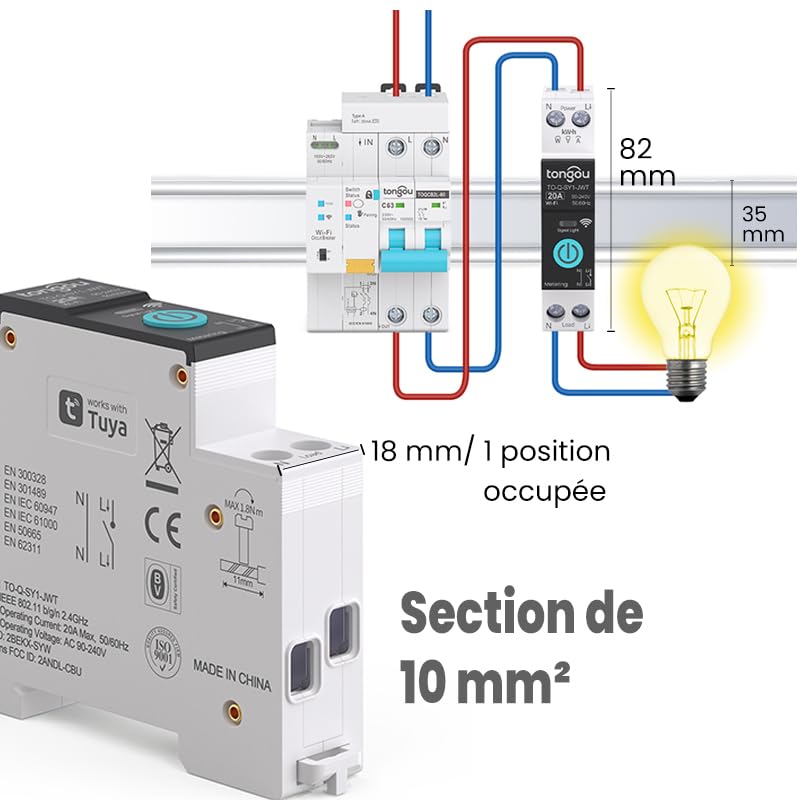
Image 5.2: Close-up of the smart switch showing its dimensions (82mm height, 35mm depth, 18mm width) and indicating a 10 mm² wiring section capacity.
6. Configuració
To enable smart functionalities, connect your TONGOU Wi-Fi Smart Switch to the Smart Life or Tuya application.
- Descarrega l'aplicació: Download the "Smart Life" or "Tuya Smart" application from the App Store (iOS) or Google Play Store (Android).
- Registra't/Iniciar sessió: Obre l'aplicació i registra't per obtenir un compte nou o inicia la sessió amb un compte existent.
- Introduïu el mode de vinculació: After restoring power to the switch, press and hold the main button on the device for 5 to 10 seconds until the signal light blinks rapidly in blue. This indicates the device is in pairing mode.
- Afegeix un dispositiu a l'aplicació: In the Smart Life/Tuya app, tap the "+" icon (usually in the top right corner) to add a new device. The app should automatically discover the switch. If not, manually select "Electrical" > "Circuit Breaker (Wi-Fi)" or similar.
- Connecta't a Wi-Fi: Follow the in-app instructions to connect the device to your 2.4 GHz Wi-Fi network. Nota: The device only supports 2.4 GHz Wi-Fi; 5 GHz networks are not compatible.
- Canvia el nom del dispositiu: Once connected, you can rename the device for easier identification (e.g., "Living Room Light").

Image 6.1: Visual guide showing how to press and hold the button for 5-10 seconds until the blue indicator light blinks rapidly, signifying pairing mode.

Image 6.2: Screenshot of the Smart Life/Tuya app showing the login/register screen, a Wi-Fi router, and the process of adding a discovered "WiFi Din Rail Switch" device.
7. Funcionament
Once the smart switch is successfully paired, you can control it and monitor energy usage through the app or voice commands.
7.1. Control remot mitjançant l'aplicació
Open the Smart Life or Tuya app. Select your TONGOU Smart Switch from the device list. You can:
- Turn the connected appliance On or Off remotely from anywhere.
- Configura diversos modes de temporitzador:
- Mode de sincronització: Schedule specific on/off times for daily or weekly routines.
- Mode de compte enrere: Set a countdown timer for the device to turn off after a specified duration.
- Cyclic Timing Mode: Configure repetitive on/off cycles.
- Astronomical Timing Mode: Automatitzar en funció de les hores de sortida i posta de sol.
7.2. Control per veu
The TONGOU Smart Switch is compatible with Amazon Alexa and Google Assistant. To enable voice control:
- Link your Smart Life/Tuya account to Amazon Alexa or Google Home app.
- Descobreix nous dispositius.
- Utilitzeu ordres de veu com ara:
- "Alexa, activa [Nom del dispositiu]"
- "Ei Google, desactiva [Nom del dispositiu]"

Image 7.1: An Amazon Echo device displaying a voice waveform, indicating it is processing a command to turn off a lamp.
7.3. Power Monitoring
The smart switch provides real-time and historical energy consumption data:
- View real-time current, voltage, and power consumption of the connected load.
- Access historical data (hourly, daily, monthly, yearly) to track energy usage patterns.
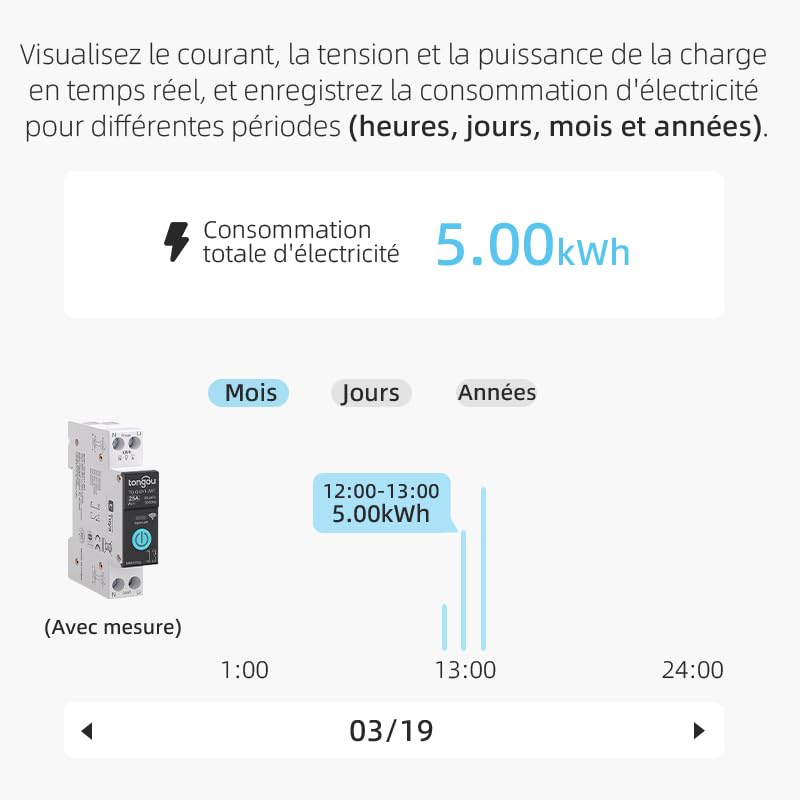
Image 7.2: A graphical representation within the app showing total electricity consumption (5.00 kWh) and a bar chart illustrating hourly consumption data for a specific date.
8. Manteniment
To ensure optimal performance and longevity of your TONGOU Wi-Fi Smart Switch:
- Mantingueu el dispositiu net i lliure de pols. Feu servir un drap sec i suau per netejar-lo.
- No utilitzeu netejadors líquids ni dissolvents.
- Assegureu-vos que hi hagi una ventilació adequada al voltant del dispositiu per evitar el sobreescalfament.
- Comproveu regularment l'estanquitat de les connexions del cablejat, especialment després de la instal·lació inicial.
9. Solució De Problemes
If you encounter issues with your TONGOU Wi-Fi Smart Switch, refer to the following common problems and solutions:
| Problema | Causa possible | Solució |
|---|---|---|
| El dispositiu no es connecta a la Wi-Fi | Incorrect Wi-Fi band (5GHz), weak signal, incorrect password, device not in pairing mode. | Ensure your Wi-Fi is 2.4 GHz. Move the device closer to the router. Re-enter Wi-Fi password carefully. Put the device back into pairing mode (rapid blue blinking). |
| Dispositiu fora de línia a l'aplicació | Wi-Fi disconnected, power outage, router issues. | Check your Wi-Fi router and internet connection. Verify the device has power. Re-pair if necessary. |
| El control de veu no funciona | Account not linked, device not discovered, incorrect commands. | Ensure Smart Life/Tuya account is linked to Alexa/Google Home. Discover devices in the voice assistant app. Use the exact device name. |
| Les dades de monitorització d'energia són inexactes o no hi són | Incorrect wiring, device malfunction. | Double-check wiring according to the installation diagram. Contact support if the issue persists. |
| Device not responding to manual button press | No power, internal fault. | Check power supply to the device. If power is present and the device is unresponsive, contact support. |
10. Garantia i Suport
For warranty information and technical support, please refer to the documentation provided with your purchase or contact TONGOU customer service through their official channels. Keep your purchase receipt as proof of purchase.


