1. Introducció
The Flashpoint R2 Nano Remote is a compact and advanced wireless flash trigger designed for Panasonic and Olympus camera systems. It offers precise control over your flash settings through an intuitive touchscreen interface and OLED display, enhancing your photography experience with seamless integration and reliable performance.
Les característiques clau inclouen:
- Integració perfecta: Full TTL compatibility with Olympus/Panasonic cameras for optimal exposure.
- Ultimate Reliability: Stable 2.4 GHz radio frequency with 32 channels, ensuring consistent triggering up to 328 feet (100 meters).
- Sincronització d'alta velocitat (HSS): Achieve sync speeds up to 1/8000s for creative effects and motion freezing.
- Control intuïtiu de la pantalla tàctil: Responsive interface for quick and easy adjustments.
- Versatile Group Control: Manage up to 16 groups (A-F, 0-9) independently for complex lighting setups.
2. Què hi ha a la caixa
Upon unboxing your Flashpoint R2 Nano, please verify that all components are present:
- Flashpoint R2 Nano Remote
- Cable de càrrega USB-C
- Bossa d'emmagatzematge
- Manual d'usuari (aquest document)
3. Producte acabatview
Familiarize yourself with the components and controls of your R2 Nano remote.
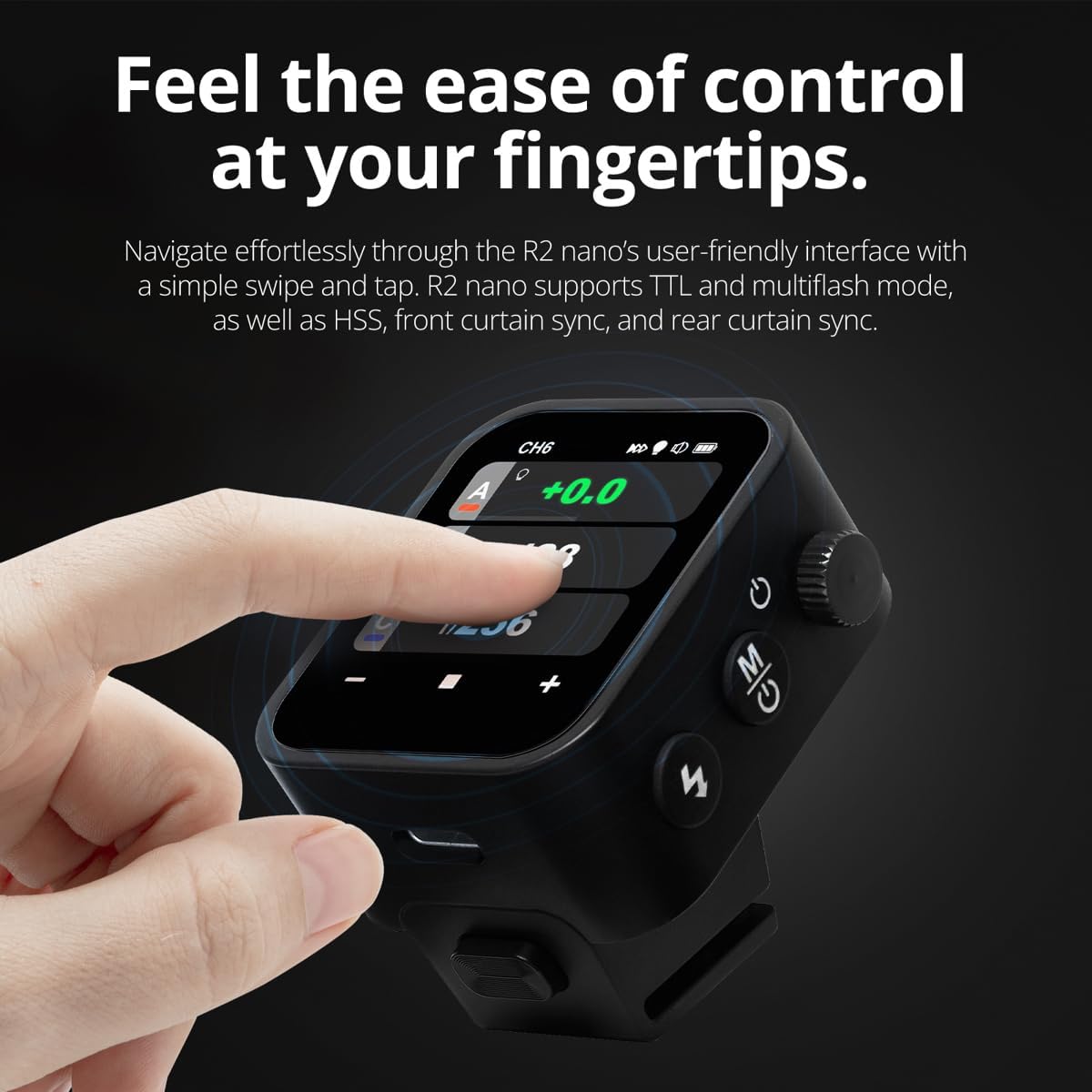
Figura 3.1: Frontal i lateral View of the R2 Nano with Key Components Labeled.
- Pantalla tàctil: Main interface for settings and control.
- Seleccionar marcatge: Per navegar pels menús i ajustar valors.
- Interruptor d'alimentació: Encén/apaga el dispositiu.
- Botó de prova: Activa un flaix de prova.
- Botó d'instal·lació/desinstal·lació: Releases the remote from the hotshoe.
- Ranura de muntatge: Es connecta a la sabata d'accés de la càmera.
- Port de càrrega USB-C: Per a la càrrega de la bateria.

Figure 3.2: R2 Nano Touchscreen Interface Details.
- Channel (CH): Displays the current wireless channel (e.g., CH6).
- Group (A, B, C, etc.): Indicates the active flash groups.
- Nivell de potència de sortida: Shows the flash power setting (e.g., +0.0, 1/128).
- Parameters - / +: Touch controls for decreasing/incrementasinvalors g.
- Modes de sincronització: Icons indicating sync modes (e.g., HSS, front curtain, rear curtain).
- Modelatge Lamp: Icon for modeling lamp estat.
- Indicador de bateria: Mostra el nivell actual de la bateria.
4. Configuració
4.1 Càrrega de la bateria
The R2 Nano is equipped with a built-in rechargeable lithium battery. Before first use, fully charge the device.
- Locate the USB-C charging port on the side of the R2 Nano.
- Connecteu el cable de càrrega USB-C proporcionat al port.
- Connecteu l'altre extrem del cable a un adaptador de corrent USB (no inclòs) o al port USB d'un ordinador.
- The battery indicator on the screen will show charging status. A full charge from 0% to 100% typically takes approximately 2 hours.

Figure 4.1: Charging the R2 Nano via USB-C.
4.2 Muntatge a la càmera
The R2 Nano features an easy-mounting, durable hotshoe design for secure attachment to your camera.
- Assegureu-vos que la càmera estigui apagada.
- Slide the R2 Nano's mounting slot onto your camera's hotshoe.
- Gently push until it clicks into place, ensuring a secure connection.
- To detach, press the Installing/Detaching Button and slide the remote off.

Figure 4.2: Mounting the R2 Nano on a Camera Hotshoe.
5. Instruccions de funcionament
5.1 Engegada/apagada
- To power on, press and hold the Power Switch until the screen illuminates.
- To power off, press and hold the Power Switch until the screen turns off.
5.2 Navegació per la interfície de pantalla tàctil
The R2 Nano features a responsive touchscreen and a select dial for intuitive control.

Figure 5.1: High Definition OLED Screen Interface.
- Interacció tàctil: Tap on a group (A, B, C, etc.) to select it for adjustment. Tap on parameters like power level to modify them.
- Seleccionar marcatge: Rotate the dial to scroll through options or adjust values. Press the dial to confirm selections.
- Ajust de paràmetres: Use the on-screen '-' and '+' buttons or the Select Dial to change flash power, exposure compensation, or other settings.

Figure 5.2: Touchscreen Interaction for Settings Adjustment.
5.3 Setting Channels and Groups
To avoid interference and control multiple flashes, set appropriate channels and groups.
- Access the channel settings through the touchscreen menu. Select a channel from 1 to 32. Ensure your flash units are set to the same channel.
- Assign flash units to different groups (A-F, 0-9) to control them independently. The R2 Nano allows control of up to 16 groups.
5.4 Flash Modes (TTL, Manual, Multi-flash)
The R2 Nano supports various flash modes to suit different shooting scenarios.
- TTL (A través de la lent): Automatically adjusts flash output for correct exposure. Ideal for fast-paced shooting where lighting conditions change frequently.
- Manual (M): Allows precise control over flash power output (e.g., 1/1 to 1/256). Suitable for consistent lighting setups and creative control.
- Multi-flash (Stroboscopic): Dispara una sèrie de flaixos ràpids durant una sola exposició per capturar múltiples moviments d'un subjecte.
5.5 Sync Modes (HSS, Front Curtain, Rear Curtain)
Select the appropriate sync mode based on your shutter speed and desired effect.
- HSS (High-Speed Sync): Enables flash synchronization at shutter speeds faster than the camera's native sync speed (up to 1/8000s). Useful for overpowering ambient light or using wide apertures in bright conditions.
- Sincronització de la cortina frontal: The flash fires at the beginning of the exposure. This is the standard sync mode.
- Sincronització de cortina posterior: The flash fires just before the second curtain closes. This creates a streaking effect behind moving subjects, giving a sense of motion.
6. Manteniment
Proper maintenance ensures the longevity and optimal performance of your R2 Nano remote.
- Neteja: Use a soft, dry cloth to clean the exterior of the device. For the touchscreen, use a microfiber cloth specifically designed for electronics. Avoid using harsh chemicals or abrasive materials.
- Emmagatzematge: When not in use, store the R2 Nano in its provided storage bag to protect it from dust and scratches. Store in a cool, dry place away from direct sunlight and extreme temperatures.
- Cura de la bateria: Per mantenir la bateria en bon estat, eviteu descarregar-la completament amb freqüència. Si la guardeu durant períodes prolongats, carregueu-la aproximadament al 50% cada pocs mesos.
- Hotshoe Contacts: Keep the hotshoe contacts clean and free of debris to ensure reliable communication with your camera.
7. Solució De Problemes
If you encounter issues with your Flashpoint R2 Nano, refer to the following common problems and solutions.
| Problema | Causa possible | Solució |
|---|---|---|
| El dispositiu no s'encén. | La bateria està esgotada. | Carregueu el dispositiu amb el cable USB-C. |
| Les unitats de flaix no disparen. | Incorrect channel or group settings. | Ensure the R2 Nano and flash units are set to the same channel and correct groups. |
| Les unitats de flaix no disparen. | Remote not securely mounted. | Ensure the R2 Nano is fully seated in the camera's hotshoe. |
| Inconsistent flash triggering. | Interferència ambiental. | Change the wireless channel to one with less interference. Ensure no obstructions between remote and flash. |
| La pantalla tàctil no respon. | Error temporal de programari. | Power off the device, wait a few seconds, then power it back on. |
| HSS not working. | Camera or flash not set to HSS mode. | Verify HSS is enabled on both the R2 Nano and your compatible flash unit. Ensure camera shutter speed is above sync speed. |
8. Especificacions
| Característica | Detall |
|---|---|
| Model | Flashpoint R2 Nano |
| Compatibilitat | Panasonic and Olympus Cameras |
| Freqüència sense fil | 2.4 GHz |
| Canals | 32 |
| Grups | 16 (AF, 0-9) |
| abast sense fils | Fins a 100 metres (328 peus) |
| Velocitat de sincronització | Fins a 1/8000s (HSS) |
| Mostra | Touchscreen OLED |
| Bateria | Bateria de liti recarregable incorporada |
| Port de càrrega | USB-C |
| Dimensions del producte | 5.25 x 4.25 x 2.5 polzades |
| Pes de l'article | 6.4 unces |
| Fabricant | Punt d'inflamació |
| Data de primera disponibilitat | 19 de juny de 2024 |
9. Garantia i Suport
Flashpoint products are designed for reliability and performance. For warranty information, technical support, or service inquiries, please refer to the official Flashpoint weblloc web o poseu-vos en contacte amb el vostre distribuïdor autoritzat.
Si us plau, conserveu el comprovant de compra per a qualsevol reclamació de garantia.


