1. Informació important de seguretat
- Llegiu totes les instruccions abans d'utilitzar el dispositiu.
- Mantingueu el dispositiu allunyat de l'aigua i la humitat.
- No exposar a temperatures extremes ni a la llum solar directa.
- Use only the provided power adapter and charging cables.
- No intenteu desmuntar ni reparar el dispositiu vosaltres mateixos. Poseu-vos en contacte amb personal de servei qualificat.
- Assegureu-vos una ventilació adequada per evitar el sobreescalfament.
2. Contingut del paquet
Verifiqueu que tots els elements siguin presents al paquet:
- Ikarao Break X2 Karaoke Machine
- 2 micròfons sense fils
- Cable de càrrega
- Corretja
- Manual d'usuari
3. Producte acabatview
The Ikarao Break X2 is an all-in-one portable karaoke system designed for an immersive entertainment experience. It features a 10.1-inch touch screen, a powerful 600W Bluetooth speaker, and two self-charging wireless microphones.
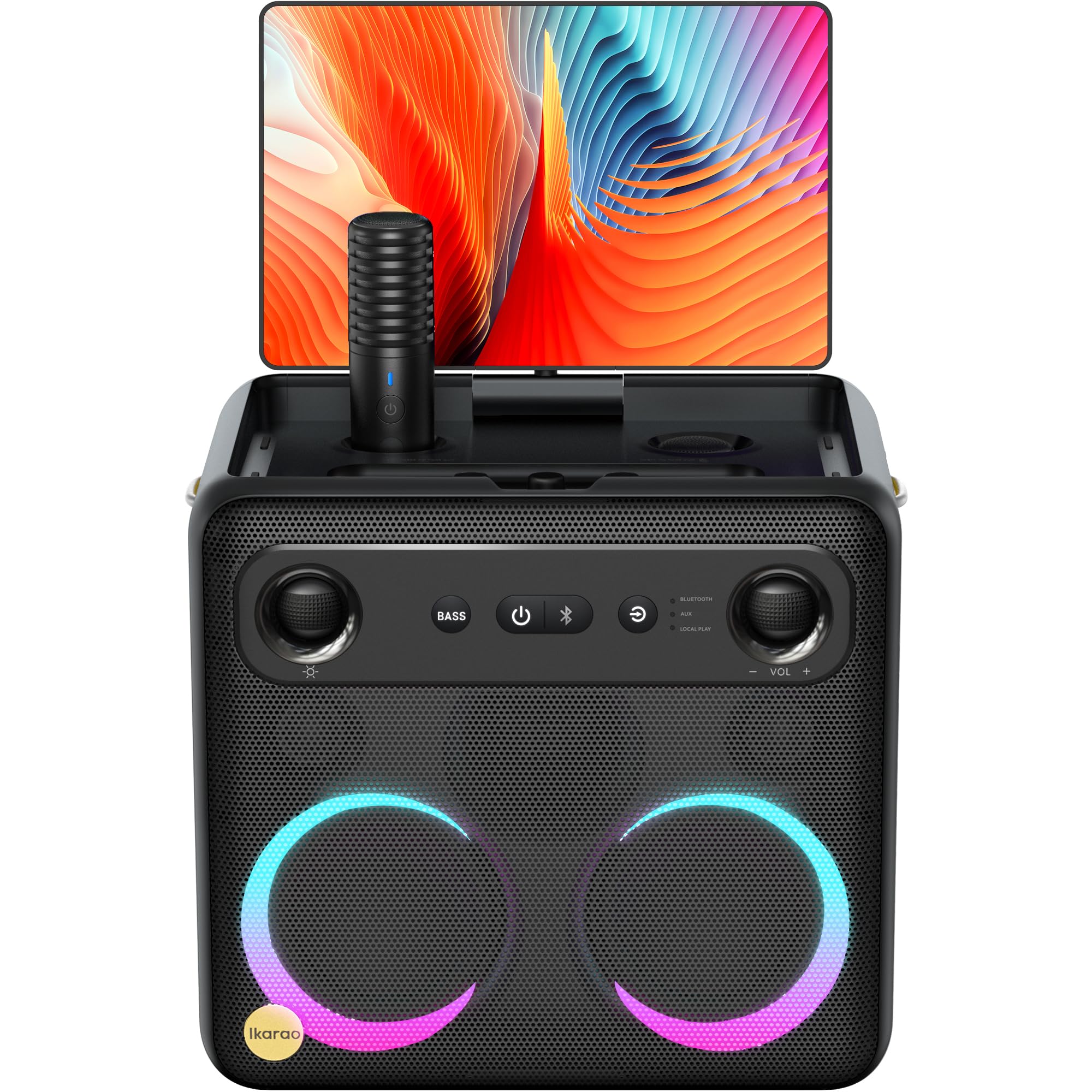
Image: Ikarao Break X2 Karaoke Machine. This image shows the main unit with its integrated 10.1-inch touch screen, the speaker grille, and the two wireless microphones stored in their charging slots.
Característiques principals:
- Pantalla tàctil integrada de 10.1 polzades: 2K HD resolution for clear lyric display. The screen can rotate 180 degrees for optimal viewangles d'ajust.
- 600W Bluetooth Speaker: Delivers powerful and clear audio for an engaging karaoke experience.
- Two Self-Charging Wireless Microphones: Conveniently store and charge microphones within the unit. No manual pairing required.
- Connectivitat integrada: Access YouTube and Spotify via Wi-Fi for an unlimited song library.
- Múltiples modes de reproducció: Supports HDMI, USB, AUX IN, AUX OUT, TF, SD, and wired microphone connections.
- Disseny portàtil: Compact and equipped with a strap for easy transport, offering up to 8 hours of battery life.
4. Configuració
4.1 Càrrega inicial
- Connect the provided charging cable to the charging port on the Ikarao Break X2.
- Plug the other end into a suitable power outlet.
- Allow the device to charge fully before first use. The charging indicator will show the battery status.
4.2 Engegada/apagada
- To power on, press and hold the Power button located on the control panel until the screen illuminates.
- To power off, press and hold the Power button until the shutdown options appear on the screen, then select 'Power Off'.
4.3 Connexió Wi-Fi
- Once powered on, navigate to the 'Settings' menu on the touch screen.
- Select 'Wi-Fi' and turn it on.
- Trieu la xarxa Wi-Fi que vulgueu de la llista i introduïu la contrasenya si se us demana.
- Once connected, you can access online features like YouTube and Spotify.
4.4 Ús del micròfon
- The two wireless microphones are pre-paired with the unit. Simply remove them from their charging slots to activate.
- To charge, place the microphones back into their designated slots on the main unit.
5. Instruccions de funcionament
5.1 Ús de la pantalla tàctil
- The 10.1-inch touch screen functions like a tablet. Tap to select, swipe to scroll.
- The screen can be rotated 180 degrees to adjust the viewing angle. Gently pivot the screen to the desired position.
5.2 Karaoke Mode (YouTube/Spotify)
- Assegureu-vos que el dispositiu estigui connectat a la Wi-Fi.
- From the home screen, tap on the YouTube or Spotify application icon.
- Cerca your desired karaoke songs or playlists.
- Adjust the main volume using the controls on the unit or the on-screen interface.
- Adjust microphone volume and echo effects using the dedicated controls.
Mode d'altaveu Bluetooth 5.3
- Activate Bluetooth on your external device (e.g., smartphone, tablet).
- On the Ikarao Break X2, navigate to the Bluetooth settings or select the Bluetooth input mode.
- Cerca 'Ikarao Break X2' on your external device and pair.
- Once connected, you can play audio from your external device through the Ikarao Break X2 speaker.
5.4 Connectivitat de dispositius externs
- HDMI: Connect to a TV or external display for a larger viewexperiència.
- USB/TF/SD: Insert USB drives or memory cards to play local audio or video files.
- AUX IN: Connecteu fonts d'àudio externes amb un cable d'àudio de 3.5 mm.
- SORTIDA AUXILIAR: Connect to external speakers or sound systems.
- Micròfon amb cable: An additional port is available for a wired microphone if desired.
6. Manteniment
6.1 Neteja
- Netegeu la pantalla i les superfícies exteriors amb un drap suau, sec i sense borrissol.
- No utilitzeu netejadors abrasius, dissolvents ni aerosols.
- Per a marques difícils, esbandiu lleugeramentampNetegeu el drap amb aigua i eixugueu-lo immediatament.
6.2 Emmagatzematge
- Guardeu el dispositiu en un lloc fresc i sec, allunyat de la llum solar directa i de temperatures extremes.
- Ensure microphones are securely placed in their charging slots when not in use.
6.3 Cura de la bateria
- Per allargar la durada de la bateria, eviteu descarregar-la completament amb freqüència.
- Si l'emmagatzemeu durant un període prolongat, carregueu la bateria aproximadament al 50% cada pocs mesos.
7. Solució De Problemes
7.1 No Sound from Speaker
- Check the main volume level on the unit and any connected external devices.
- Ensure the correct input source is selected (e.g., Bluetooth, AUX, YouTube).
- Verify that cables are securely connected if using wired inputs.
7.2 Microphones Not Working
- Ensure microphones are fully charged. Place them in their slots for a few minutes.
- Check microphone volume levels on the unit.
- Confirm that the microphones are removed from their charging slots to activate.
7.3 Problemes de connexió Wi-Fi
- Restart the Ikarao Break X2 and your Wi-Fi router.
- Assegureu-vos que esteu dins de l'abast de la vostra xarxa Wi-Fi.
- Comproveu dues vegades la contrasenya del Wi-Fi.
7.4 La pantalla no respon
- Try restarting the device by holding the Power button.
- If the screen is frozen, a hard reset might be necessary (refer to specific instructions if available, or hold power button for 10-15 seconds).
8. Especificacions
| Característica | Especificació |
|---|---|
| Marca | Ikarao |
| Nom del model | Pausa X2 |
| Dimensions del producte | 21 x 27 x 29 cm |
| Pes | 6 quilos |
| Tipus de bateria | Ió de liti (cal 1, inclosa) |
| Font d'alimentació | Funciona amb bateria |
| Perifèrics compatibles | HDMI, Guitar, USB, AUX IN, AUX OUT, TF, SD, Wired Microphone |
| Característiques especials | Integrated YouTube and Spotify connection |
| Tecnologia de connectivitat | Aux, Bluetooth, HDMI, USB, Wi-Fi |
| Tipus de suport | USB, Bluetooth |
| Usos recomanats | TV connection, Indoor, Outdoor, Parties, Commercial, Home use |
9. Garantia i Suport
The Ikarao Break X2 Karaoke Machine comes with a standard manufacturer's warranty. Please refer to the warranty card included in your package for specific terms and conditions.
For technical support, troubleshooting assistance, or warranty claims, please contact Ikarao customer service through their official weblloc web o la informació de contacte que es proporciona a la documentació de compra.
Si us plau, conserveu el comprovant de compra per motius de garantia.


