1. Producte acabatview
The Roborock Qrevo Curv is an advanced robot vacuum cleaner designed for comprehensive home cleaning. It features powerful suction, intelligent navigation, and a multifunctional dock for automated maintenance.

Image: The Roborock Qrevo Curv robot vacuum cleaner docked in its white multifunctional station, with a smartphone and smartwatch displaying the companion app interface.
Característiques principals:
- Succió HyperForce de 18,500 Pa: Delivers powerful cleaning, capturing fine particles and effectively removing pet hair.
- Sistema dual anti-embolics: Features a main brush and a side brush designed to prevent hair tangles, ideal for homes with pets.
- AdaptiLift™ Chassis: Allows the robot to lift its body by 10mm, enabling it to cross obstacles up to 4cm and clean long-pile carpets effectively.
- Multifunctional Dock 3.0: Provides automated mop washing with 75°C hot water, automatic dustbin emptying, water refilling, hot air drying for mops, and self-cleaning of the dock.
- Dual Rotary Mop: Rotates at 200 RPM, applying constant pressure and moisture for efficient stain removal.
- Detecció intel·ligent de brutícia: Automatically re-washes or re-mops areas with stubborn dirt.
- Reactive AI Obstacle Recognition: Navigates around objects using structured light and an RGB camera.
- LiDAR Navigation (PreciSense™): Creates precise real-time maps for optimal cleaning paths.
- Integrated Voice Assistant: Allows voice commands for cleaning tasks.
- Roborock App & Third-Party Voice Control: Compatible with Amazon Alexa, Apple Siri, and Google Home for smart control.
2. Guia de configuració
2.1 Desembalatge i col·locació
- Traieu amb cura tots els components de l'embalatge. Assegureu-vos que totes les pel·lícules protectores i els materials d'embalatge s'han tret del robot i de la base.
- Place the Multifunctional Dock 3.0 on a hard, level surface against a wall, ensuring there is at least 0.5 meters (1.6 feet) of clear space on both sides and 1.5 meters (4.9 feet) in front. Avoid placing it near stairs or heat sources.
- Connect the power cable to the dock and plug it into a wall outlet. Ensure the cable is neatly tucked away to prevent entanglement.
2.2 Càrrega inicial
Place the robot vacuum onto the charging contacts of the dock. The robot will automatically align itself. Allow the robot to fully charge before its first use. The indicator lights on the robot will show charging status.
2.3 Instal·lació i connexió de l'aplicació
- Download the "Roborock" app from your smartphone's app store (iOS App Store or Google Play Store).
- Obre l'aplicació i crea un compte o inicia la sessió.
- Follow the in-app instructions to add your Roborock Qrevo Curv. This typically involves scanning a QR code on the robot or dock, connecting to the robot's Wi-Fi hotspot, and then connecting the robot to your home Wi-Fi network.
- Once connected, the app will guide you through initial mapping of your home.

Image: Screenshots of the Roborock app interface showing mapping, real-time cleaning progress, and temporary cleaning zone selection.
3. Instruccions de funcionament
3.1 Inici d'un cicle de neteja
- Mitjançant el botó del robot: Press the power button on the robot once to start a full cleaning cycle.
- A través de l'aplicació Roborock: Open the app, select the desired cleaning mode (e.g., Vacuum, Mop, Vacuum & Mop), and tap "Start Cleaning." You can also define specific rooms or zones to clean.
- Mitjançant comandament de veu: If integrated with Amazon Alexa, Google Home, or Apple Siri, use commands like "Hello Rocky, start cleaning."
3.2 Modes i funcions de neteja
The Roborock Qrevo Curv offers various cleaning modes to suit different needs:
- Aspirar: Utilizes 18,500 Pa suction power for deep cleaning of floors and carpets.

Image: An illustration showing the robot vacuum's powerful 18,500 Pa suction, with dust and debris being pulled into the device, highlighting 100% dust removal and 99.5% hair removal rates.
- Fregar: Engages the dual rotary mops for wet cleaning. The dock automatically washes the mops with 75°C hot water for hygienic cleaning.

Imatge: Un primer pla view of the robot vacuum's underside, showing two circular rotary mops in action, with water splashing, indicating 200 RPM rotation speed and 30 levels of water flow.
- Aspiradora i fregona: Aspiració i fregat simultanis per a una neteja completa.
- Augment de la catifa: The AdaptiLift™ chassis automatically raises the brushes and mops when a carpet is detected, increasing suction for deeper carpet cleaning.

Image: An illustration demonstrating the AdaptiLift chassis, showing the robot lifting its main body and brushes by 10mm to cross thresholds up to 4cm and clean long-pile carpets.
- Edge Cleaning (FlexiArm™): The side brush extends to clean edges and corners effectively.
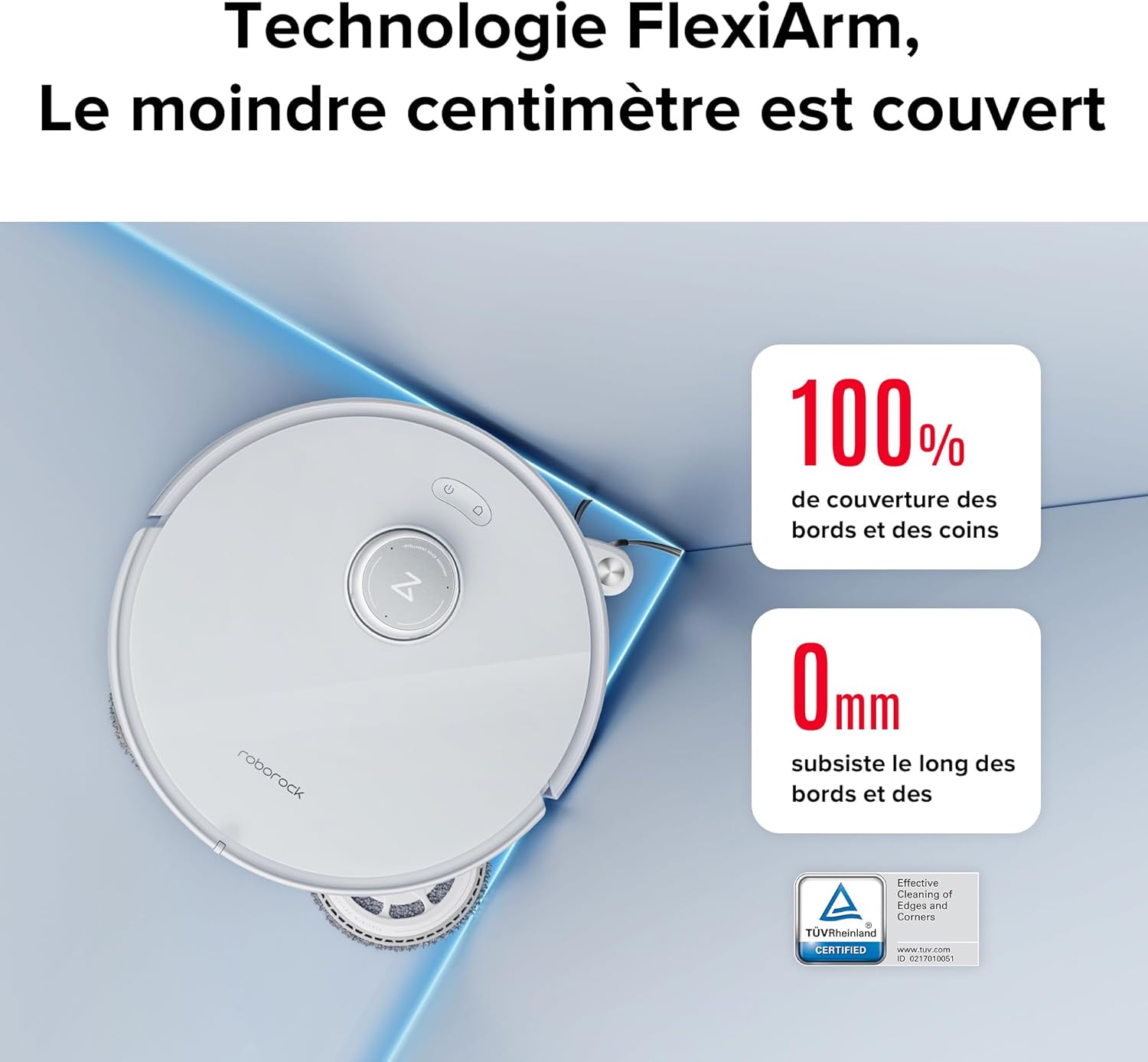
Image: The robot vacuum positioned in a corner, with its FlexiArm side brush extended to reach the very edge, illustrating 100% coverage of edges and corners.
- Detecció intel·ligent de brutícia: If the robot detects heavily soiled areas, it will perform an additional mop wash and re-mop the area for thorough cleaning.

Image: A split image showing the robot's dock performing a re-wash of the mop pads on the left, and the robot on the right detecting a dirty area on the floor, indicating it will re-mop that specific spot.
3.3 Navegació i evitació d'obstacles
The Roborock Qrevo Curv uses advanced technologies for efficient navigation:
- LiDAR Navigation (PreciSense™): Creates accurate maps of your home, allowing the robot to plan optimal cleaning routes and avoid missing spots.

Image: A visual representation of the robot vacuum using LiDAR technology to map a room, showing a detailed floor plan on a smartphone screen and the robot navigating around furniture with a laser scan.
- Reactive AI Obstacle Recognition: Equipped with structured light and an RGB camera, the robot identifies and avoids common household obstacles like shoes, cables, and pet waste, reducing the need for manual intervention.

Image: The robot vacuum emitting a light beam to detect obstacles such as slippers, cables, and crumpled paper, demonstrating its Reactive AI obstacle recognition capabilities in a dimly lit room.
4. Manteniment
Regular maintenance ensures optimal performance and extends the lifespan of your Roborock Qrevo Curv.
4.1 Multifunctional Dock 3.0 Maintenance
- Automatic Dustbin Emptying: The dock automatically empties the robot's dustbin into a sealed dust bag. Replace the dust bag when full (approximately every 7 weeks, depending on usage).
- Reompliment automàtic d'aigua: The dock refills the robot's water tank. Ensure the clean water tank in the dock is filled.
- Automatic Mop Washing & Drying: The dock washes the mop pads with 75°C hot water and dries them with hot air to prevent odors and mildew. Periodically clean the dock's dirty water tank and the washing tray.

Image: A composite image illustrating the various functions of the Multifunctional Dock 3.0, including 75°C hot water mop washing, automatic dustbin emptying, automatic water refilling, hot air drying, and automatic station cleaning.
4.2 Robot Components Maintenance
- Pinzell principal: Regularly check and clean the main brush for tangled hair or debris. The Dual Anti-Tangle System minimizes tangles, but occasional cleaning is still recommended.

Image: An illustration detailing the robot's Dual Anti-Tangle System, showing the internal mechanism of the DuoDivide main brush and the FlexiArm arc-shaped side brush, designed to prevent hair entanglement.
- Raspall lateral: Inspect the side brush for wear and tear or tangled debris. Replace if bristles are damaged.
- Fregones: Although automatically washed, periodically remove and hand-wash the mop pads to ensure thorough cleaning. Replace them every 3-6 months depending on usage.
- Dustbin Filter: Tap out dust from the filter after each cleaning. Wash the filter with water every two weeks and allow it to air dry completely before reinserting.
- Sensors: Netegeu tots els sensors (sensors de penya-segat, sensors de paret, contactes de càrrega) amb un drap suau i sec per garantir un funcionament correcte.
5. Solució De Problemes
| Problema | Causa possible | Solució |
|---|---|---|
| El robot no s'encén ni es carrega. | Low battery; charging contacts are dirty; power cable not connected. | Charge the robot; clean charging contacts on both robot and dock; ensure power cable is securely plugged in. |
| El robot es queda encallat sovint. | Too many obstacles; cliff sensors are dirty. | Clear obstacles from the cleaning path; clean cliff sensors. |
| Mal rendiment de neteja. | Dustbin full; main brush or side brush tangled; filter clogged; mop pads dirty. | Empty dustbin; clean main/side brushes; clean or replace filter; clean or replace mop pads. |
| El robot no pot tornar al moll. | Dock is blocked or moved; no-go zones set incorrectly. | Ensure dock is accessible and not moved; check app for virtual walls or no-go zones. |
| Problemes de connexió de l'aplicació. | Weak Wi-Fi signal; incorrect Wi-Fi password; robot offline. | Ensure strong Wi-Fi signal; re-enter Wi-Fi password; restart robot and router. |
For more detailed troubleshooting, refer to the Roborock app's help section or visit the official Roborock support weblloc.
6. Especificacions
| Característica | Especificació |
|---|---|
| Marca | Roborock |
| Nom del model | Roborock Qrevo Curv |
| Potència d'aspiració | 18,500 Pa |
| Velocitat de rotació de la fregona | 200 RPM |
| Temperatura de rentat de la mopa | 75 °C |
| Alçada de pas d'obstacles | Up to 4 cm (10mm chassis lift) |
| Durada de la bateria | 240 minuts |
| Dimensions del producte (L x A x A) | 44.96 x 44.96 x 44.96 cm (17.7 x 17.7 x 17.7 polzades) |
| Pes de l'article | 17.57 kg (38.74 lliures) |
| Voltage | 220 Volts |
| Connectivitat | Wi-Fi, Amazon Echo, Google Home, Smartwatches, Smartphones |
7. Garantia i Suport
The Roborock Qrevo Curv comes with a 2 any de garantia des de la data de compra, cobrint defectes de fabricació i avaries en condicions d'ús normal.
7.1 Reclamacions de garantia
To make a warranty claim, please retain your proof of purchase. Contact Roborock customer support through their official website or the Roborock app for assistance.
7.2 Atenció al client
For technical support, product inquiries, or service requests, please visit the official Roborock support page or use the in-app support feature. You can also find FAQs and video tutorials online.
Roborock Official Weblloc: www.roborock.com


