1. Introducció
The AJAZZ AK35I V3 is a full-size RGB gasket mount mechanical keyboard designed for both gaming and professional use. It features an 8000mAh battery, triple connection modes, a multi-function TFT color display, and Cherry profile PBT keycaps. This manual provides comprehensive instructions for setting up, operating, maintaining, and troubleshooting your keyboard to ensure optimal performance and longevity.

Figure 1: AJAZZ AK35I V3 Full Size Mechanical Keyboard with its full layout and display screen.
Característiques principals:
- Multi-function TFT Color Display Screen: Customize GIF images, RGB modes, Win/Mac settings, and backlight brightness/speed.
- Five-Layer Sound and Shock-Absorbing Design: Includes Poron cotton, IXPE switch pad, PET sound enhancement pad, and bottom silicone pad for reduced typing noise.
- FR4 Positioning Board: Precision-designed 1.2mm thick board for accurate and stable keystrokes.
- Pre-lubricated Linear Switches: Durable Avocado linear switches for quiet and smooth performance.
- Cherry Profile Double-Shot PBT Keycaps: Wear-resistant and durable keycaps.
- 8000mAh Large-Capacity Battery: Extended battery life for wireless use.
- Connexió en mode triple: Bluetooth 5.0, 2.4G Wireless, and Type-C Wired connectivity.
- Programmable RGB & South-Facing LED: 20 default lighting modes with software customization options.
- Hotswap Compatibility: Supports 3/5-pin mechanical switches for easy customization.
- Integrated Multimedia Control Knob: Quick adjustments for volume and media playback.
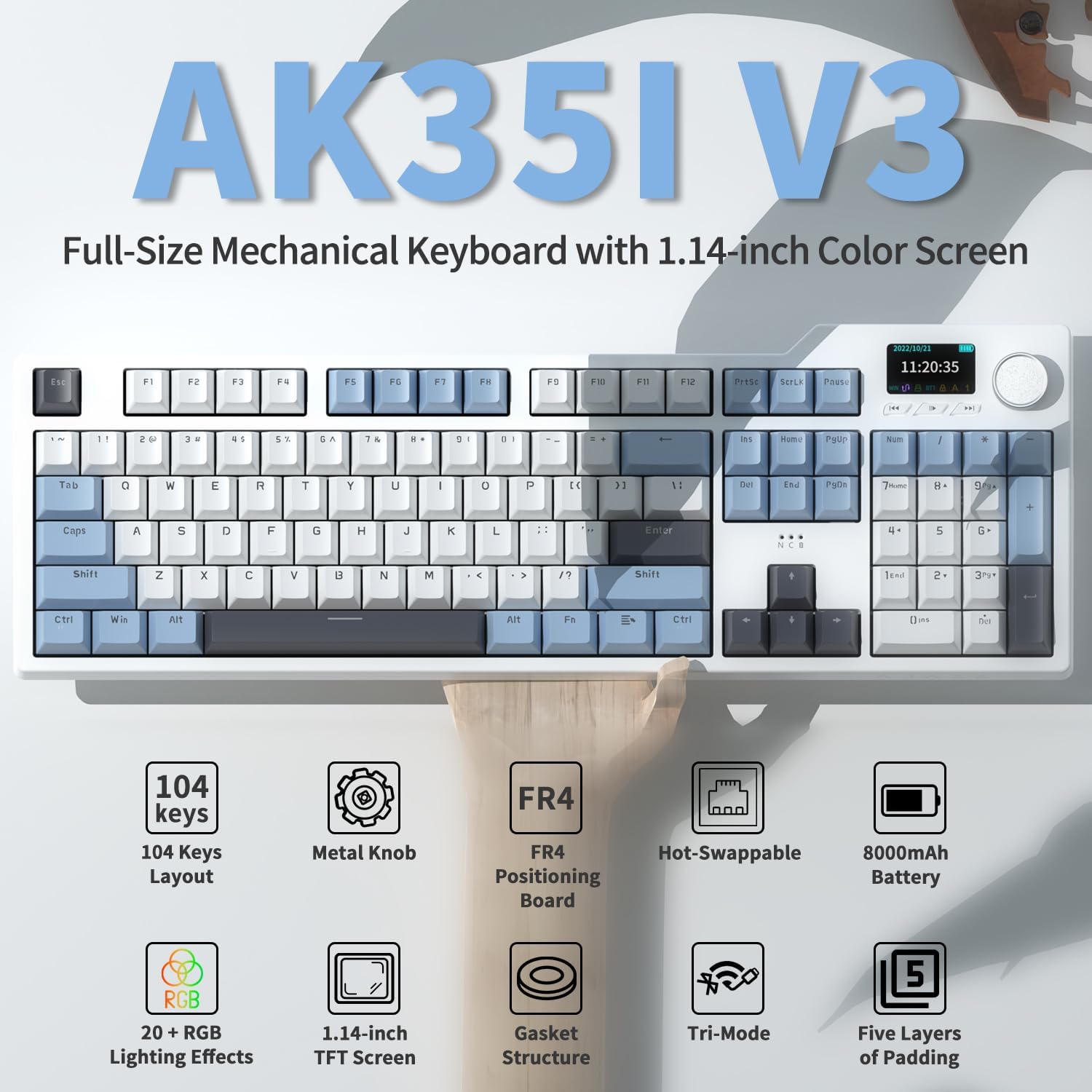
Figura 2: Mésview of AK35I V3 key features including 104 keys, metal knob, FR4 board, hot-swappable switches, 8000mAh battery, RGB lighting, TFT screen, gasket structure, tri-mode connectivity, and five-layer padding.
2. Configuració i connectivitat
The AK35I V3 keyboard offers versatile connectivity options to suit various devices and preferences.
2.1 Modes de connexió
- Bluetooth 5.0: Ideal for connecting to multiple devices wirelessly, such as smartphones, tablets, and laptops.
- Sense fil 2.4G: Provides a stable and fast wireless connection via the included USB receiver. Plug and play, no driver required for basic functionality.
- Cablejat tipus C: Connect directly to your device using the USB-C cable for a reliable wired connection and simultaneous charging.

Figure 3: Visual representation of the three connection modes: Bluetooth, 2.4G Wireless (with USB receiver), and Type-C Wired.
2.2 Configuració inicial
- Càrrega: Before first use, fully charge the keyboard using the provided Type-C cable. The 8000mAh battery ensures long usage times.
- Selecció del mode: Locate the mode switch on the back or side of the keyboard to select between Bluetooth, 2.4G, or Wired mode.
- Connecting via 2.4G Wireless:
- Remove the 2.4G USB receiver from its storage slot (usually on the back or bottom of the keyboard).
- Connecteu el receptor a un port USB disponible de l'ordinador.
- El teclat s'hauria de connectar automàticament.
- Connexió mitjançant Bluetooth:
- Canvia el teclat al mode Bluetooth.
- Al dispositiu (ordinador, tauleta, telèfon intel·ligent), activeu el Bluetooth i cerqueu dispositius nous.
- Select "AJAZZ AK35I V3" (or similar name) from the list of available devices to pair.
- The keyboard can connect to up to 3 Bluetooth devices. Refer to the specific key combinations (e.g., Fn+1, Fn+2, Fn+3) for switching between paired devices.
- Connecting via Type-C Wired:
- Connect one end of the Type-C cable to the keyboard and the other end to your device's USB port.
- Ensure the keyboard is set to Wired mode.
- Coixinets de peu ajustables: El teclat té duestage adjustable foot pads on the bottom, allowing you to set your preferred typing angle for ergonomic comfort.
3. Instruccions de funcionament
3.1 Multi-function TFT Color Display Screen
The 1.14-inch intelligent TFT color screen provides real-time information and allows for various customizations.
- Visualització d'informació: Shows connection system (Win/Mac), current time, battery status, and connection mode.
- Custom GIF Images: Supports custom GIF images via the dedicated driver software.
- RGB Mode Control: Adjust RGB lighting effects directly from the screen.
- Brillantor/velocitat de la retroiluminació: Fine-tune the backlight intensity and animation speed.

Figure 4: The TFT screen displaying various configuration options for RGB effects, brightness, speed, and language settings.
3.2 efectes d'il·luminació RGB
The keyboard features 20 default RGB lighting modes with south-facing LEDs for vibrant illumination. You can switch between modes using "FN+|" (Fn + Backslash key).
For advanced customization and to create your own lighting effects, download the compatible software from the AJAZZ official weblloc.

Figura 5: La pantalla del teclatasing its diverse RGB lighting effects, highlighting the customizable options.
3.3 Knob Control and Multimedia Keys
The integrated metal knob and 3 multimedia keys provide convenient control over your audio and media playback without interrupting your workflow.
- Perilla: Typically controls volume (rotate) and mute/unmute (press).
- Tecles multimèdia: Dedicated buttons for play/pause, previous track, and next track.
3.4 Commutadors intercanviables en calent
The AK35I V3 supports 3/5-pin mechanical switches, allowing you to easily change switches without soldering. This feature is ideal for enthusiasts who wish to customize their typing feel.
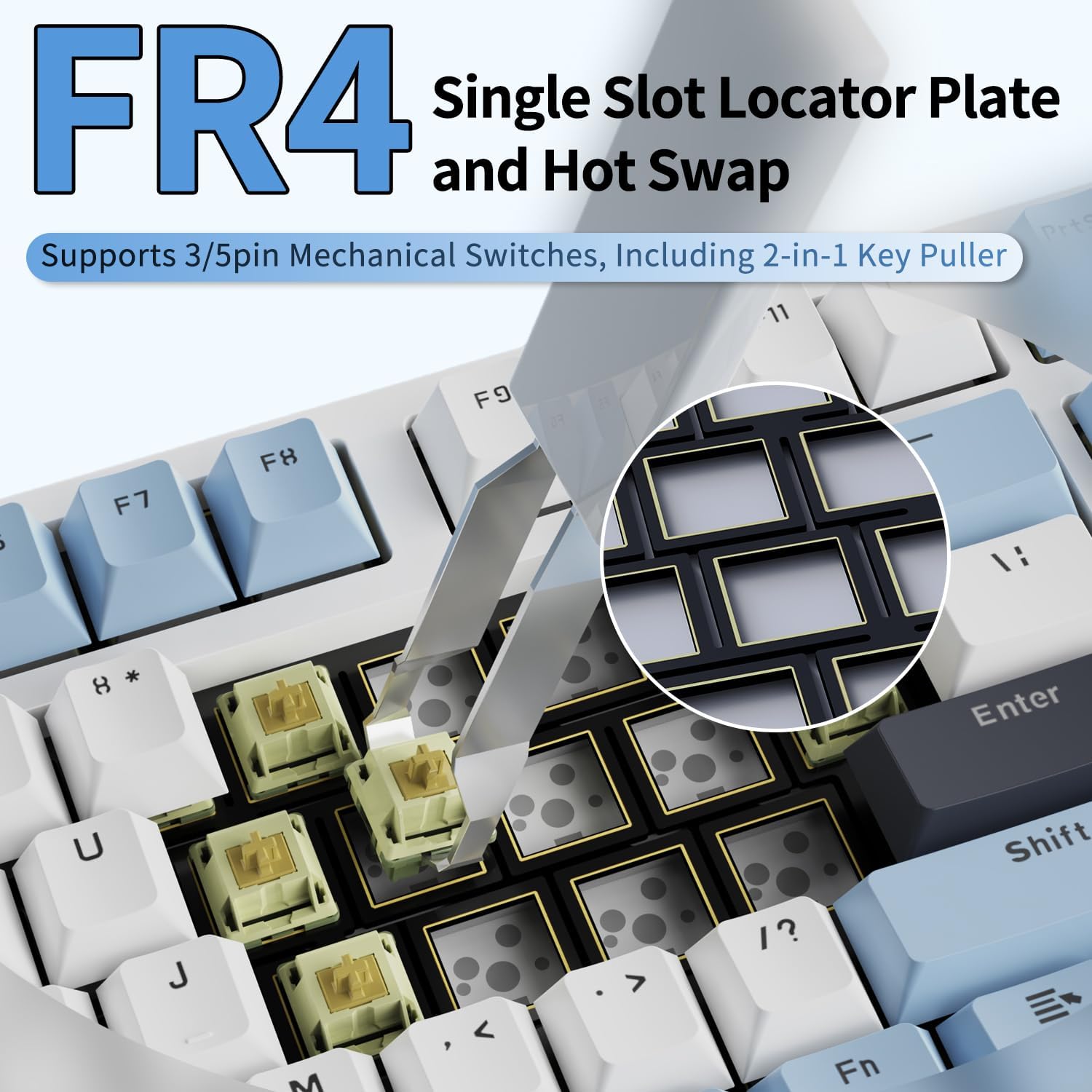
Figure 6: Demonstrating the hot-swappable feature with a switch puller, highlighting the FR4 single slot locator plate.
Per substituir un interruptor:
- Use the included 2-in-1 key puller to carefully remove the keycap.
- Use the switch puller end of the tool to gently pull the switch straight up from the PCB.
- Align the pins of the new switch with the holes on the PCB and press it firmly until it clicks into place. Ensure pins are not bent.
- Torneu a col·locar la tapa de les tecles.
3.5 Producte acabatview Vídeo
Video 1: An official product video from the seller showcasing the AK35I V3 Full Size Gasket Keyboard with its screen and knob, including features like the 2.4G receiver hiding place, customizable display, typing sound, dust cover, included accessories, retro color scheme, 104-key layout, 1.14" TFT screen, metal knob, three-mode switch, 8000mAh battery, non-slip foot pads, and two-stage adjustable foot pads.
4. Manteniment i cura
Proper maintenance will extend the life of your AK35I V3 keyboard.
- Neteja de les tecles: Utilitzeu un suau, damp cloth to wipe down keycaps. For deeper cleaning, remove keycaps using the key puller and wash them with mild soap and water. Ensure they are completely dry before reattaching.
- Neteja del cos del teclat: Use a dry, soft cloth to wipe the keyboard body. Avoid using harsh chemicals or abrasive materials.
- Protecció contra la pols: When not in use, cover the keyboard with the included dust cover to prevent dust and debris accumulation.
- Emmagatzematge: Guardeu el teclat en un lloc fresc i sec, allunyat de la llum solar directa i de temperatures extremes.
5. Solució De Problemes
Si teniu problemes amb el teclat, consulteu les solucions habituals següents:
| Problema | Causa possible | Solució |
|---|---|---|
| El teclat no respon en mode sense fil. | Bateria baixa, mode incorrecte seleccionat, receptor no connectat (2.4G), no emparellat (Bluetooth). | Charge the keyboard. Ensure the mode switch is set correctly. Re-insert the 2.4G receiver. Re-pair Bluetooth device. |
| TFT screen not displaying correctly or time is off. | Software glitch, incorrect settings. | Restart the keyboard. Check for firmware updates or driver software on the AJAZZ website to sync time and customize display. |
| Les claus no es registren o s'escriuen dues vegades. | Loose switch, faulty switch, dust/debris under keycap. | Remove keycap and switch, clean the area, and re-insert the switch firmly. If issue persists, replace the switch. |
| RGB lighting not working or stuck. | Incorrect setting, software issue. | Press Fn+| to cycle through modes. Check the TFT screen settings. Reinstall or update the keyboard software. |
| El teclat es desconnecta sovint. | Interference (wireless), low battery, out of range. | Move closer to the receiver/device. Ensure no strong interference sources nearby. Charge the keyboard. Try wired mode if wireless issues persist. |
6. Especificacions
| Característica | Detall |
|---|---|
| Dimensions del producte | 17.64 x 5.83 x 0.91 polzades |
| Pes de l'article | 3.89 lliures |
| Fabricant | AJAZZ |
| Número de model de l'article | AK35I V3 |
| Bateries | Necessita 1 bateria de ions de liti (inclosa) |
| Tecnologia de connectivitat | Bluetooth 5.0, 2.4G sense fil, tipus C amb cable |
| Descripció del teclat | Teclat mecànic per a jocs |
| Característica especial | 8000mAh Battery, Multi-function TFT Color Display, Hot-swappable, Gasket Mount, Metal Knob |
| Color | Blue (referring to keycap accents) |
| Nombre de claus | 104 |
| Components inclosos | Keyboard, Type-C Cable, 2.4G USB Receiver, 2-in-1 Key/Switch Puller, Dust Cover |
7. Informació de la garantia
AJAZZ products are manufactured to the highest quality standards. For detailed warranty information, including coverage period and terms, please refer to the warranty card included with your product or visit the official AJAZZ weblloc web. Conserveu el comprovant de compra per a reclamacions de garantia.
8. Atenció al client
If you require further assistance or have questions not covered in this manual, please contact AJAZZ customer support through their official weblloc web o la informació de contacte que s'inclou amb l'embalatge del producte. També podeu visitar el AJAZZ Store on Amazon per obtenir recursos addicionals.


