Introducció
The UCOCARE 4G LTE Mini Security Camera (Model CA-5100C-R) provides seamless remote surveillance through a 4G LTE network, eliminating the need for Wi-Fi connectivity. This portable, battery-powered camera is designed for easy installation and reliable monitoring in various indoor and outdoor environments, including vehicles, remote cabins, and camping sites. Its compact size and robust features make it suitable for recording daily life or professional activities.
This manual will guide you through the setup, operation, maintenance, and troubleshooting of your UCOCARE security camera to ensure optimal performance and security.

Image: UCOCARE 4G LTE Mini Security Camera and its components, including a SIM card and a smartphone displaying live footage.
Contingut del paquet
Si us plau, verifiqueu que tots els elements siguin presents al vostre paquet:
- UCOCARE 4G LTE Mini Security Camera
- 4G SIM Card (includes 300MB free trial data)
- Suport de muntatge
- Paquet de cargols
- Manual d'usuari (aquest document)
- USB Type-C Charging Cable (not explicitly listed but implied for charging)

Image: Key features of the UCOCARE 4G LTE Mini Security Camera, highlighting 4G LTE connectivity, 5200mAh battery, portability, 1080P HD resolution, 10m night vision, remote viewing, motion detection, adjustable sensitivity, local/cloud storage, and multi-user access.
Guia de configuració
1. Càrrega de la càmera
Before initial use, fully charge the camera using the provided USB Type-C cable. The camera features a 5200mAh rechargeable battery designed for extended operation with advanced low-power technology.
2. Instal·lació de la targeta SIM
- Localitza la ranura de la targeta SIM a la càmera.
- Insert the provided 4G SIM card into the slot. Ensure it is inserted correctly according to the diagram in the quick start guide.
- After insertion, a blue indicator light will illuminate, signifying a successful connection to the 4G network. If the light does not turn blue after a few minutes, refer to the Troubleshooting section.
3. App Download and Device Pairing
- Download the 'UBox' application from your smartphone's app store (iOS or Android).
- Creeu un compte i inicieu sessió.
- Segueix les instruccions de l'aplicació per afegir la teva nova càmera. Normalment, això implica escanejar un codi QR a la càmera o introduir-ne l'ID manualment.
- Once paired, you will be able to view the live feed and configure settings through the app.
4. Muntatge de la càmera
La càmera ofereix opcions de muntatge flexibles:
- Muntatge de paret/sostre: Use the included mounting bracket and screw pack to securely attach the camera to a wall or ceiling.
- Tabletop/Adhesive Mount: For temporary or non-invasive placement, use the 3M adhesive sticker on the base of the bracket to place the camera on a flat surface or cabinet.
Installation is designed to be quick and easy, typically taking about one minute without requiring professional assistance or wiring.

Image: Demonstration of the UCOCARE 4G LTE Mini Security Camera's compact size and ease of portability, showing it being held in a hand, placed in a pocket, and mounted on a wall and ceiling.
Instruccions de funcionament
1. En directe View
Open the UBox app on your smartphone. Select your camera from the device list to access the live 1080P HD video feed. You can monitor your property in real-time from anywhere with 4G LTE coverage.
2. Detecció de moviment i alertes
The camera utilizes smart AI to detect people, vehicles, and pets, reducing false alarms. When motion is detected, you will receive instant alerts on your smartphone. Event recordings are saved to your chosen storage option. You can customize alert sensitivity levels and time schedules within the app to avoid unnecessary interruptions.

Image: Depiction of the UCOCARE 4G LTE Mini Security Camera's accurate motion detection and instant alert system, showing a detected intruder and a smartphone notification.
3. Àudio bidireccional
Engage in real-time two-way communication through the camera using the UBox app. This feature allows you to speak to and hear from anyone near the camera, regardless of your distance.

Image: Illustration of the two-way audio feature of the UCOCARE 4G LTE Mini Security Camera, showing a person communicating through a smartphone app with the camera.
4. Enregistrament i emmagatzematge
La càmera admet dos mètodes d'emmagatzematge:
- Emmagatzematge local: Insert a TF (Micro SD) card (not included, up to 128GB) into the camera's slot. Recordings will be stored locally.
- Emmagatzematge al núvol: A 30-day free trial of cloud storage is available. After the trial, subscription plans are offered through the app.
When storage is full, the camera automatically overwrites the oldest recordings, so manual deletion is not required.

Imatge: Més deview of the secure and flexible storage options for the UCOCARE 4G LTE Mini Security Camera, including local SD card storage (up to 128GB, not included) and cloud storage (with a 30-day free trial), with automatic overwriting of old recordings.
5. Visió nocturna
Equipped with enhanced IR LEDs, the camera provides clear night vision up to 10 meters, ensuring reliable surveillance even in complete darkness.
6. Digital Zoom and Wide Angle
The camera features a 160° ultra-wide-angle lens and 10x digital zoom, allowing for broad coverage and the ability to focus on specific details within the frame. Advanced image processing technology ensures sharp 1080P HD images up to 40 meters.
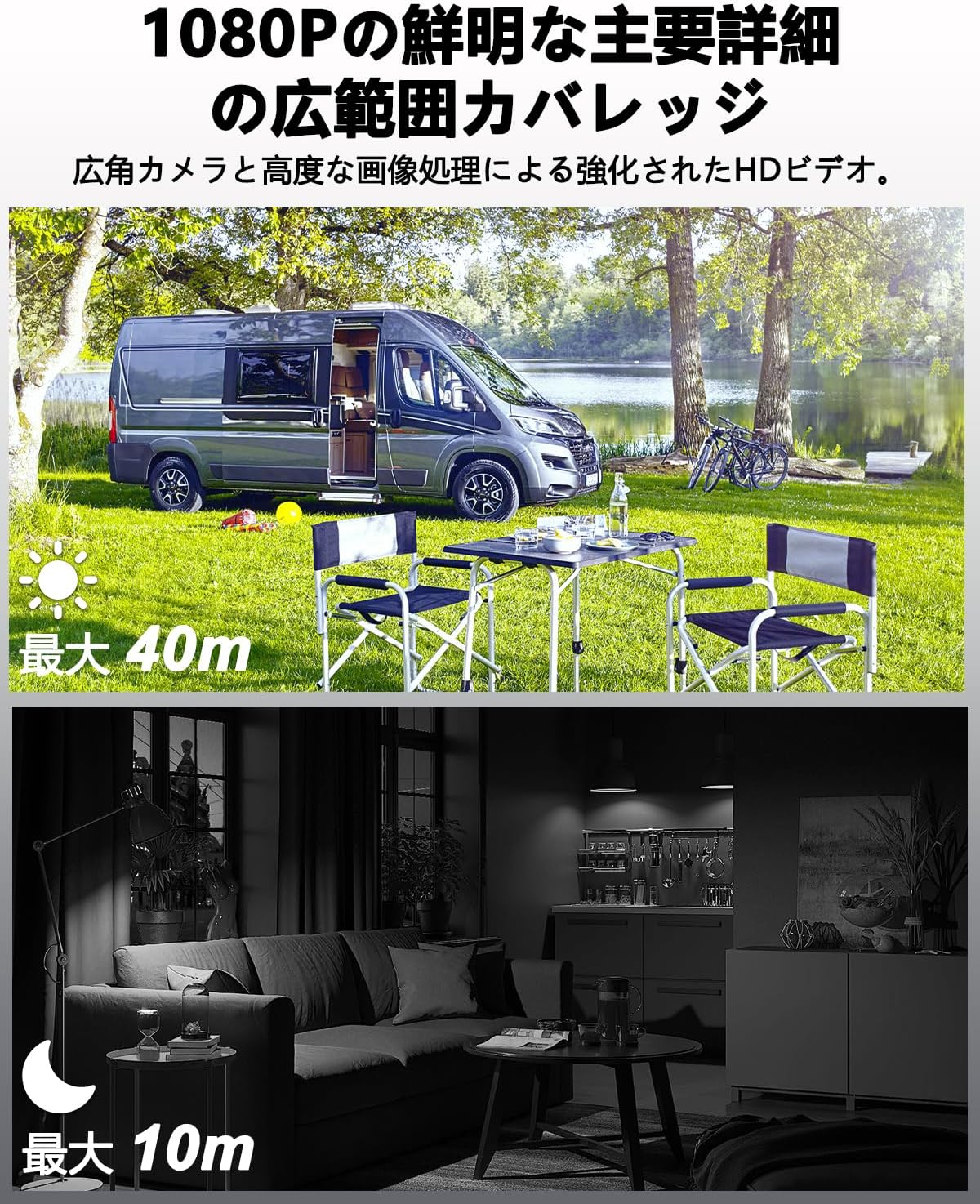
Image: Visual representation of the UCOCARE 4G LTE Mini Security Camera's 1080P HD video quality, showing clear daytime footage with a 40m visible range and effective 10m night vision in a dark environment.
Manteniment
1. Cura de la bateria
- Per maximitzar la durada de la bateria, eviteu les temperatures extremes.
- Carregueu la càmera regularment, sobretot si la guardareu durant un període prolongat.
- Feu servir només el cable de càrrega proporcionat o un cable USB tipus C certificat.

Image: Illustration of the UCOCARE 4G LTE Mini Security Camera's powerful 5200mAh rechargeable battery, emphasizing its low power consumption technology for extended use.
2. Neteja
- Gently wipe the camera lens with a soft, lint-free cloth to ensure clear image quality.
- Clean the camera body with a dry or slightly damp tela. Eviteu utilitzar productes químics o materials abrasius.
3. Emmagatzematge
Quan no la feu servir, guardeu la càmera en un lloc fresc i sec, allunyat de la llum solar directa i de temperatures extremes.
Resolució de problemes
1. Camera Not Connecting to 4G Network (Blue Light Not On)
- Ensure the SIM card is correctly inserted. Remove and reinsert it firmly.
- Check if the SIM card has active data. The included SIM card comes with 300MB trial data.
- Verify 4G LTE signal strength in the camera's location. Move the camera to an area with better signal if necessary.
- Perform a device reset. Refer to the quick start guide for the reset button location and procedure.
- If using your own SIM card, ensure it is compatible with 4G LTE networks and properly configured (APN settings may be required, refer to your SIM provider's instructions).
2. Problemes de connexió de l'aplicació
- Assegura't que el teu telèfon intel·ligent tingui una connexió a Internet estable (Wi-Fi o dades mòbils).
- Restart the UBox app.
- If the camera is offline, check its battery level and 4G connection.
3. SD Card Not Recording or Recognized
- Ensure the TF (Micro SD) card is inserted correctly and fully.
- Check if the SD card is formatted to a compatible file system (e.g., FAT32). Format it if necessary (this can usually be done via the app or a computer).
- Verify that the SD card is not full. The camera supports automatic overwriting, but a faulty card might prevent this.
- Use a high-quality TF card (Class 10 or higher) up to 128GB.
4. Mala qualitat d'imatge
- Netegeu la lent de la càmera per eliminar la pols o les taques.
- Ensure adequate lighting during the day. For night vision, confirm the IR LEDs are active.
- Check the camera's position to avoid direct glare or reflections.

Image: Various application scenarios for the UCOCARE 4G LTE Mini Security Camera, such as in a vehicle, remote cabin, motorhome, and camping site, demonstrating its versatility in environments without Wi-Fi.
Especificacions
| Característica | Detall |
|---|---|
| Nom del model | CA-5100C-R |
| Tecnologia de connectivitat | Wireless (4G LTE) |
| Resolució de captura de vídeo | 1080p |
| Resolució de vídeo efectiva | 1080 |
| Camp de View | 160 graus |
| Gamma de visió nocturna | 10 metres |
| Velocitat de fotogrames | 15 fps |
| Capacitat de la bateria | 5200 mAh |
| Font d'alimentació | Funciona amb bateria |
| Voltage | 5 Volts |
| Tipus de muntatge | Wall Mount, Ceiling Mount, Tabletop Mount |
| Tipus d'instal·lació | Screw-in, Freestanding, Adhesive |
| Material | Plàstic |
| Dimensions del producte (LxWxH) | 5.5 x 4.2 x 3.8 cm |
| Pes del producte | 230 g |
| Usos recomanats | Baby Monitor, Pet Monitor, Indoor Security, Outdoor Security, Vehicle Monitoring, Wildlife Monitoring |
| Característiques especials | Two-way audio, HD high quality resolution, 40 meter visible range, 160 degree wide field of view, 10x digital zoom, image sensor, motion detection, event recording, instant alert, manual recording, 10 meter night vision, wireless portable |
| Ús interior/exterior | Interior, Exterior |
| Dispositius compatibles | Smartphone |
| Tipus de controlador | Aplicació UBox |
Informació de la garantia
UCOCARE provides a Garantia de qualitat de 3 anys for this product. This warranty covers manufacturing defects and ensures the product meets its specified performance standards under normal use.
Atenció al client
For any questions or assistance regarding your UCOCARE 4G LTE Mini Security Camera, please do not hesitate to contact our customer support team. We offer 24-hour support via Amazon messaging and email. Multi-language support is available.
Contact us through your Amazon order page or the contact information provided in the product packaging.


