1. Producte acabatview
The ARCCAPTAIN TIG 5-pin Welding Foot Pedal is designed to provide precise amperage control for compatible ARCCAPTAIN TIG welding machines. This hands-free control enhances welding efficiency and productivity by allowing the operator to adjust current without interrupting the welding process.

Imatge: The ARCCAPTAIN TIG 5-pin Welding Foot Pedal, showcasing its robust design and the included 10-foot cable with a 5-pin connector.

Imatge: A user's foot operating the TIG welding foot pedal, highlighting its ergonomic design for comfortable and flexible use during pulse welding.
Característiques principals:
- Disseny compatible: Specifically engineered for ARCCAPTAIN TIG welding machines, including TIG200, TIG200P ACDC, and TIG205 Pro.
- Precís Amperage Control: Features a 12-teeth alloy gear for a full turn of the potentiometer, allowing current adjustment from 0 to 200 Amps.
- Funcionament amb mans lliures: Enables welders to control amperage with their foot, freeing hands for torch manipulation and improving work efficiency.
- Construcció duradora: Built with a rugged outer casing for extended lifespan and high reliability.
- Portàtil: Equipped with a 10ft (3m) wire cable for convenient placement and portability.
- Superfície antilliscant: Designed with a textured surface to ensure stable foot placement during operation.
2. Configuració i instal·lació
Before connecting the foot pedal, ensure your ARCCAPTAIN TIG welding machine supports remote amperage control via a foot pedal. Compatibility is crucial for proper function.
Comprovació de compatibilitat:
This foot pedal is designed for ARCCAPTAIN TIG200, TIG200P ACDC, and TIG205 Pro models. Due to variations in control boards, it is recommended to contact ARCCAPTAIN support if you are unsure about your specific welder's compatibility.

Imatge: Important note regarding compatibility: This foot pedal is exclusively for ARCCAPTAIN TIG welding machines. Do not purchase for other brands or models.
Connecting the Foot Pedal:
- Locate the 5-pin remote control port on your compatible ARCCAPTAIN TIG welding machine.
- Identify the correct end of the foot pedal cable for connection to the welding machine. The 5-pin connector on the cable is not symmetrical; ensure the correct orientation to avoid damage and ensure functionality. If the pedal does not work, try reversing the connectors.
- Carefully insert the 5-pin connector into the welding machine's remote control port until it is securely seated.
- Place the foot pedal on a stable, flat surface near your welding workstation.
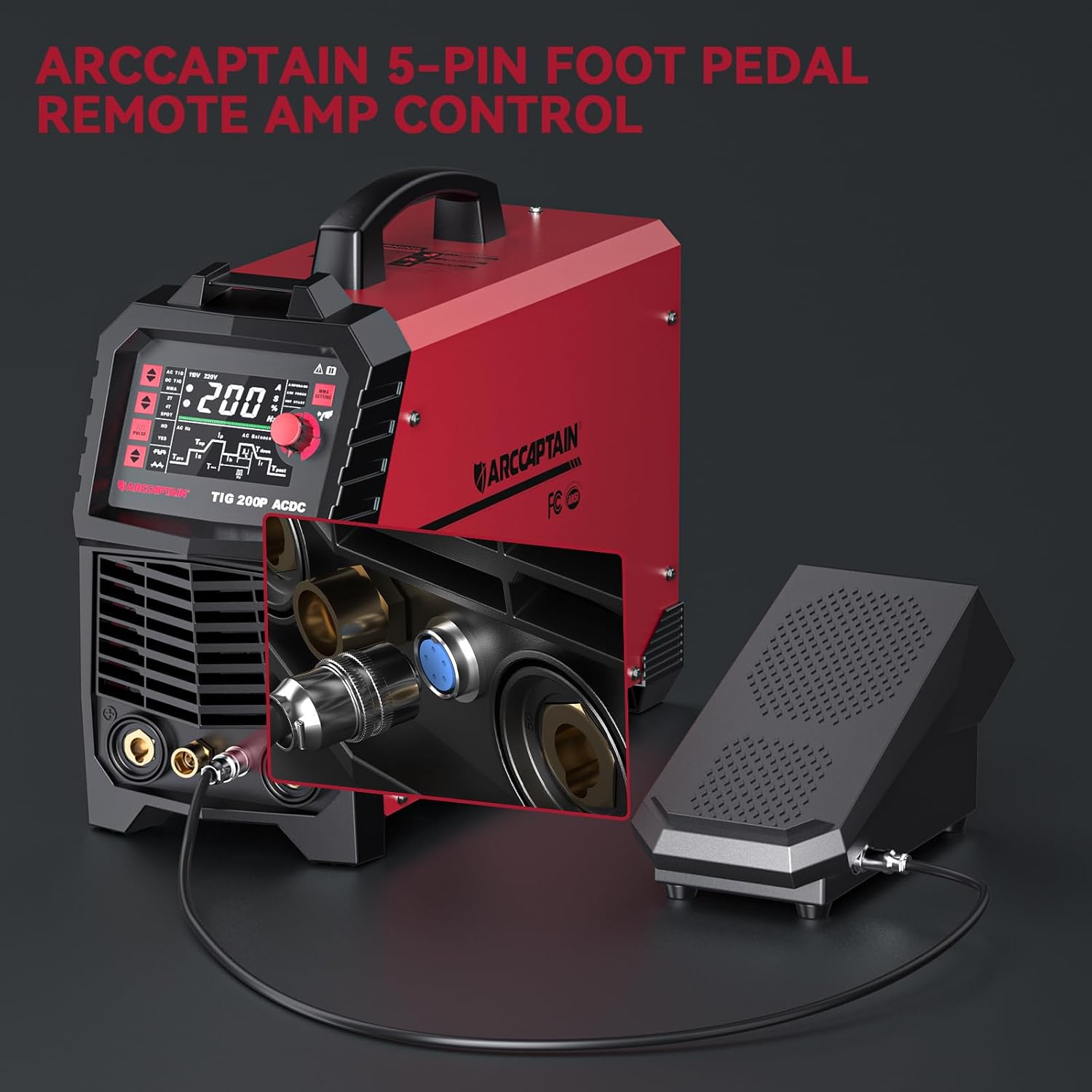
Imatge: The ARCCAPTAIN TIG 5-pin Welding Foot Pedal connected to an ARCCAPTAIN TIG 200P ACDC welding machine, illustrating the cable connection point.

Imatge: A visual guide demonstrating the correct and incorrect ways to connect the foot pedal cable, emphasizing proper termination for durability and function.
3. Instruccions de funcionament
The foot pedal provides intuitive control over welding amperage, allowing for dynamic adjustments during the welding process.
Amperage Control:
- To Activate and Increase Ampera: Press down on the foot pedal. The further you depress the pedal, the higher the amperage will be, up to the maximum set on your welding machine.
- Disminuir Amperage and Turn Off: Release pressure on the foot pedal. As you ease off the pedal, the amperage will decrease. Fully releasing the pedal will turn off the welding arc.

Imatge: A diagram illustrating the operation of the foot pedal for amperage control, showing how pressing down increases current and releasing decreases it.
This dynamic control allows for precise heat management, crucial for achieving optimal weld quality, especially when working with varying material thicknesses or performing intricate welds.
4. Manteniment i cura
Proper maintenance ensures the longevity and reliable performance of your ARCCAPTAIN TIG 5-pin Welding Foot Pedal.
Atenció general:
- Neteja: Regularly wipe down the pedal with a dry cloth to remove dust, debris, and welding spatter. Avoid using harsh chemicals or abrasive cleaners.
- Inspecció del cable: Periodically inspect the 10-foot cable for any signs of damage, cuts, or fraying. Ensure the connectors are clean and free from corrosion.
- Emmagatzematge: Store the foot pedal in a clean, dry environment when not in use, away from extreme temperatures and direct sunlight.
- Comprovació mecànica: Occasionally check the pedal's movement for any stiffness or "sticky spots." If resistance is felt, a careful inspection of the internal mechanism may be required. Some users have found success by disassembling the pedal to remove any sharp edges or excess material that might impede smooth travel. This should only be attempted by individuals with mechanical aptitude.
5. Solució De Problemes
If you encounter issues with your ARCCAPTAIN TIG 5-pin Welding Foot Pedal, refer to the following common troubleshooting steps:
| Problema | Causa possible | Solució |
|---|---|---|
| Pedal does not control amperage or is unresponsive. |
|
|
| Pedal does not reach full ampcapacitat d'edat. |
|
|
| Pedal feels "sticky" or has inconsistent movement. |
|
|
For issues not covered here, or if troubleshooting steps do not resolve the problem, please contact ARCCAPTAIN customer support.
6. Especificacions del producte
| Especificació | Detall |
|---|---|
| Fabricant | ARCCAPTAIN |
| Número de part | 5P-WFP-10FT |
| Pes de l'article | 7.11 lliures |
| Dimensions del paquet | 13.19 x 8.15 x 6.38 polzades |
| Número de model de l'article | 5P-WFP-10FT |
| Color | Negre |
| Material | Ferro |
| Font d'alimentació | AC, AC/DC |
| Quantitat de paquet d'articles | 1 |
| Components inclosos | 1x 5-Pin TIG Welding Foot Pedal |
| Longitud del cable | 10 peus (3 metres) |
| Current Adjustment Range | 0-200 Amps |

Imatge: Visual representation of the foot pedal's dimensions (11" length, 4.8" width, 6.3" height) and the 10-foot cable length.
7. Garantia i Suport
ARCCAPTAIN is committed to providing high-quality products and customer satisfaction. While specific warranty details are not provided in this manual, please retain your proof of purchase for any warranty claims.
For technical assistance, troubleshooting, or warranty inquiries, please contact ARCCAPTAIN customer support through their official channels. You can find more information and contact details on the official ARCCAPTAIN store page:


