1. Producte acabatview
This manual provides instructions for the Bewinner 4K Portable Monitor 17.3 Inch, Model Bewinnerz7brg98kxm. This portable display is designed to extend your screen space for various devices, offering a high-resolution viewexperiència.

Image 1.1: Bewinner 4K Portable Monitor 17.3 Inch with its integrated kickstand.
Característiques principals:
- 17.3-inch 4K Display: Features panel technology with 3840x2160 pixel resolution, providing detailed images suitable for graphic design, photo editing, or video production.
- Portabilitat: Lightweight design allows for easy transport and use in various locations.
- Vibrant Image Quality: Offers 100% sRGB wide color range, 16.7 million colors (8-bit), a 1500:1 contrast ratio, and 400 nits brightness for accurate color reproduction and image clarity.
- Adjustable Stand & VESA Support: Includes an integrated adjustable kickstand and supports VESA mounting (75x75mm) for landscape or portrait orientation.
- Connectivitat versàtil: Equipped with full-featured USB-C 3.1 ports, an HDMI port, a Micro USB data transfer port, and a 3.5mm headphone jack. USB-C supports single-cable power and video transmission.

Image 1.2: Illustration of display technologies including IPS, 100% sRGB, 4K HDR, and resolution comparisons.

Image 1.3: The monitor's protective cover functions as a magnetic kickstand, offering scratch protection and water resistance.
2. Contingut del paquet
Verifiqueu que tots els elements siguin presents al paquet:
- Bewinner 4K Portable Monitor 17.3 Inch
- Cable USB-C a USB-C
- Cable HDMI a Mini HDMI
- Cable d'alimentació USB-A a USB-C
- Power Adapter (not explicitly listed but implied for power cable)
- Manual d'usuari (aquest document)

Image 2.1: The various cables included with the monitor for connectivity and power.
3. Components físics
Ports i botons:
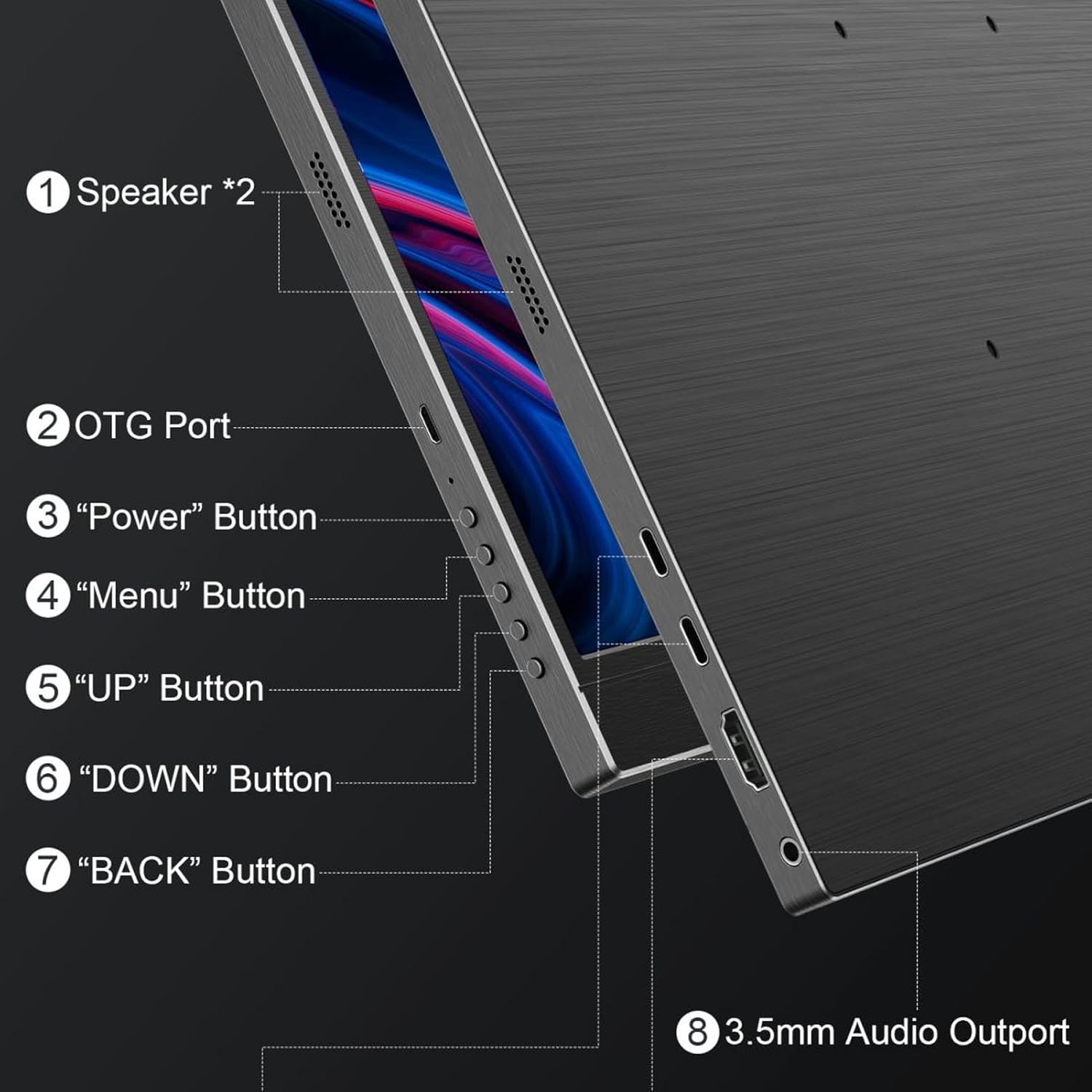
Imatge 3.1: Lateral view diagram illustrating the monitor's buttons and audio port.
- Speakers (*2): Altaveus estèreo integrats per a la sortida d'àudio.
- Port OTG: On-The-Go port, typically for connecting USB peripherals.
- Botó d'encesa: S'utilitza per encendre o apagar el monitor.
- Botó de menú: Accedeix al menú de visualització en pantalla (OSD).
- Botó amunt: Navigates up in menus or adjusts settings.
- Botó ABAIX: Navigates down in menus or adjusts settings.
- Botó TORNAR: Returns to the previous menu level.
- Sortida d'àudio de 3.5 mm: Per connectar auriculars o altaveus externs.

Image 3.2: Close-up of the monitor's USB-C and HDMI input ports.
- Type-C Ports (*2): Full-featured USB-C 3.1 ports for power, video, and data transmission.
- Port HD (HDMI): For video input from devices supporting HDMI output.
4. Instruccions de configuració
Follow these steps to connect your portable monitor to various devices.
4.1. Connecting to a Laptop/PC (USB-C)
- Ensure your laptop/PC has a full-featured USB-C port that supports DisplayPort Alternate Mode and power delivery.
- Connect one end of the provided USB-C to USB-C cable to your laptop/PC's USB-C port.
- Connect the other end of the USB-C to USB-C cable to one of the monitor's Type-C ports.
- The monitor should automatically detect the signal and power on. If not, press the Power button.
4.2. Connecting to a Laptop/PC (HDMI)
- Connect one end of the provided HDMI to Mini HDMI cable to your laptop/PC's HDMI output.
- Connect the Mini HDMI end of the cable to the monitor's HD port.
- Connect the USB-A to USB-C power cable from a power adapter (not included) or a USB port on your PC to the other Type-C port on the monitor for power.
- The monitor should display the signal. If not, press the Power button.
4.3. Connecting to a Gaming Console/Phone
- For devices with full-featured USB-C output (e.g., some smartphones, Nintendo Switch), use a single USB-C to USB-C cable for both video and power.
- For devices with HDMI output (e.g., most gaming consoles), use the HDMI to Mini HDMI cable for video and the USB-A to USB-C power cable for power, as described in section 4.2.

Image 4.1: Various connection scenarios for the portable monitor, including direct USB-C, via a USB hub, and with a camera.

Imatge 4.2: Ex.amples of how the monitor can be used as a secondary display for laptops, smartphones, gaming consoles, and PCs.
5. Instruccions de funcionament
5.1. Encendre/apagar
- To power on the monitor, press the Botó d'engegada.
- To power off the monitor, press and hold the Botó d'engegada for a few seconds until the screen turns off.
5.2. Navegació pel menú en pantalla (OSD)
The OSD menu allows you to adjust various display settings such as brightness, contrast, color temperature, and input source.
- Premeu el botó Botó de menú per obrir el menú OSD.
- Utilitza el UP i ABAIX botons per navegar per les opcions del menú.
- Premeu el botó Botó de menú again to select an option or enter a sub-menu.
- Utilitza el UP i ABAIX botons per ajustar valors o seleccionar subopcions.
- Premeu el botó Botó TORNAR to return to the previous menu or exit the OSD menu.
5.3. Modes de visualització
The monitor can be used in both landscape and portrait orientations, especially when mounted on a VESA arm. Adjust the display settings on your connected device to match the desired orientation.
6. Manteniment
6.1. Neteja del monitor
- Always power off the monitor and disconnect it from power before cleaning.
- Utilitzeu un drap suau i sense pelusa lleugerament dampRenteu-ho amb aigua o un netejador de pantalles no abrasiu.
- No ruixeu el netejador directament sobre la pantalla. Apliqueu-lo primer al drap.
- Avoid using harsh chemicals, alcohol, or abrasive materials, as these can damage the screen or casing.
6.2. Emmagatzematge
- Quan no l'utilitzeu, guardeu el monitor en un lloc fresc i sec, allunyat de la llum solar directa i de temperatures extremes.
- Utilize the protective cover to prevent scratches and dust accumulation.
7. Solució De Problemes
Si teniu problemes amb el monitor, consulteu els problemes i solucions més comuns següents:
| Problema | Possible solució |
|---|---|
| No display/"No Signal" message |
|
| Pantalla parpellejant o imatge inestable |
|
| No sound from speakers/headphone jack |
|
| El monitor no s'encén |
|
8. Especificacions tècniques
| Especificació | Detall |
|---|---|
| Marca | Guanyador |
| Número de model | Bewinnerz7brg98kxm |
| Mida de la pantalla | 17.3 polzades |
| Resolució | 4K (3840x2160) |
| Freqüència d'actualització | 60 Hz |
| Gamma de colors | 100% sRGB |
| Brillantor | 400 nits |
| Relació de contrast | 1500:1 |
| Profunditat de color | 16.7 M (8 bits) |
| Tipus de panell | IPS |
| Connectivitat | 2x USB-C 3.1 (Full-featured), 1x HDMI, 1x Micro USB (data transfer), 1x 3.5mm Audio Out |
| Muntatge VESA | 75x75mm |
| Pes de l'article | 5.3 lliures |
| Dimensions del paquet | 17.72 x 11.81 x 2.36 polzades |

Imatge 8.1: Lateral view illustrating the monitor's slim profile.
