1. Introducció
This manual provides detailed instructions for installing and maintaining your amFilm Auto-Alignment OneTouch Screen Protector and Camera Lens Protector for iPhone 16 Pro (6.3''). This product is designed to offer robust protection for your device's screen and camera lenses, featuring a tempered glass construction and an innovative auto-alignment installation system for a bubble-free application.
2. Què hi ha a la caixa
Si us plau, comproveu que hi hagi tots els components abans de començar la instal·lació:
- 2 x amFilm OneTouch Screen Protector Installation Kits (with pre-installed screen protectors)
- 2 x Tempered Glass Screen Protectors (pre-installed in kits)
- 2 x protectors de lents de càmera
- 2 x Wet Wipes
- 2 x Microfiber Cloths
- 2 adhesius d'eliminació de pols
- 1 x Rascador
- 1 x Guia d'instal·lació

Image: Contents of the amFilm Screen Protector Kit.
3. Compatibilitat
This amFilm screen and camera lens protector kit is specifically designed for the iPhone 16 Pro (6.3-inch) model. It is not compatible with any other iPhone models.

Image: Device compatibility chart for iPhone 16 Pro (6.3 inch).
4. Guia d'instal·lació
The amFilm OneTouch system ensures a quick and precise installation process.
4.1. Instal·lació del protector de pantalla
- Netegeu la pantalla: Use the provided wet wipe to thoroughly clean your iPhone 16 Pro screen. Follow with the microfiber cloth to dry the screen completely. Ensure no dust, smudges, or fingerprints remain.
- Eliminar la pols: Use the dust removal sticker to dab any remaining dust particles from the screen surface. This step is crucial for a bubble-free application.
- Position the Alignment Kit: Take one of the amFilm OneTouch installation kits. Place it over your iPhone 16 Pro, ensuring it snaps securely into place. The screen protector is pre-installed within this kit.
- Aplica el protector: Gently press down firmly along the center of the screen protector within the alignment frame. The adhesive will begin to spread, and the protector will automatically align and adhere to your phone's screen.
- Eliminar bombolles: Use the included squeegee to gently push any visible air bubbles towards the edges of the screen. Most small bubbles will dissipate on their own within 24-48 hours.
- Remove Alignment Frame: Carefully lift and remove the alignment frame from your phone.
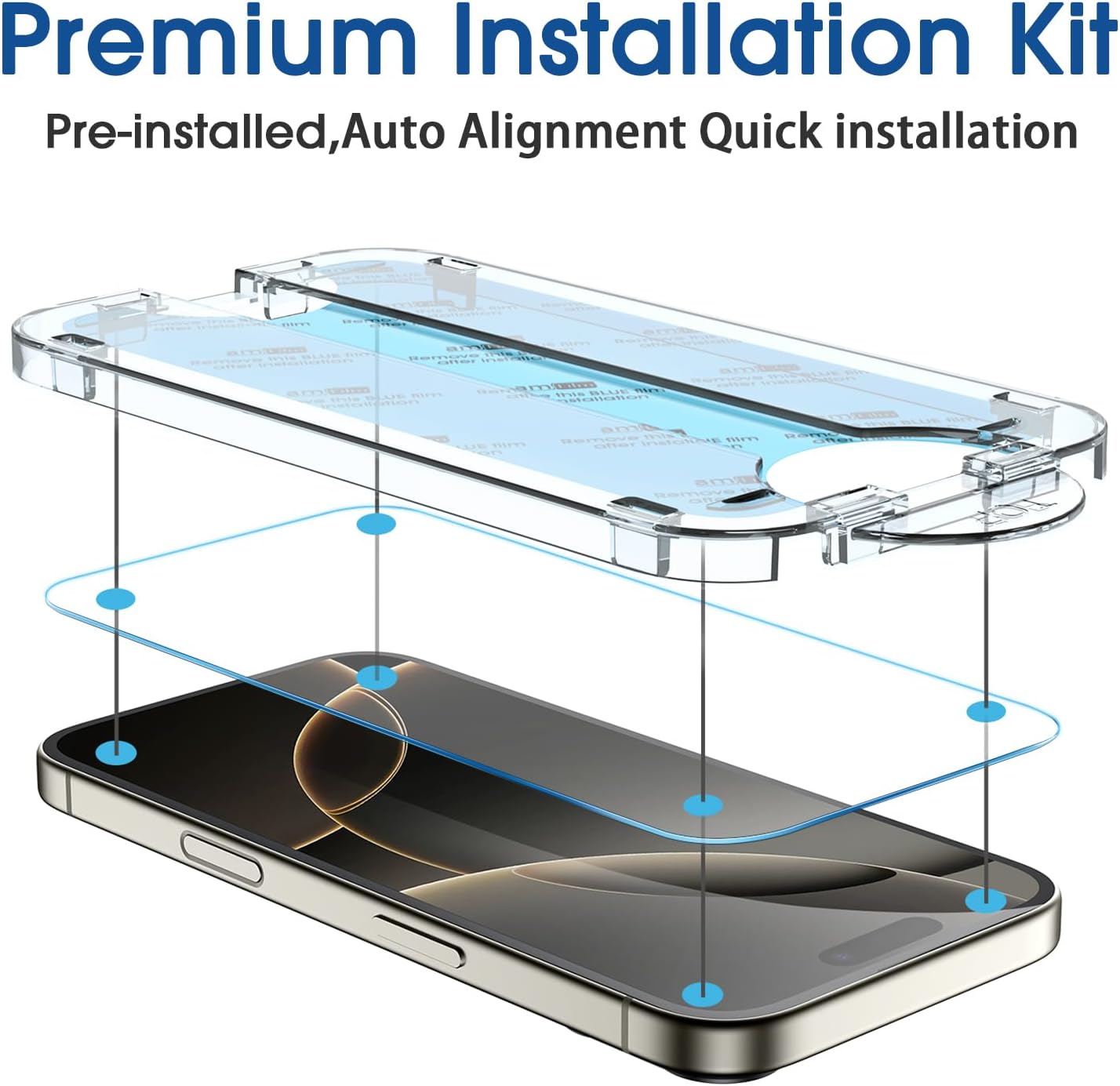
Image: Auto-alignment installation kit in use.

Image: OneTouch application method.

Imatge: Guia d'instal·lació pas a pas.
4.2. Camera Lens Protector Installation
- Netegeu les lents: Use a clean section of the microfiber cloth or a fresh wet wipe to clean the camera lenses on your iPhone 16 Pro. Ensure they are free of dust and smudges.
- Apply Protector: Carefully remove the protective film from the camera lens protector. Align it precisely over your phone's camera module and gently press down to secure it.

Image: Camera lens protector features.
5. Característiques del producte
- Ultra-Clear Transparency: Enjoy 99% transparency, restoring the original image quality and brightness of your screen for a clear visual experience.
- High Touch Sensitivity: The protector maintains the original touch response, ensuring smooth swiping, tapping, and gaming without delay.
- 9H Hardness Protection: Crafted from ultra-high 9H hardness tempered glass, providing maximum resistance against scratches, impacts, and daily wear.
- Revestiment antiempremtes dactilars: Features a hydrophobic and oleophobic layer that effectively repels fingerprints, sweat, and oil stains, keeping your screen cleaner.
- Disseny compatible amb el cas: Designed to be slightly smaller than the phone's panel size, ensuring compatibility with most phone cases without lifting or peeling.
- Protecció contra caigudes: Offers an additional layer of sturdy protection for both your screen and camera lenses against accidental drops.

Image: Shatter-proof 9H hardness tempered glass.

Image: Case-friendly design.

Image: High-definition vision with 99% transparency.

Image: Comparison of amFilm's scratch and fingerprint resistance.
6. Manteniment
To ensure the longevity and clarity of your screen protector:
- Gently wipe the screen protector with a soft, lint-free cloth to remove dust and smudges.
- For more stubborn marks, use a screen cleaner solution specifically designed for electronic devices. Apply the solution to the cloth, not directly to the screen.
- Avoid using harsh chemicals, abrasive materials, or paper towels, as these can scratch the coating or the protector itself.
7. Solució De Problemes
7.1. Problemes comuns i solucions
- Bubbles After Installation:
- Small bubbles often disappear naturally within 24-48 hours as the adhesive fully settles. For larger bubbles, gently lift the nearest edge of the screen protector with a fingernail or a plastic card, then slowly reapply while using the squeegee to push the air out towards the edge.
- Dust Trapped Under Protector:
- If dust is visible under the protector, carefully lift the protector using a dust removal sticker or a piece of tape. Use another dust removal sticker to gently dab the dust off both the screen and the adhesive side of the protector. Realign and reapply.
- Desalineació:
- If the screen protector is misaligned, gently lift it from one corner. Re-seat the alignment frame onto your phone, then carefully lower the protector back into the frame to ensure proper positioning before pressing down.
- Edges Not Sticking:
- Ensure the screen edges were thoroughly cleaned and free of dust or oil before installation. Press firmly along the edges with the microfiber cloth or squeegee to encourage adhesion. If the issue persists, it might be due to case interference; ensure your case is compatible with edge-to-edge protectors.
8. Especificacions
| Dimensions del producte | 7.05 x 5 x 0.5 polzades |
| Pes de l'article | 3.8 unces |
| Material | Vidre temperat |
| Duresa de l'article | 9H |
| Característiques especials | Scratch Resistant, Water Resistant, Glossy Finish |
| Mida de la pantalla | 6.3 polzades |
| Models de telèfon compatibles | iPhone 16 Pro 6.3" |
9. Garantia i assistència
amFilm is committed to providing high-quality products and customer satisfaction. For any questions, concerns, or issues regarding your product, please contact amFilm customer support.
Some amFilm products may qualify for a lifetime warranty. Please refer to the packaging or visit the official amFilm website to register your product and review specific warranty terms and conditions.
Per obtenir assistència directa, visiteu el amFilm Store on Amazon o els seus canals de suport oficials.


