Introducció
This manual provides essential information for the safe and effective use of your Carry-on Digital Wind Instrument 2. Please read it thoroughly before operating the instrument and retain it for future reference.
The Carry-on Digital Wind Instrument 2 is a lightweight and rechargeable digital wind instrument featuring 10 instrument voices, a built-in speaker, and MIDI over Bluetooth connectivity, designed for practice and performance anywhere.
Producte acabatview
The Carry-on Digital Wind Instrument 2 is designed for musicians seeking portability and versatility. It offers a range of features to enhance your musical experience.
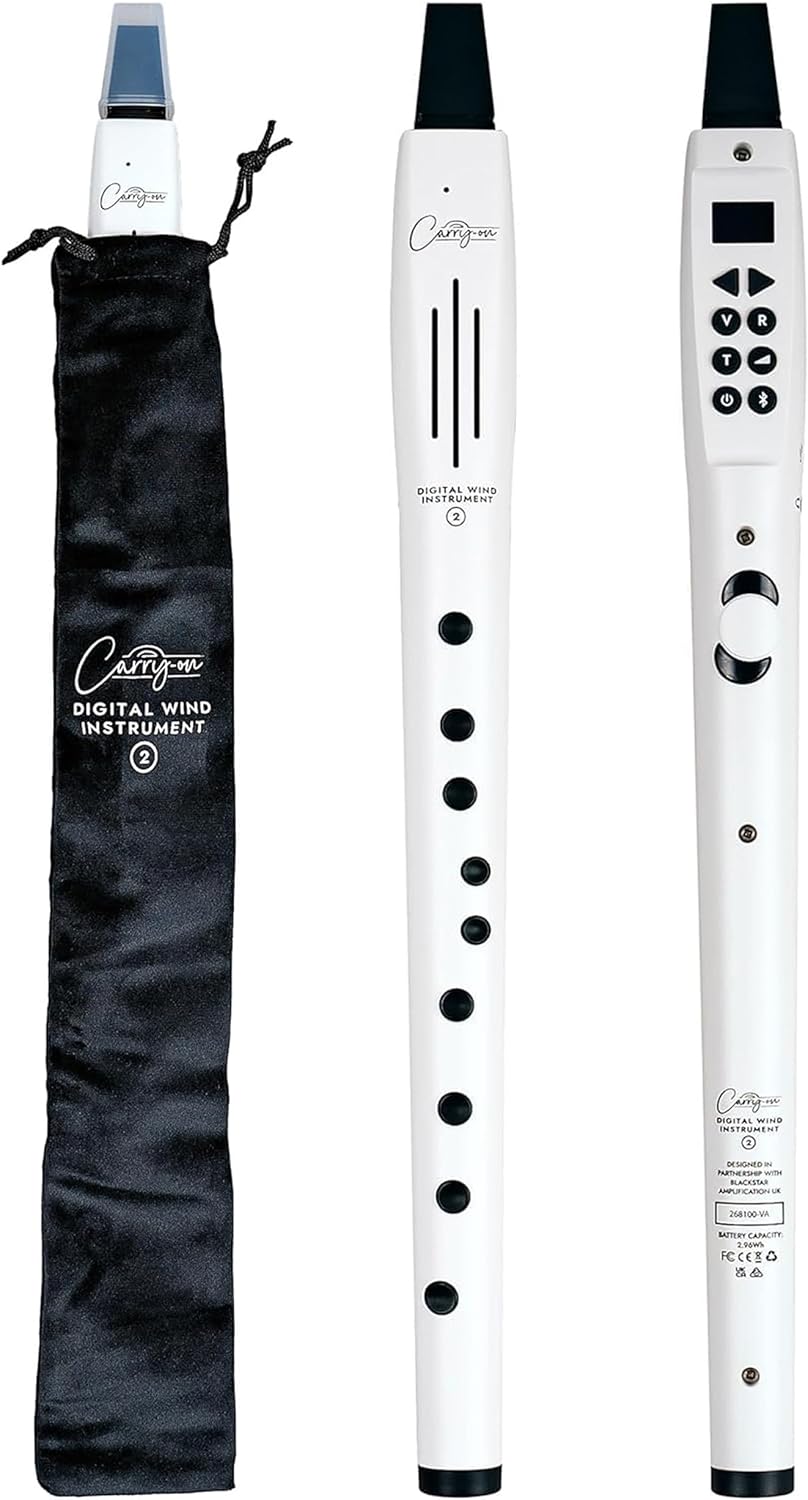
The Carry-on Digital Wind Instrument 2, shown alongside its soft carrying case. The instrument is white with black keys and mouthpiece.

A young girl demonstrating the use of the Carry-on Digital Wind Instrument 2 in a home setting.
Característiques principals:
- 10 Instrument Voices: Explore various genres with distinct instrument sounds.
- Control de precisió de la respiració: Adjustable breath sensitivity for dynamic playing.
- Built-in Speaker & Headphone Jack: Play aloud or practice privately.
- MIDI Over Bluetooth: Seamless connectivity for composing, recording, or performing.
- Portàtil i recarregable: Lightweight, compact design with up to 3 hours of continuous play.

An illustration highlighting the key features of the instrument: 10 voices, headphone input, MIDI over Bluetooth, reverb effect, built-in speaker, and rechargeable battery.
Què hi ha a la caixa
Upon unboxing your Carry-on Digital Wind Instrument 2, please ensure all the following components are present:
- Instrument de vent digital de mà 2
- Estoig suau
- Cable de càrrega USB-C a USB-A
- Washable Silicone Mouthpiece
- Note Chart (to assist with learning)
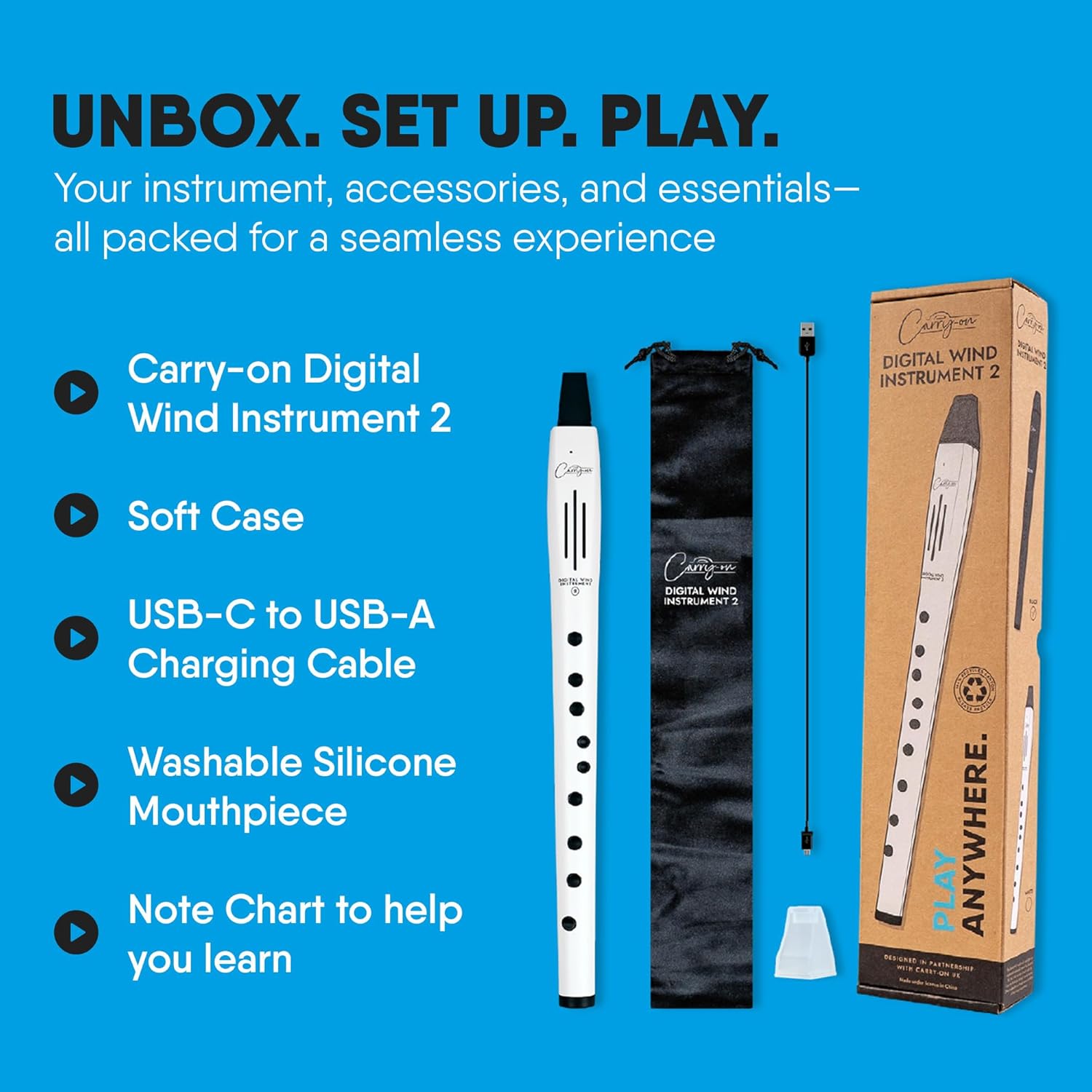
A visual representation of the items included in the product packaging.
Configuració
1. Càrrega de l'instrument
Before first use, fully charge the instrument. Connect the supplied USB-C to USB-A charging cable to the USB-C charging port on the instrument and a compatible USB power source (e.g., computer USB port, USB wall adapter).
- A full charge provides up to 3 hours of continuous play.
- El llum indicador de càrrega mostrarà l'estat de càrrega.
2. Fixació de la boquilla
Gently attach the washable silicone mouthpiece to the instrument's mouthpiece opening. Ensure it is securely fitted.
3. Encès / apagat
Press and hold the power button (usually marked with a power symbol) to turn the instrument on or off. The display screen will illuminate upon power-on.

An annotated diagram illustrating the various ports and controls on the instrument, including the USB-C charging port, 3.5mm input for headphones/AUX, octave shift button, function buttons, screen, built-in 3-watt speaker, and finger holes.
Funcionament de l'instrument
1. Selecting Instrument Voices
The instrument comes with 10 distinct voices. Use the designated function buttons (often labeled 'V' or with arrows) to cycle through the available instrument sounds. The current voice selection will be displayed on the screen.
2. Ajust de volum
Use the volume control buttons (often labeled 'R' or with '+' and '-' symbols) to adjust the output volume of the built-in speaker or connected headphones.
3. Sensibilitat respiratòria
The instrument features adjustable breath sensitivity with three levels. Refer to the instrument's display and function buttons to navigate to the breath sensitivity setting and select your preferred level. This allows for precise control over dynamics.
4. Octave Shift
Utilize the octave shift button to change the playing octave of the instrument, expanding its musical range.
5. Silent Practice with Headphones
For private practice, connect standard 3.5mm headphones to the headphone jack. This will mute the built-in speaker, allowing you to practice without disturbing others.

A young girl demonstrating silent practice using headphones connected to the instrument.
6. MIDI Over Bluetooth Connectivity
The instrument supports MIDI over Bluetooth for advanced connectivity with music applications and software. To connect:
- Assegureu-vos que l'instrument està encès.
- Activate Bluetooth on your compatible device (smartphone, tablet, computer).
- Open your MIDI-compatible application and search for available Bluetooth MIDI devices.
- Select "Carry-on Digital Wind Instrument 2" (or similar name) from the list to pair.
Note: Compatibility with Windows PCs may require specific drivers or workarounds. Refer to your operating system's documentation or third-party MIDI software for detailed instructions.
Manteniment
1. Neteja de l'instrument
- Wipe the exterior of the instrument with a soft, dry cloth.
- The silicone mouthpiece is washable. Remove it from the instrument and clean with mild soap and water. Ensure it is completely dry before reattaching.
- Do not use abrasive cleaners, solvents, or waxes, as these may damage the finish.
2. Emmagatzematge
When not in use, store the instrument in its provided soft case to protect it from dust, dirt, and minor impacts. Store in a cool, dry place away from direct sunlight and extreme temperatures.
3. Cura de la bateria
- Per allargar la durada de la bateria, eviteu descarregar-la completament amb freqüència.
- Si l'emmagatzemeu durant un període prolongat, carregueu la bateria aproximadament al 50% cada pocs mesos.
Resolució de problemes
| Problema | Causa possible | Solució |
|---|---|---|
| L'instrument no s'encén. | La bateria està esgotada. | Connect the instrument to a power source using the USB-C cable and allow it to charge. |
| No hi ha so dels altaveus/auriculars. | Volume is too low or muted; headphones not fully inserted; instrument voice not selected. | Increase volume; ensure headphones are fully plugged in; select an instrument voice. |
| Bluetooth MIDI connection issues. | Instrument not in pairing mode; device Bluetooth off; compatibility issues. | Ensure instrument is on and Bluetooth is active; check device Bluetooth settings; consult device/app documentation for compatibility. |
| Sound has a constant buzzing/static noise. | Internal component issue; interference. | Try moving away from other electronic devices. If the issue persists, contact customer support. |
| Keys are unresponsive or notes are incorrect. | Incorrect fingering; software glitch. | Refer to the included note chart for correct fingering. Try restarting the instrument. |
Especificacions
- Número de model: BA268012
- Marca: Segueix
- Tipus d'instrument: Instrument de vent digital
- Veus: 10 Instrument Voices
- Connectivitat: MIDI over Bluetooth, USB-C (charging), 3.5mm Audio Input (Headphones/AUX)
- Ponent: Built-in 3 Watt Speaker
- Bateria: 1 Lithium Ion battery (included), up to 3 hours continuous play
- Dimensions: Aproximadament 15.6 x 3.6 x 1.9 polzades (dimensions del paquet)
- Pes de l'article: Aproximadament 0.24 grams
- Color: Blanc
Garantia i Suport
For warranty information and customer support, please refer to the official Carry-on weblloc web o poseu-vos en contacte amb el vostre distribuïdor. Conserveu el comprovant de compra per a qualsevol reclamació de garantia.
Per a més ajuda, podeu visitar el Carry-on Store on Amazon.


