1. Introducció
Welcome to your new ECHTPower Switch 2 Wireless Controller. This manual provides detailed instructions for setup, operation, maintenance, and troubleshooting to ensure you get the most out of your gaming experience. This controller features vibrant RGB lighting, advanced macro programming, responsive turbo functions, and adjustable vibration feedback, offering broad compatibility with Nintendo Switch/Switch 2, PC, Android, and iOS devices.
2. Informació de seguretat
- No exposeu el controlador a temperatures extremes, humitat ni llum solar directa.
- Eviteu deixar caure el controlador ni sotmetre'l a impactes forts.
- No intenteu desmuntar ni modificar el controlador. Això anul·larà la garantia.
- Mantingueu el controlador allunyat de l'aigua i altres líquids.
- Feu servir només el cable de càrrega proporcionat o un equivalent certificat.
- Mantenir fora de l'abast dels nens petits.
3. Contingut del paquet
Si us plau, comproveu el contingut del paquet per assegurar-vos que hi hagi tots els elements:
- 1 x ECHTPower Wireless Controller (Starry Sky Blue)
- 1 x cable de càrrega USB
- 1 x Manual d'usuari
4. Disseny del controlador
Familiarize yourself with the buttons and features of your ECHTPower controller:
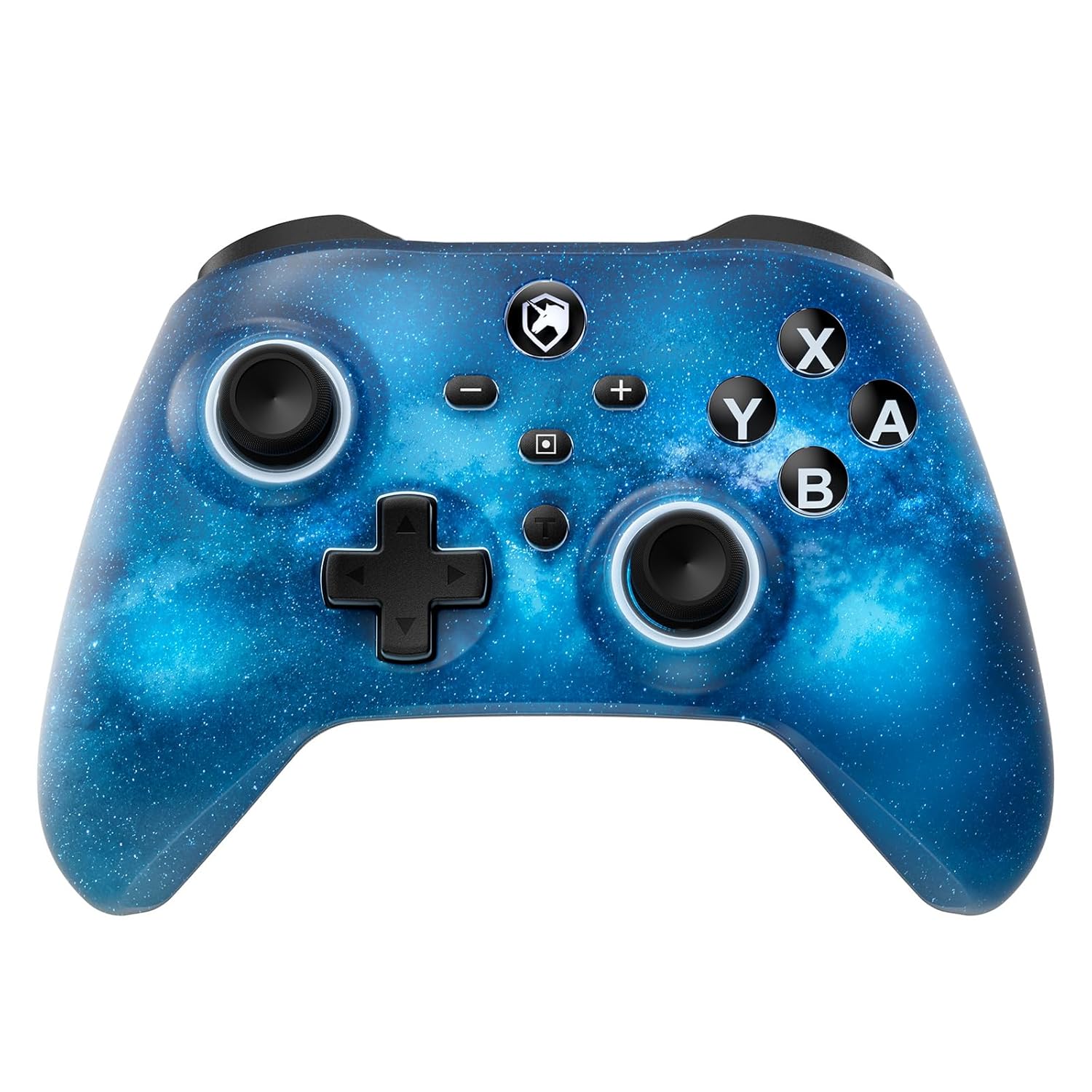
Davant view of the ECHTPower Wireless Controller, showcasing its Starry Sky Blue design and button layout.
- Stick analògic esquerre: Per al moviment i el control de la càmera.
- Stick analògic dret: Per al control de la càmera i l'apuntament.
- D-Pad: Entrada direccional.
- Botons A/B/X/Y: Botons d'acció estàndard.
- Botons E/D: Botons a l'espatlla.
- ZL/ZR Triggers: Analog triggers for precise input.
- Botó d'inici: Torna a la pantalla d'inici del sistema.
- Botó de captura de pantalla: Fa captures de pantalla.
- Botons més (+) / menys (-): Navegació pel menú del sistema.
- Botó Turbo (T): Activates and adjusts turbo functions.
- Macro (M) Button: Initiates macro programming.
- Botons M1/M2: Programmable back paddles.
5. Configuració
5.1 Càrrega inicial
Before first use, fully charge your controller. Connect the included USB charging cable to the controller's USB-C port and a USB power source (e.g., console, PC, USB wall adapter). The charging indicator will illuminate during charging and turn off when fully charged.

The controller features a 1000mAh battery, providing approximately 6-8 hours of playtime with lights on, and takes 2-3 hours to fully charge.
5.2 Pairing with Nintendo Switch/Switch 2
To pair your controller with a Nintendo Switch or Switch 2 console:
- Al menú INICI, seleccioneu Controladors > Canvia d'adherència/ordre.
- Al controlador, premeu i manteniu premut Botó d'inici for 3-5 seconds until the LED indicators begin to flash rapidly.
- Un cop emparellat, el(s) LED(s) del jugador corresponent(s) del controlador s'il·luminaran fixament.

The ECHTPower controller is compatible with Nintendo Switch 2, though it does not support the C key, 3.5mm audio jack, or wake-up function on Switch 2.
5.3 Pairing with PC (Windows)
To connect to a Windows PC:
- Assegureu-vos que el vostre ordinador tingui el Bluetooth habilitat.
- Vés a Configuració > Dispositius > Bluetooth i altres dispositius.
- Seleccioneu Afegeix Bluetooth o un altre dispositiu > Bluetooth.
- Manteniu premut el botó Botó d'inici on the controller until the LEDs flash.
- Select the controller from the list of available devices to pair.
5.4 Pairing with Android/iOS
To connect to Android or iOS devices:
- Activa el Bluetooth al teu dispositiu mòbil.
- Manteniu premut el botó Botó d'inici on the controller until the LEDs flash.
- Select the controller from the Bluetooth device list on your phone/tablet.

The ECHTPower Wireless Controller offers wide compatibility across Switch, PC, Android, and iOS platforms.
6. Instruccions de funcionament
6.1 Encès/Apagat
- Encès: Premeu el botó Botó d'inici una vegada.
- Apagar: Manteniu premut el botó Botó d'inici for 5 seconds, or the controller will automatically power off after 5 minutes of inactivity (adjustable via KeyLinker app).
6.2 Control d'il·luminació RGB
The controller features 9 different light effects and 3 light models (Breathing Cycle, Laser Mode, Neon Mode) with 4 levels of brightness adjustment (25%-50%-75%-100%).
- Canvia el color: Premeu Macro (M) + Minus (-).
- Canvia el mode de llum: Premeu Macro (M) + Plus (+).
- Ajusta la brillantor: Premeu Macro (M) + Left Analog Stick (down).

The controller's RGB lighting offers 9 colors and 4 light modes, creating a dynamic visual experience.
Official ECHTPower video demonstrating the wireless controller's features, including its RGB lighting and responsiveness.
6.3 Programació de macros
The programmable function allows you to map up to 16 button functions to the M1 or M2 back paddles, enabling complex skill execution with a single press.
- Introduïu el mode de programació: Manteniu premut el botó Macro (M) buttoni, a continuació, premeu Botó M1 o M2 you wish to program. The indicator light will flash slowly.
- Seqüència de registre: Press the sequence of buttons you want to record (up to 16 inputs).
- Sortir del mode de programació: Premeu el botó Macro (M) button again. The indicator light will stop flashing.
- Esborra la macro: In programming mode, press the Botó M1 o M2 twice without inputting any sequence.

The controller's ultra-programmable design allows mapping various buttons to the M1 and M2 back paddles for enhanced gameplay.
6.4 Funció Turbo
The controller supports both auto and manual Turbo functions with three adjustable speeds: 5 rounds/s, 12 rounds/s, and 25 rounds/s.
- Set Turbo: Manteniu premut el botó Turbo (T) button, then press the desired action button (A/B/X/Y/L/R/ZL/ZR). The button will now have Turbo functionality.
- Ajusta la velocitat del turbo: Manteniu premut el botó Turbo (T) buttoni, a continuació, premeu Right Analog Stick (up/down) to cycle through speeds.
- Clear Turbo: Manteniu premut el botó Turbo (T) button, then press the Turbo-enabled action button again.

The controller offers strong manual and auto turbo capabilities, allowing up to 25 shots per second for rapid actions.
6.5 Ajust de vibració
The built-in dual vibration motors provide 4 levels of feedback: Strong, Medium, Weak, and None, for a realistic gaming experience.
- Ajusta la vibració: Manteniu premut el botó Turbo (T) buttoni, a continuació, premeu D-Pad (up/down) to cycle through vibration intensities.

Adjustable dual vibration provides four intensity levels (0%, 30%, 70%, 100%) for a customized gaming experience.
7. Manteniment
- Neteja: Feu servir un drap suau i sec per netejar el controlador. No utilitzeu productes químics agressius ni materials abrasius.
- Emmagatzematge: Guardeu el controlador en un lloc fresc i sec, allunyat de la llum solar directa i de temperatures extremes quan no l'utilitzeu.
- Cura de la bateria: Per allargar la durada de la bateria, eviteu descarregar completament el controlador amb freqüència. Carregueu-lo regularment, fins i tot si no l'utilitzeu constantment.
8. Solució De Problemes
If you encounter any issues with your ECHTPower controller, please refer to the table below for common problems and solutions:
| Problema | Causa possible | Solució |
|---|---|---|
| El controlador no s'encén. | Bateria baixa. | Charge the controller for 2-3 hours. |
| Unable to pair with device. | El comandament no està en mode d'emparellament; interferències de Bluetooth; Bluetooth del dispositiu desactivat. | Ensure controller is in pairing mode (flashing LEDs). Turn off/on device Bluetooth. Move closer to the device. |
| Buttons/Joysticks unresponsive. | Connection issue; software glitch. | Reconnect the controller. Reset the controller (refer to manufacturer's specific reset instructions if available, usually a small pinhole button). |
| La vibració no funciona o és massa feble/forta. | Vibration setting is off or at minimum/maximum. | Adjust vibration intensity using Turbo (T) + D-Pad (up/down). |
| Macro not working correctly. | Programació incorrecta. | Re-program the macro carefully following the instructions in Section 6.3. |
9. Especificacions
| Característica | Detall |
|---|---|
| Número de model | SP06GA |
| Capacitat de la bateria | 1000 mAh d'ions de liti |
| Temps de càrrega | Aprox. 2-3 hores |
| Temps de joc | Approx. 6-8 hours (with lights on) |
| Compatibilitat | Nintendo Switch/Switch Lite/Switch 2, PC (Windows), Android, iOS |
| Connectivitat | Sense fil (Bluetooth), amb cable (USB-C) |
| Vibració | Motors duals, 4 nivells ajustables |
| Sensor de giroscopi | 6-axis gyro |
| Dimensions | 6.3 x 4.69 x 2.72 polzades |
| Pes | 9.91 unces |
10. Garantia i Suport
ECHTPower provides a standard warranty for this product. For detailed warranty information, product support, or any questions not covered in this manual, please contact ECHTPower customer service through the retailer's platform or visit the official ECHTPower weblloc web. Si us plau, conserveu el comprovant de compra per a reclamacions de garantia.


