1. Introducció
This manual provides detailed instructions for the setup, operation, and maintenance of your BISOFICE D2015 TAM Expandable Phone System. This system includes a corded base station with an integrated answering machine and a cordless handset, designed for clear communication and ease of use. Please read this manual thoroughly before using your phone system to ensure proper functionality and to utilize all available features.
2. Contingut del paquet
Verifiqueu que tots els elements que s'enumeren a continuació siguin presents al vostre paquet:
- Telephone Base (Corded Unit)
- Telèfon sense fil
- Handset Charging Cradle
- Cordó de línia telefònica
- Adaptador d'alimentació per a l'estació base
- Power Adapter for Handset Charging Cradle
- Piles AAA recarregables (2x)
- Manual d'usuari (aquest document)

Image: All components included in the BISOFICE D2015 TAM Phone System package.
3. Producte acabatview
3.1 Base Station Layout

Image: Labeled diagram of the base station's front and rear panels.
- Llum indicador de funcionament: Indica l'estat de funcionament.
- Pantalla de visualització: 3.1-inch LCD for caller ID, menu, and status.
- Downlink/Incoming call button: To answer incoming calls.
- M1-M4 Photo Memory Keys: Four one-touch memory keys for frequently dialed numbers.
- MEMO recording button: For recording voice memos.
- OGM recording button: For recording outgoing messages for the answering machine.
- Answering record switch: To turn the answering machine on/off.
- One-touch voice increase (BOOST) button: Increases call volume by 15dB.
- Flash/Delete (FL/CLR) button: For flash function or clearing entries.
- Redial/Pause (RD/P) button: For redialing the last number or inserting a pause.
- Hands-free button: To activate speakerphone.
- Uplink/Outgoing call button: To initiate calls.
- Menu key/Confirm key/Mute: Navigates menus, confirms selections, or mutes the microphone.
- Phonebook/Return: Accesses the phonebook or returns to the previous menu.
- Botó de reproducció: Plays back answering machine messages.
- Number keys (0-9, *, #): For dialing and data entry.
- Telephone line socket: Connects to the telephone wall jack.
- DC6V socket: Es connecta a l'adaptador de corrent.
3.2 Cordless Handset Layout

Image: Cordless handset highlighting the AMP (volume boost) button and side volume controls.
- 1.8-inch Half-Dot Display: Shows caller ID, menu, and status.
- M1, M2, M3 Keys: Three one-touch memory keys for quick dialing.
- Botó OK/Menú: Accedeix als menús i confirma les seleccions.
- Botons de navegació (amunt/avall/esquerra/dreta): For menu navigation and volume adjustment during calls.
- Talk/Speakerphone Button: To make or answer calls, or activate speakerphone.
- End Call/Power Button: To end calls or power the handset on/off.
- R/CLR (Redial/Clear) Button: For redialing or clearing entries.
- INT (Intercom) Button: For internal calls between handsets.
- RD/P (Redial/Pause) Button: For redialing the last number or inserting a pause.
- AMP (Volume Boost) Button: Located on the side, increases call volume by 15dB.
- Side Volume Buttons: Adjusts earpiece or speakerphone volume (8 levels).
4. Configuració
4.1 Battery Installation (Cordless Handset)
- Localitzeu la tapa del compartiment de la bateria a la part posterior del telèfon sense fil.
- Feu lliscar la coberta cap avall per treure-la.
- Insert the two supplied 1.2V 400mAh Ni-MH AAA rechargeable batteries, observing the correct polarity (+ and -).
- Torneu a col·locar la tapa del compartiment de la bateria lliscant-la cap amunt fins que encaixi al seu lloc.
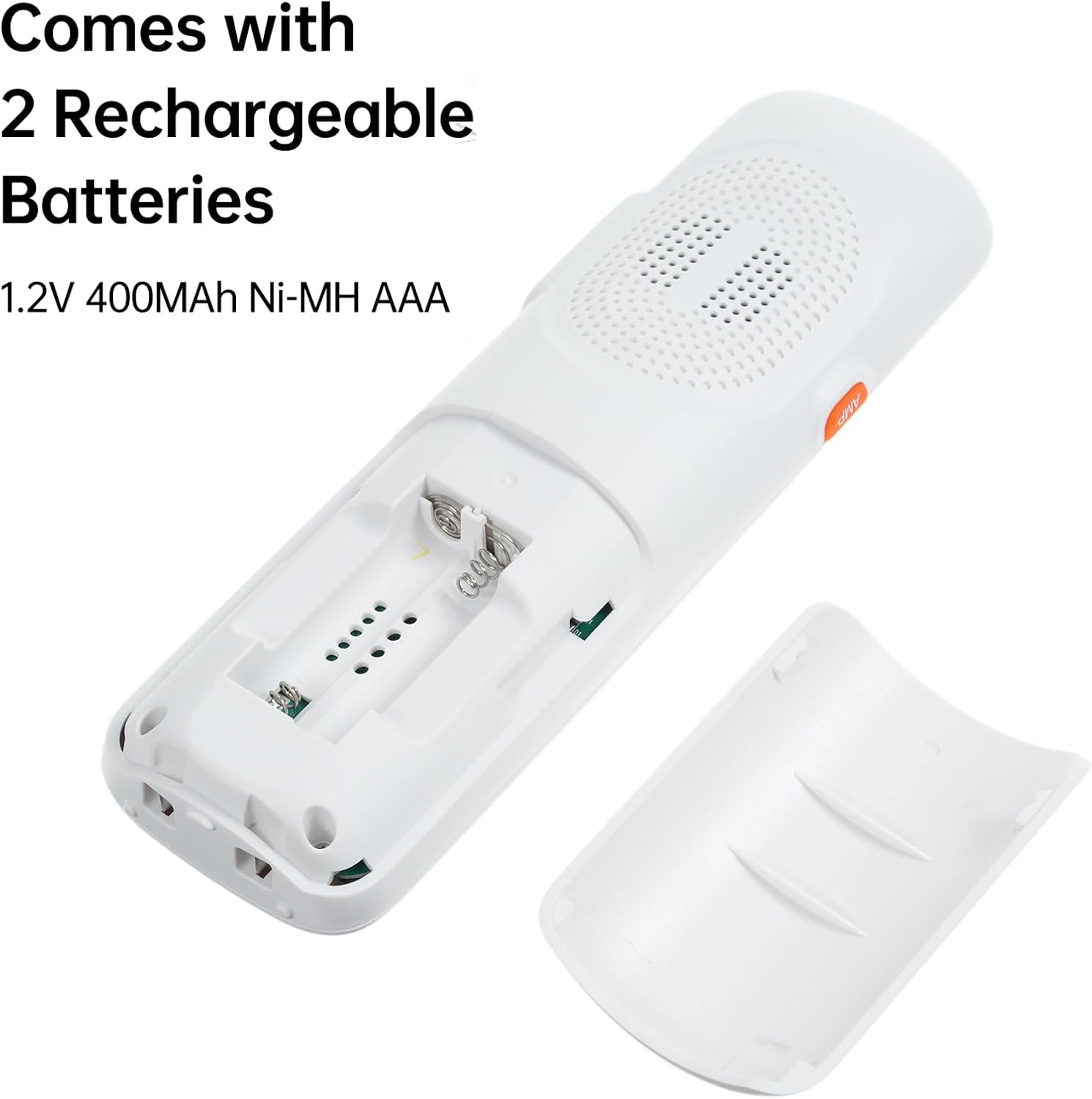
Image: Battery compartment of the cordless handset with batteries inserted.
4.2 Connecting the Base Station and Charging Cradle
- Connect the Telephone Line: Plug one end of the telephone line cord into the TEL LINE socket on the back of the base station and the other end into your telephone wall jack.
- Connect Base Power: Plug the small end of the base station power adapter into the DC6V socket on the back of the base station. Plug the larger end into a standard electrical outlet.
- Connect Handset Charging Cradle Power: Plug the small end of the charging cradle power adapter into the DC6V socket on the back of the charging cradle. Plug the larger end into a standard electrical outlet.
4.3 Càrrec inicial
Place the cordless handset in its charging cradle. For optimal battery performance, allow the handset to charge continuously for at least 12-15 hours before its first use, even if the display indicates a full charge sooner.
5. Operacions bàsiques
5.1 Fer una trucada
- Using the Corded Base: Lift the corded handset or press the Mans lliures button. Dial the desired number using the number keys.
- Ús del telèfon sense fil: Premeu el botó Talk/Speakerphone button. Dial the desired number using the number keys.
5.2 Respondre a una trucada
- Using the Corded Base: Lift the corded handset or press the Mans lliures botó quan sona el telèfon.
- Ús del telèfon sense fil: Premeu el botó Talk/Speakerphone botó quan sona el telèfon.
5.3 Ajust del volum
- Corded Base: Use the volume up/down buttons (often integrated with navigation) during a call. Press the IMPULS button for a 15dB volume increase.
- Cordless Handset: Use the side volume buttons or the navigation up/down buttons during a call. Press the AMP button on the side for a 15dB volume increase. There are 8 volume levels available.
5.4 One-Touch Dialing (M1-M4)
The base station features four one-touch memory keys (M1-M4), and the cordless handset has three (M1-M3). These allow for quick dialing of pre-programmed numbers.

Image: Base station and handset highlighting the one-touch memory dial buttons.
To Program a One-Touch Key:
- Press and hold the desired memory key (M1-M4 on base, M1-M3 on handset) until the display prompts for number entry.
- Introduïu el número de telèfon que voleu desar.
- Press the same memory key again to save.
To Use a One-Touch Key: Simply press the desired memory key to dial the stored number.
5.5 Gestió de la guia telefònica
The system supports storing up to 50 phonebook entries. Both the base station and handset offer caller ID memory, dialed number memory, and phonebook memory.

Image: Base station and handset illustrating the phonebook memory feature.
To Add a Phonebook Entry:
- Premeu el botó Agenda telefònica button (on base) or navigate to the Phonebook menu (on handset).
- Select 'Add New Entry'.
- Enter the name using the alphanumeric keys. (For example, press '2' once for 'A', twice for 'B', three times for 'C').
- Introduïu el número de telèfon.
- Guarda l'entrada.
Per marcar des de la llibreta d'adreces:
- Access the Phonebook.
- Scroll to the desired entry.
- Premeu el botó Talk/Speakerphone button (handset) or lift the handset/press Mans lliures (base) to dial.
6. Funcions avançades
6.1 Digital Answering Machine (TAM)
The base station includes a digital answering machine with up to 60 minutes of recording time for incoming messages and up to 120 seconds for memo recording.

Image: Base station display indicating an answering machine function is active.
- Activació/desactivació: Utilitza el Answering record switch a l'estació base.
- Recording Outgoing Message (OGM): Premeu el botó OGM recording button and follow the voice prompts.
- Reproducció de missatges: Premeu el botó Reproducció botó a l'estació base.
- Enregistrament de notes: Premeu el botó MEMO recording button to record a personal reminder.
6.2 Intercom and Conference Calls
The system supports intercom functionality between two registered handsets and conference calling with an external line.

Image: Illustration of multi-device interconnectivity, showing handsets communicating across different rooms.
- Intercomunicador: From a cordless handset, press the INT button and select the desired handset number to call.
- Conferència trucada: During an external call on a handset, you can initiate an intercom call to another handset. Once the second handset answers, select the 'Conference' option from the menu to merge the calls.
6.3 Multi-Handset Registration
The system supports up to 5 handsets registered to the same base station. Each handset can also be registered to up to 4 different base stations.
To Register an Additional Handset:
- On the base station, enter the registration mode (refer to the base station's menu for specific steps, usually found under 'Settings' or 'Registration').
- On the new cordless handset, access the 'Registration' menu.
- Follow the on-screen prompts to complete the registration process. This typically involves entering a PIN (default is often 0000).
7. Configuració i personalització
7.1 Ringtones and Volume
You can choose from 10 different ringtones and adjust the ringtone, headset, and speakerphone volumes. Different melodies can be set for different incoming calls.
- Access the 'Settings' or 'Ringtone' menu on either the base station or handset.
- Select your preferred ringtone and adjust volume levels.
7.2 Dialing Modes and Flash Time
Customize tone/pulse dialing modes and flash time (100/300/600/1000ms) to suit your telephone line requirements.
- Navigate to 'Settings' > 'Dialing Mode' or 'Flash Time' in the menu.
- Select the appropriate option for your service provider.
7.3 Funció d'alarma
The phone system includes an alarm function.
- Access the 'Alarm' menu via the handset or base station.
- Set the desired alarm time and activation status.
8. Solució De Problemes
If you encounter issues with your phone system, refer to the table below for common problems and solutions.
| Problema | Causa possible | Solució |
|---|---|---|
| Sense to de marcatge | El cable de la línia telefònica està desconnectat o defectuós. | Ensure the telephone line cord is securely connected to both the base station and the wall jack. Test with another phone if possible. |
| Handset display is blank or 'Searching' | Handset is out of range, batteries are low, or not registered. | Move the handset closer to the base. Place the handset on the charging cradle. Re-register the handset if necessary (refer to Section 6.3). |
| No puc fer ni rebre trucades | Power adapter is disconnected, telephone line issue, or system error. | Check all power and telephone line connections. Unplug the base station power adapter, wait 15 seconds, then plug it back in. |
| Poor call quality (static, interference) | Interference from other electronic devices or distance from base. | Move the base station away from other electronic devices (Wi-Fi routers, microwaves). Move closer to the base station. |
| El contestador automàtic no grava | Answering machine is off or memory is full. | Ensure the answering machine is switched on. Delete old messages to free up memory. |
9. Especificacions
- Dimensions del producte: 8.66 x 3.54 x 12.6 inches (Base unit)
- Pes de l'article: 2.82 lliures
- Marca: Bisofici
- Color: Blanc
- Tipus de telèfon: Corded (Base) / Cordless (Handset)
- Material: Acrilonitril butadiè estirè (ABS)
- Font d'alimentació: Elèctric amb cable
- Tipus de contestador: Digital
- Temps d'enregistrament del contestador automàtic: Fins a 60 minuts
- Memo Recording Time: Fins a 120 segons
- Dispositius compatibles: PSTN Network
- Capacitat de trucada de conferència: Bàsica
- Operació multilínia: Multi-Line Operation (via multiple registered handsets)
- Pantalla de l'auricular: 1.8-inch half-dot display
- Base Station Display: Pantalla LCD d'3.1 polzades
- Handset Volume Boost: +15dB via AMP botó
- Base Station One-Touch Memory Keys: 4
- Handset One-Touch Memory Keys: 3
- Phonebook Memory: 50 entrades

Image: Dimensions of the base station and cordless handset.
10. Garantia i Suport
Your BISOFICE D2015 TAM Expandable Phone System is covered by a manufacturer's warranty. Please refer to the warranty card included in your package for specific terms and conditions. For technical support, troubleshooting assistance, or warranty claims, please contact BISOFICE customer service through the retailer where the product was purchased or visit the official BISOFICE weblloc per obtenir informació de contacte.


