1. Introducció
This manual provides essential information for the proper installation, operation, and maintenance of your Fortinet FortiAP 441K Wi-Fi 7 Indoor Wireless Access Point. Please read this manual thoroughly before using the device to ensure optimal performance and safety.

Figure 1: Fortinet FortiAP 441K Wi-Fi 7 Indoor Wireless Access Point, top view.
2. Informació de seguretat
Observeu les següents precaucions de seguretat per evitar danys al dispositiu o lesions personals:
- Install the device in a dry, well-ventilated area, away from direct sunlight and heat sources.
- Assegureu-vos de posar a terra correctament per evitar descàrregues elèctriques.
- No obriu el dispositiu casing. Demaneu totes les tasques de manteniment a personal qualificat.
- Use only the power supply methods specified for this device (PoE++).
- Mantingueu el dispositiu allunyat de l'aigua i la humitat.
3. Contingut del paquet
Verifiqueu que tots els elements siguin presents al vostre paquet:
- Fortinet FortiAP 441K Wireless Access Point
- Mounting Bracket (for ceiling or wall mounting)
- Guia d'instal·lació
- Band (referring to the device itself, as per product data)
4. Configuració
4.1 Muntatge
The FortiAP 441K is designed for indoor ceiling or wall mounting. Use the provided mounting bracket and hardware to secure the device in a central location for optimal Wi-Fi coverage.
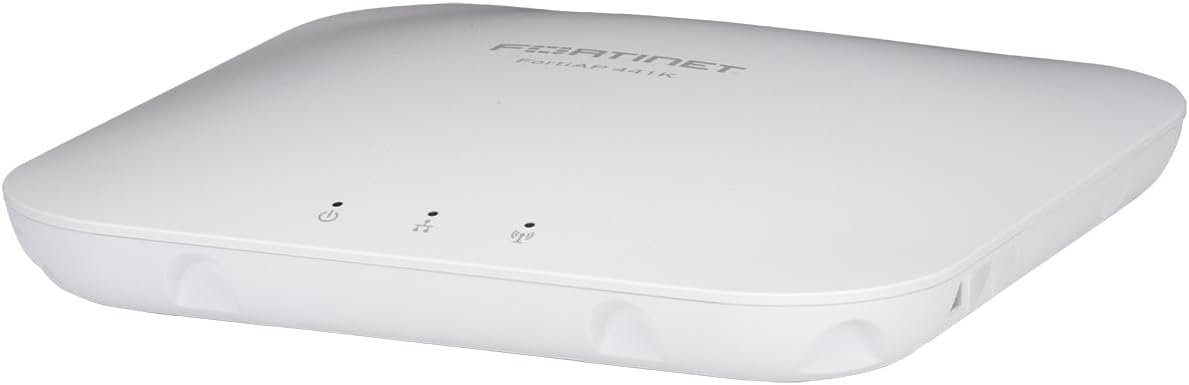
Figure 2: Fortinet FortiAP 441K, suitable for discreet ceiling or wall mounting.
4.2 Encès
The FortiAP 441K supports Power over Ethernet (PoE++). Connect an Ethernet cable from a PoE++ compliant switch or injector to the device's Ethernet port. The device will power on automatically.
4.3 Connexió de xarxa
Connect the FortiAP 441K to your network infrastructure using one of its 10 Gigabit Ethernet ports. These ports provide high-speed connectivity for optimal performance.
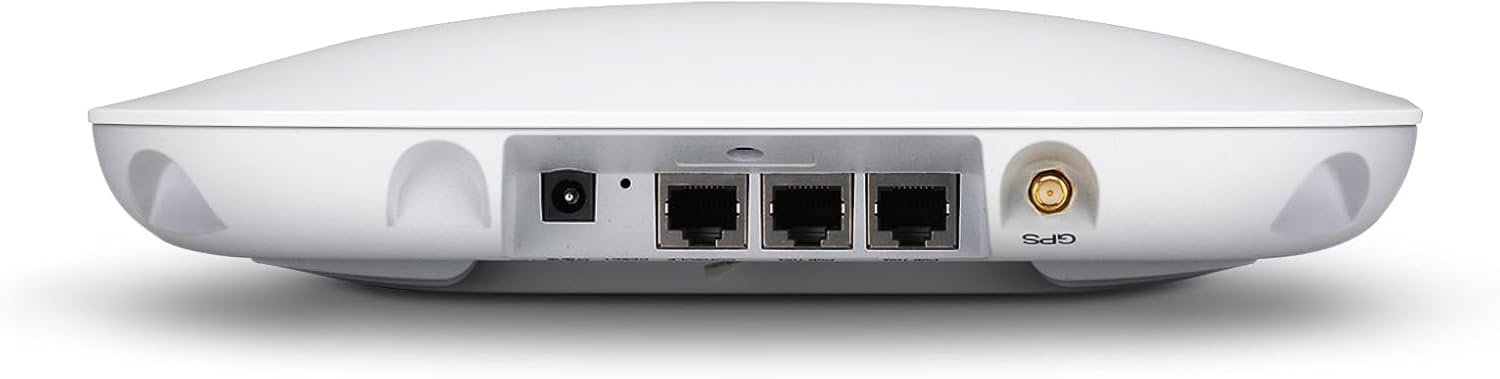
Figura 3: posterior view of FortiAP 441K, highlighting the Ethernet ports for network connection and power.
5. Instruccions de funcionament
Once powered on and connected to the network, the FortiAP 441K will begin broadcasting Wi-Fi signals across its tri-band frequencies (2.4 GHz, 5 GHz, and 6 GHz). Clients can connect to the appropriate SSID (Service Set Identifier) as configured in your Fortinet network management system. The access point is designed to provide 24/7 scanning across all bands while simultaneously offering client access.
6. Característiques clau
The FortiAP 441K offers advanced features for high-performance wireless networking:
- Wi-Fi 7 Estàndard: Supports the latest Wi-Fi 7 (802.11ax) standard for enhanced speed and efficiency.
- Funcionament tribanda: Utilizes 2.4 GHz, 5 GHz, and 6 GHz bands for flexible and high-capacity wireless connectivity.
- 4x4 MU-MIMO: Features 4x4 Multi-User Multiple-Input, Multiple-Output technology for improved performance with multiple connected devices.
- Antenes internes: Equipped with internal antennas for a sleek design and optimized signal coverage.
- 2x 10G Ethernet Ports: Provides two 10 Gigabit Ethernet ports for high-speed wired backhaul.
- OFDMA: Orthogonal Frequency-Division Multiple Access for efficient channel utilization.
- Integrated BLE/ZigBee Radio: Can be used for beaconing and location-based applications.

Figura 4: Mésview of FortiAP 441K key specifications and features.
7. Manteniment
To ensure the longevity and optimal performance of your FortiAP 441K, follow these maintenance guidelines:
- Regularly check for firmware updates through your Fortinet management interface to ensure the latest security patches and features.
- Mantingueu el dispositiu net i lliure de pols. Feu servir un drap suau i sec per netejar-lo.
- Assegureu-vos que hi hagi un flux d'aire adequat al voltant del dispositiu per evitar el sobreescalfament.
- Eviteu col·locar objectes pesats al dispositiu.
8. Solució De Problemes
If you encounter issues with your FortiAP 441K, refer to the following common troubleshooting steps:
- Sense energia: Verify that the Ethernet cable is securely connected and that the PoE++ switch/injector is functioning correctly.
- Sense senyal Wi-Fi: Check the device status indicators. Ensure the access point is properly configured and broadcasting SSIDs.
- Rendiment lent: Check network congestion, client device capabilities (Wi-Fi 7 clients will perform best), and ensure the 10G Ethernet ports are utilized for backhaul.
- Problemes de connectivitat: Restart the access point and any connected network devices. Verify network settings in your Fortinet management system.
For more advanced troubleshooting, consult the Fortinet support documentation or contact technical support.
9. Especificacions
| Atribut | Valor |
|---|---|
| Dimensions del producte | 10 x 10 x 2 polzades |
| Pes de l'article | 7 lliures |
| ASIN | B0D9R166L5 |
| Número de model de l'article | FAP-441K-A |
| Marca | FORTINET |
| Nom del model | FAP-441K-A 25550886 |
| Característica especial | Accés remot |
| Classe de banda de freqüència | Tri-banda |
| Comunicació sense fils estàndard | 802.11ax (Wi-Fi 7) |
| Dispositius compatibles | Ordinador portàtil, ordinador personal, telèfon intel·ligent, tauleta |
| Usos recomanats per al producte | Oficina, jocs |
| Tecnologia de connectivitat | Wi-Fi 7, Ethernet |
| Color | Multicolor |
| Fabricant | Fortinet |
| Data de primera disponibilitat | 19 de juliol de 2024 |

Figure 5: FortiAP 441K dimensions for installation planning.
10. Garantia i Suport
The Fortinet FortiAP 441K is covered by a manufacturer's warranty. For specific warranty terms and conditions, please refer to the documentation included with your product or visit the official Fortinet website. For technical support, product registration, and additional resources, please visit the Fortinet support portal.


