Introducció
This manual provides detailed instructions for the proper setup, operation, and maintenance of your Fuzion Hive - 200 Balance. Please read this manual thoroughly before use to ensure accurate measurements and prolong the life of your device. The Fuzion Hive - 200 Balance is designed for precise weighing with a 0.01 precision, ideal for various applications requiring high accuracy.
Configuració
Follow these steps to set up your Fuzion Hive - 200 Balance:
- Desembalatge: Carefully unpack all components from the packaging. You should find the Fuzion Hive - 200 Balance unit, a protective cover, a weighing tray (often green), a calibration weight, and a USB charging cable.
- Font d'alimentació: Ensure the balance is fully charged or connected to a power source via the provided USB cable before initial use.
- Col·locació: Place the balance on a stable, level, and vibration-free surface. Avoid locations with direct sunlight, strong drafts, or extreme temperature fluctuations, as these can affect measurement accuracy.
- Calibració inicial: It is highly recommended to perform an initial calibration before the first use. Refer to the 'Operating' section for detailed calibration instructions.
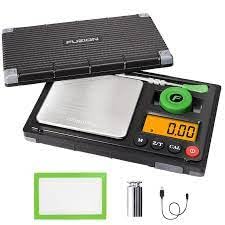
Image showing the Fuzion Hive - 200 Balance, its protective cover, a green weighing tray, a silver calibration weight, and a USB charging cable. These are the main components included with the product.
En funcionament
Learn how to operate your Fuzion Hive - 200 Balance for accurate measurements:
- Encès/apagat: Press the 'ON/OFF' button to turn the balance on or off. The display will illuminate.
- Funció de tara: To weigh items in a container, first place the empty container on the weighing platform. Press the 'TARE' button to zero the display. This will subtract the weight of the container, allowing you to measure only the contents.
- Conversió d'unitat: Press the 'UNIT' button to cycle through available weighing units (e.g., grams (g), ounces (oz), carats (ct), grains (gn)). The current unit will be displayed.
- Calibració:
- Turn the balance on.
- Press and hold the 'CAL' button until 'CAL' appears on the display, then release the button.
- The display will then show the required calibration weight (e.g., '200.00g').
- Gently place the specified calibration weight (included) on the center of the weighing platform.
- Wait for the display to stabilize and show 'PASS' or 'END'.
- Remove the calibration weight. Calibration is now complete.
- Pesatge: Place the item to be weighed gently on the center of the weighing platform. Wait for the display to stabilize before reading the measurement.
Manteniment
Proper maintenance ensures the longevity and accuracy of your balance:
- Neteja: Clean the balance with a soft, slightly damp cloth. Do not use abrasive cleaners, solvents, or immerse the device in water. Ensure no liquids enter the internal components.
- Emmagatzematge: Store the balance in a dry, cool place, away from direct sunlight and extreme temperatures. Always use the protective cover when the balance is not in use to prevent dust and damage.
- Cura de la bateria: Recharge the battery when the low battery indicator appears on the display. Avoid completely draining the battery or leaving it uncharged for extended periods. Do not overcharge.
Resolució de problemes
If you encounter issues with your Fuzion Hive - 200 Balance, refer to the following common problems and solutions:
- Display shows 'LO': This indicates a low battery. Recharge the balance using the provided USB cable.
- Display shows 'OUE2' or 'EEEE': This is an overload error. Remove any excess weight from the weighing platform immediately to prevent damage.
- Inaccurate or Fluctuating Readings:
- Ensure the balance is placed on a stable, level, and vibration-free surface.
- Recalibrate the balance as described in the 'Operating' section.
- Check for drafts, air conditioning vents, or fans that might be affecting the readings.
- Ensure the weighing platform is clean and free of debris.
- Balance Does Not Turn On: Check the battery charge. Ensure the USB cable is properly connected if attempting to charge. If the issue persists, contact support.
Especificacions
| Característica | Especificació |
|---|---|
| Número de model | HIVE-200 |
| Marca | Genèric |
| Capacitat | 200 grams |
| Precisió | 0.01 g |
| Color | Negre |
| Font d'alimentació | USB recarregable |
Garantia i Suport
Garantia: Warranty information for the Fuzion Hive - 200 Balance is typically provided by the retailer or manufacturer at the time of purchase. Please refer to your purchase documentation, such as the sales receipt or product packaging, for specific warranty terms and conditions, including coverage period and what is covered.
Suport tècnic: For technical support, service inquiries, or if you require replacement parts, please contact the vendor or manufacturer directly. Contact information is usually provided with your product or can be found on the manufacturer's official weblloc.


