Introducció
Thank you for choosing JOYWISE Bluetooth Headphones. These wireless earbuds are designed to provide a high-fidelity audio experience with seamless connectivity, comfort, and durability, making them ideal for sports and daily use. This manual will guide you through the setup, operation, and maintenance of your new headphones.

Image: JOYWISE Bluetooth Headphones, black, with ear hooks, connected by a neckband. A round, black zippered protective case with a carabiner is shown next to them.
Què hi ha a la caixa
Si us plau, comproveu el contingut del paquet per assegurar-vos que hi hagi tots els elements:
- Wireless Headphones (JOYWISE U18C)
- Funda protectora
- Cable de càrrega USB-C
- Eartips (3 pairs: S, M, L)
- Manual d'usuari
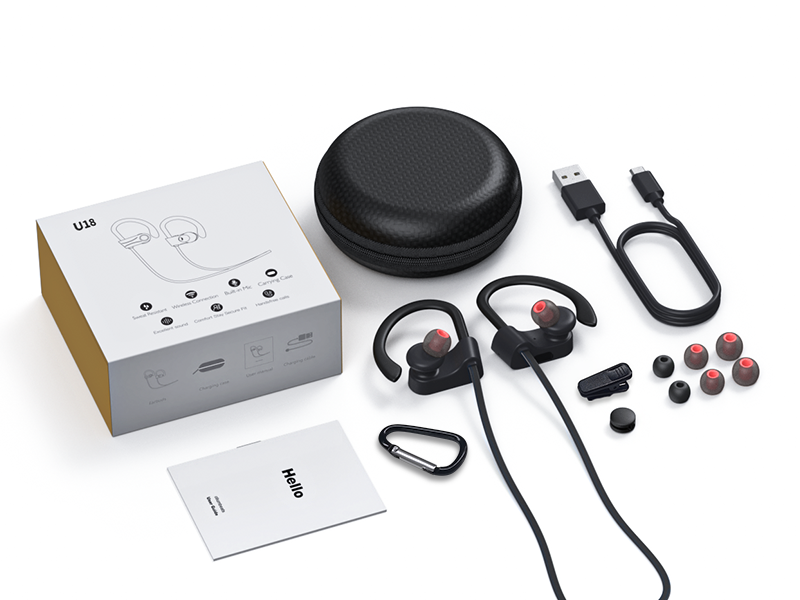
Image: The package contents laid out, including the headphones, charging cable, protective case, multiple eartips, and the user manual.
Producte acabatview
Familiarize yourself with the main components and controls of your JOYWISE Bluetooth Headphones.

Image: Close-up diagram of the right earbud showing the location of the MFB (Multi-Function Button), '+' button, and '-' button.
- Botó MFB (botó multifunció): Power On/Off, Play/Pause, Answer/End Calls, Activate Voice Assistant.
- Botó '+': Volume Up, Next Track.
- Botó '-': Volume Down, Previous Track.
- Ganxos per a les orelles: Provide a secure and comfortable fit during physical activity.
- Puntes d'orelles: Interchangeable for optimal comfort and sound isolation.
- Port de càrrega USB-C: Per carregar els auriculars.
Configuració
1. Càrrega dels auriculars
Before first use, fully charge your headphones. Use only the provided USB-C charging cable.
- Connect the USB-C end of the charging cable to the charging port on the headphones.
- Connect the USB-A end to a standard USB power adapter (not included) or a computer's USB port.
- The indicator light on the headphones will show charging status (refer to LED indicator section in manual for details).
- Once fully charged, disconnect the charging cable. A full charge provides up to 16 hours of playtime.

Image: A close-up of the earbud showing the USB-C charging port with a USB-C cable connected.
2. Encès / apagat
- Encès: Press and hold the MFB button for approximately 3 seconds until you hear a power-on prompt and the LED indicator flashes.
- Apagar: Press and hold the MFB button for approximately 5 seconds until you hear a power-off prompt and the LED indicator turns off.
3. Emparellament Bluetooth
The headphones utilize Bluetooth 5.3 technology for stable and efficient connection.
- Assegureu-vos que els auriculars estiguin apagats.
- Press and hold the MFB button for approximately 5-7 seconds until the LED indicator flashes red and blue alternately, indicating pairing mode.
- Al dispositiu amb Bluetooth (telèfon intel·ligent, tauleta, ordinador portàtil), aneu a la configuració de Bluetooth.
- Cerca available devices and select "JOYWISE U18C" from the list.
- Once connected, the LED indicator will flash blue slowly, and you will hear a connection confirmation tone.
- If pairing fails, power off the headphones and repeat the steps.

Image: A close-up of the earbud highlighting the Bluetooth 5.3 chip, indicating seamless connectivity.

Image: A smartphone screen showing the Bluetooth settings with the headphones icon, indicating a successful connection.
4. Portar els auriculars
For optimal sound quality and secure fit, choose the correct eartip size and adjust the ear hooks.
- Select the eartips that provide a snug seal in your ear canal.
- Place the earbuds into your ears.
- Gently adjust the flexible ear hooks over the top of your ears until they feel secure and comfortable.
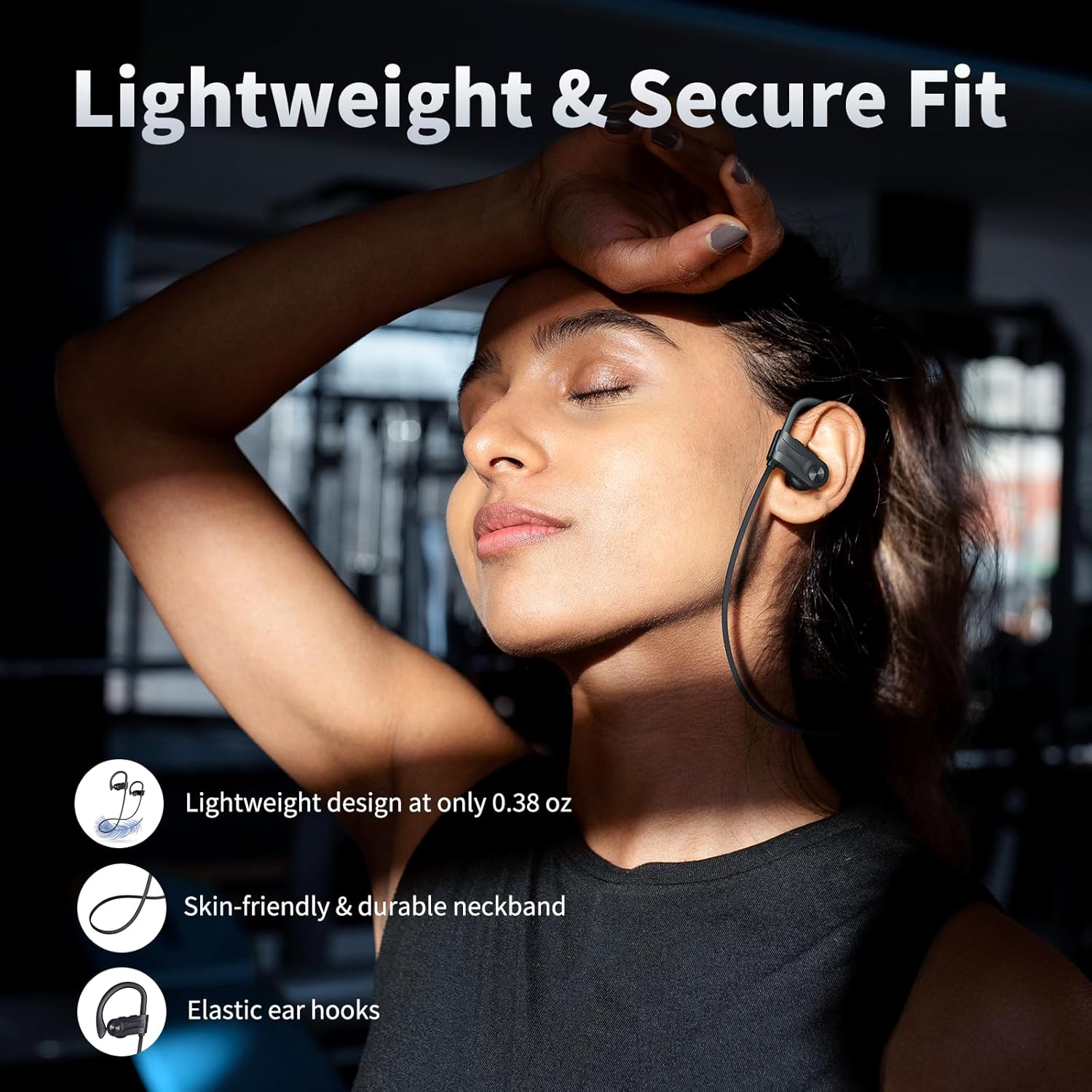
Image: A person wearing the JOYWISE Bluetooth Headphones, demonstrating the secure fit provided by the ear hooks during activity.
Instruccions de funcionament
Reproducció de música
- Reproduir/pausa: Premeu el botó MFB una vegada.
- Pista següent: Premeu i manteniu premut el botó '+' durant 2 segons.
- Pista anterior: Premeu i manteniu premut el botó '-' durant 2 segons.
- Pujar el volum: Premeu breument el botó '+'.
- Baixar el volum: Premeu breument el botó '-'.
Gestió de trucades
- Respondre/Finalitzar la trucada: Premeu el botó MFB una vegada.
- Rebutja la trucada: Manteniu premut el botó MFB durant 2 segons.
- Torna a marcar l'últim número: Double-press the MFB button.
Assistent de veu
- Activar l'assistent de veu (Siri, Google Assistant, etc.): Triple-press the MFB button.
Manteniment
Neteja
- Regularly clean the eartips and earbud surfaces with a soft, dry, lint-free cloth.
- No utilitzeu productes químics aggressivs, dissolvents de neteja o detergents forts.
- Assegureu-vos que el port de càrrega estigui lliure de pols i deixalles.
Emmagatzematge
- When not in use, store the headphones in the provided protective case to prevent damage.
- Emmagatzemar en un lloc fresc i sec, allunyat de temperatures extremes i de la llum solar directa.
Resistència a l'aigua (IPX7)
The JOYWISE U18C headphones feature an IPX7 waterproof rating, meaning they can withstand immersion in water up to 1 meter for 30 minutes. This makes them suitable for workouts, rain, and sweat.
- NO use for swimming or prolonged water immersion.
- Ensure the charging port cover is securely closed before exposure to water.
- If the headphones get wet, wipe them dry completely before charging.

Image: A person with sweat on their face and neck, wearing the JOYWISE Bluetooth Headphones, demonstrating their suitability for intense workouts due to IPX7 waterproofing.
Resolució de problemes
| Problema | Causa possible | Solució |
|---|---|---|
| Els auriculars no s'encenen. | Bateria baixa. | Carregueu els auriculars completament. |
| No es pot emparellar amb el dispositiu. | Auriculars no en mode d'emparellament; Bluetooth desactivat al dispositiu; dispositiu massa lluny. | Ensure headphones are in pairing mode (flashing red/blue). Turn on Bluetooth on your device. Move device closer to headphones. Forget previous connections and re-pair. |
| Sense so o amb un volum baix. | Volume too low on headphones or device; improper fit; connection issue. | Increase volume on both headphones and device. Adjust eartips for a secure fit. Reconnect Bluetooth. |
| Connexió intermitent. | Interferència; dispositiu massa lluny; bateria baixa. | Move closer to the paired device. Avoid environments with strong Wi-Fi or other Bluetooth signals. Charge headphones. |
| El micròfon no funciona. | Device settings; connection issue. | Ensure the headphones are selected as the audio input device in your phone's settings. Reconnect Bluetooth. |
Especificacions
| Característica | Detall |
|---|---|
| Nom del model | U18 |
| Tecnologia de connectivitat | Sense fil (Bluetooth) |
| Versió Bluetooth | 5.3 |
| Tecnologia de comunicació sense fils | Bluetooth |
| Durada de la bateria | Fins a 16 hores de joc |
| Nivell de resistència a l'aigua | IPX7 (impermeable) |
| Tipus de controlador d'àudio | Controlador dinàmic (13 mm) |
| Interval de freqüència | 20 Hz - 20,000 Hz |
| Mètode de control | Botó |
| Col·locació de l'orella | In Ear with Hook |
| Material | Plàstic |
| Color | Negre |
| Pes de l'article | 3.2 unces |
| Fabricant | Shenzhen Jiechen Technology Co.LTD |
Garantia i suport
Informació de la garantia
JOYWISE Bluetooth Headphones Model U18C come with a Garantia limitada de 1 anys from the date of purchase. This warranty covers manufacturing defects in materials and workmanship. It does not cover damage caused by misuse, accidents, unauthorized modifications, or normal wear and tear.
Conserveu el vostre comprovant de compra per a reclamacions de garantia.
Atenció al client
For technical assistance, warranty claims, or any questions regarding your JOYWISE Bluetooth Headphones, please contact our customer support team:
- Correu electrònic: [Inseriu aquí el correu electrònic d'atenció al client, si n'hi ha]
- Weblloc: Visit the official JOYWISE weblloc web per a preguntes freqüents i recursos de suport.
When contacting support, please provide your product model (U18C) and a detailed description of the issue.
