1. Introducció
Thank you for choosing the Ashfly LCD Digital Coin Microscope 500x. This device is designed for detailed observation of various objects, including coins, circuit boards, insects, and more. Featuring a 7-inch HD display, 50X to 500X magnification, and adjustable LED lighting, it provides clear digital imaging for both standalone use and PC connectivity. This manual will guide you through the setup, operation, and maintenance of your microscope.

Image 1.1: Ashfly LCD Digital Coin Microscope 500x with 7-inch display and remote control.
2. Què hi ha a la caixa
Si us plau, comproveu el contingut del paquet en rebre'l per assegurar-vos que hi hagi tots els elements:
- Digital Microscope (1 unit)
- USB-C Data Cable (1 unit)
- Manual d'instruccions (1 unitat)
3. Producte acabatview
The Ashfly Digital Microscope features a high-resolution display and powerful magnification capabilities. Key components include:
- Pantalla HD de 7 polzades: Ofereix una visió clara i detallada view of magnified objects.
- Microscope Lens: Offers 50X to 500X magnification for observing fine details.
- Llums LED ajustables: Eight integrated LED lights with stepless adjustment for optimal illumination.
- Sturdy Stand and Base: Ensures stability during observation.
- Botons de control: Located on the display for easy operation.
- Comandament a distància: Per a un funcionament còmode des de la distància.
- Connectivitat amb PC: Compatible with Windows and Mac operating systems for external display.
- Ranura per a targeta de memòria: Supports up to 64GB memory card for photo and video storage (memory card not included).

Image 3.1: Key features of the Ashfly HD Digital Microscope.

Image 3.2: The 7.0-inch IPS screen provides a wide viewing angle and clear images.
4. Instruccions de configuració
Follow these steps to assemble your Ashfly Digital Microscope:
- Step 1: Place Bracket on Pole. Insert the microscope bracket onto the vertical support pole.
- Step 2: Place Bracket on Base. Securely attach the pole with the bracket to the microscope's base.
- Step 3: Place the Screen on the Bracket. Mount the microscope screen unit onto the bracket.
- Step 4: Tighten the Two Knobs. Secure all connections by tightening the adjustment knobs on the bracket and pole.

Image 4.1: Step-by-step assembly guide for the microscope.
5. Instruccions de funcionament
5.1 Engegada/apagada
Press and hold the power button on the microscope unit to turn it on or off. Ensure the device is charged or connected to a power source via the USB-C cable.
5.2 Ajust de l'ampliació
Magnification is adjusted by changing the distance between the microscope lens and the object. Physically move the microscope head up or down along the stand to achieve the desired magnification level, ranging from 50X to 500X. The actual magnification displayed depends on the screen size and the distance between the camera and the object.
5.3 Ajust dels llums LED
The microscope is equipped with 8 adjustable LED lights. Use the knob located on the right side of the screen to control the brightness. Adjust the illumination to achieve clear video and images, especially in dim environments.

Image 5.1: Adjustable LED ring lights with stepless control.
5.4 Fer fotos i gravar vídeos
The microscope supports both still image capture and video recording. Insert a compatible memory card (up to 64GB, not included) into the designated slot to save your observations. Use the appropriate buttons on the device or remote control to initiate photo capture or video recording.

Image 5.2: HD photo and real-time video recording capabilities.
5.5 PC View Mode
Connect the digital microscope to a computer to view images on a larger screen. The device is compatible with Windows Vista/XP/7/8/10/11 and Mac OS 11.0 or above. Use the provided USB-C data cable to establish the connection. Once connected, the microscope functions as an external camera, allowing real-time observation and data transfer.
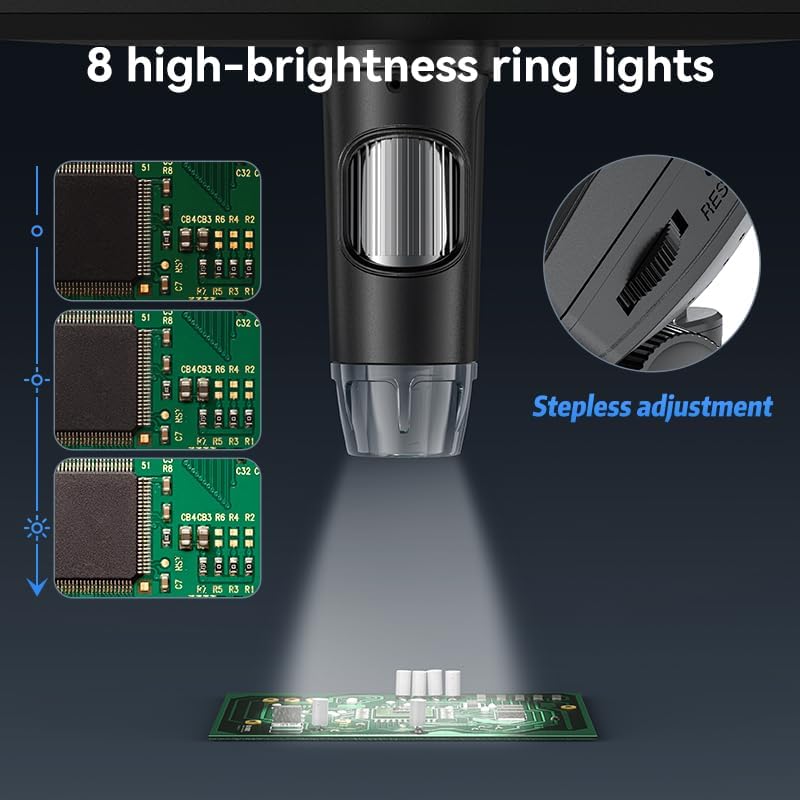
Image 5.3: Microscope connected to a computer for PC viewing.
6. Manteniment
To ensure the longevity and optimal performance of your Ashfly Digital Microscope, follow these maintenance guidelines:
- Neteja de la lent: Use a soft, lint-free cloth specifically designed for optical lenses to gently clean the microscope lens. Avoid abrasive materials or harsh chemicals.
- Neteja de la pantalla: Wipe the 7-inch display with a soft, dry microfiber cloth. For stubborn smudges, slightly dampNetegeu el drap amb aigua i després eixugueu-lo.
- Neteja general: Keep the microscope body and stand free from dust and debris. Use a soft, dry cloth for general cleaning.
- Emmagatzematge: When not in use, store the microscope in a clean, dry place away from direct sunlight and extreme temperatures.
- Cura de la bateria: The device contains a Lithium Ion battery. For best battery life, avoid fully discharging the battery frequently and store it with a partial charge if not used for extended periods.
7. Solució De Problemes
If you encounter issues with your Ashfly Digital Microscope, refer to the following common troubleshooting tips:
- Sense energia: Ensure the device is fully charged or connected to a power source. Check the USB-C cable connection.
- Imatge poc clara: Adjust the distance between the lens and the object to focus. Clean the lens if smudges are present. Adjust the LED light brightness for better illumination.
- Problemes de connexió amb l'ordinador: Verify the USB-C cable is securely connected to both the microscope and the computer. Ensure your computer's operating system (Windows Vista/XP/7/8/10/11 or Mac OS 11.0+) is compatible and drivers are correctly installed if prompted.
- Targeta de memòria no detectada: Ensure the memory card is inserted correctly and is not damaged. The microscope supports up to 64GB cards.
- La bateria s'esgota ràpidament: Battery life can vary based on usage and settings. Ensure the device is fully charged before use. If the issue persists, contact customer support.
8. Especificacions
| Característica | Especificació |
|---|---|
| Nom del model | 330 |
| Mida de la pantalla | 7 polzades |
| Ampliació màxima | 500 x (actual magnification depends on screen size and object distance) |
| Tipus de font de llum | LED (8 high-brightness ring lights) |
| Dispositius compatibles | Laptop, Personal Computer (Windows Vista/XP/7/8/10/11, Mac OS 11.0 or above) |
| Font d'alimentació | Corded Electric / 1 Lithium Ion battery (included) |
| Material | Plàstic |
| Color | Negre |
| Pes de l'article | 1.72 lliures |
| Dimensions del paquet | 12.24 x 8.82 x 4.61 polzades |
9. Garantia i Suport
For information regarding product warranty, please refer to the documentation provided at the time of purchase or contact Ashfly customer support directly. Protection plans are available for purchase separately to extend coverage for your device.
For technical assistance or further inquiries, please visit the official Ashfly weblloc web o poseu-vos en contacte amb el seu departament d'atenció al client. Les dades de contacte normalment es troben a l'embalatge del producte o al fabricant. weblloc.


