Introducció
This manual provides comprehensive instructions for the setup, operation, maintenance, and troubleshooting of your Logitech G915 X Lightspeed Wireless Mechanical Gaming Keyboard. Designed for high-performance gaming and versatile connectivity, this keyboard features LIGHTSPEED wireless technology, GL mechanical switches, customizable G-keys, and LIGHTSYNC RGB lighting. Please read this manual thoroughly to ensure optimal use and longevity of your device.

Imatge: De dalt a baix view of the Logitech G915 X Lightspeed Wireless Mechanical Gaming Keyboard, showcasing el seu disseny complet i la retroiluminació RGB.
Què hi ha a la caixa
Upon unboxing your Logitech G915 X Lightspeed keyboard, verify that all the following components are present:
- Logitech G915 X Lightspeed Wireless Mechanical Gaming Keyboard
- LIGHTSPEED USB Receiver
- Extensor USB
- USB-C Data/Charging Cable
- Documentació d'usuari (aquest manual)

Image: All components included in the Logitech G915 X keyboard packaging, including the keyboard, USB-A to USB-C cable, USB extender, and USB wireless receiver.
Configuració
Càrrega inicial
Before first use, it is recommended to fully charge the keyboard.
- Connect the supplied USB-C data/charging cable to the USB-C port on the keyboard (located on the top edge).
- Connect the other end of the cable (USB-A) to a powered USB port on your computer or a USB wall adapter.
- The battery indicator light on the keyboard will show charging status. A full charge typically takes approximately 4 hours.
Connexió del teclat
The G915 X offers three connectivity options: LIGHTSPEED Wireless, Bluetooth, and Wired USB.

Image: Close-up of the Logitech G915 X keyboard's connectivity buttons (LIGHTSPEED, Bluetooth, Wired) located above the F5-F8 keys.
LIGHTSPEED Wireless (Recommended for Gaming)
- Locate the LIGHTSPEED USB receiver. For optimal signal, use the USB extender to position the receiver closer to the keyboard.
- Plug the LIGHTSPEED USB receiver into an available USB-A port on your computer.
- On the keyboard, slide the power switch to the ON position (located on the top right).
- Press the LIGHTSPEED button (indicated by a wireless signal icon) on the keyboard. The indicator light above the button will turn solid cyan when connected.
Connectivitat Bluetooth
- Assegureu-vos que el teclat estigui encès.
- Press and hold the Bluetooth button (indicated by a Bluetooth icon) on the keyboard until the indicator light above it starts blinking blue rapidly. This indicates pairing mode.
- On your computer or device, navigate to Bluetooth settings and select "G915 X" from the list of available devices.
- The indicator light will turn solid blue when successfully paired.
Mode USB per cable
- Connect the USB-C data/charging cable to the keyboard and the USB-A end to your computer.
- El teclat canviarà automàticament al mode amb cable i començarà a carregar-se.
Instruccions de funcionament
S'han acabat les funcions clauview
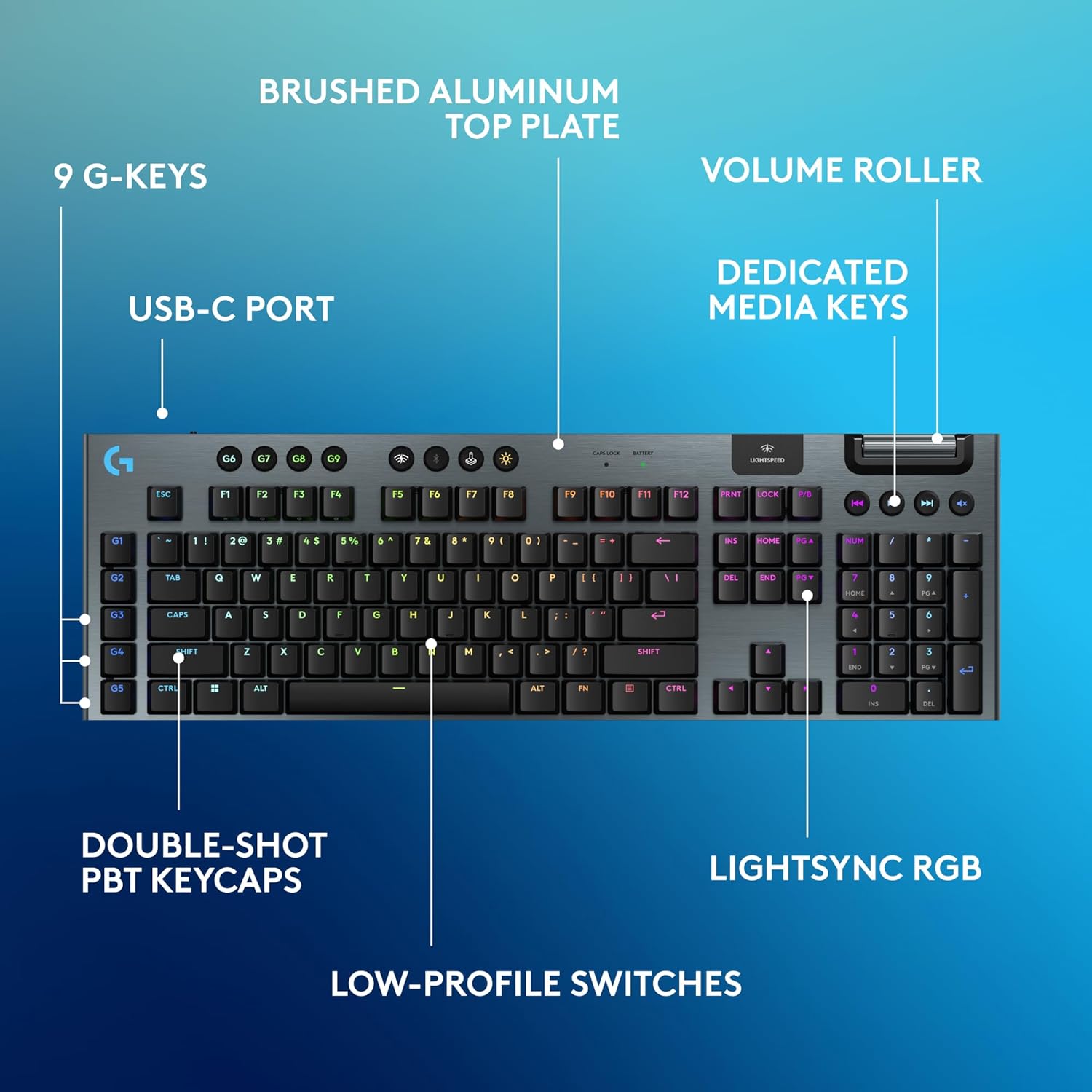
Image: Diagram highlighting key features of the Logitech G915 X keyboard, including G-keys, USB-C port, double-shot PBT keycaps, low-profile switches, brushed aluminum top plate, volume roller, dedicated media keys, and LIGHTSYNC RGB.
- GL Mechanical Switches: Pro baixfile switches designed for speed, precision, and comfort with a 1.3mm actuation point.
- LIGHTSPEED sense fil: Pro-grade wireless technology for ultra-fast and reliable connection.
- Bluetooth: For connecting to other devices that support Bluetooth.
- Tecles multimèdia dedicades: Control audio and video playback with ease.
- Rodet de volum: Smoothly adjust audio volume.
- LIGHTSYNC RGB: Customizable per-key RGB lighting with approximately 16.8 million colors.
- G-Keys (G1-G5): Five dedicated programmable macro keys on the left side of the keyboard.
- Double-Shot PBT Keycaps: Durable keycaps resistant to wear and shine.
Customizing with G HUB Software
To unlock the full potential of your G915 X keyboard, download and install the Logitech G HUB software from the official Logitech website. G HUB allows for extensive customization.
- G-Key Programming: Assign custom macros, commands, or system functions to the G1-G5 keys. You can create multiple profiles per a diferents jocs o aplicacions.
- LIGHTSYNC RGB Customization: Personalize lighting effects, colors, and animations. Sync lighting with other Logitech G devices.
- Mode de joc: Disable specific keys (e.g., Windows key) during gaming to prevent accidental interruptions.
- KEYCONTROL: Set up to 15 functions per key for advanced control.

Image: Screenshot of the Logitech G HUB software interface showing options for customizing commands and assigning functions to G-keys on the G915 X keyboard.
Media Controls and Volume
Dedicated media controls and a volume roller are located on the top right of the keyboard for quick access.
- Rodet de volum: Roll up to increase volume, roll down to decrease.
- Media Buttons:
- Pista anterior
- Reproduir/Pausa
- Pista següent
- Silenciar
Gestió de la bateria
The Logitech G915 X keyboard provides up to 36 hours of continuous battery life with lighting enabled. Battery life may vary based on usage and lighting intensity.
- Indicador de bateria: A dedicated battery indicator light is located near the LIGHTSPEED logo on the top right. It changes color to indicate battery level.
- Càrrega: Connect the USB-C cable to the keyboard and a powered USB port. You can continue to use the keyboard in wired mode while it charges.
- Estalvi d'energia: The keyboard will enter a low-power state after a period of inactivity to conserve battery.
Manteniment
Un manteniment adequat garanteix la longevitat i el rendiment del teclat.
- Neteja de les tecles: Utilitzeu un drap suau i sense pelusa lleugerament dampEsbandiu amb aigua o una solució de neteja suau. Eviteu productes químics agressius.
- Removing Dust/Debris: Use compressed air to clear dust and debris from between the keycaps and switches.
- Neteja de superfícies: Wipe the aluminum top plate with a soft, dry cloth.
- Emmagatzematge: Quan no l'utilitzeu durant períodes prolongats, guardeu el teclat en un lloc sec i fresc, allunyat de la llum solar directa.
Resolució de problemes
If you encounter issues with your Logitech G915 X keyboard, refer to the following common troubleshooting steps.
| Problema | Possible solució |
|---|---|
| El teclat no respon (sense fil) |
|
| Problemes de connexió Bluetooth |
|
| Les claus no es registren o s'escriuen dues vegades |
|
| La il·luminació RGB no funciona o és incorrecta |
|
| G-keys or macros not working |
|
Especificacions
| Característica | Detall |
|---|---|
| Número de model | 920-012670 |
| Connectivitat | LIGHTSPEED Wireless (2.4 GHz RF), Bluetooth, Wired USB-C |
| Tipus de canvi | GL Tactile Mechanical Switches (Low-Profile) |
| Punt d'actuació | 1.3 mm |
| Distància total de recorregut | 3.2 mm |
| Taps de claus | PBT de doble tret |
| Il·luminació | LIGHTSYNC RGB (Per-key customizable) |
| Tecles programables | 5 dedicated G-keys, up to 15 functions per key via KEYCONTROL |
| Durada de la bateria | Up to 36 hours (with lighting) |
| Temps de càrrega | Aprox. 4 hores |
| Dimensions (LxWxH) | 18.7 x 5.91 x 0.87 polzades (47.5 x 15 x 2.2 cm) |
| Pes | 2.38 lliures (1.08 kg) |
| Material | Placa superior d'alumini |
| Compatibilitat de sistemes operatius | PC, Mac OS |
Garantia i Suport
Logitech products are designed for durability and performance. For information regarding warranty coverage, technical support, and frequently asked questions, please visit the official Logitech support weblloc.
Suport Logitech Weblloc: https://support.logi.com/
Per a una protecció addicional, considereu la possibilitat de comprarasing an extended protection plan available at the time of purchase.


