1. Introducció
The CHERRY XTRFY M64 Wireless Gaming Mouse is engineered for competitive gaming, offering ultra-fast 8000 Hz polling rate technology for extremely low click latency and precise cursor movements. This ergonomic mouse features a reinvented design for enhanced grip and control, combined with a lightweight construction for swift and accurate gameplay. It utilizes a high-performance Pixart 3395 sensor and refined wireless technology to ensure uncompromised speed and responsiveness.
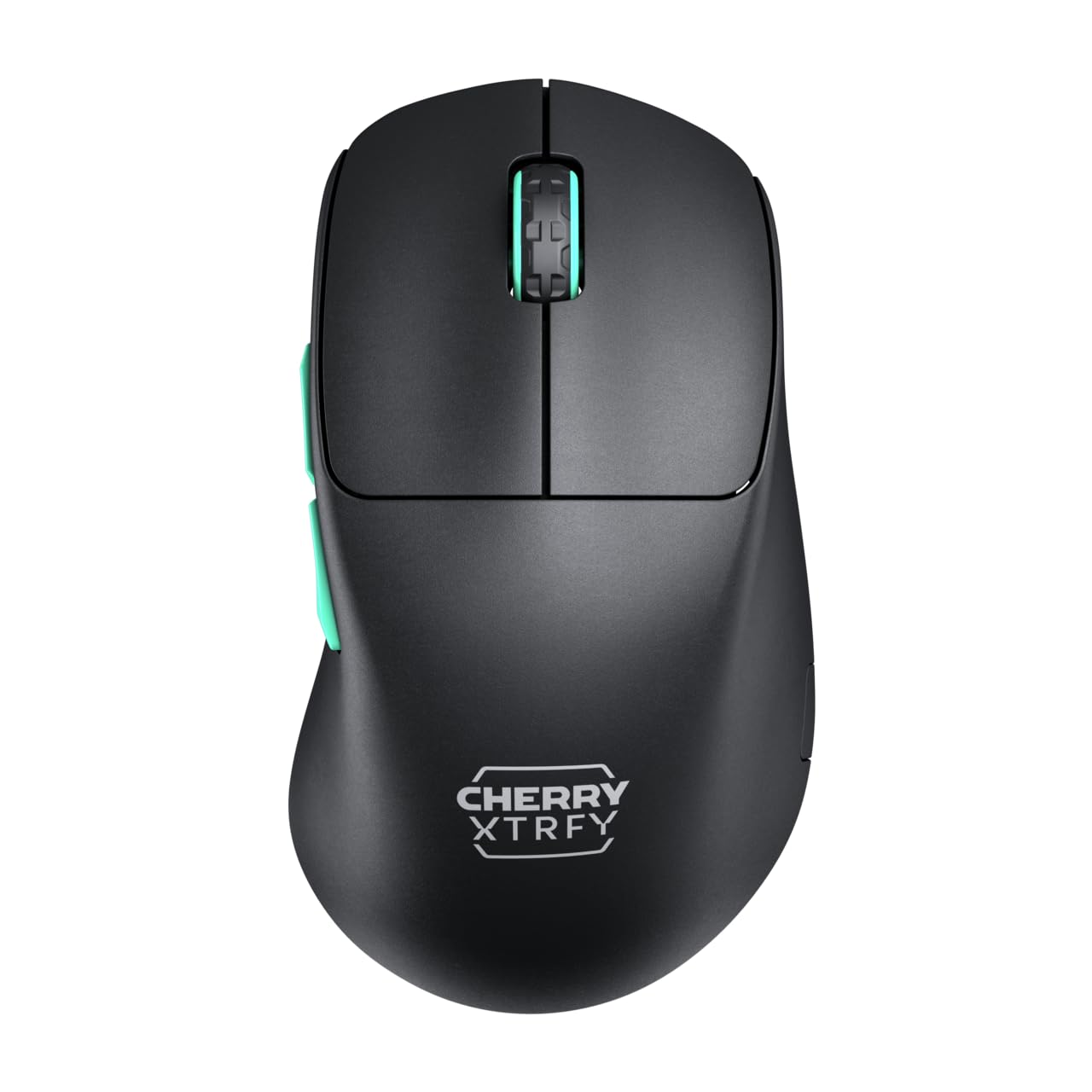
Image 1: CHERRY XTRFY M64 Wireless Gaming Mouse. This image shows the ergonomic design of the mouse, highlighting its black body and distinctive teal scroll wheel and side buttons.
2. Contingut del paquet
Verifiqueu que tots els elements siguin presents al paquet:
- Ratolí per a jocs sense fil CHERRY XTRFY M64
- USB-C Charging Cable (flexible CHERRY XTRFY EZcord)
- Receptor sense fil USB-A
- USB-A to USB-C Adapter (for receiver extension)
- Manual d'usuari (aquest document)

Image 2: Included accessories. This image displays the USB-C charging cable, the USB-A wireless receiver, and an adapter, which are essential for connecting and charging the mouse.
3. Configuració
- Connecteu el receptor sense fil: Insert the USB-A wireless receiver into an available USB port on your computer. For optimal signal strength and reduced latency, use the provided USB-A to USB-C adapter and charging cable to position the receiver closer to the mouse.
- Engegar el ratolí: Locate the power switch on the underside of the mouse and slide it to the "ON" position. The mouse should automatically connect to the receiver.
- Càrrec inicial: For first-time use, it is recommended to fully charge the mouse. Connect the USB-C end of the charging cable to the mouse and the USB-A end to your computer or a USB power adapter. The mouse can be used while charging.
4. Instruccions de funcionament
4.1. Funcions del botó
- Botó esquerre de clic: Acció primària.
- Botó dret: Acció secundària.
- Roda de desplaçament: Desplaça't amunt/avall, fes clic amb el botó central.
- Botons laterals: Typically configured for forward/backward navigation in web browsers or custom functions in games.
4.2. Ajust de DPI
The M64 Wireless mouse allows for on-the-fly DPI (Dots Per Inch) adjustment without requiring software. The DPI button is located on the underside of the mouse. Press this button to cycle through preset DPI levels. An indicator light will typically change color to show the current DPI setting.

Image 3: Underside of the mouse. This view highlights the various switches and buttons on the bottom of the mouse, including the DPI adjustment button and polling rate switch.
4.3. Ajust de la taxa de sondeig
The M64 Pro Wireless supports up to an 8000 Hz polling rate, providing extremely fast response times. A switch on the underside of the mouse allows you to select between different polling rates (e.g., 1000 Hz, 8000 Hz) to suit your preference and system capabilities. Refer to the markings on the mouse for specific settings.
4.4. Bateria i càrrega
The mouse is equipped with a rechargeable Lithium Ion battery. A full charge can provide up to 90 hours of playtime in Standard Gaming Mode. When the battery is low, the indicator light on the mouse will signal this condition. Connect the mouse using the provided USB-C cable to charge. You can continue using the mouse while it is connected via cable.
5. Manteniment
- Neteja: Feu servir un drap suau i sec per netejar la superfície del ratolí. Per a la brutícia persistent, feu un drap lleugerament sec.amp es pot fer servir un drap, assegurant-se que no entri líquid al ratolí. Eviteu productes químics agressius o materials abrasius.
- Emmagatzematge: Guardeu el ratolí en un lloc fresc i sec, allunyat de la llum solar directa i de temperatures extremes.
- Cura de la bateria: Per allargar la durada de la bateria, eviteu descarregar completament el ratolí amb freqüència. Carregueu-lo quan aparegui l'indicador de bateria baixa.
6. Solució De Problemes
- El ratolí no respon:
- Assegureu-vos que el ratolí estigui encès.
- Check if the wireless receiver is securely plugged into a USB port.
- Verify the mouse battery has sufficient charge.
- Prova de connectar el receptor a un port USB diferent.
- Assegureu-vos que no hi hagi altres dispositius sense fil que causin interferències.
- Lag or Disconnects:
- Move the wireless receiver closer to the mouse, using the extension cable if necessary.
- Ensure there are no large metal objects or other strong wireless signals between the mouse and receiver.
- Reduce the polling rate if your system struggles to maintain 8000 Hz.
- Problemes de càrrega:
- Assegureu-vos que el cable USB-C estigui connectat correctament tant al ratolí com a la font d'alimentació.
- Proveu un altre port USB o adaptador de corrent.
7. Especificacions
| Model | M64 sense fil |
| Tecnologia de connectivitat | Wireless (2.4 GHz), USB (for charging/wired use) |
| Sensor | pixart 3395 |
| Taxa de votació | Up to 8000 Hz (Pro models) |
| Pes | Approx. 55 grams (Pro Wireless) |
| Tipus de bateria | 1 bateria de ions de liti (inclosa) |
| Durada de la bateria | Up to 90 hours (Standard Gaming Mode) |
| Dimensions (paquet) | 4.7 x 2.5 x 1.5 polzades |
| Pes de l'article | 1.94 unces |
| Fabricant | Cherry Xtrfy |
8. Garantia i Suport
CHERRY XTRFY products are covered by a manufacturer's warranty. For detailed warranty information, technical support, or service inquiries, please visit the official CHERRY XTRFY weblloc web o contacteu directament amb el seu servei d'atenció al client.
Oficial Webllocs: cherryxtrfy.com, cherry.de


