Manual d'usuari del ratolí de jocs sense fil CHERRY XTRFY M64 Pro 8K
Model: CX-M64W-PRO-BLACK
Introducció
The CHERRY XTRFY M64 Pro 8K Wireless Gaming Mouse is engineered for competitive gaming, offering ultra-fast 8000 Hz polling rate technology and an ergonomic design. This manual provides comprehensive instructions for setting up, operating, maintaining, and troubleshooting your M64 Pro 8K mouse to ensure optimal performance.
Les característiques clau inclouen:
- Ultra-fast 8000 Hz polling rate for extremely low click latency.
- Reinvented ergonomic shape for enhanced grip and control.
- Lightweight design at approximately 55 grams.
- High-performance Pixart 3395 sensor.
- Up to 90 hours of battery life in Standard Gaming Mode.
- Flexible CHERRY XTRFY EZcord charging cable for unhindered play during charging.
Configuració
Follow these steps to set up your CHERRY XTRFY M64 Pro 8K Wireless Gaming Mouse:
- Unboxing: Carefully remove the mouse, wireless dongle, and charging cable from the packaging.

Image: The M64 Pro 8K mouse's wireless dongle and USB-C charging cable.
- Càrrega del ratolí:
- Connect the USB-C end of the EZcord charging cable to the mouse's charging port (located at the front).
- Connecteu l'extrem USB-A del cable a un port USB disponible de l'ordinador o a un adaptador de paret USB.
- Allow the mouse to charge fully before first use. The LED indicator on the mouse will show charging status.
- Connecting the Wireless Dongle:
- Plug the wireless USB dongle into an available USB port on your computer. For optimal performance, use a USB 2.0 or 3.0 port directly on your motherboard or a powered USB hub.
- The mouse should automatically connect to the dongle. If not, ensure the mouse is powered on.
- Instal·lació de programari (opcional però recomanada):
- Visit the official CHERRY XTRFY weblloc (cherryxtrfy.com) to download the latest software/drivers for the M64 Pro 8K.
- This software allows for customization of DPI settings, button assignments, polling rate, and other advanced features.
Instruccions de funcionament
Understanding the functions and controls of your M64 Pro 8K mouse:
Mouse Layout and Buttons
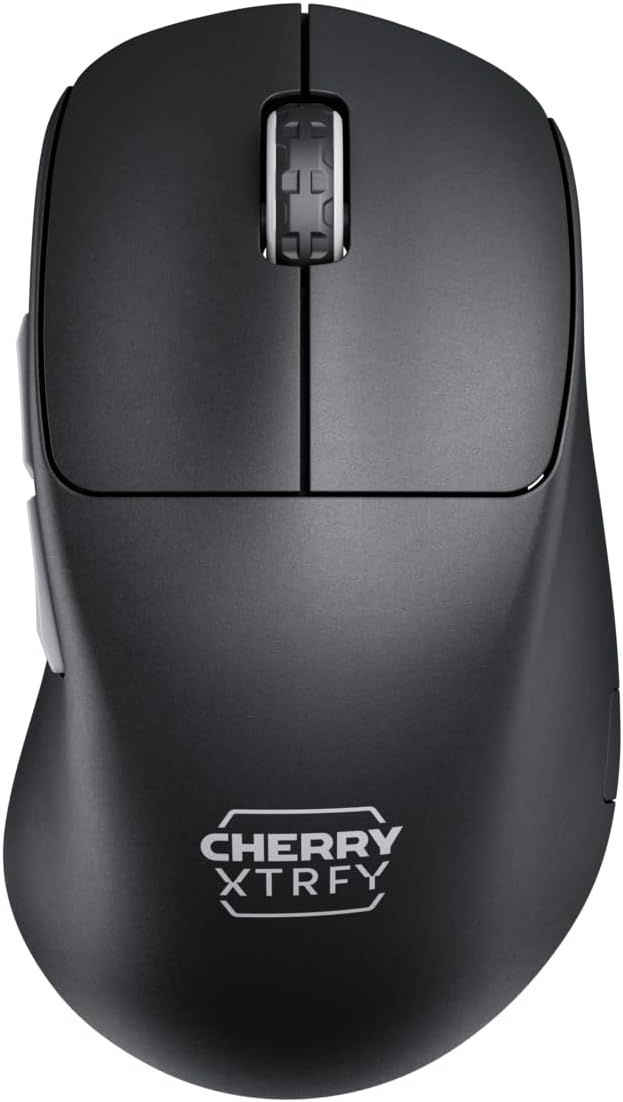
Imatge: Superior view of the M64 Pro 8K mouse, showing the left and right click buttons and scroll wheel.
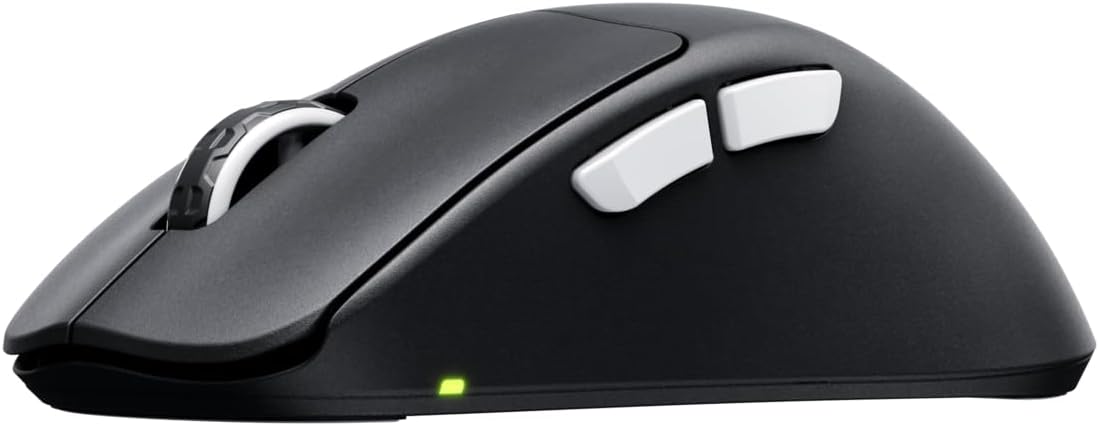
Imatge: Lateral view of the M64 Pro 8K mouse, highlighting the two side buttons.
- Botó esquerre de clic: Botó d'acció principal.
- Botó dret: Botó d'acció secundària.
- Roda de desplaçament: For scrolling through content. Also functions as a middle click button.
- Botons laterals (endavant/enrere): Normalment s'utilitza per a la navegació en web browsers or assigned to in-game actions.
- DPI Button (Bottom of mouse): Allows for on-the-fly adjustment of DPI settings.
- Polling Rate Switch (Bottom of mouse): Adjusts the polling rate (e.g., 1000 Hz, 8000 Hz).
- Power Switch (Bottom of mouse): Activa o desactiva el ratolí.

Imatge: Part inferior view of the M64 Pro 8K mouse, showing the DPI, polling rate, and power switches.
Ajust de DPI
The M64 Pro 8K allows for quick DPI (Dots Per Inch) adjustments. Press the dedicated DPI button on the bottom of the mouse to cycle through preset DPI levels. The LED indicator will change color to indicate the current DPI setting. For custom DPI steps, use the CHERRY XTRFY software.
Polling Rate (8K Hz Technology)
The M64 Pro 8K features an 8000 Hz polling rate, meaning it reports its position to your computer 8000 times per second. This significantly reduces input lag and provides smoother cursor movement, especially on high refresh rate monitors. Use the polling rate switch on the bottom of the mouse to select your desired rate. Note that higher polling rates may consume more battery and require more system resources.
Vídeo: Presentació oficial del producte en vídeoasing the M64 Pro Wireless 8K mouse, highlighting its ergonomic shape and ultra-fast 8K polling rate technology.
Gestió de la bateria
The M64 Pro 8K is equipped with a 350-mA battery, offering up to 90 hours of playtime in Standard Gaming Mode. The mouse can be charged using the included EZcord cable. You can continue to use the mouse while it is charging, providing uninterrupted gameplay. Monitor the battery indicator light for low battery warnings.
Manteniment
Proper maintenance ensures the longevity and optimal performance of your M64 Pro 8K mouse:
- Neteja: Feu servir un drap suau, sec i sense borrissol per netejar el ratolí. Per a la brutícia persistent, netegeu-lo lleugerament.ampNetegeu el drap amb aigua o una solució de neteja suau. Eviteu productes químics agressius o materials abrasius.
- Cura del sensor: Mantingueu el sensor òptic de la part inferior del ratolí net i lliure de pols o restes. Feu servir un bastonet de cotó o aire comprimit si cal.
- Peus de ratolí (patins): The mouse feet are designed for smooth gliding. If they become worn, replacements may be available from CHERRY XTRFY.
- Emmagatzematge: Quan no l'utilitzeu durant períodes prolongats, guardeu el ratolí en un lloc fresc i sec, allunyat de la llum solar directa i de temperatures extremes.
Resolució de problemes
If you encounter issues with your M64 Pro 8K mouse, try the following solutions:
| Problema | Possible solució |
|---|---|
| Mouse not responding/connecting wirelessly. |
|
| El moviment del cursor és erràtic o irregular. |
|
| Mouse disconnects frequently (especially at 8K Hz). |
|
| Buttons or scroll wheel not functioning correctly. |
|
| La durada de la bateria és més curta del que s’esperava. |
|
Especificacions
| Característica | Detall |
|---|---|
| Número de model | CX-M64W-PRO-BLACK |
| Marca | XTRFY DE CIRER |
| Color | Negre |
| Tecnologia de connectivitat | Wireless (USB Dongle), USB (for charging/wired use) |
| Tecnologia de detecció de moviment | Laser (Pixart 3395 sensor) |
| Taxa de votació | Fins a 8000 Hz |
| Pes de l'article | Aproximadament 55 grams (1.94 unces) |
| Tipus de bateria | 1 bateria de ions de liti (inclosa) |
| Durada de la bateria | Up to 90 hours (Standard Gaming Mode) |
| Dimensions del paquet | 4.7 x 2.5 x 1.5 polzades |
| País d'origen | Xina |
Garantia i Suport
CHERRY XTRFY products are built to high standards. For warranty information and technical support, please refer to the official CHERRY XTRFY weblloc web o contacteu directament amb el seu servei d'atenció al client.
- Oficial Weblloc: For drivers, software, FAQs, and support resources, visit cherryxtrfy.com.
- Atenció al client: Contact information for support can typically be found on the official website under a "Support" or "Contact Us" section.
- Garantia: The product comes with a standard manufacturer's warranty. Please retain your proof of purchase for warranty claims. Specific warranty terms and duration may vary by region.


