Introducció
Thank you for choosing the PoP Voice PV610 Professional Lavalier Lapel Microphone. This compact and versatile microphone is designed to deliver clear, crisp audio for a wide range of applications, including video recording, live broadcasting, interviews, and vlogging. Its omnidirectional pickup pattern ensures comprehensive sound capture, making it an ideal tool for content creators and professionals alike.

Image: Two PoP Voice PV610 Lavalier Microphones, showcasing their compact design and 3.5mm TRRS connectors.
Característiques del producte
- Recollida omnidireccional: Captures sound equally from all directions, ideal for interviews and group recordings.
- Àudio de grau professional: Equipped with a high-quality sound chipset and structural design for effective noise reduction, ensuring clear and crisp audio.
- Disseny Plug & Play: No batteries or additional applications are required for operation, offering immediate usability.
- Àmplia compatibilitat: Compatible with a broad range of devices including smartphones (iPhone, Android), cameras, laptops, tablets, and voice recorders.
- Construcció duradora: Made from professional-grade materials for enhanced durability and reliable performance.
- Portàtil i còmode: Lightweight design with a long 6.5-foot cable for flexible placement and easy storage with the included pouch.
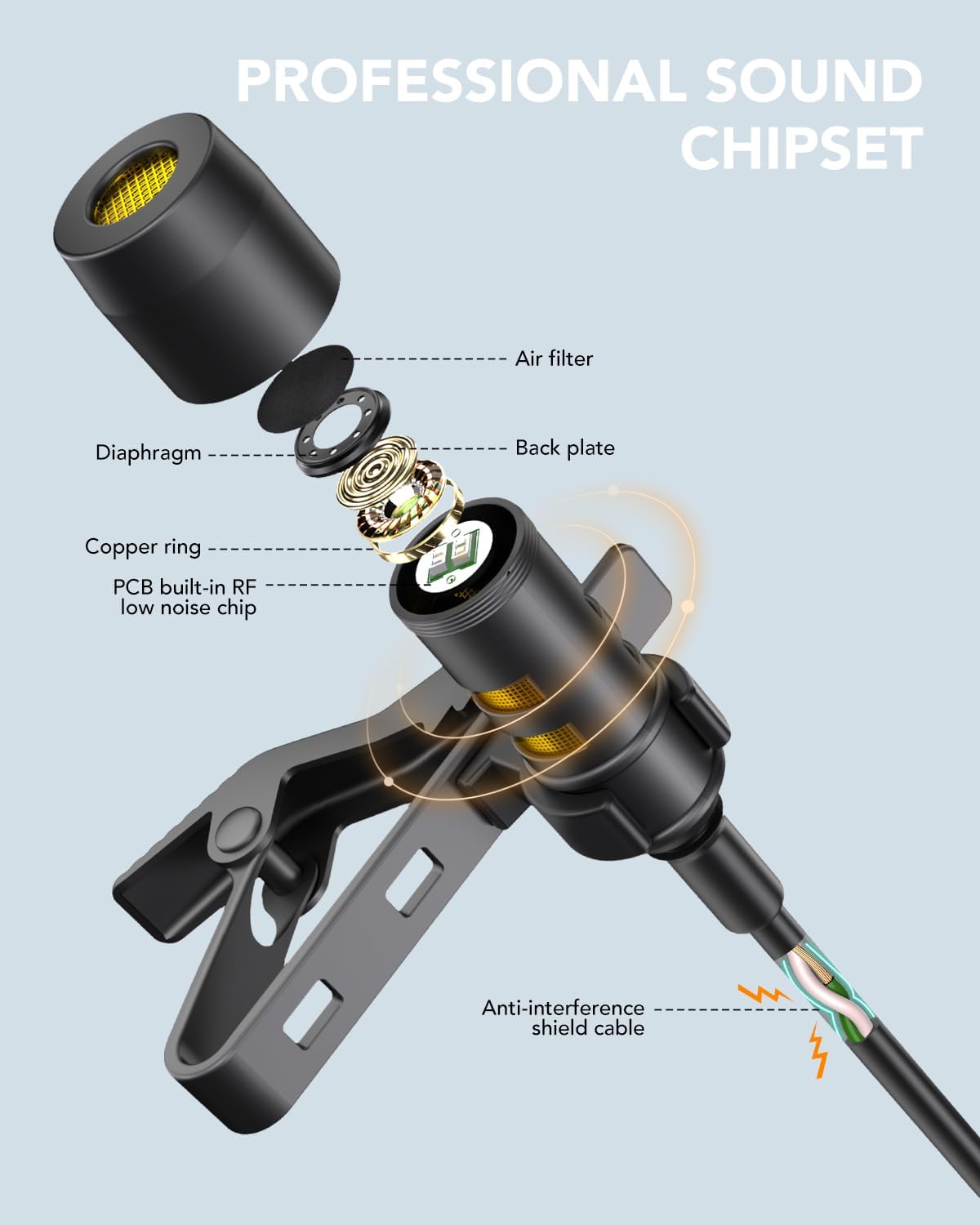
Image: Detailed diagram illustrating the internal components of the microphone, highlighting the professional sound chipset and anti-interference shield cable.
Què hi ha a la caixa
Upon opening your PoP Voice PV610 microphone package, you will find the following items:
- 2 x 3.5mm Wired Microphones (6.5FT each)
- 4 x Extra Mic Covers (foam windscreens)
- 2 x Extra Mic Windscreen (furry wind muffs)
- 2 x 3.5mm TRRS to TRS Adapters
- 1 x Manual d'usuari
- 1 x bossa d'emmagatzematge

Imatge: Representació visual de tots els elements inclosos en el paquet del producte.
Configuració
Setting up your PoP Voice PV610 microphone is straightforward. Follow these steps to begin recording:
- Identify Your Device's Audio Input: The microphone features a 3.5mm TRRS (Tip-Ring-Ring-Sleeve) connector, commonly found on smartphones, tablets, and some laptops.
- Per a telèfons intel·ligents/tauletes: Directly plug the 3.5mm TRRS connector into your device's headphone/microphone jack. If your iPhone 7 or above, or newer Android device lacks a 3.5mm jack, you will need your original phone adapter (e.g., Lightning to 3.5mm or USB-C to 3.5mm adapter), which is not included with this microphone.
- For Cameras/Laptops/PCs: If your device has separate microphone and headphone jacks (TRS input), use the included 3.5mm TRRS to TRS adapter. Plug the microphone into the TRRS end of the adapter, then plug the TRS end into your device's microphone input.
- Fixeu el parabrisa: For outdoor use or to reduce plosive sounds, attach one of the included foam or furry windscreens over the microphone capsule.
- Enganxar: Use the integrated lapel clip to securely attach the microphone to your clothing, approximately 6-8 inches from your mouth for optimal sound capture.

Image: Compatibility chart for the microphone with different device types and the necessity of specific adapters.

Image: The microphone can be used as an external clip-on mic with compatible wireless transmitters like DJI Mic or Rode Wireless GO.

Image: Important note regarding the exclusion of USB-C and Lightning adapters.
Instruccions de funcionament
Once connected, the PoP Voice PV610 microphone operates on a plug-and-play basis. No special drivers or software are typically needed. Simply open your preferred audio or video recording application on your device and select the external microphone as your input source if prompted. The microphone is designed for immediate use without the need for batteries.
- Gravació: Start your recording application (e.g., Voice Memos, Camera app, GarageBand) and ensure the microphone is selected as the audio input.
- Live Broadcasting/Streaming: Connect the microphone to your smartphone or computer and configure your streaming software to use the external microphone for enhanced audio quality.
- Interviews: Position the microphone on the subject's clothing for clear voice capture. For two-person interviews, two microphones can be used simultaneously with compatible devices or mixers.
- Vlogs: Attach the microphone to your shirt for hands-free, high-quality audio while filming.

Image: A user demonstrating the microphone's ease of use and key audio benefits.

Image: The microphone in use, highlighting its extended wired reach and clip-on convenience.

Image: Various applications of the microphone, including live broadcasting, recording, interviews, i vlogging.
Manteniment
To ensure the longevity and optimal performance of your PoP Voice PV610 microphone, follow these simple maintenance guidelines:
- Neteja: Gently wipe the microphone capsule and cable with a soft, dry cloth. Avoid using liquid cleaners or abrasive materials.
- Emmagatzematge: When not in use, store the microphone in the provided storage bag to protect it from dust, dirt, and physical damage. Use the magic tape to tidy the cord and prevent tangling.
- Manejar amb cura: Avoid pulling on the cable directly when unplugging the microphone. Always grasp the connector.
- Replace Windscreens: If the foam or furry windscreens become worn or damaged, replace them with the extra ones provided to maintain sound quality and protect the microphone.
Resolució de problemes
If you encounter issues with your PoP Voice PV610 microphone, refer to the following common problems and solutions:
| Problema | Causa possible | Solució |
|---|---|---|
| Sense so o so molt baix | Microphone not fully plugged in; incorrect adapter used; device settings; damaged cable/mic. | Ensure the connector is fully inserted into the jack. Verify you are using the correct TRRS/TRS adapter for your device. Check your device's audio input settings to ensure the external microphone is selected and volume is up. Try unplugging and re-plugging the microphone. Test with another device if possible. |
| Hollow or echoey sound | Microphone not properly connected; internal device microphone still active. | Ensure the microphone is securely connected. Some devices may default to their internal mic even when an external one is plugged in; check and adjust settings. |
| Àudio distorsionat o poc clar | Microphone too close/far from source; strong wind/background noise; damaged windscreen. | Adjust microphone placement (6-8 inches from mouth is ideal). Use the included windscreens to reduce environmental noise. Replace damaged windscreens. |
| Microphone not recognized by PC/Laptop | Incorrect jack used; driver issues; adapter needed. | Ensure you are plugging into the microphone input jack (often pink or with a mic icon). Use the TRRS to TRS adapter if your PC has separate mic/headphone jacks. Check sound settings in your operating system. |
Especificacions
| Especificació | Detall |
|---|---|
| Nom del model | PV610 |
| Factor de forma del micròfon | Lavalier |
| Patró polar | Omnidireccional |
| Tecnologia de connectivitat | Auxiliar (amb cable) |
| Tipus de connector | 3.5 mm Jack (TRRS) |
| Longitud del cable | 6.5 FT (per microphone) |
| Font d'alimentació | Elèctric amb cable (no calen piles) |
| Pes de l'article | 2.89 unces |
| Dimensions del producte | 5.91 x 0.67 x 4.13 polzades |
| Dispositius compatibles | Camera, Laptop, Smartphone, Tablet, Voice Recorder |
| Components inclosos | 3.5mm Wired Mic, User Manual, Wind Muff for Mic |
Garantia i suport
PoP voice is committed to providing high-quality products and customer satisfaction. If you have any questions or require assistance with your PoP Voice PV610 microphone, please contact the seller directly through your purchase platform. They will be able to provide detailed support and address any concerns you may have regarding the product's use or performance.
Si us plau, conserveu el comprovant de compra per a qualsevol reclamació de garantia o consulta d'assistència.


