1. Introducció
Thank you for choosing the Cyboris KKM-001 Portable Karaoke Machine. This device combines a 15W Bluetooth speaker with two wireless microphones, offering a versatile audio experience for various occasions. Please read this manual thoroughly before use to ensure proper operation and to maximize your enjoyment of the product.
2. Contingut del paquet
Marqueu la casella per als elements següents:
- 1 x Cyboris KKM-001 Portable Karaoke Speaker
- 2 x micròfons sense fil
- 1 x cable de càrrega tipus C
- 1 x Manual d'usuari (aquest document)
3. Producte acabatview
Familiarize yourself with the components and controls of your Cyboris KKM-001 Karaoke Machine.

Image: The Cyboris KKM-001 Portable Karaoke Machine in green, accompanied by two matching wireless microphones.
3.1 Speaker Controls and Ports

Image: A detailed diagram illustrating the control buttons and ports on the Cyboris KKM-001 speaker and its wireless microphone.
- Botó per baixar el volum / pista anterior: Short press to decrease volume, long press for previous track.
- Botó Pujar volum / Pista següent: Short press to increase volume, long press for next track.
- Power On/Off Knob: Rotate to turn the speaker on or off.
- Play/Pause / Mode Switching / Lights Button: Short press to play/pause, long press to switch modes (Bluetooth, AUX, TF Card), double press to turn lights on/off.
- AUX Audio Cable Jack: For connecting external audio devices via a 3.5mm AUX cable.
- Ranura per a targetes TF: Per reproduir música directament des d'una targeta TF (MicroSD).
- Port de càrrega tipus C: Per carregar la bateria interna de l'altaveu.
3.2 Controls del micròfon
- Microphone/Reverb Volume + / Next Song Button: Short press to increase microphone volume or reverb, long press for next song (in music playback mode).
- Microphone/Reverb Volume - / Previous Song Button: Short press to decrease microphone volume or reverb, long press for previous song (in music playback mode).
- Power On/Off / Microphone Mute / Play/Pause Button: Long press to power on/off the microphone, short press to mute/unmute, double press to play/pause music.
- Original Sound Cancellation / Magic Sound Loop Switching Button: Short press to cancel original vocals from a song (karaoke mode), long press to cycle through voice change effects.
4. Configuració
4.1 Càrrega del dispositiu
Before first use, fully charge the speaker and both microphones.
- Connect the provided Type-C charging cable to the speaker's Type-C charging port and a standard USB power adapter (not included).
- Connect the Type-C charging cable to each microphone's charging port.
- The charging indicator light will show charging status (refer to product for specific light behavior).
- A full charge takes approximately 3 hours for the speaker and microphones.
4.2 Engegada i emparellament
- Ponent: Rotate the Power On/Off knob clockwise to turn on the speaker. A power-on prompt will sound.
- Micròfons: Long press the Power On/Off button on each microphone to turn them on. They will automatically pair with the speaker. A successful connection will be indicated by a sound prompt.
4.3 Connexió Bluetooth
To connect the karaoke machine to your smartphone or other Bluetooth-enabled device:
- Ensure the speaker is powered on and in Bluetooth mode (indicated by a voice prompt or light). If not, long press the Play/Pause / Mode Switching / Lights Button to cycle modes until Bluetooth mode is active.
- Al dispositiu, aneu a la configuració de Bluetooth i cerqueu els dispositius disponibles.
- Select "KKM-001" from the list.
- Once connected, a confirmation sound will play from the speaker. You can now stream audio from your device.
5. Instruccions de funcionament
5.1 Funcionament de l'altaveu
- Ajust de volum: Use the Volume Up/Down buttons on the speaker.
- Control de la pista: Long press the Volume Up/Down buttons for next/previous track.
- Reproduir/pausa: Premeu breument el botó Reproduir/Pausa.
- Canvi de mode: Long press the Play/Pause button to switch between Bluetooth, AUX, and TF Card modes.
- Efectes de llum: Double press the Play/Pause button to turn the LED lights on or off.
5.2 Microphone Operation
- Microphone Volume/Reverb: Use the +/- buttons on the microphone.
- Silencia/Activa el silenci: Short press the Power On/Off button on the microphone.
- Voice Change Effects: Long press the Original Sound Cancellation / Magic Sound Loop Switching button to cycle through 6 sound modes: Original Sound, Male to Female, Female to Male, Magic Sound, Kid Sound, and Karaoke Mode.
- Original Sound Cancellation: Short press the Original Sound Cancellation button to reduce or remove vocals from a playing song, allowing you to sing along.

Image: Two children happily singing into the wireless microphones, demonstrating the dual microphone functionality of the Cyboris KKM-001.
5.3 Modes de reproducció
- Mode Bluetooth: Connect your device as described in Section 4.3.
- Mode AUX: Insert a 3.5mm audio cable into the AUX jack on the speaker and connect the other end to your audio source. The speaker will automatically switch to AUX mode or can be manually selected using the mode button.
- Mode de targeta TF: Insert a TF (MicroSD) card with MP3, WAV, FLAC, or APE audio files into the TF card slot. The speaker will automatically switch to TF Card mode and begin playback.
5.4 efectes d'il·luminació LED
The speaker features vibrant LED lights that can sync with the rhythm of your music. Double press the Play/Pause button on the speaker to toggle the lights on or off.

Image: The Cyboris KKM-001 speaker showcasing its dynamic, colorful LED lighting effects.
6. Manteniment
- Netegeu el dispositiu amb un drap suau i sec. No utilitzeu productes de neteja abrasius ni dissolvents.
- Eviteu exposar el dispositiu a temperatures extremes, llum solar directa o humitat elevada.
- Guardeu el dispositiu en un lloc fresc i sec quan no l'utilitzeu.
- No intenteu desmuntar ni reparar el dispositiu vosaltres mateixos, ja que això anul·larà la garantia.
7. Solució De Problemes
| Problema | Causa possible | Solució |
|---|---|---|
| Sense poder | La bateria està esgotada. | Charge the speaker and microphones fully. |
| No hi ha so de l'altaveu | El volum és massa baix o silenciat. Mode d'entrada incorrecte. | Increase volume. Ensure correct mode (Bluetooth, AUX, TF Card) is selected. |
| El micròfon no funciona | Microphone is off or not paired. Battery is low. | Turn on microphone. Ensure it's paired. Charge microphone. |
| Echo or feedback (squealing) | Microphone too close to speaker. Microphone volume too high. | Increase distance between microphone and speaker. Reduce microphone volume or reverb. |
| Connexió Bluetooth inestable | Device too far from speaker. Interference. | Move device closer to speaker (within 18m). Avoid obstacles. Re-pair Bluetooth. |
8. Especificacions
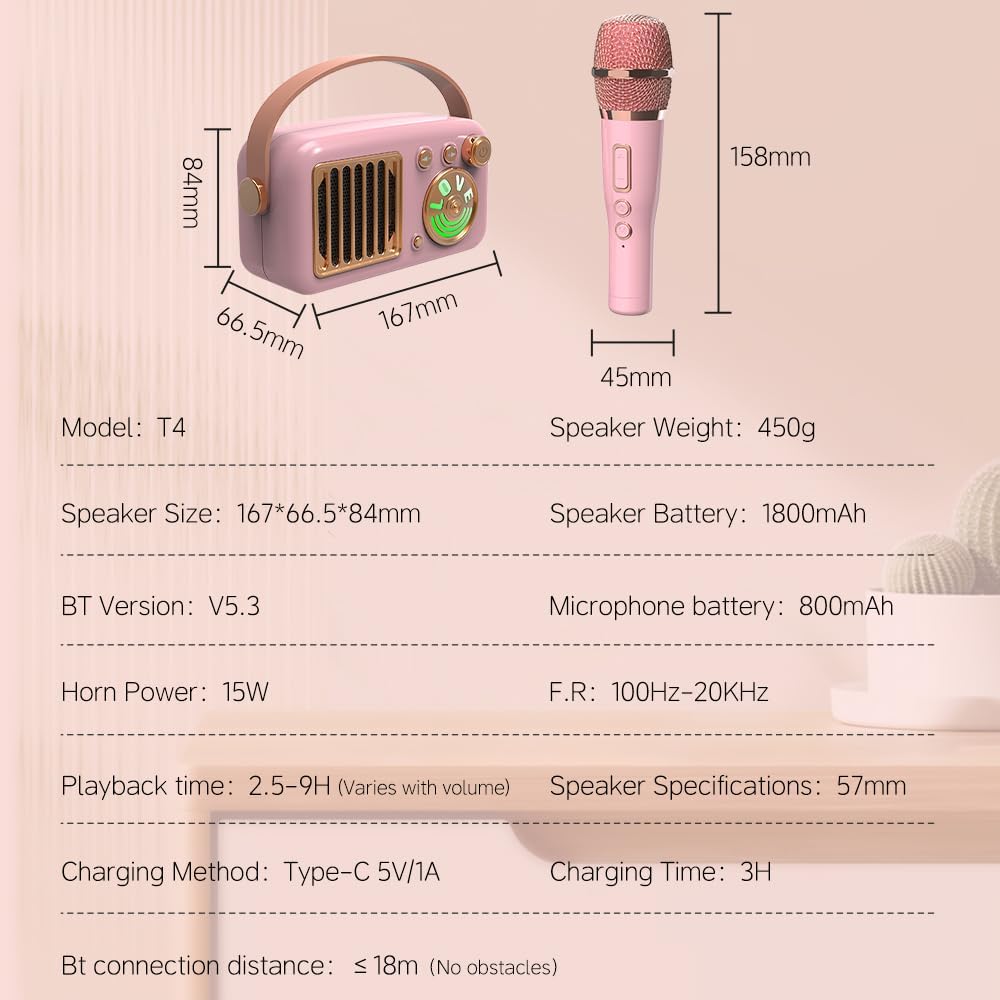
Image: A visual representation of the Cyboris KKM-001 speaker and microphone dimensions, along with key technical specifications.
| Número de model | KKM-001 |
| Speaker Dimensions (L x W x H) | 5.9 x 3.14 x 2.16 polzades (167 x 66.5 x 84 mm) |
| Pes de l'altaveu | 2.27 lliures (aprox. 450 g) |
| Potència de la trompa | 15W |
| Bateria de l'altaveu | Ió de liti de 1800 mAh (inclosa) |
| Bateria del micròfon | 800 mAh |
| Temps de reproducció | 2.5 - 9 hours (varies with volume) |
| Temps de càrrega | Aprox. 3 hores |
| Mètode de càrrega | Tipus C 5V/1A |
| Versió Bluetooth | 5.3 |
| Distància de connexió Bluetooth | Fins a 18 metres (sense obstacles) |
| Resposta de freqüència | 100Hz - 20KHz |
| Entrada d'àudio | AUX, TF Card |
| Material | Metall, plàstic |
9. Informació de seguretat
- Mantingueu el dispositiu allunyat de l'aigua i altres líquids.
- No deixeu caure ni sotmeti el dispositiu a impactes forts.
- Feu servir només el cable de càrrega especificat.
- Mantingueu-ho fora de l'abast dels nens petits per evitar el risc d'asfíxia amb peces petites.
- Eviteu escoltar música durant molt de temps a volums alts per evitar danys auditius.
10. Garantia i Suport
The Cyboris KKM-001 Portable Karaoke Machine comes with a standard manufacturer's warranty. For specific warranty details, please refer to the warranty card included in your package or contact Cyboris customer support.
For technical support, troubleshooting assistance, or warranty claims, please contact the seller or visit the official Cyboris weblloc.


