1. Informació important de seguretat
Please read all instructions carefully before using the SANSUI ES-24C1 monitor. Keep this manual for future reference.
- Do not expose the monitor to rain or moisture to prevent fire or electric shock hazards.
- No obriu el monitor casing. No hi ha peces a l'interior que l'usuari pugui reparar. Demaneu totes les tasques de manteniment a personal qualificat.
- Col·loqueu el monitor sobre una superfície estable i plana per evitar que caigui.
- Assegureu-vos que hi hagi una ventilació adequada al voltant del monitor. No bloquegeu les obertures de ventilació.
- Feu servir només l'adaptador de corrent que s'inclou amb el monitor.
- Desendolleu el monitor de la presa de corrent durant tempestes o quan no el feu servir durant períodes prolongats.
2. Contingut del paquet
Verifiqueu que tots els elements siguin presents al paquet:
- SANSUI ES-24C1 24-inch Curved Monitor
- Suport de monitor (base i coll)
- Adaptador d'alimentació
- Cable HDMI
- Manual d'usuari
3. Producte acabatview
The SANSUI ES-24C1 is a 24-inch Full HD (1920x1080) curved monitor featuring a 100Hz refresh rate, 1ms MPRT response time, and built-in speakers. It is designed for both home and office use, offering a 1500R curvature for an immersive viewexperiència.

Imatge: Més deview of the SANSUI ES-24C1 monitor highlighting its key features and curved design.

Image: Summary of the monitor's main features including 100Hz, 1ms MPRT, USB Type-C, HDR, 100% sRGB, 3000:1 contrast, 250 Nits, built-in speakers, and VESA mount.
Ports i controls

Imatge: Primer pla view of the monitor's rear ports, including HDMI, USB Type-C, and Audio Out.
- USB tipus C: 1 port for video input (does not support charging).
- HDMI 1.4: 1 port for video input.
- Conector d'àudio de 3.5 mm: Per connectar auriculars o altaveus externs.
- DC IN: Port d'entrada d'alimentació.
- Five-Way Joystick: Located on the back for OSD menu navigation.
4. Configuració
4.1 Muntatge del monitor
Segueix aquests passos per muntar el suport del monitor:
- Fixeu el coll del suport al panell del monitor.
- Secure the stand base to the neck.
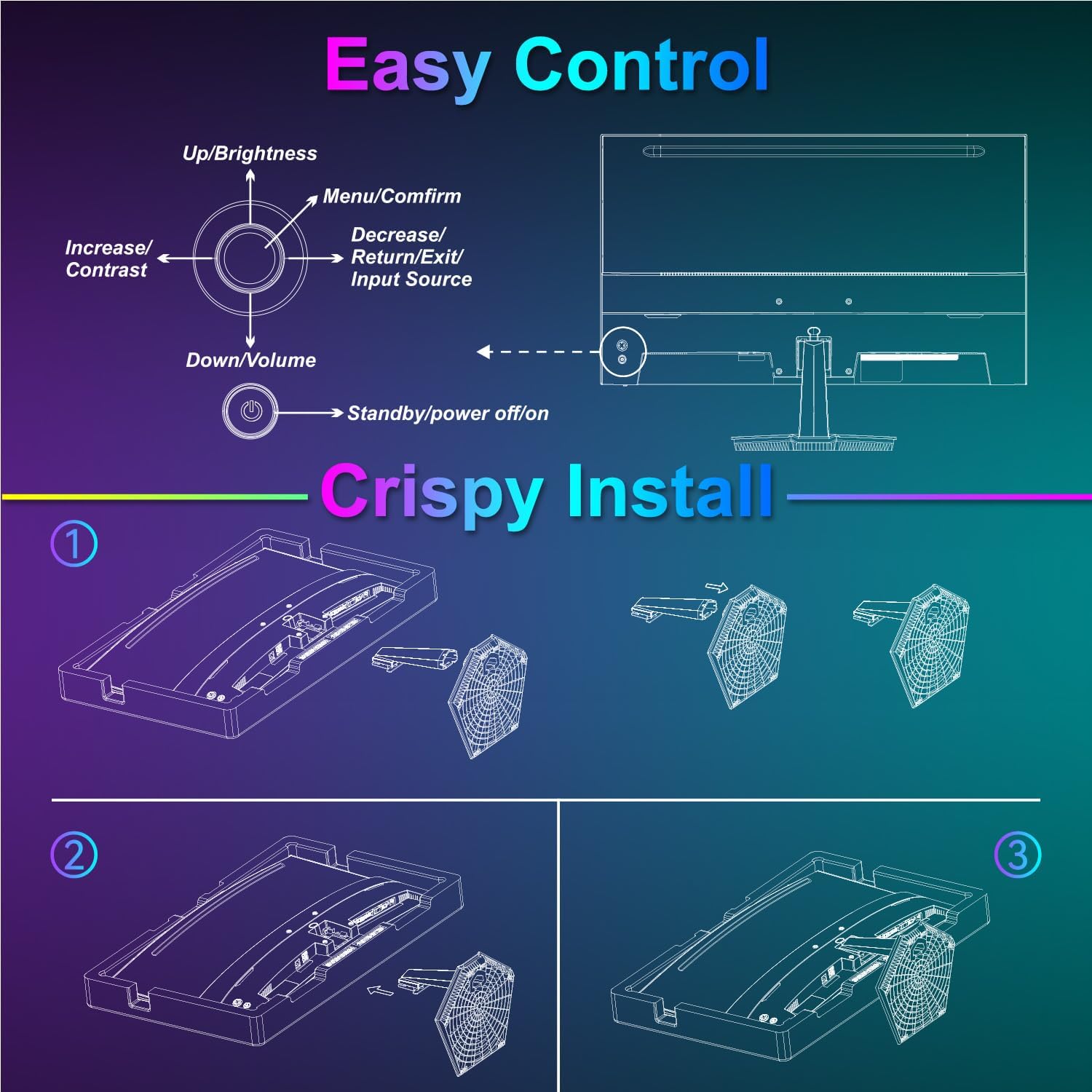
Image: Diagram illustrating the step-by-step assembly of the monitor stand.
4.2 Connexió a dispositius
Connect your monitor to a computer or other video source using the appropriate cable.
- HDMI: Connect one end of the HDMI cable to the monitor's HDMI port and the other end to your device's HDMI output.
- USB tipus C: Connect one end of the USB Type-C cable to the monitor's USB Type-C port and the other end to your device's compatible USB Type-C output.
- Àudio: If using external audio devices, connect them to the 3.5mm audio jack.

Image: Visual representation of various devices connecting to the monitor via HDMI and USB Type-C.
4.3 Encès/Apagat
Connect the power adapter to the monitor's DC IN port and then plug it into a power outlet. Press the power button located on the back of the monitor to turn it on or off.
5. Instruccions de funcionament
5.1 Navegació pel menú OSD
The On-Screen Display (OSD) menu is controlled using the five-way joystick on the back of the monitor. Press the joystick to open the menu, then move it up/down/left/right to navigate and select options.

Image: Diagram showing the five-way joystick and its functions for OSD menu navigation.
5.2 Configuració de la pantalla
Adjust various display parameters to optimize your viewexperiència.
- Brillantor/Contrast: Ajusta els nivells generals de luminància i contrast.
- Configuració de color: Ajusta amb precisió la temperatura de color, el to i la saturació.
- HDR: Enable or disable High Dynamic Range for enhanced contrast and color.
- Low Blue Light/Anti-Flicker: Reduce eye strain during prolonged use.
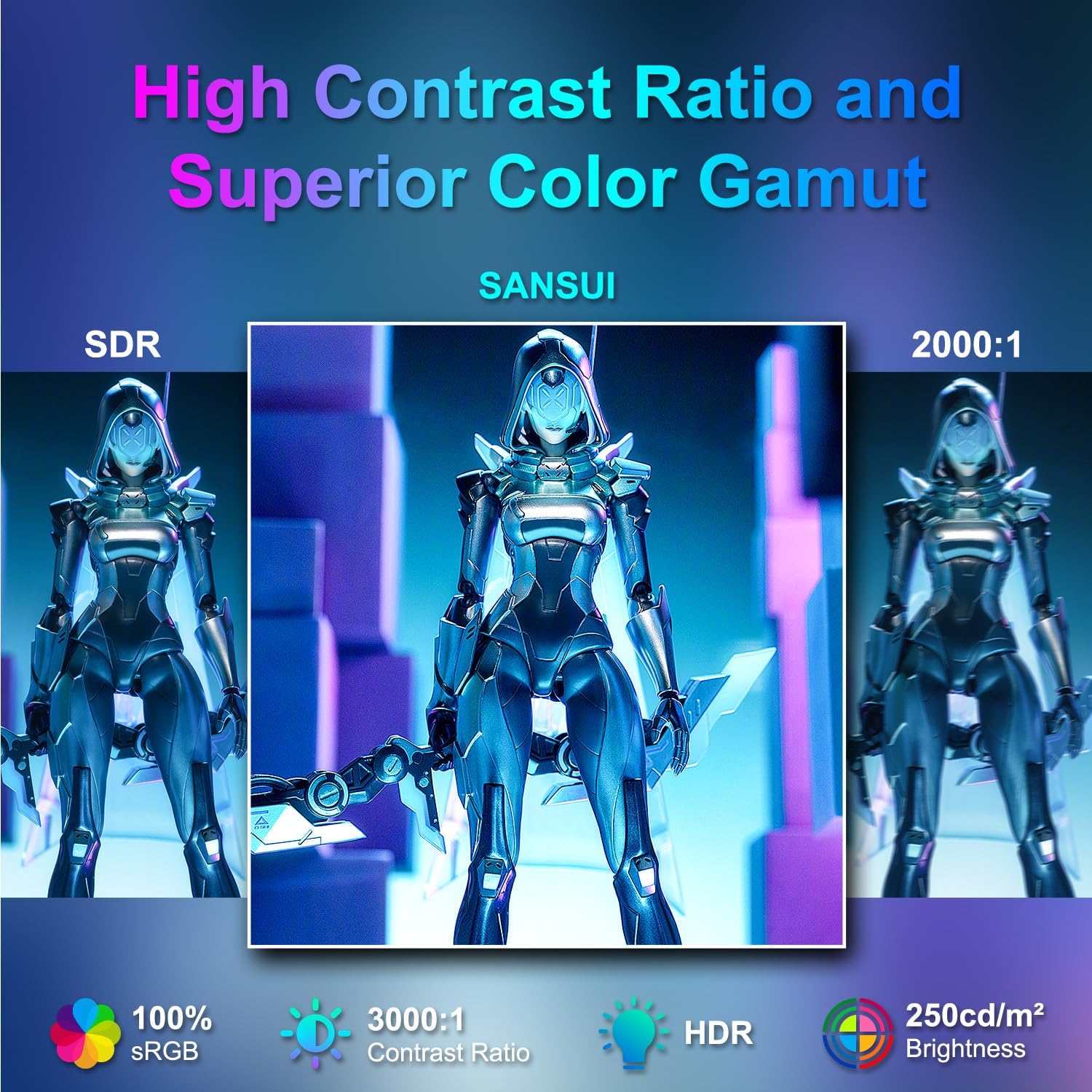
Image: Visual comparison demonstrating high contrast ratio and superior color gamut of the SANSUI monitor.

Image: Highlights of display features like 3000:1 contrast ratio, 100% sRGB, and 250 Nits brightness.

Image: Comparison of display quality with and without HDR enabled.

Image: Illustration of Low Blue Light and Flicker-Free technologies for reduced visual fatigue.
5.3 Característiques del joc
The ES-24C1 monitor includes features optimized for gaming performance.
- Freqüència de refresc de 100 Hz: Provides smoother motion and reduced input lag.
- Temps de resposta MPRT d'1 ms: Minimitza el desenfocament de moviment i les imatges fantasma.
- Sincronització adaptativa: Sincronitza la freqüència d'actualització del monitor amb la freqüència d'imatges de la GPU per eliminar el trencament i les entrebancades de la pantalla.
- Modes de joc: Pre-set display modes optimized for different game genres (e.g., FPS, RTS, RPG).
- Punt de mira de la IA: An on-screen crosshair overlay for improved aiming accuracy.
- Temporitzador de joc: Un temporitzador en pantalla per al seguiment dels esdeveniments del joc.

Image: Demonstrates the difference in smoothness between 60Hz, 75Hz, and 100Hz refresh rates, highlighting low blue light and Adaptive FreeSync.

Image: Illustrates the benefits of 100Hz refresh rate and 1ms MPRT response time in reducing screen tearing and improving fluidity.
5.4 Multi-Window Modes (PIP/PBP)
The monitor supports Picture-in-Picture (PIP) and Picture-by-Picture (PBP) modes, allowing you to view content from multiple input sources simultaneously.
- PBP (Picture-by-Picture): Divides the screen into two halves, displaying content from two different sources side-by-side.
- PIP (Imatge en imatge): Displays content from a secondary source in a smaller window overlaid on the main display.

Imatge: Examples of Duplicated Mode, Second Screen Mode, and Single Display Screen Mode for enhanced productivity.
6. Manteniment
6.1 Neteja
- Desconnecteu sempre el monitor abans de netejar-lo.
- Utilitzeu un drap suau i sense pelusa dampNetejat amb aigua o un netejador suau i no abrasiu dissenyat específicament per a electrònica.
- No ruixeu el netejador directament sobre la pantalla.
6.2 Atenció
- Eviteu col·locar objectes pesats sobre el monitor o els seus cables.
- Mantingueu el monitor allunyat de la llum solar directa, de fonts de calor i de temperatures extremes.
- Do not expose the monitor to strong magnetic fields.
7. Solució De Problemes
If you encounter issues with your SANSUI ES-24C1 monitor, refer to the following common problems and solutions:
- Sense energia: Assegureu-vos que l'adaptador de corrent estigui connectat correctament tant al monitor com a una presa de corrent que funcioni. Comproveu si l'indicador lluminós d'engegada està encès.
- Sense senyal: Verify that the video cable (HDMI or USB Type-C) is correctly connected to both the monitor and your device. Ensure the correct input source is selected in the OSD menu.
- Pantalla parpellejant: Check the video cable for damage or loose connections. Try a different video cable or port. Ensure your graphics card drivers are up to date.
- Mala qualitat d'imatge: Adjust brightness, contrast, and color settings in the OSD menu. Ensure the display resolution and refresh rate are set correctly in your device's display settings.
- No hi ha so dels altaveus: Check the volume settings on both the monitor and your connected device. Ensure the audio cable (if used) is properly connected.
8. Especificacions
Detailed technical specifications for the SANSUI ES-24C1 24-inch Curved Monitor:
| Característica | Especificació |
|---|---|
| Número de model | ES-24C1 |
| Mida de la pantalla | 24 polzades |
| Tipus de panell | Corbat (1500R) |
| Resolució | 1920 x 1080 (FHD) |
| Freqüència d'actualització | 100 Hz |
| Temps de resposta | 1 ms (MPRT) |
| Relació de contrast | 3000:1 |
| Brillantor | 250 Nit |
| Colors de visualització | 16.7 milions |
| Gamma de colors | 100% sRGB |
| Viewangle ing | 178° (H/V) |
| Entrades de vídeo | 1x HDMI 1.4, 1x USB Type-C |
| Sortida d'àudio | 1 presa d'àudio de 3.5 mm |
| Altaveus | 2x 2W Built-in Speakers |
| Muntatge VESA | 75 x 75 mm |
| Ajust d'inclinació | -5° a 15° |
| Dimensions del producte | 21 x 38 x 49 polzades |
| Pes de l'article | 7.78 lliures |

Image: Detailed dimensions and ergonomic features like 178° wide viewing angle and -5°~15° tilt.

Image: Visual representation of the 178° wide viewangle de ing.

Image: Tips for VESA mounting (75x75mm, M4*8mm screw size) and tilt adjustment.

Imatge: Part posterior view of the monitor detailing port locations and key specifications.
9. Garantia i Suport
SANSUI provides a limited warranty for this product. For detailed warranty information, please refer to the warranty card included in your package or visit the official SANSUI website. For technical support or service inquiries, please contact SANSUI customer service.
Assistència en línia: Visit the SANSUI Store on Amazon
10. Vídeo oficial del producte
Watch the official product video for a visual guide to the SANSUI ES-24C1 monitor's features and benefits.
Video: SANSUI 24" 100Hz Curved Monitor USB C with Speakers. This video provides an overview of the monitor's design, key features, and connectivity options.


