Introducció
Thank you for choosing the iTOMA 515 Alarm Clock. This device combines an alarm clock with an FM radio, a dimmable LED display, and dual alarm functionality, designed for convenience and reliability. This manual provides detailed instructions for setup, operation, and maintenance to ensure optimal performance.
Contingut del paquet
- 1 x iTOMA 515 Alarm Clock
- 1 x Manual d'usuari
Nota: No s'inclou un adaptador de corrent i s'ha de comprar per separat.
Producte acabatview
Familiarize yourself with the main components and controls of your iTOMA 515 Alarm Clock.
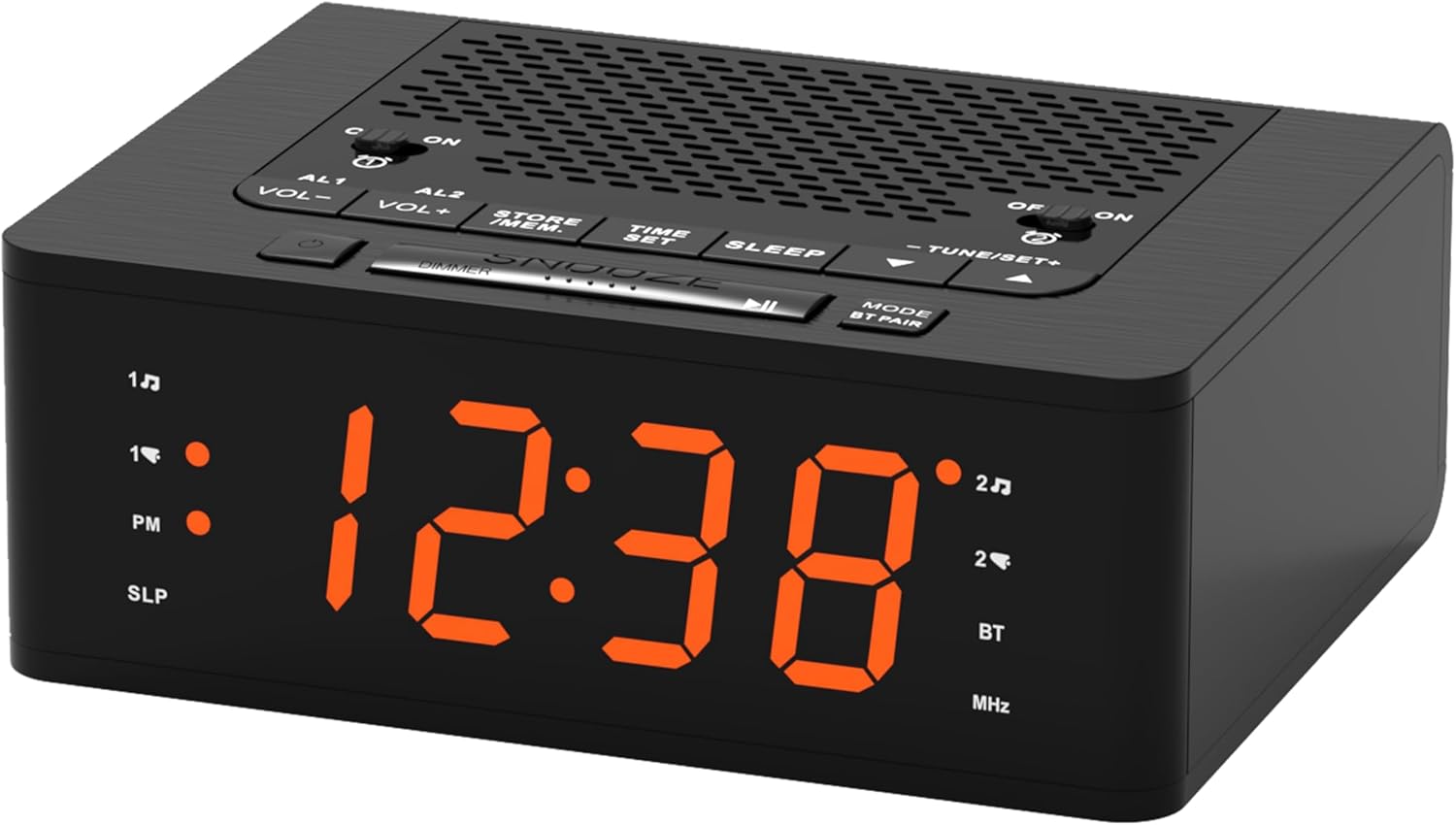
Imatge: Davant view of the iTOMA 515 Alarm Clock, showcasing the orange LED display and top-mounted control buttons.

Imatge: A dalt view of the alarm clock, highlighting the various control buttons for volume, alarm settings, time, sleep, and tuning.
Botons de control:
- AL1 / AL2: Alarm 1 / Alarm 2 setting buttons.
- VOL+ / VOL-: Ajusta el volum.
- STORE / MEM: Saves and recalls FM radio presets.
- HORA ESTABLECIDA: Entra al mode de configuració de l'hora.
- DORMIR: Activates sleep timer for FM radio.
- TUNE+ / TUNE-: Ajusta la freqüència de ràdio FM.
- SNOOZE / DIMMER: Snoozes alarm; adjusts display brightness.
- MODE / BT PAIR: Switches between modes (FM, Bluetooth); initiates Bluetooth pairing.
- ON / OFF (for AL1/AL2): Toggles alarms on or off.
Configuració
1. Connexió d'alimentació
- Connect a compatible DC 5V power adapter (not included) to the DC IN port on the back of the alarm clock.
- Plug the adapter into a standard wall outlet. The display will light up.
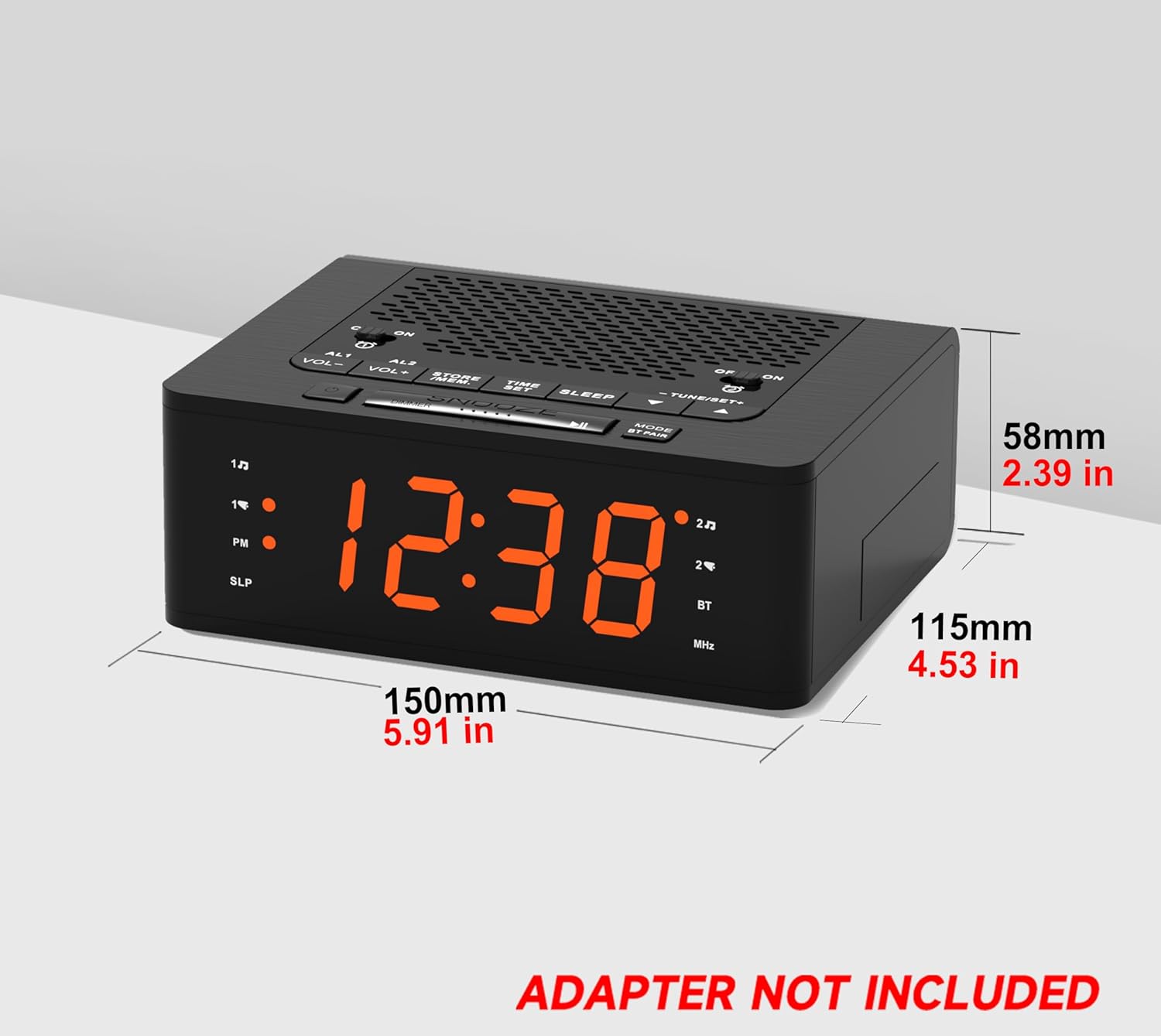
Imatge: lateral view of the iTOMA 515 Alarm Clock with dimensions indicated, and a clear note stating "ADAPTER NOT INCLUDED".
2. Configuració inicial de l'hora
- Manteniu premut el botó HORA CONFIGURADA fins que els dígits de les hores comencin a parpellejar.
- Utilitza el TUNE+ or TUNE- buttons to adjust the hour. Pay attention to the PM indicator if using 12-hour format.
- Premeu HORA CONFIGURADA again to confirm the hour and move to minute adjustment.
- Utilitza el TUNE+ or TUNE- botons per ajustar els minuts.
- Premeu HORA CONFIGURADA once more to confirm the minutes and exit time setting mode.
3. Selecció de format de 12/24 hores
While the time is flashing during setup, press the MODE per alternar entre els formats de visualització de 12 hores i 24 hores.
Instruccions de funcionament
1. Display Brightness Control (Dimmer)
The iTOMA 515 features a 4-level dimmable LED display.
- Premeu el botó SNOOZE / DIMMER button repeatedly to cycle through the brightness levels: Level 3 (brightest), Level 2, Level 1, and OFF.
- Select the brightness level that suits your preference for optimal visibility without disturbance.

Imatge: The alarm clock display transitioning through four brightness levels (L3, L2, L1, OFF) to illustrate the dimmer function.
2. Setting Alarms (AL1 & AL2)
The clock supports two independent alarms. You can set the alarm time, sound source (buzzer or FM radio), and alarm week mode.
- Manteniu premuda la tecla AL1 or AL2 fins que els dígits de l'hora de l'alarma parpellegin.
- Utilitza el TUNE+ or TUNE- botons per ajustar l'hora de l'alarma.
- Premeu el corresponent AL1 or AL2 de nou per confirmar l'hora i passar a l'ajust dels minuts.
- Utilitza el TUNE+ or TUNE- botons per ajustar els minuts de l'alarma.
- Premeu el botó AL1 or AL2 button again to select the alarm sound source: Zumbador or Ràdio FM.
- Premeu el botó AL1 or AL2 button again to select the alarm week mode: d1-7 (every day), d1-5 (weekdays only), or d6-7 (weekends only).
- Premeu el botó AL1 or AL2 button one last time to save the settings and exit.

Imatge: The alarm clock display with indicators for two separate alarms, showing AM 7:00 (Wake Up Time) and PM 7:00 (Coffee Time) as examples.
3. Turning Alarms ON/OFF
To activate or deactivate an alarm, use the dedicated ON/OFF buttons located on the top panel for AL1 and AL2.
4. Funció de posposició
Quan soni una alarma, premeu la tecla gran DORMITAR button on the top of the clock to temporarily silence the alarm for an additional 9 minutes of sleep. The alarm will sound again after this period.

Imatge: A hand reaching to press the large SNOOZE button on the top of the alarm clock, indicating its function for an extra 9 minutes of sleep.
5. Funcionament de la ràdio FM
The iTOMA 515 features an FM radio with 20 preset stations and adjustable volume.
- Premeu el botó MODE button to switch to FM radio mode. The frequency will appear on the display.
- Escaneig automàtic: Manteniu premut el botó TUNE+ or TUNE- per cercar automàticament la següent emissora disponible.
- Sintonització manual: Premeu breument TUNE+ or TUNE- button to manually adjust the frequency in small increments.
- Ajustar el volum: Utilitza el VOL+ or VOL- buttons to adjust the radio volume (16 levels).
- Desa els valors predefinits: To save a station, tune to your desired frequency, then press and hold the STORE / MEM button until a preset number flashes. Use TUNE+ or TUNE- to select the preset number (P01-P20), then press STORE / MEM de nou per salvar.
- Recuperació de presets: In FM mode, briefly press the STORE / MEM button to cycle through your saved preset stations.

Imatge: The alarm clock displaying an FM radio frequency (87.5 MHz), with icons indicating sleep timer, presets, and volume levels.
6. FM Radio Sleep Timer
The sleep timer allows you to fall asleep to the radio, which will automatically turn off after a set duration.
- Mentre sona la ràdio FM, premeu el botó DORMIR button repeatedly to cycle through the sleep timer options (e.g., 90, 80, 70... 10 minutes, OFF).
- La ràdio reproduirà durant el temps seleccionat i després s'apagarà automàticament.
7. Emparellament Bluetooth
The iTOMA 515 supports Bluetooth connectivity for audio streaming.
- Premeu el botó MODE / BT PAIR button to switch to Bluetooth mode. The display will show "BT" and flash, indicating it's in pairing mode.
- Al dispositiu mòbil, activeu el Bluetooth i cerqueu els dispositius disponibles.
- Seleccioneu "iTOMA 515" de la llista de dispositius per emparellar.
- Once paired, the "BT" indicator on the clock will stop flashing and remain solid. You can now stream audio from your device to the alarm clock.
Imatge: The iTOMA 515 Alarm Clock positioned next to a smartphone, illustrating its capability to play music via Bluetooth connection.
Manteniment
To ensure the longevity and proper functioning of your iTOMA 515 Alarm Clock, follow these simple maintenance guidelines:
- Neteja: Use a soft, dry cloth to wipe the exterior of the clock. Avoid using abrasive cleaners, waxes, or solvents as they may damage the finish.
- Col·locació: Col·loqueu el rellotge sobre una superfície estable i plana, allunyada de la llum solar directa, de fonts de calor i d'humitat excessiva.
- Ventilació: Ensure the ventilation openings on the top and sides of the unit are not blocked to prevent overheating.
- Desconnexió d'alimentació: If the clock will not be used for an extended period, unplug it from the power outlet.
Resolució de problemes
If you encounter issues with your iTOMA 515 Alarm Clock, refer to the following common problems and solutions:
| Problema | Causa possible | Solució |
|---|---|---|
| La pantalla del rellotge està apagada o no funciona. | No hi ha connexió a la xarxa elèctrica o l'adaptador és defectuós. | Ensure the power adapter is securely plugged into the clock and a working wall outlet. Verify the adapter is functional. |
| Cannot set time or alarm. | Incorrect button sequence or not in setting mode. | Manteniu premut el botó HORA CONFIGURADA or respective ALARMA button until digits flash. Follow the instructions carefully. |
| La recepció de ràdio FM és deficient. | Senyal feble o interferències. | Adjust the position of the clock. Extend the FM antenna fully if available (not explicitly mentioned but common for radios). Try scanning for stations again. |
| L'alarma no sona. | Alarm is off or volume is too low. | Ensure the alarm's ON/OFF button is set to ON. Check the alarm volume setting. |
| Cannot switch off military time (24-hour format). | Incorrect setting during time adjustment. | During time setting (when hour digits flash), press the MODE botó per alternar entre els formats de 12 hores i 24 hores. |
| El dispositiu Bluetooth no es pot emparellar. | Clock not in pairing mode or device too far. | Ensure the clock is in Bluetooth pairing mode (BT flashing). Move your device closer to the clock. Try restarting both devices. |
Especificacions
- Marca: iTOMA
- Model: 515
- Tipus de visualització: LED (taronja)
- Brillantor de la pantalla: 4 levels (L3, L2, L1, OFF)
- Font d'alimentació: Mains powered (DC 5V adapter, not included)
- Dimensions del producte: 15 cm (llargada) x 11.5 cm (amplada) x 5.8 cm (alçada) / 5.91 polzades (llargada) x 4.53 polzades (amplada) x 2.39 polzades (alçada)
- Pes de l'article: 420 g
- Freqüència de ràdio FM: 87.5 - 108 MHz
- Presets FM: Up to 20 stations
- Volum de la ràdio: 16 nivells ajustables
- Temporitzador de son: 10-90 minuts
- Tipus d'alarma: Buzzer, FM Radio
- Alarm Week Modes: Every day (d1-7), Weekdays (d1-5), Weekends (d6-7)
- Connectivitat: Bluetooth
Informació de la garantia
iTOMA products are manufactured to high-quality standards. For specific warranty details, please refer to the warranty card included with your purchase or contact iTOMA customer support. Keep your purchase receipt as proof of purchase for any warranty claims.
Suport
For further assistance, technical support, or inquiries regarding your iTOMA 515 Alarm Clock, please visit the official iTOMA weblloc web o poseu-vos en contacte amb el seu departament d'atenció al client. La informació de contacte normalment es pot trobar a l'embalatge del producte o a la presència oficial en línia de la marca.


