Introducció
The Maxcom FW59 Kiddo is a 4G smartwatch specifically designed for children, offering a blend of safety features and communication capabilities. It allows parents to stay connected with their children and monitor their location, providing peace of mind. Key features include video and voice calls, GPS tracking with safe zone definition, an SOS button for emergencies, and a user-friendly interface.
This manual provides detailed instructions on how to set up, operate, and maintain your Maxcom FW59 Kiddo smartwatch to ensure optimal performance and safety.
Contingut del paquet
Marqueu la casella per als elements següents:
- Maxcom FW59 Kiddo Smartwatch
- Cable de càrrega USB
- Manual d'usuari (aquest document)
- Eina d'expulsió de la targeta SIM (si escau)
Guia de configuració
1. Instal·lació de la targeta SIM
The Maxcom FW59 Kiddo requires a nano SIM card for 4G connectivity, enabling calls and GPS tracking. Ensure the SIM card is active and supports 4G LTE networks.
- Localitza la ranura de la targeta SIM al lateral del rellotge intel·ligent.
- Using the provided SIM ejector tool or a small pin, gently press into the small hole next to the SIM slot to open the tray.
- Carefully place the nano SIM card into the tray with the gold contacts facing down, ensuring it is correctly oriented.
- Empenyeu suaument la safata de la SIM cap a dins de la ranura fins que encaixi al seu lloc.
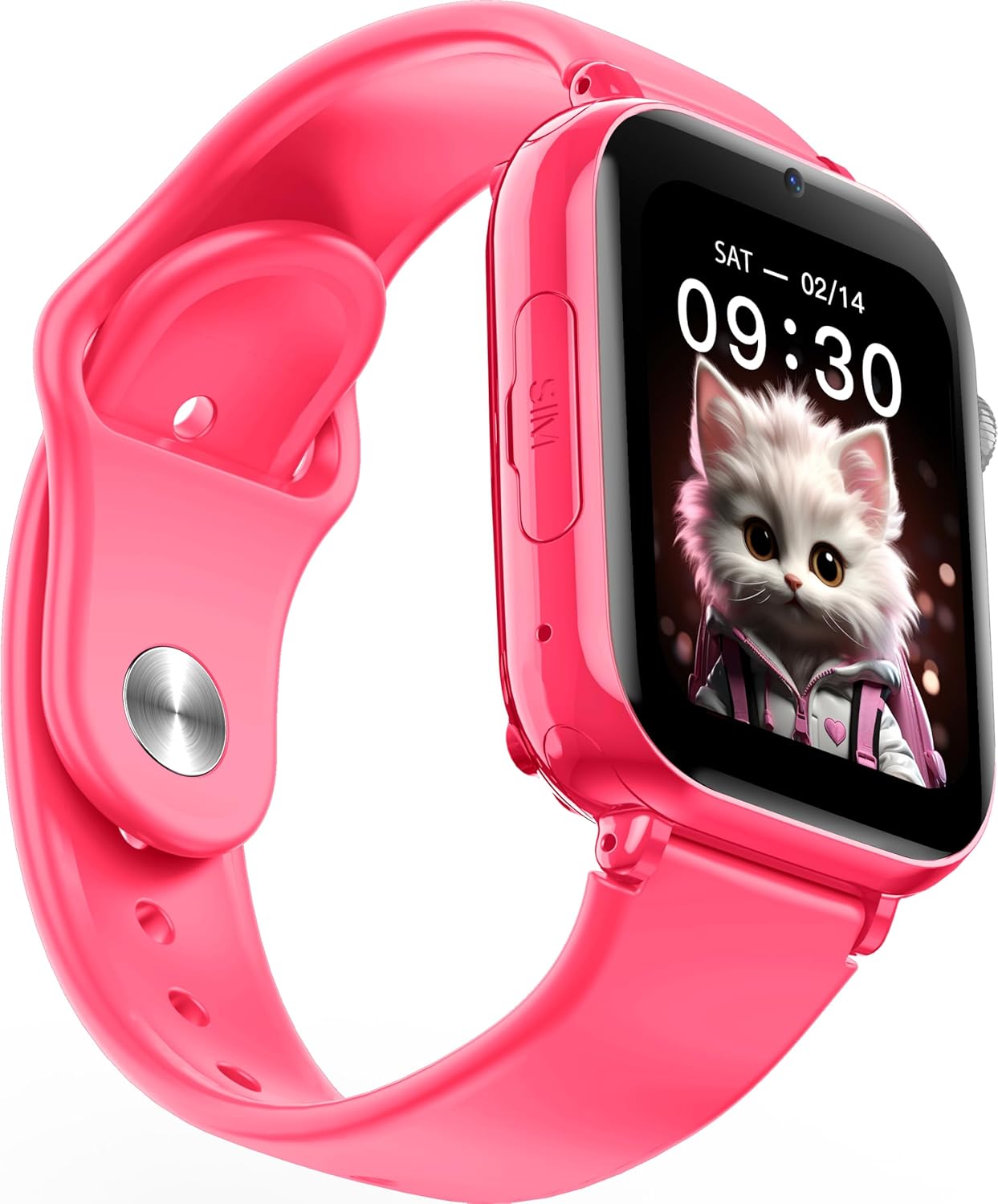
Imatge: Anglesa view of the Maxcom FW59 Kiddo smartwatch, highlighting the location of the SIM card slot on the side.
2. Càrrega del rellotge intel·ligent
Before first use, fully charge the smartwatch. The device is equipped with a 670 mAh Lithium Ion battery.
- Connect the USB charging cable to the charging port on the smartwatch.
- Connecteu l'altre extrem del cable USB a un adaptador de corrent USB compatible (no inclòs) o al port USB d'un ordinador.
- The screen will indicate charging status. A full charge typically takes approximately 2-3 hours.
3. Instal·lació i emparellament de l'aplicació
To utilize all features, parents must install the "MAXCOM TRACKER" mobile application on their smartphone and pair it with the smartwatch.
- Download the "MAXCOM TRACKER" app from your smartphone's app store (Google Play Store for Android or Apple App Store for iOS).
- Obriu l'aplicació i creeu un compte o inicieu sessió si ja en teniu un.
- Follow the in-app instructions to add a new device. This usually involves scanning a QR code displayed on the smartwatch screen or manually entering the device ID.
- Once paired, you can configure settings, add contacts, define safe zones, and track the smartwatch's location from the app.
Funcionament del rellotge intel·ligent
Navegació bàsica
The Maxcom FW59 Kiddo features a 1.85" IPS touchscreen display for easy interaction. Swipe left/right or up/down to navigate through menus and applications. Press the side button to return to the home screen or wake the device.

Imatge: Frontal view of the Maxcom FW59 Kiddo smartwatch displaying the time and a cute cat wallpaper.
Video and Voice Calls
With a nano SIM card inserted, the smartwatch supports both video and voice calls to pre-approved contacts.
- Fer una trucada: Navigate to the "Contacts" or "Phone" application, select the desired contact, and choose to initiate a voice or video call.
- Recepció d'una trucada: When a call comes in, the smartwatch will ring and display the caller ID. Tap the green icon to answer or the red icon to decline.
Funció SOS
The dedicated SOS button provides an immediate way for the child to alert pre-set emergency contacts.
- Activació de SOS: Press and hold the SOS button (usually a prominent side button) for a few seconds.
- The smartwatch will automatically call the emergency contacts in a pre-defined sequence until one answers. It will also send an alert with the child's current location to the parent's app.
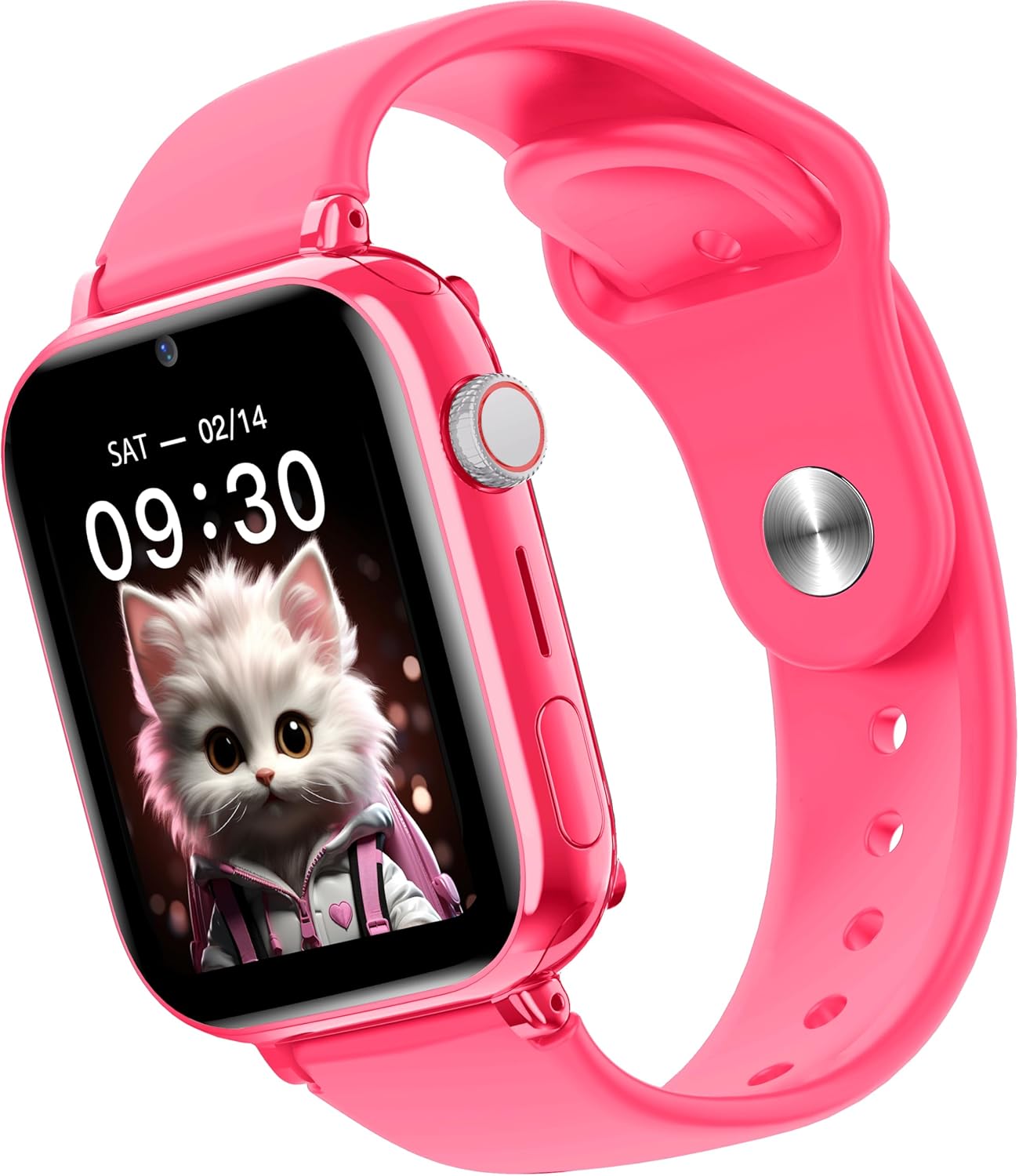
Imatge: Lateral view of the Maxcom FW59 Kiddo smartwatch, illustrating the physical buttons, including the SOS button.
GPS Tracking and Safe Zones
Parents can monitor the child's location in real-time via the MAXCOM TRACKER app.
- Seguiment en temps real: Open the MAXCOM TRACKER app on your smartphone to view the smartwatch's current location on a map.
- Zones segures: In the app, you can define virtual geographic boundaries (e.g., home, school). You will receive notifications when the smartwatch enters or exits these designated safe zones.
- Historial de la ruta: The app also allows you to review the historical movement data of the smartwatch.
Funció de càmera
The smartwatch includes a built-in camera. Children can take photos directly from the watch, and parents can remotely activate the camera from the MAXCOM TRACKER app to capture images of the surroundings.
Phone Book Management
Contacts can only be added and managed through the MAXCOM TRACKER app by the parent. This ensures that the child can only communicate with pre-approved numbers.
Manteniment
Neteja
To keep your smartwatch clean and in good condition:
- Netegeu la pantalla i el cos amb un drap suau i sense borrissol.
- Per a marques difícils, lleugerament dampRenta el drap amb aigua. Evita utilitzar productes químics agressius o materials abrasius.
- Ensure the charging port and SIM slot are free of dust and debris.
Cura de la bateria
Proper battery care extends the life of your device:
- Eviteu les temperatures extremes, ja que poden degradar el rendiment de la bateria.
- Carregueu el dispositiu regularment, però eviteu deixar-lo completament descarregat durant períodes prolongats.
- Utilitzeu només el cable de càrrega subministrat.
Resolució de problemes
If you encounter issues with your Maxcom FW59 Kiddo, refer to the following common solutions:
- El rellotge intel·ligent no s'encén: Ensure the battery is charged. Connect to the charger and wait a few minutes before attempting to power on.
- No network signal/cannot make calls:
- Check if the nano SIM card is correctly inserted and active.
- Verify that the SIM card has sufficient credit or an active data plan.
- Ensure you are in an area with 4G network coverage.
- GPS location inaccurate:
- Assegureu-vos que el rellotge intel·ligent tingui una visió clara view del cel per a una recepció òptima del senyal GPS.
- Location accuracy can be affected by dense buildings, underground areas, or poor network signal.
- Check the MAXCOM TRACKER app settings to ensure location services are enabled for the smartwatch.
- No es pot emparellar amb l'aplicació:
- Ensure the smartwatch is powered on and has a network connection.
- Verify that the QR code or device ID is entered correctly in the app.
- Try restarting both the smartwatch and your smartphone.
- Autonomia curta de la bateria:
- Frequent video calls, high screen brightness, and continuous GPS tracking can consume more battery.
- Adjust settings in the app to optimize battery usage (e.g., location update frequency).
If the issue persists, please contact Maxcom customer support for further assistance.
Especificacions
| Característica | Detall |
|---|---|
| Marca | Maxcom |
| Nom del model | FW59 Kiddo |
| Mida de la pantalla | 1.85 polzades |
| Tipus de visualització | IPS (240 x 280 resolution) |
| Sistema operatiu | Closed OS |
| Capacitat d'emmagatzematge de memòria | 2 MB |
| Capacitat de la bateria | 670 mAh (ió de liti) |
| Tecnologia cel·lular | 4G |
| Tecnologia de connectivitat | Bluetooth, Radio Frequency |
| Característiques especials | Kids Tracking, SOS Button, Video/Voice Calls |
| Pes de l'article | 300 g |
Garantia i Suport
For information regarding warranty coverage and terms for your Maxcom FW59 Kiddo smartwatch, please refer to the warranty card included with your purchase or visit the official Maxcom website. For technical support, troubleshooting beyond this manual, or service inquiries, please contact Maxcom customer support through their official channels.


