1. Introducció
The Smartby XRT270 Voice Remote is designed to provide seamless and intuitive control for your Vizio 4K, FHD, Quantum, Quantum Pro, or P-Series TV. This manual will guide you through the setup, operation, and maintenance of your new remote, ensuring you can fully utilize its features, including advanced voice command capabilities.
2. Compatibilitat
This XRT270 Voice Remote is a replacement and is compatible with the following Vizio TV models:
- Vizio 4K TVs
- Vizio FHD TVs
- Vizio Quantum TVs
- Vizio Quantum Pro TVs
- Vizio P-Series TVs
3. Característiques clau
- Control de veu: Enables effortless voice commands for navigating menus, launching apps, and more.
- Interfície intuïtiva: Ergonomic design with dedicated buttons for quick access to frequently used functions and a comfortable grip.
- Connectivitat de llarg abast: Control your TV from anywhere in the room without direct line-of-sight.
- Integració perfecta: Designed for automatic pairing with compatible Vizio TVs.
4. Guia de configuració
4.1. Instal·lació de la bateria
The XRT270 remote requires two (2) AAA batteries (not included). Please follow these steps to install them:
- Localitzeu el compartiment de la bateria a la part posterior del comandament a distància.
- Feu lliscar la tapa de la bateria cap avall per obrir-la.
- Insert two AAA batteries, ensuring the positive (+) and negative (-) ends align correctly with the indicators inside the compartment.
- Feu lliscar la coberta de la bateria al seu lloc fins que faci un clic de manera segura.

Imatge: Frontal i lateral view of the XRT270 remote, showing its ergonomic design. The battery compartment is located on the back.
4.2. Maridatge inicial
The remote should automatically pair with your Vizio TV upon battery installation. If automatic pairing does not occur, or if you need to re-pair the remote, follow these manual pairing instructions:
- Assegureu-vos que el vostre televisor Vizio estigui encès.
- On the XRT270 remote, press and hold the "Mic" botó i el "Mute" botó simultàniament.
- Hold both buttons until an on-screen message appears on your TV indicating that the remote is pairing or has successfully paired.
- Release the buttons once pairing is complete.

Image: The XRT270 remote highlighting its voice control capabilities, which are central to its functionality and pairing process.
5. Ús del comandament a distància
5.1. Navegació bàsica
The XRT270 remote features standard buttons for TV control:
- Botó d'encesa: Encén o apaga el televisor.
- Botó d'entrada: Passa ciclicament per les fonts d'entrada disponibles.
- Pad direccional (D-Pad) i botó OK: Navegar pels menús i confirmar les seleccions.
- Botó enrere: Torna a la pantalla o menú anterior.
- Botó d'inici: Accesses the Vizio SmartCast Home screen.
- Pujar/baixar el volum: Ajusta el volum del televisor.
- Botó de silenci: Silencia o activa l'àudio del televisor.
- Botons de drecera d'aplicacions: Dedicated buttons for popular streaming services like Netflix, Prime Video, Disney+, Sling, iHeartRadio, and XumoPlay for quick access.
5.2. Voice Control Functionality
The voice control feature allows you to interact with your Vizio TV using spoken commands. This makes searching for content, launching apps, and adjusting settings more convenient.
- Manteniu premut el botó "Mic" button (voice button) located on the remote.
- While holding the button, speak your command clearly into the remote.
- Allibera el "Mic" botó un cop hagis acabat de parlar.
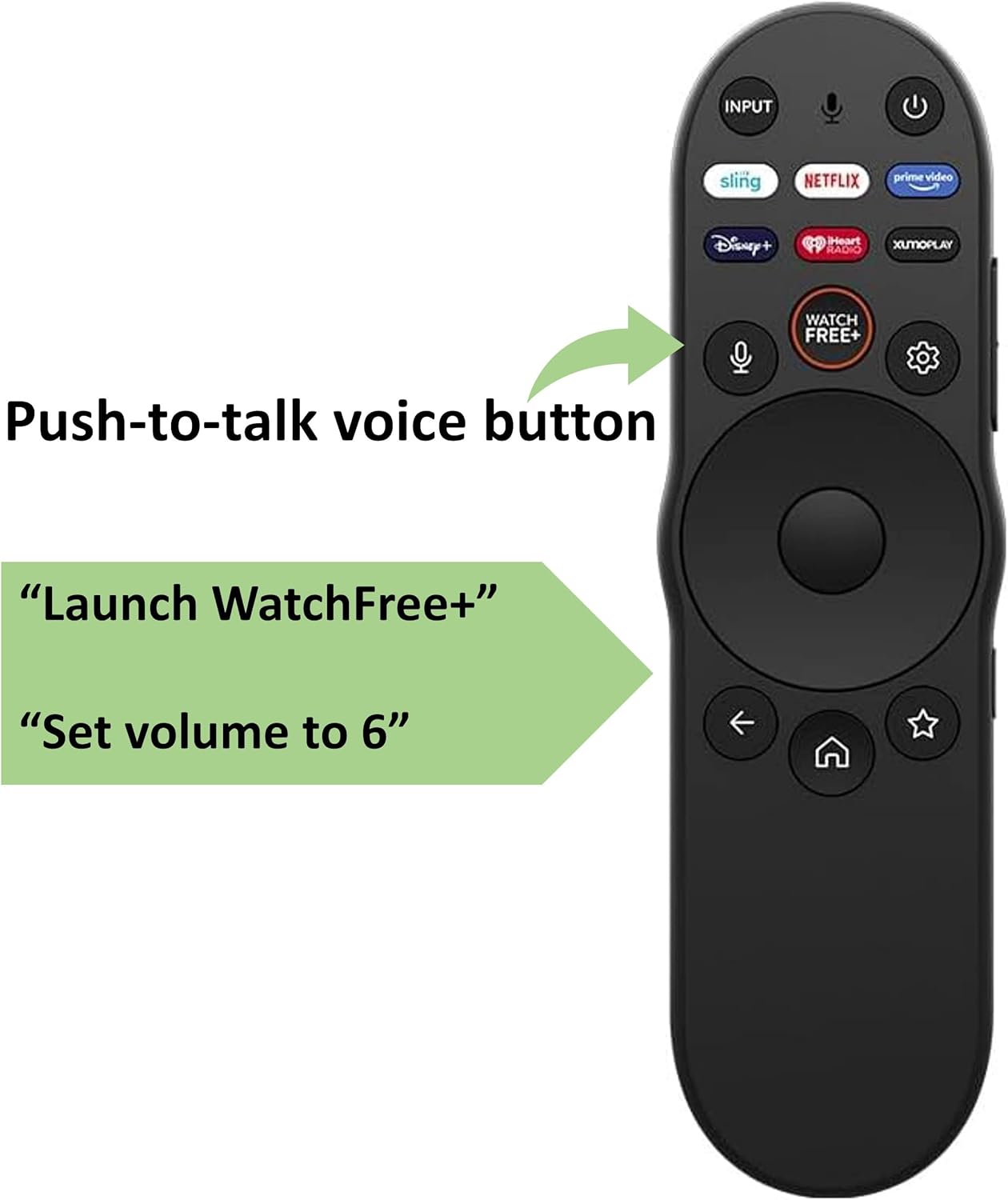
Image: The XRT270 remote with an arrow indicating the location of the 'Push-to-talk voice button' for activating voice commands.
Examples of voice commands you can use:
- "Launch WatchFree+"
- "Set volume to 6"
- "Canvia a HDMI 1"
- "Show me comedy movies"
- "Quin temps fa?"

Image: The XRT270 remote displayed alongside common voice command examples, illustrating its voice control capabilities.
6. Cura i Manteniment
To ensure the longevity and optimal performance of your XRT270 Voice Remote, please follow these care instructions:
- Neteja: Feu servir un drap suau i sec per netejar el comandament a distància. No utilitzeu netejadors líquids ni materials abrasius.
- Substitució de la bateria: Canvieu les piles quan la resposta del comandament a distància es torni lenta o deixi de funcionar. Canvieu sempre les dues piles alhora per unes de noves.
- Emmagatzematge: Guardeu el comandament a distància en un lloc fresc i sec, allunyat de la llum solar directa i de temperatures extremes.
- Eviteu les gotes: Protegiu el comandament a distància d'impactes físics, ja que les caigudes poden danyar els components interns.
7. Solució De Problemes
If you encounter issues with your XRT270 Voice Remote, try the following troubleshooting steps:
- El comandament a distància no respon:
- Comproveu si les piles estan correctament inserides i tenen prou càrrega. Substituïu-les si cal.
- Assegureu-vos que no hi hagi obstacles entre el comandament a distància i el televisor.
- El control per veu no funciona:
- Assegureu-vos que el comandament a distància estigui correctament emparellat amb el televisor (consulteu la secció 4.2).
- Speak clearly and directly into the microphone when pressing the "Mic" button.
- Revisa la configuració del televisor per assegurar-te que el control per veu estigui activat.
- Problemes d'aparellament:
- Repeat the manual pairing process (Section 4.2).
- Ensure your TV's software is up to date.
- Try restarting your TV by unplugging it from the power outlet for a few minutes, then plugging it back in.
8. Especificacions del producte
| Característica | Detall |
|---|---|
| Dimensions del producte | 6 x 1.5 x 0.7 polzades |
| Pes de l'article | 1.94 unces |
| Número de model de l'article | XRT270 |
| Piles necessàries | 2 piles AAA (no incloses) |
| Característica especial | Ergonomic, Voice Search |
| Nombre màxim de dispositius compatibles | 1 |
| Dispositius compatibles | Televisió |
| Tecnologia de connectivitat | Bluetooth |
| Fabricant | Smartby |
| País d'origen | Xina |
9. Garantia i Suport
For information regarding warranty coverage and customer support for your Smartby XRT270 Voice Remote, please refer to the documentation provided with your purchase or contact the seller directly. You may also visit the official Smartby store for additional resources and contact information:

