1. Introducció
This manual provides detailed instructions for the installation, operation, and maintenance of your PNI House WiFi800 NVR and PNI IP840 Outdoor Camera Wireless Surveillance Kit. Please read this manual thoroughly before using the product to ensure proper setup and functionality. Keep this manual for future reference.
2. Informació de seguretat
- Ensure all power connections are secure and meet the specified voltage (12 V CC).
- Do not expose the NVR to moisture or extreme temperatures.
- The PNI IP840 cameras are IP65 rated for outdoor use; however, avoid submerging them in water.
- Si no esteu segurs de les connexions elèctriques o dels procediments de muntatge, la instal·lació l'ha de dur a terme personal qualificat.
- Mantingueu el producte lluny de camps magnètics forts.
- Use only original or certified replacement parts and accessories.
3. Contingut del paquet
Verifiqueu que tots els elements que s'enumeren a continuació siguin presents al vostre paquet:
- PNI House WiFi800 NVR (1 unit)
- PNI IP840 Outdoor Cameras (2 units)
- Power Adapters (for NVR and cameras)
- USB Mouse (for NVR)
- Fixing Screws and Wall Plugs (for cameras)
- User Manuals (for NVR and cameras)

Image: PNI House WiFi800 NVR with included USB mouse and power adapter.

Image: PNI IP840 Outdoor Camera with its power adapter and mounting hardware.
4. Producte acabatview
4.1 PNI IP840 Outdoor Camera
The PNI IP840 camera is a high-resolution wireless outdoor surveillance camera featuring 8MP 4K video, pan/tilt functionality, and advanced night vision. It is designed for robust performance in various weather conditions.
- Sensor: 1/2.7" CMOS, 8MP
- Resolució: 3840x2160 (4K)
- Lent: 3.6mm, 90° viewangle de ing
- Panorama/inclinació: Horizontal 355°, Vertical 90°
- Visió nocturna: 4 IR LEDs and 4 White LEDs, up to 15m
- Emmagatzematge: Ranura per a targetes MicroSD (fins a 256 GB, targeta no inclosa)
- Connectivitat: WiFi 2.4GHz, ONVIF support
- Característiques: Motion Detection, Human Shape Detection, Rotation after movement, ICSee app support
- Resistència a la intempèrie: Classificació IP65

Imatge: Frontal view of the PNI IP840 outdoor camera, showing the lens, LEDs, and antennas.

Image: Close-up of the PNI IP840 camera's connection cables for power and wired network.
4.2 PNI House WiFi800 NVR
The PNI House WiFi800 NVR (Network Video Recorder) is the central unit for managing and recording video from your surveillance cameras. It supports up to 8 channels at 5MP or 4 channels at 4K (8MP) resolution.
- Video Channels: 8 channels (5MP) / 4 channels (4K/8MP)
- Compressió de vídeo: H.265AI/H.265+
- Resolució de reproducció: 1080P (HDMI output)
- Emmagatzematge: Supports 1x 2.5" HDD (up to 14TB) or 1x MicroSD card (up to 128GB)
- Interfície de xarxa: RJ45 10/100/1000 Mbit/s
- Freqüència sense fil: 2.4 GHz (for NVR-camera communication)
- Sortides: 1x HDMI, 1x USB 2.0
- Característiques: Mobile/PC viewing (Android, iOS, Windows), ICSee/XMEye app support, Integrated voice prompt speaker

Image: Rear panel of the PNI House WiFi800 NVR, displaying its various ports including power, HDMI, Ethernet, USB, and reset button.

Imatge: Lateral view of the PNI House WiFi800 NVR, showing its antennas and port layout.
5. Configuració
5.1 NVR Initial Setup
- Connectar l'alimentació: Connect the NVR to its power adapter and plug it into an electrical outlet.
- Connecta la pantalla: Connect the NVR to a monitor or TV using an HDMI cable.
- Connecta el ratolí: Plug the USB mouse into the NVR's USB port for navigation.
- Connexió de xarxa (opcional): For remote access and firmware updates, connect the NVR to your router using an Ethernet cable.
- Storage Installation (Optional): If using an HDD, open the NVR casing and install a 2.5" SATA HDD. Alternatively, insert a MicroSD card into the designated slot.
5.2 Instal·lació de la càmera
- Tria la ubicació: Select a suitable outdoor location for each camera, ensuring good Wi-Fi signal strength and an unobstructed view. The IP65 rating allows for outdoor exposure.
- Muntar la càmera: Use the provided screws and wall plugs to securely mount the camera to a wall or ceiling.
- Connectar l'alimentació: Connect the camera to its power adapter and plug it into an electrical outlet. Ensure the power cable is protected from the elements.
5.3 Pairing Cameras with NVR
The cameras are typically pre-paired with the NVR in the kit. If not, or if adding new cameras:
- Ensure both the NVR and cameras are powered on.
- On the NVR interface (connected to a monitor), navigate to the camera management or channel settings.
- Select the option to add or search for wireless cameras. The NVR will scan for available PNI IP840 cameras.
- Seguiu les indicacions a la pantalla per completar el procés de vinculació.
5.4 Mobile App Configuration (ICSee / XMEye)
- Descarregar l'aplicació: Download the ICSee or XMEye app from your smartphone's app store (Android or iOS).
- Registre del compte: Create a new user account or log in if you already have one.
- Afegeix un dispositiu: In the app, select "Add Device" or scan the QR code displayed on the NVR's monitor (if available) or the NVR itself.
- Seguiu les indicacions: Follow the in-app instructions to connect your NVR and cameras to your mobile device for remote viewing i control.
6. Instruccions de funcionament
6.1 Viu View
Access live video feeds from your cameras via the NVR's connected monitor or through the ICSee/XMEye mobile application. The NVR interface allows for multi-channel display.
6.2 Enregistrament
- Gravació contínua: Configure the NVR to record continuously to the installed HDD or MicroSD card.
- Gravació activada per moviment: Set up recording to trigger only when motion is detected by the cameras.
- Enregistrament programat: Defineix períodes de temps específics per a l'enregistrament.
6.3 Reproducció
Per tornarview foo gravattage:
- On the NVR interface, select the "Playback" option.
- Choose the desired camera, date, and time range.
- Use the controls to play, pause, fast forward, or rewind footage.
- Mobile app playback functions similarly, allowing remote access to recorded video.
6.4 Motion Detection and AI Functions
The PNI IP840 cameras feature advanced detection capabilities:
- Detecció de moviment: Configurable sensitivity to detect movement within the camera's field of view.
- Human Shape Detection: Intelligent analysis to differentiate human figures from other moving objects, reducing false alarms.
- Rotation After Movement: The camera can be set to automatically track detected movement within its pan/tilt range.
- Notificacions d'alarma: Enable push notifications to your mobile phone when an alarm event (e.g., motion detection) occurs.
Access these settings through the NVR menu or the mobile application to customize detection zones, sensitivity, and notification preferences.
6.5 Pan/Tilt/Zoom (PTZ) Control
For PNI IP840 cameras, you can remotely control the camera's orientation:
- Use the PTZ controls available in the NVR interface or the ICSee/XMEye mobile app.
- Drag your finger on the live view screen in the app to pan (horizontal 355°) and tilt (vertical 90°) the camera.
- Digital zoom functionality may be available through the app.
7. Manteniment
- Neteja: Regularly clean the camera lenses with a soft, dry cloth to ensure clear image quality. Do not use harsh chemicals.
- Actualitzacions de firmware: Periodically check for firmware updates for both the NVR and cameras through the mobile app or NVR interface. Updates can improve performance and add new features.
- Comproveu les connexions: Ensure all power and network cables are securely connected and free from damage.
- Gestió d'emmagatzematge: Regularly back up important recordings and manage storage space on your HDD or MicroSD card.
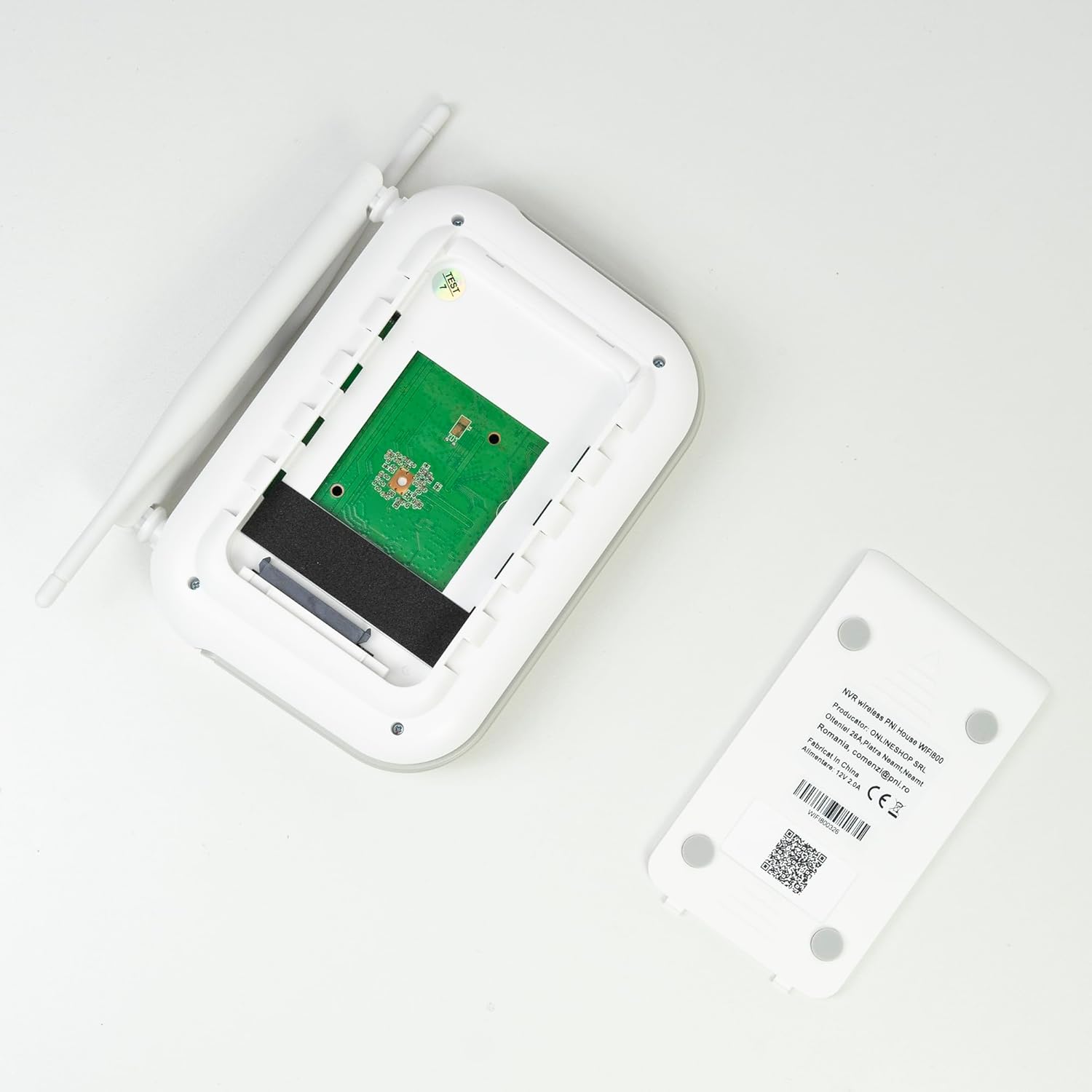
Imatge: Interna view of the PNI House WiFi800 NVR, illustrating the circuit board and the bay for HDD installation.
8. Solució De Problemes
- Sense imatge al monitor:
- Check NVR power supply and HDMI cable connection to the monitor.
- Assegureu-vos que el monitor estigui configurat a la font d'entrada correcta.
- Cameras Not Connecting:
- Verify cameras are powered on.
- Check Wi-Fi signal strength at camera locations.
- Re-pair cameras with the NVR if necessary (refer to Section 5.3).
- Sense accés remot mitjançant l'aplicació:
- Ensure the NVR is connected to the internet via Ethernet.
- Comproveu la connexió a Internet del vostre telèfon intel·ligent.
- Verify NVR is correctly added to the ICSee/XMEye app.
- Mala qualitat d'imatge:
- Netegeu les lents de la càmera.
- Comproveu si hi ha obstruccions al camp de la càmera view.
- Ensure adequate lighting for night vision.
- Problemes de gravació:
- Check if an HDD or MicroSD card is properly installed and formatted.
- Verifiqueu els horaris d'enregistrament i la configuració de la detecció de moviment.
- Assegureu-vos que hi hagi prou espai d'emmagatzematge disponible.
9. Especificacions
9.1 PNI IP840 Outdoor Camera Specifications
| Característica | Detall |
|---|---|
| Sensor d'imatge | CMOS d'1/2.7" |
| Resolució del sensor | 8MP |
| Resolució de vídeo | 3840x2160 (4K) |
| Tipus de lent | 3.6 mm |
| Viewangle ing | 90° |
| Panorama/inclinació | Horitzontal: 355°, Vertical: 90° |
| Il·luminació infraroja | 4x IR LEDs, 4x White LEDs |
| Distància IR | Fins a 15 m |
| Compressió de vídeo | H.265X (compatible with H.264+/H.264) |
| Àudio | Integrated Microphone and Speaker |
| Freqüència sense fil | 2.4 GHz |
| Protocols compatibles | ONVIF |
| Emmagatzematge | Ranura per a targetes MicroSD (màxim 256 GB) |
| Font d'alimentació | 12V/1A |
| Classe de protecció | IP65 |
| Temperatura de funcionament | -26 °C ~ +80 °C |
| Dimensions | 86x135x146 mm |
| Pes | 371 grams |
9.2 PNI House WiFi800 NVR Specifications
| Característica | Detall |
|---|---|
| Video Channels | 8 canals 5MP / 4 canals 4K (8MP) |
| Compressió de vídeo | H.265AI/H.265+ |
| Resolució de reproducció | 1080P (HDMI) |
| Capacitat d'emmagatzematge | 1x 2.5" HDD (max 14TB) / 1x MicroSD card (max 128GB) |
| Interfície de xarxa | RJ45 - 10/100/1000 Mbit/s |
| Sortida de vídeo | 1x HDMI |
| Interfície USB | 1x USB 2.0 |
| Processador | MSR621Q |
| Font d'alimentació | 12V/2A |
| Dimensions | 170x120x35 mm |
| Pes | 245 grams |
| Wi-Fi Frequency (NVR-Camera) | 2.4 GHz |
| Indicació de veu | Yes, integrated speaker |
10. Garantia i Suport
For warranty information, please refer to the documentation provided at the time of purchase or contact your retailer. For technical support, product inquiries, or assistance with troubleshooting, please visit the official PNI website or contact PNI customer service directly. Keep your purchase receipt as proof of purchase.
Fabricant: BOTIGA EN LÍNIA SRL
Número de model: PNI-WF8-840-2


