1. Introducció
This manual provides detailed instructions for the ANCEL FX3000 Elite OBD2 Scanner Diagnostic Tool and the ANCEL BD200 Pro OBD2 Scanner Bluetooth. These devices are designed to assist in vehicle diagnostics, performance monitoring, and maintenance.
The ANCEL FX3000 Elite is a comprehensive diagnostic tool capable of reading and clearing codes from various vehicle systems. The ANCEL BD200 Pro is a Bluetooth-enabled OBD2 scanner that extends diagnostic capabilities to mobile devices, offering basic OBDII functions and advanced system diagnostics for specific vehicle brands.
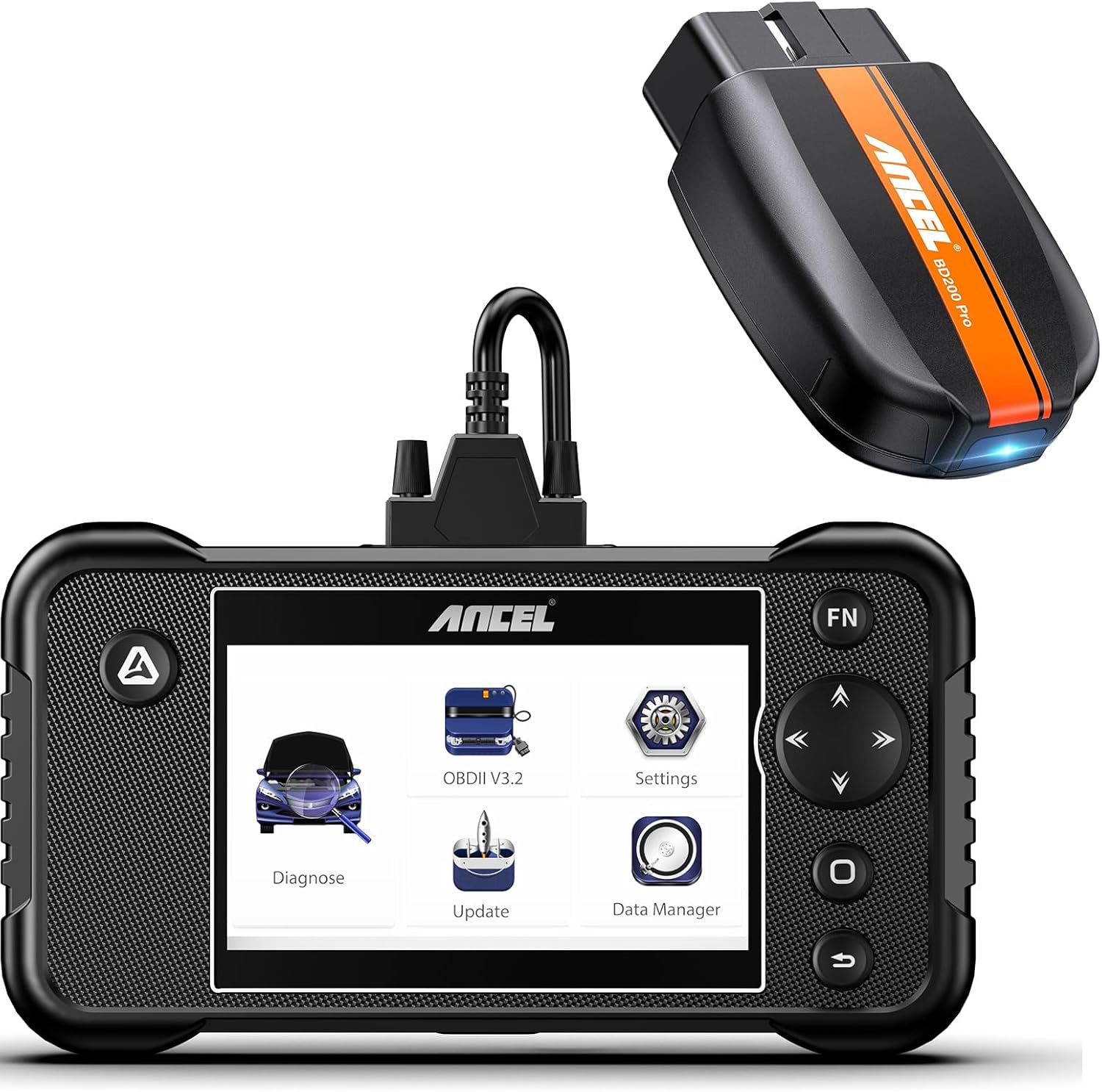
Figure 1.1: ANCEL FX3000 Elite Diagnostic Tool and ANCEL BD200 Pro Bluetooth Scanner.
2. Configuració i ús inicial
Follow these steps to set up and begin using your ANCEL diagnostic tools.
- Step 1: Connect the Scanner. Locate your vehicle's OBD2 port, typically found under the dashboard on the driver's side. Plug the 16-pin connector of the ANCEL FX3000 Elite or the ANCEL BD200 Pro into the OBD2 port.
- Step 2: Turn on the Car Engine. Ensure your vehicle's ignition is in the 'ON' position or the engine is running. This provides power to the OBD2 port.
- Step 3: Start Diagnosis. For the FX3000 Elite, the device will power on automatically. Navigate the menu to select 'Diagnose'. For the BD200 Pro, pair it with your mobile device via Bluetooth and open the compatible ANCEL application to begin.

Figure 2.1: Visual guide for the plug-and-play setup process, showing connection to the OBD2 port, turning on the car engine, and initiating diagnosis.
3. Instruccions de funcionament
This section details the various diagnostic and monitoring functions of your ANCEL devices.
3.1. Full OBDII Modes (ANCEL BD200 Pro)
The ANCEL BD200 Pro supports all 10 modes of OBDII testing, allowing for comprehensive engine system diagnostics. These modes include:
- Llegir codis: Retrieve Diagnostic Trouble Codes (DTCs) from the vehicle's engine control unit (ECU).
- Esborra codis: Esborra els DTC i desactiva l'indicador d'avaria Lamp (MIL) després de les reparacions.
- Dades en directe: View dades de sensors en temps real en format de text o gràfic.
- Congelar fotograma: Capture a snapshot of vehicle conditions when a DTC is set.
- Prova del sensor d'O2: Monitor and test the oxygen sensors.
- Prova de monitorització a bord: Accedir als resultats de les proves de monitorització de diagnòstic a bord per a components/sistemes específics.
- Prova del sistema EVAP: Initiate a test of the Evaporative Emission Control System.
- Informació del vehicle: Recuperar el número d'identificació del vehicle (VIN), l'ID de calibratge (CALID) i el número de verificació de calibratge (CVN).
- Preparació I/M: Check the readiness status of emission-related monitors.

Figure 3.1: Interface of the ANCEL BD200 Pro displaying various full OBDII diagnostic modes.
3.2. 4-System Diagnosis (FX3000 Elite & BD200 Pro)
Both the FX3000 Elite and BD200 Pro offer advanced diagnostics for the four main vehicle systems: Engine, Anti-lock Braking System (ABS), Supplemental Restraint System (SRS/Airbag), and Transmission. This allows you to read and clear codes specific to these critical systems.
Nota: The 4-system diagnostic function for the ANCEL BD200 Pro is compatible with specific vehicle brands including Mercedes-Benz, BMW, Volkswagen, Opel, Vauxhall, Volvo, Land Rover, Ford, General Motors (GM), Chrysler, and Toyota.

Figura 3.2: Mésview of the enhanced 4-system diagnostic capabilities, covering Engine, ABS, Transmission, and SRS (Airbag) systems.
3.3. Code Reading and Clearing
When a fault occurs in one of the monitored systems, a Diagnostic Trouble Code (DTC) is stored, and often a warning light illuminates on the dashboard. Your ANCEL scanner can read these codes to identify the issue and clear them once the problem is resolved.
- Lectura de codis: Select the relevant system (e.g., Engine, ABS) and choose 'Read Codes' to display active and pending DTCs. The scanner will provide code definitions.
- Clearing Codes: After performing necessary repairs, select 'Clear Codes' within the system menu. This will erase the DTCs and turn off the corresponding warning light (e.g., Check Engine Light, ABS light). Ensure the underlying issue is fixed before clearing codes, as they will reappear if the fault persists.

Figure 3.3: Illustration of reading and clearing fault codes for ABS, Airbag, Engine, and Transmission warning lights.
3.4. Performance Tracking (ANCEL BD200 Pro)
The ANCEL BD200 Pro allows you to monitor your vehicle's performance in real-time. This feature is useful for tracking various parameters and analyzing driving behavior.
- Proves de rendiment: Conduct tests for vehicle acceleration, braking, and distance.
- PID Chart: View live data parameters such as RPM (Revolutions Per Minute), VSS (Vehicle Speed Sensor), ECT (Engine Coolant Temperature), and MAF (Mass Air Flow) in graphical format.
- Trip Analysis: Record and analyze trip status, including coolant temperature, speed changes, RPM, and distance covered.

Figure 3.4: Real-time vehicle performance tracking, displaying speed and RPM data on both the car's dashboard and the ANCEL BD200 Pro mobile application.
3.5. Bateria Voltage Check (ANCEL BD200 Pro)
The ANCEL BD200 Pro can detect and display the 12V car battery voltage in real-time. This helps you understand the health of your vehicle's battery and determine if replacement is needed.
- Monitorització en temps real: The device provides a graphical representation of voltage fluctuacions.
- Voltage Referència: The app provides reference ranges for normal, slightly low, too low, and too high battery voltages, both before and after starting the engine.

Figure 3.5: The ANCEL BD200 Pro displaying real-time 12V car battery voltage and health status on a connected smartphone.
4. Manteniment
Regular maintenance ensures the longevity and optimal performance of your ANCEL diagnostic tools.
4.1. Actualitzacions de programari
The ANCEL FX3000 Elite supports one-click WiFi updates, providing a faster and more convenient way to keep your device's software current. Regular updates ensure compatibility with newer vehicle models and provide access to the latest diagnostic features and bug fixes.
- WiFi Update: Connect the FX3000 Elite to a WiFi network or a phone hotspot. Navigate to the 'Update' section on the device's main menu and follow the on-screen prompts to download and install updates.
- BD200 Pro App Updates: Ensure your ANCEL BD200 Pro mobile application is updated through your device's app store (Google Play Store for Android, Apple App Store for iOS).

Figure 4.1: The ANCEL FX3000 Elite displaying the 'Update' option, highlighting the one-click WiFi update feature.
4.2. Atenció general
- Keep the devices clean and free from dust and moisture. Use a soft, dry cloth for cleaning.
- Eviteu deixar caure els dispositius o sotmetre'ls a impactes forts.
- Guardeu els dispositius en un lloc fresc i sec quan no els feu servir.
5. Solució De Problemes
If you encounter issues while using your ANCEL diagnostic tools, refer to the following common troubleshooting tips:
- El dispositiu no s'encén: Ensure the OBD2 connector is securely plugged into the vehicle's port. Verify the vehicle's ignition is on or the engine is running. Check the vehicle's fuse for the OBD2 port if necessary.
- Error de comunicació: Confirm the vehicle supports the OBD2 protocol. Ensure the ignition is on. Try connecting to a different vehicle to rule out a vehicle-specific issue. For BD200 Pro, ensure Bluetooth is enabled on your mobile device and the app is correctly paired.
- No s'han trobat codis: If no codes are found, it may indicate that there are no active faults in the system being scanned. Ensure you are scanning the correct system (e.g., Engine, ABS).
- Lectures inexactes: Ensure the software is up to date. Verify the vehicle's VIN is correctly recognized by the scanner.
- App Connectivity Issues (BD200 Pro): Restart your phone's Bluetooth. Close and reopen the ANCEL app. Re-pair the BD200 Pro with your phone.
Si els problemes persisteixen, consulteu la secció Garantia i assistència per obtenir més ajuda.
6. Especificacions
| Característica | Descripció |
|---|---|
| Número de model | FX3000 Elite-BD200 PRO |
| Marca | ANCEL |
| Operating System (FX3000 Elite) | Android 8.0 |
| Connectivity (FX3000 Elite) | WiFi for updates |
| Connectivity (BD200 Pro) | Bluetooth |
| Protocols compatibles | OBDII/EOBD protocols |
| Funcions de diagnòstic | Engine, ABS, SRS, Transmission (4 systems); Full OBDII modes |
| Política d'actualització | Free Lifetime Update |
7. Garantia i Suport
ANCEL is committed to providing high-quality products and customer satisfaction.
7.1. Free Lifetime Update
Both the ANCEL FX3000 Elite and BD200 Pro come with a free lifetime update policy. This ensures your diagnostic tools remain current with the latest vehicle data and software enhancements without additional cost.
7.2. Atenció al client
For any technical assistance, warranty claims, or product inquiries, please contact ANCEL customer support. You can typically find contact information on the official ANCEL website or through the support section of the product's mobile application.
Visita el ANCEL Store on Amazon per a més informació i recursos.




