Introducció
This manual provides detailed instructions for the ATK VXE Dragonfly R1 SE+ White Wireless Gaming Mouse. The R1 SE+ is a lightweight (55g) wireless gaming mouse featuring the Pixart PAW3395 SE sensor, offering performance up to 18,000 DPI, 400 IPS, and 40G acceleration. It supports both 2.4GHz wireless and Bluetooth connections, and boasts a battery life of up to 70 hours. Please read this manual thoroughly to ensure proper use and optimal performance of your device.
Contingut del paquet
- ATK VXE Dragonfly R1 SE+ Wireless Gaming Mouse
- Receptor USB (dongle)
- Cable de càrrega USB-C
- Manual d'usuari (aquest document)
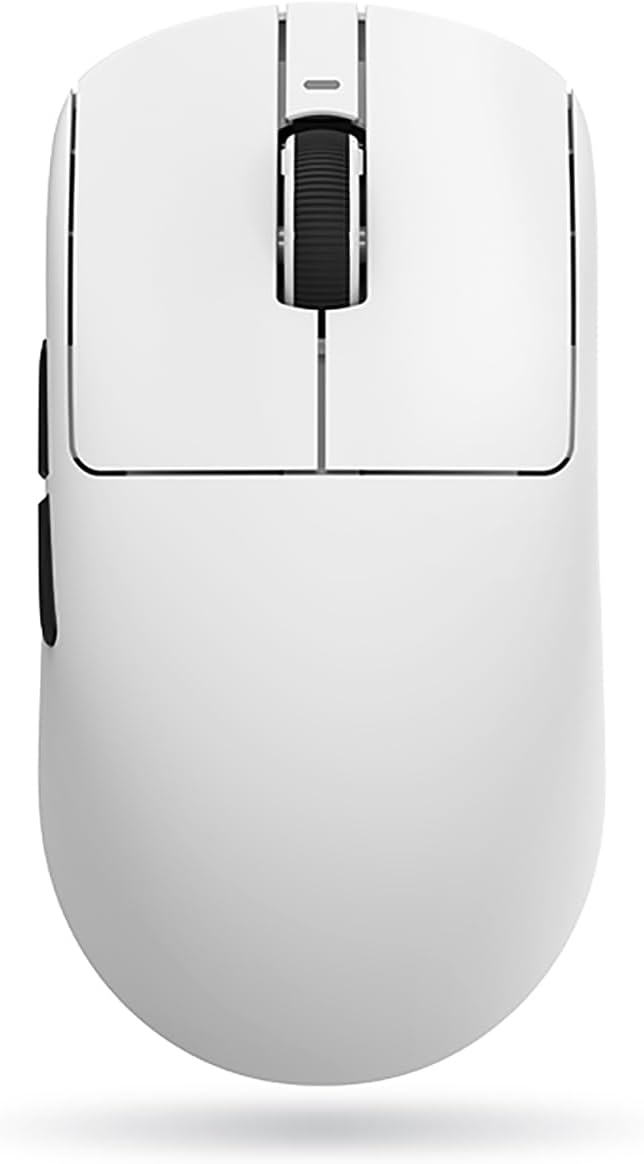
Producte acabatview


Configuració
1. Càrrega del ratolí
Before first use, it is recommended to fully charge the mouse. Connect the provided USB-C cable to the mouse's front port and the other end to a USB power source (e.g., computer USB port, USB wall adapter). The mouse's indicator light will show charging status. A full charge can provide up to 70 hours of battery life.
2. Connectar el ratolí
The ATK VXE Dragonfly R1 SE+ supports three connection modes: 2.4GHz Wireless, Bluetooth, and Wired.
2.1. Connexió sense fil de 2.4 GHz
- Locate the USB receiver (dongle) usually stored in a compartment on the underside of the mouse.
- Connecteu el receptor USB a un port USB disponible de l'ordinador.
- Turn on the mouse using the power switch located on the underside. Ensure the switch is set to the 2.4GHz mode (indicated by an icon or label).
- The mouse should automatically connect to your computer. If not, press the pairing button (if available) on the mouse or refer to the software section for re-pairing instructions.
2.2. Connexió Bluetooth
- Turn on the mouse and set the power switch to Bluetooth mode.
- A l'ordinador, navega fins a la configuració de Bluetooth.
- Put the mouse into pairing mode (usually by pressing and holding a button on the mouse, refer to specific button layout if available).
- Select "ATK VXE Dragonfly R1 SE+" from the list of available Bluetooth devices on your computer and complete the pairing process.
2.3. Connexió per cable
- Connecteu el cable USB-C proporcionat al port frontal del ratolí.
- Connecteu l'altre extrem del cable USB-C a un port USB de l'ordinador.
- El ratolí canviarà automàticament al mode amb cable i començarà a carregar-se.
3. Software Installation (ATK V HUB)
For advanced customization, including DPI settings, polling rate, macro programming, button mapping, and illumination control, download and install the ATK V HUB software.
- Visit the official ATK website (refer to product packaging or manufacturer's weblloc per a URL).
- Download the latest version of the ATK V HUB software compatible with your operating system (Windows XP, Linux, etc.).
- Seguiu les instruccions a la pantalla per completar la instal·lació.
Funcionament del ratolí
1. Ajust de DPI
The Pixart PAW3395 SE sensor supports DPI settings up to 18,000. You can cycle through preset DPI levels using the dedicated DPI button on the mouse (if available) or customize them precisely using the ATK V HUB software.
2. Taxa de votació
The polling rate determines how often the mouse reports its position to the computer. A higher polling rate results in smoother and more responsive tracking. Adjust the polling rate (e.g., 125Hz, 500Hz, 1000Hz) via the ATK V HUB software.
3. Button Mapping and Macros
Utilize the ATK V HUB software to remap mouse buttons to different functions or assign complex macros for gaming and productivity tasks. The mouse features 5 programmable buttons.
4. Illumination (if applicable)
If your model includes illumination features, you can customize lighting effects, colors, and brightness through the ATK V HUB software.
5. Gestió de la bateria
The mouse has a high-capacity battery providing up to 70 hours of use. Monitor battery level through the ATK V HUB software or the mouse's indicator light. Recharge when the battery is low to ensure uninterrupted performance.
Manteniment
1. Neteja
- Regularly clean the mouse surface with a soft, dry, lint-free cloth.
- Per a la brutícia persistent, lleugerament dampNetegeu el drap amb aigua o un netejador suau i no abrasiu. Eviteu la humitat excessiva.
- Netegeu la zona del sensor òptic a la part inferior del ratolí amb un bastonet de cotó per garantir un seguiment precís.
- No utilitzeu productes químics agressius, dissolvents ni materials abrasius.
2. Cura de la bateria
- Eviteu descarregar completament la bateria amb freqüència.
- Guardeu el ratolí en un lloc fresc i sec quan no l'utilitzeu durant períodes prolongats.
- If storing for a long time, charge the battery to about 50% to prolong its lifespan.
Resolució de problemes
| Problema | Causa possible | Solució |
|---|---|---|
| El ratolí no respon (sense fil) | Low battery; USB receiver disconnected; Incorrect connection mode; Interference. | Charge the mouse; Reconnect USB receiver; Ensure mouse is in 2.4GHz or Bluetooth mode; Move closer to receiver; Avoid other wireless devices. |
| El ratolí no respon (amb cable) | Cable not properly connected; Faulty USB port. | Ensure cable is securely connected; Try a different USB port on your computer. |
| Seguiment inexacte o retard del cursor | Dirty sensor; Unsuitable surface; Low battery; Incorrect DPI setting. | Clean the optical sensor; Use a mouse pad or suitable surface; Charge the mouse; Adjust DPI settings via mouse button or ATK V HUB software. |
| Software (ATK V HUB) not detecting mouse | Mouse not connected; Software not updated; Driver issues. | Ensure mouse is connected (wired connection often best for software detection); Reinstall software; Update mouse drivers via Device Manager. |
| Durada de la bateria curta | High polling rate; Excessive illumination; Aging battery. | Reduce polling rate; Turn off or dim illumination; Battery replacement may be needed after prolonged use. |
Especificacions
| Característica | Detall |
|---|---|
| Marca | ATK |
| Nom del model | Dragonfly R1 SE+ |
| Número de model de l'article | R1SEP-W |
| Tecnologia de connectivitat | Sense fil de 2.4 GHz, Bluetooth, amb cable (USB-C) |
| Sensor | Pixart PAW3395 SE Optical Sensor |
| DPI | Fins a 18,000 DPI |
| IPS | 400 IPS |
| Acceleració | 40G |
| Nombre de botons | 5 (programable) |
| Pes | 55 grams |
| Dimensions | 8 x 3.5 x 0.1 cm (aproximadament) |
| Durada de la bateria | Fins a 70 hores |
| Tipus de bateria | Lithium Ion (1 cell, 2 Watt Hours) |
| Sistema operatiu compatible | Windows XP, Linux |
| Color | Blanc |
Garantia i Suport
Informació de la garantia
Aquest producte ve amb un 6 Months Gate Warranty. Please retain your proof of purchase for warranty claims. The warranty covers manufacturing defects and malfunctions under normal use. It does not cover damage caused by misuse, accidents, unauthorized modifications, or normal wear and tear.
Atenció al client
For technical assistance, troubleshooting, or warranty inquiries, please contact ATK customer support. You can also refer to the ATK V HUB software for common FAQs and support resources.
- Assistència en línia: Visit the official ATK website for support resources, driver downloads, and contact information.
- Suport de programari: The ATK V HUB software may include built-in help or links to support.


