1. Introducció i finalview
The Irfora ET828PRO is an innovative 2-in-1 device that seamlessly integrates the functionalities of a digital oscilloscope and a professional multimeter. Designed for portability and ease of use, it is an ideal tool for on-site debugging, electronic circuit testing, and general electrical measurements. Its compact form factor and intuitive interface make it suitable for a wide range of users, from hobbyists to experienced technicians.
Key features include a high-speed sampling rate of 50 Msps, an analog bandwidth of 10 MHz, and a clear 2.4-inch color display. The multimeter function offers 6000 counts and supports a comprehensive array of measurements. Built-in safety features, such as a 10A double fuse and overload protection, ensure reliable operation.


2. Llista d'embalatge
Please verify the contents of your package upon receipt:
- 1 x ET828PRO 2-in-1 Oscilloscope Multimeter Unit
- 1 x Parell de cables de prova (vermell i negre)
- 1 x Bossa de transport de tela
- 1 x Manual d'instruccions (aquest document)

3. Configuració
The ET828PRO is designed for immediate use. Follow these steps for initial setup:
- Encès: Press and hold the power button (usually integrated with the rotary switch) to turn on the device. The 2.4-inch color display will illuminate.
- Connecteu els cables de prova: Insert the red test lead into the 'VΩCx' input jack and the black test lead into the 'COM' input jack for most voltage, resistance, and capacitance measurements. For current measurements, use the 'mA' or '10A' input jacks as appropriate. Ensure connections are secure.
- Comprovació inicial: The device will typically power on in multimeter mode. You can switch between modes as described in the Operating Instructions section.
4. Instruccions de funcionament
4.1. Funció de l'oscil·loscopi
The oscilloscope mode allows for the visualization and analysis of electrical waveforms. The ET828PRO features a 50 Msps sampling rate and 10 MHz analog bandwidth for accurate waveform capture.
- Entering Oscilloscope Mode: From the multimeter interface, long press the 'R' key to switch to oscilloscope mode.
- Automatic Waveform Capture: The device includes a one-touch automatic waveform capture function, simplifying the process of acquiring stable waveforms.
- Waveform Scanning Modes: Three scanning modes are available:
- Mode automàtic: Automatically adjusts settings to display a stable waveform.
- Mode normal: Captures a waveform when a trigger signal is detected.
- Mode únic: Captures a single waveform when a trigger signal is detected and then stops.
- Ajust de paràmetres: Waveform parameters such as time base and amplitude can be set independently using the function keys (F1-F4) and rotary switch.


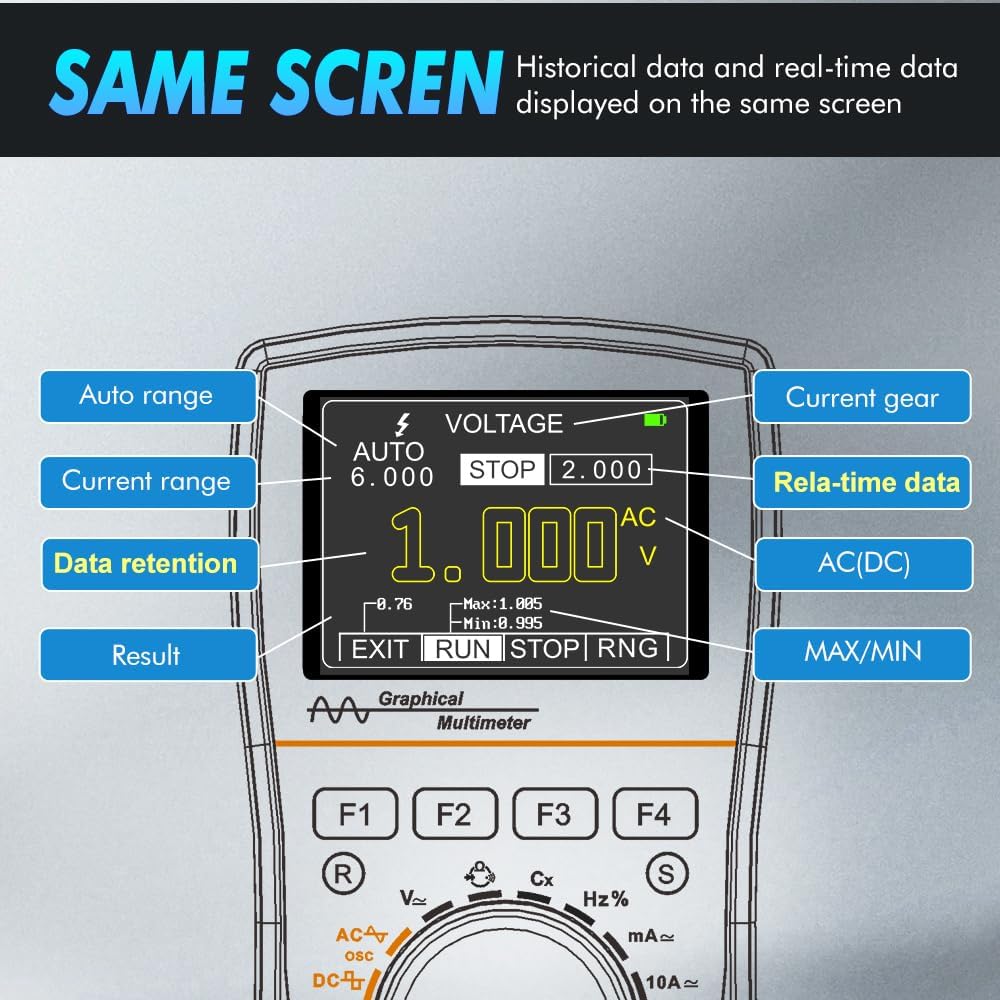
4.2. Funció multímetre
The multimeter function provides precise measurements of various electrical parameters. It supports both automatic and manual range switching.
- Tipus de mesura: The ET828PRO can measure:
- AC i DC Voltage
- AC and DC Current (mA, 10A ranges)
- Resistència
- Capacitat
- Freqüència
- Cicle de treball
- Diode Detection
- Continuity (On/Off Test)
- Visualització de dades: Real-time measurement data and stored data can be displayed simultaneously on the screen.
- Conservació de dades: Use the data hold function to freeze the current reading on the display for easier recording.

5. Manteniment
Proper maintenance ensures the longevity and accuracy of your ET828PRO device.
- Neteja: Use a soft, dry cloth to clean the device. Do not use abrasive cleaners or solvents. Ensure the device is powered off before cleaning.
- Emmagatzematge: Store the device in a cool, dry place, away from direct sunlight and extreme temperatures. Use the provided cloth bag for protection when not in use.
- Substitució de fusibles: The ET828PRO is equipped with a 10A double fuse for protection. If the device fails to measure current or shows incorrect readings in current mode, the fuse may need replacement. Refer to a qualified technician for fuse replacement to ensure proper safety and functionality.
6. Solució De Problemes
If you encounter issues with your ET828PRO, refer to the following common troubleshooting steps:
- El dispositiu no s'encén: Ensure the rotary switch is in an 'ON' position. If the device has a rechargeable battery, ensure it is sufficiently charged.
- No lectura o lectura incorrecta:
- Check that the test leads are securely connected to the correct input jacks for the desired measurement.
- Verify that the rotary switch is set to the appropriate measurement function.
- For current measurements, check if the fuse needs replacement (see Maintenance section).
- Ensure the circuit being tested is within the device's specified measurement range.
- Problemes de visualització: If the display is dim or flickering, the battery may be low. Recharge the device if applicable.
- Protecció de sobrecàrrega: The device has built-in overload protection. If an overload occurs, the device may temporarily stop functioning or display an error. Remove the overload condition and restart the device.
7. Especificacions
The following table details the technical specifications of the Irfora ET828PRO 2-in-1 Oscilloscope Multimeter:
| Atribut | Especificació |
|---|---|
| Marca | Irfora |
| Número de model | ET828PRO |
| Font d'alimentació | Funciona amb bateria |
| Color | Multicolor |
| Dimensions de l'article (L x A x A) | 7.48 x 5.51 x 1.77 polzades |
| Pes de l'article | 13.8 unces |
| Tipus de mesura | Multímetre |
| Oscilloscope SampTarifa ling | 50 msps |
| Ample de banda de l'oscil·loscopi | 10 MHz |
| Multimeter Display Counts | 6000 recomptes |
| Tipus de visualització | Pantalla a color de 2.4 polzades |
| Fabricant | Irfora |
| Número de part | LAKUSE25678 |
| ASIN | B0DBY6WG86 |
| Data de primera disponibilitat | 2 d'agost de 2024 |

8. Garantia i Suport
Warranty information for the Irfora ET828PRO is typically provided with the product packaging or can be obtained directly from the manufacturer or authorized reseller. Please retain your proof of purchase for warranty claims.
For technical support, troubleshooting assistance beyond this manual, or service inquiries, please contact Irfora customer support through their official website or the point of purchase. Always refer to the latest contact information provided by the manufacturer.