1. Introducció
Thank you for choosing the PUTRIMS K12 Google TV Projector. This manual provides essential information for the safe and efficient use of your new projector. Please read it thoroughly before operation and keep it for future reference.

Figure 1.1: PUTRIMS K12 Projector
2. Informació de seguretat
- No mireu directament a la lent del projector quan estigui encès.amp està activat.
- Assegureu-vos una ventilació adequada per evitar el sobreescalfament.
- Mantingueu el projector allunyat de l'aigua o altres líquids.
- Utilitzeu només l'adaptador d'alimentació subministrat.
- Eviteu col·locar el projector sobre superfícies inestables.
- No intenteu desmuntar ni reparar el projector vosaltres mateixos. Poseu-vos en contacte amb el servei d'atenció al client per obtenir ajuda.
3. Contingut del paquet
Verifiqueu que tots els elements siguin presents al vostre paquet:
- Projector PUTRIMS K12
- Control remot
- Cable d'alimentació
- Cable HDMI
- Coberta de la lent del projector
- Manual d'usuari (aquest document)
4. Producte acabatview
The PUTRIMS K12 projector is designed for a versatile home theater and business experience. It features a sleek design with essential ports for connectivity.
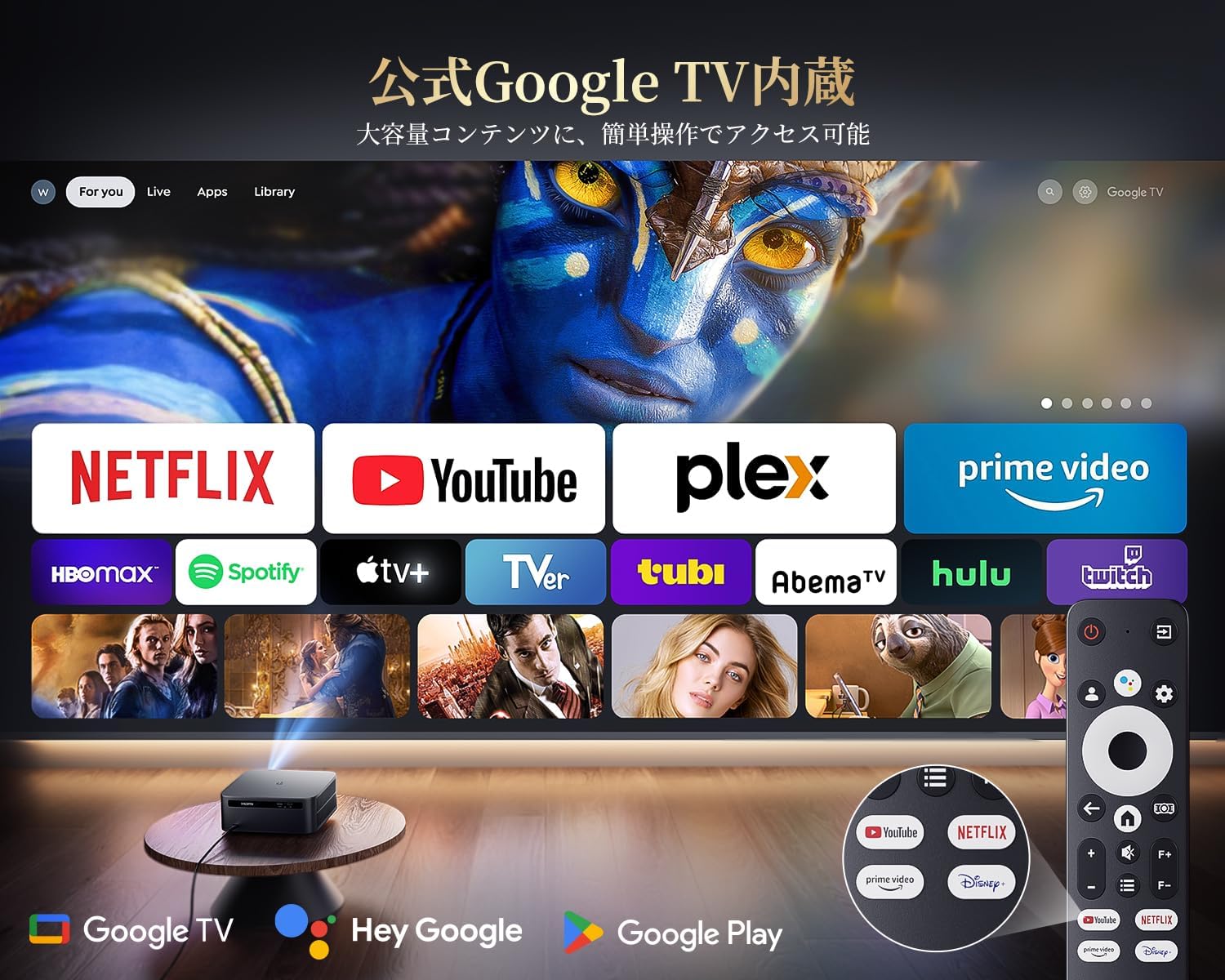
Figura 4.1: Frontal view of the K12 Projector, showing the lens and auto-focus sensors.

Figura 4.2: posterior view of the K12 Projector, highlighting HDMI, USB, and audio ports.
Video 4.1: General product overview and feature demonstration of the PUTRIMS K12 projector.
5. Configuració
5.1 Configuració física
The K12 projector offers flexible installation options to suit various environments:
- Col·locació de la taula: Col·loqueu el projector sobre una superfície estable i plana.
- Muntatge del trípode: Use the M5 screw hole on the bottom to attach a tripod.
- Muntatge al sostre: Munteu el projector de manera segura al sostre amb un suport compatible.
- Muntatge a la paret: Attach the projector to a wall using a suitable bracket.

Figure 5.1: Diverse installation methods for the K12 Projector.
5.2 Encès inicial
- Connecteu el cable d'alimentació al projector i a una presa de corrent.
- Premeu el botó d'encesa del projector o del comandament a distància per encendre-lo.
- The projector will automatically perform auto-focus and keystone correction.
5.3 Connexió de xarxa (WiFi)
To access online streaming services and updates, connect your projector to a WiFi network:
- Navigate to the 'Settings' menu on the projector.
- Select 'Network' or 'WiFi Settings'.
- Turn on WiFi and select your desired network from the list.
- Introduïu la contrasenya si se us demana i connecteu-vos.
5.4 Connexió Bluetooth
Connect external Bluetooth speakers or headphones for enhanced audio:
- Go to 'Settings' and select 'Bluetooth'.
- Turn on Bluetooth and put your external device into pairing mode.
- Seleccioneu el dispositiu de la llista per emparellar-lo.
5.5 Mirall de pantalla
Share content from your mobile devices or computer wirelessly:
- For iOS devices (Airplay): Ensure your iOS device and the projector are connected to the same WiFi network. Open the 'iOS Cast' interface on the projector. On your iOS device, open Control Center, tap 'Screen Mirroring', and select 'K12-xxxx' from the list.
- For Android/Windows devices (Miracast): Ensure your device and the projector are connected to the same WiFi network. Open the 'Miracast' interface on the projector. On your Android/Windows device, enable screen mirroring/cast feature and select 'K12-xxxx' to connect.
6. Instruccions de funcionament
6.1 Funcions de Google TV
The PUTRIMS K12 comes with official Google TV, providing access to a vast library of content and applications.
- Aplicacions de streaming: Directly access Netflix, Disney+, YouTube, Prime Video, Hulu, and many more with a single click.
- Google Play Store: Download and install over 10,000 applications and games.
- Actualitzacions periòdiques: The projector receives periodic updates to enhance security and stability.

Figure 6.1: Google TV interface with popular streaming applications.
6.2 Control de veu
Utilize the Google Voice Assistant for convenient control of your projector and content.
- Press the voice control button on your remote.
- Speak commands such as "Open Netflix," "Play One Piece," "Tell me the weather," or "Increase volume."

Figure 6.2: Using the Google Voice Assistant with the remote control.
6.3 Ajust de la imatge
The K12 projector features advanced image adjustment capabilities for optimal viewing.
- Enfocament automàtic: The projector automatically adjusts the focus for a clear image upon startup or movement.
- Correcció trapezoidal automàtica: It automatically corrects horizontal and vertical trapezoidal distortions, ensuring a perfectly rectangular image even from an angle.
- Funció de zoom: Ajusteu la mida de la pantalla del 50% al 100% sense moure el projector.
- Relació d'aspecte: Supports 4:3 and 16:9 aspect ratios.
- Brillantor i contrast: Customize brightness and contrast settings to your preference.

Figure 6.3: Automatic focus and keystone correction in action.

Figure 6.4: Projection distances and corresponding screen sizes (100", 120", 150").
6.4 Connexió de dispositius externs
The K12 projector offers multiple connectivity options for various devices:
- ARC HDMI: Connect to soundbars, laptops, gaming consoles (Switch, PS5), or DVD players.
- USB: Play media directly from USB memory sticks.
- Port d'àudio de 3.5 mm: Connecteu-vos a sistemes d'àudio externs.

Figure 6.5: Seamless connection with various external devices.
7. Manteniment
7.1 Neteja de lents
To maintain optimal image quality, regularly clean the projector lens.
- Assegureu-vos que el projector estigui apagat i desconnectat.
- Gently wipe the lens with a soft, lint-free cloth or a cotton swab.
- For stubborn smudges, use a lens cleaning solution specifically designed for optical surfaces.
- Avoid using abrasive materials or harsh chemicals that could damage the lens.
8. Solució De Problemes
Aquí teniu solucions a problemes comuns que podeu trobar:
- No image/signal: Check all cable connections (HDMI, power). Ensure the correct input source is selected on the projector.
- Imatge borrosa: The projector features auto-focus. If the image remains blurry, ensure the lens is clean and there are no obstructions.
- Image not rectangular: The projector has auto-keystone correction. If issues persist, ensure the projector is placed on a stable surface and try repositioning it.
- Sense so: Check volume settings on both the projector and connected devices. Ensure external speakers are properly connected via Bluetooth or audio cable. If using HDMI ARC, verify the connection and settings.
- WiFi/Bluetooth connection issues: Ensure the projector and your device are within range of the router/device. Restart both the projector and the router/device.
- App crashes or malfunctions (for unofficial Android TV versions): The PUTRIMS K12 has an official Google TV license, which ensures stability. If you experience issues, ensure your system is updated.
Per obtenir més ajuda, consulteu la secció Garantia i assistència.
9. Especificacions
| Característica | Descripció |
|---|---|
| Marca | PUTRIMS |
| Model | K12 |
| Brillantor | 1500 lúmens ANSI |
| Resolució | 1080P FHD (4K Support) |
| Sistema operatiu | Official Google TV |
| Control de veu | Assistent de Google Voice |
| Focus | Omnidirectional Auto Focus |
| Correcció de pedra clau | Horizontal & Vertical Auto Keystone Correction |
| Zoom | 50%-100% |
| Mida màxima de la pantalla | 300 polzades |
| WiFi | WiFi 6 |
| Bluetooth | Bluetooth 5.3 |
| Sortida d'àudio | 20W HIFI Speaker, 3.5mm Audio Jack |
| Ports d'entrada | HDMI ARC, USB |
| Dimensions | 40.5 x 30.2 x 17 cm |
| Pes | 3.31 kg |
10. Garantia i Suport
PUTRIMS is committed to providing excellent customer service. Your K12 projector comes with comprehensive support:
- Servei postvenda: 24 hours a day, 365 days a year.
- Suport tècnic: Professional technical assistance is available.
- Garantia: Free exchange or 100% refund guarantee for initial defects or natural failures under normal use.
If you have any questions or require assistance, please contact PUTRIMS customer support via the official email address provided in your product packaging or on the official weblloc.


