1. Introducció
The Raddy DT7 Weather Station is an advanced indoor and outdoor temperature and humidity monitor designed to provide comprehensive weather information and timekeeping functions. Featuring a unique round HTN display, it offers clear readability and a modern aesthetic. This manual provides detailed instructions for setting up, operating, maintaining, and troubleshooting your Raddy DT7 Weather Station.

Image: The Raddy DT7 Weather Station main display unit and its accompanying wireless outdoor sensor.
2. Què hi ha a la caixa
Si us plau, comproveu que tots els components siguin presents i en bon estat en desembalar-lo:
- Raddy DT7 Main Display Unit
- Sensor exterior sense fils
- Adaptador de corrent alterna
- Manual d'usuari (aquest document)
Note: AA batteries for both the main unit (if not using AC power) and the wireless sensor are not included and must be purchased separately.

Image: The Raddy DT7 main display unit, wireless sensor, and AC power adapter.
3. Guia de configuració
3.1 Alimentació de la unitat principal
The main display unit can be powered by the included AC adapter or by batteries (not included).
- Ús de l'adaptador de CA: Connect the AC power adapter to the DC input port on the back of the main unit, then plug it into a standard wall outlet.
- Ús de piles: Open the battery compartment on the back of the main unit and insert 2 AA batteries, observing the correct polarity (+/-).
3.2 Powering the Wireless Outdoor Sensor
The wireless outdoor sensor requires batteries (not included) for operation.
- Obriu el compartiment de la bateria a la part posterior del sensor sense fil.
- Insert 2 AA batteries, observing the correct polarity (+/-).
- Tanqueu el compartiment de la bateria de manera segura.
3.3 Initial Pairing and Placement
Once both units are powered, they will automatically attempt to pair. This may take a few minutes. Ensure the sensor is placed within range of the main unit (typically up to 100 meters in open air, less with obstructions).
- Place the outdoor sensor in a shaded area, away from direct sunlight and precipitation, to ensure accurate temperature and humidity readings.
- Avoid placing the sensor near heat sources (e.g., vents, appliances) or reflective surfaces that could skew readings.
3.4 Setting Time, Date, and Location
The Raddy DT7 features an Atomic Clock (WWVB) for automatic time synchronization. If the signal is not available, you can set it manually.
- Premeu el botó SET button (usually on the back) to enter setup mode.
- Utilitza el UP i ABAIX botons per ajustar els valors.
- Premeu SET again to confirm and move to the next setting (e.g., 12/24 hour format, time zone, year, month, day).
- For sunrise/sunset times, you will need to input your city code or latitude/longitude. Refer to the detailed instructions in the included manual for specific city codes or manual coordinate entry.

Image: The Raddy DT7 Weather Station highlighting its Atomic Clock (WWVB) feature for precise timekeeping.
4. Instruccions de funcionament
4.1 Mostra finalview
The Raddy DT7 features a comprehensive HTN display that presents various weather and time-related data. Refer to the image below for a visual guide to the display sections:

Imatge: Detallada view of the Raddy DT7's multi-functional display, indicating various data points.
- Calendari: Mostra la data i el dia actuals de la setmana.
- Sunrise/Sunset Time: Shows the precise sunrise and sunset times based on your configured location.
- Indoor & Outdoor Temperature: Current temperature readings for both indoor and outdoor environments.
- Indoor & Outdoor Humidity: Current humidity levels for both indoor and outdoor environments.
- Pronòstic del temps: An icon-based prediction of future weather conditions (e.g., sunny, cloudy, rainy).
- Pressió baromètrica: Displays the current atmospheric pressure and its trend.
- Moon Phases & Tides: Indicates the current moon phase and tide information.
- High/Low Alerts: Visual indicators for extreme temperature or humidity conditions.
- Tendències: Arrows indicating whether temperature, humidity, or pressure are rising, falling, or stable.
- Nivell de confort: An icon indicating the indoor comfort level based on temperature and humidity.
4.2 Funcions dels botons
The main unit features several buttons on its back for configuration and operation:
- SET: Enters setup mode, confirms settings, and moves to the next parameter.
- AMUNT AVALL: Adjusts values during setup, scrolls through options.
- Mode: Toggles between different display modes or views.
- ALARMA: Enters alarm setting mode, activates/deactivates alarms.
- SNOOZE / LIGHT: Activates the backlight temporarily (on battery power) or adjusts brightness (on AC power), and functions as a snooze button for alarms.
4.3 Configuració d'alarma
The Raddy DT7 supports dual alarms with a snooze function.
- Premeu el botó ALARMA botó per entrar al mode de configuració d'alarma.
- Ús UP i ABAIX per configurar l'hora de l'alarma desitjada.
- Premeu ALARMA again to confirm and set the second alarm if needed.
- Per activar/desactivar una alarma, premeu ALARMA repeatedly until the alarm icon appears/disappears.
- Quan soni una alarma, premeu el botó SNOOZE / LLUM button to activate snooze (alarm will sound again after a set interval) or any other button to stop the alarm.
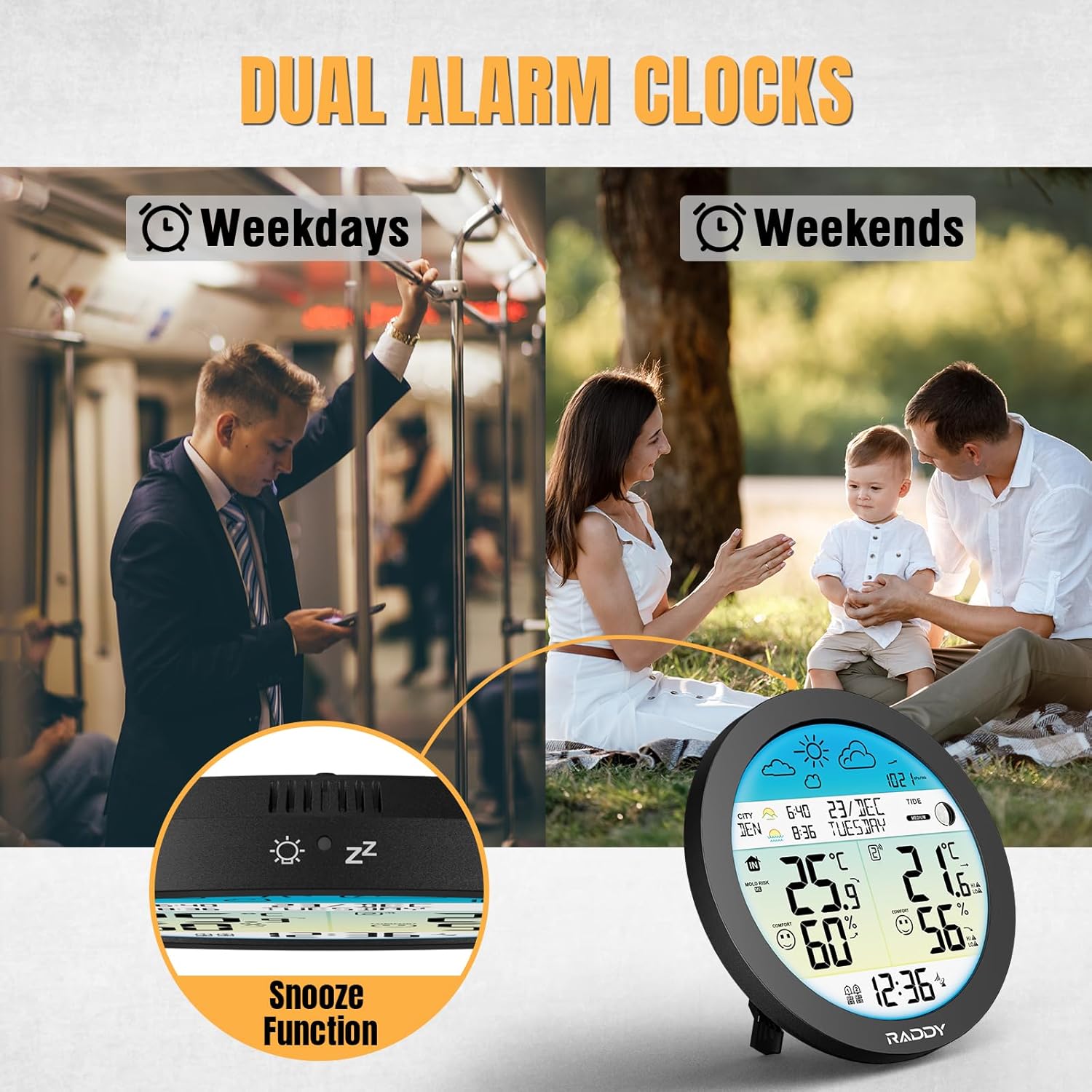
Image: The Raddy DT7 Weather Station featuring dual alarm clocks for weekdays and weekends, along with a snooze function.
4.4 Ajust de la llum de fons
The display backlight has 4 adjustable levels and an automatic mode.
- When powered by AC, repeatedly press the SNOOZE / LLUM button to cycle through brightness levels (100%, 80%, 60%, 0%) and automatic mode.
- In automatic mode, the ambient light sensor will adjust the display brightness based on room lighting.
- When powered by batteries, the backlight will only illuminate temporarily when the SNOOZE / LLUM es prem el botó.

Image: The Raddy DT7 Weather Station demonstrating its 4-level and automatic brightness adjustment feature for optimal viewdia i nit.
4.5 Conversió d'unitats
You can switch between Fahrenheit and Celsius for temperature readings, and 12-hour or 24-hour format for time.
- During time/date setup, use the UP or ABAIX buttons when the temperature unit or time format is flashing to toggle between options.
5. Característiques clau
- All-in-One Weather Monitoring: Tracks indoor/outdoor temperature and humidity, 12-24 hour weather forecast, barometric pressure & trends, moon phases, tide information, calendar, and DCF radio clock.
- Accurate Sunrise & Sunset Times: Input your city or coordinates for precise sunrise and sunset information, useful for planning outdoor activities.
- Intelligent Alerts for Extreme Conditions: Provides alerts for high/low outdoor temperature and humidity, frost warnings (no alarm sound), indoor mold risk level, and real-time comfort level display.
- Dual Alarms + Light Sensor Backlight: Set two independent alarms with a snooze function. The 4-level adjustable backlight with an ambient light sensor ensures perfect readability day or night.
- Unique Round Design with HTN Wide-Angle Screen: The distinctive round design offers a larger visible area compared to standard square displays. The HTN screen provides sharp, wide-angle readability from various viewangles d'ajust.
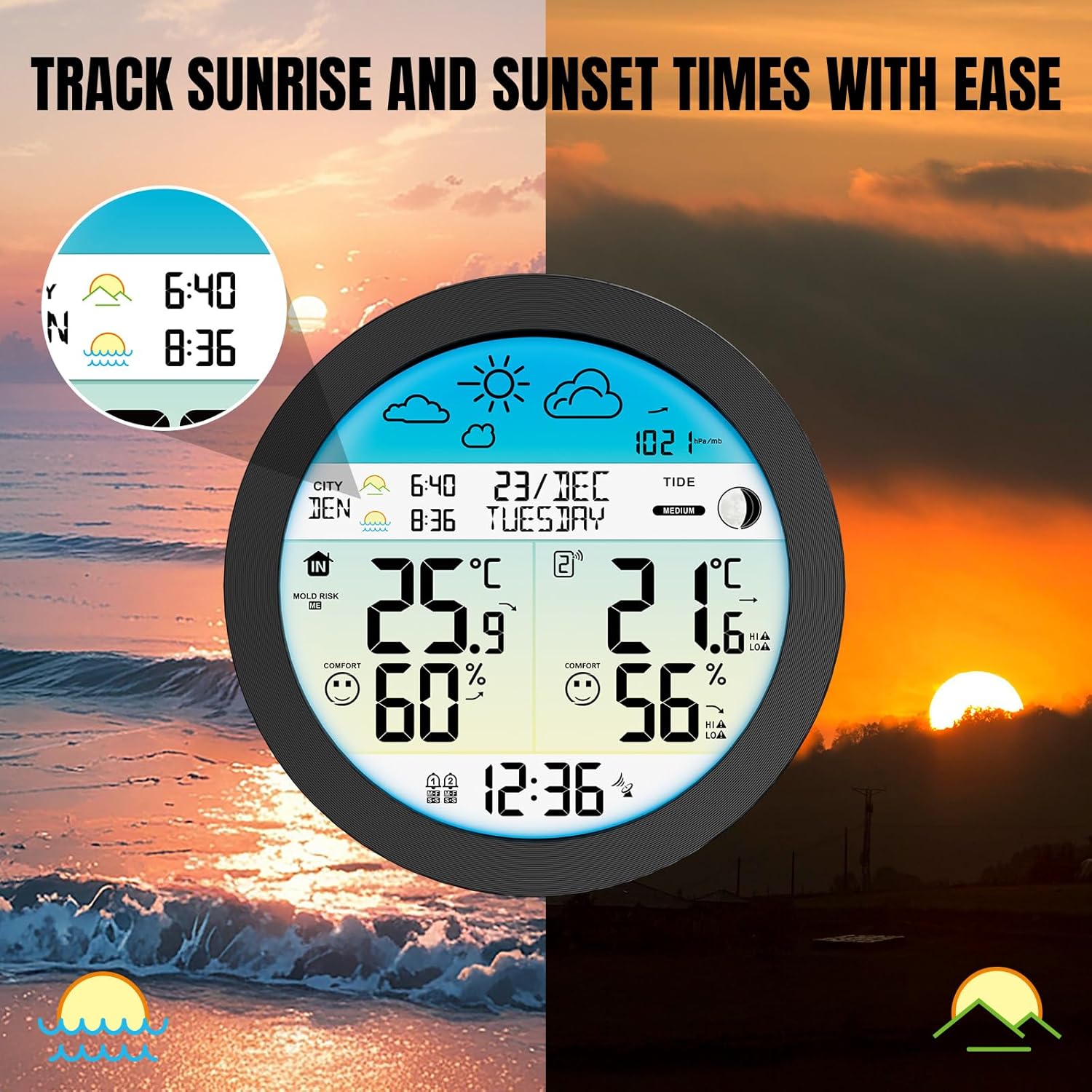
Image: The Raddy DT7 Weather Station displaying accurate sunrise and sunset times based on location.

Image: The Raddy DT7 Weather Station indicating high/low alerts for temperature and humidity, and frost warnings.

Image: A visual comparison highlighting the larger and clearer display of the Raddy DT7's 6.6" circular design versus other weather stations.
6. Manteniment
- Neteja: Netegeu la unitat de visualització i el sensor amb un drap suauamp tela. No utilitzeu netejadors abrasius ni dissolvents.
- Substitució de la bateria: Replace batteries in both the main unit (if applicable) and the wireless sensor when the low battery indicator appears on the display. Ensure correct polarity.
- Col·locació del sensor: Periodically check the outdoor sensor's placement to ensure it remains protected from direct sunlight and heavy rain, which can affect accuracy and lifespan.
7. Solució De Problemes
| Problema | Causa possible | Solució |
|---|---|---|
| No hi ha cap pantalla a la unitat principal | No power; batteries depleted or AC adapter not connected. | Ensure AC adapter is securely plugged in or replace batteries. |
| La temperatura/humitat exterior no es mostra o és inexacta | Sensor out of range; batteries low in sensor; interference; sensor improperly placed. | Move sensor closer to main unit; replace sensor batteries; avoid large metal objects; relocate sensor to a shaded, dry area. |
| Atomic clock not syncing | Weak signal; interference; incorrect time zone setting. | Place unit near a window; avoid electronic devices; manually set time zone. |
| Sunrise/sunset times are incorrect | Incorrect city code or coordinates entered; Daylight Saving Time not adjusted. | Verify and re-enter city code/coordinates; check DST setting. |
| Display has black splotches | Pressure on the display. | Ensure no pressure is applied to the screen; lay flat for a period if recently handled. |
8. Especificacions
- Número de model: 221940490
- Marca: Raddy
- Tipus de visualització: HTN Wide-Angle Screen
- Tecnologia de connectivitat: 433 MHz (Wireless Sensor)
- Font d'alimentació (unitat principal): AC Adapter (included) or 2 x AA Batteries (not included)
- Power Source (Sensor): 2 piles AA (no incloses)
- Precisió de la temperatura: ±1 °C
- Característiques especials: Alarm, Clock, Large Display, Barometric Pressure, Moon Phase, Sunrise/Sunset, Tide Info
- Color: Blau (retroiluminació de la pantalla)
- Dimensions (Unitat principal): Aproximadament 8.62 x 8.5 x 3.11 polzades
- Pes: 1.41 lliures
9. Garantia i Suport
Raddy products are designed for reliability and performance. For warranty information, technical support, or service inquiries, please refer to the contact details provided on the product packaging or visit the official Raddy weblloc web. Conserveu el rebut de compra com a comprovant de compra per a qualsevol reclamació de garantia.
No s'han trobat vídeos oficials del venedor a les dades del producte proporcionades per incrustar en aquest manual.


