1. Introducció
The Amazon Echo Show 8 (2025 Release) is a smart display designed to enhance your daily life with its vibrant HD screen, spatial audio, and integrated Alexa+ assistant. This device features a built-in smart home hub and Omnisense technology for personalized experiences. This manual provides essential information for setting up, operating, and maintaining your Echo Show 8.
2. Què hi ha a la caixa
- Echo Show 8 (2025 release)
- Adaptador de corrent (30 W)
- Guia d'inici ràpid
3. Dispositiu acabatview
Familiarize yourself with the physical components of your Echo Show 8.

Descripció de la imatge: Un front view of the Amazon Echo Show 8, showcasing its 8.7-inch HD display. The screen shows a personalized smart home interface with widgets for smart lights, temperature, and Amazon Photos. The device has a fabric-covered base and a camera at the top center of the screen bezel.

Descripció de la imatge: Un primer pla view of the side of the Echo Show 8, highlighting the physical privacy button. This button allows users to enable or disable the microphones and camera for enhanced privacy control.
4. Configuració
Follow these steps to set up your Echo Show 8:
- Encès: Connect the included 30W power adapter to your Echo Show 8 and plug it into a wall outlet. The device will power on automatically.
- Configuració inicial: Follow the on-screen instructions to select your language, connect to your Wi-Fi network, and log in with your Amazon account.
- Wi-Fi Simple Setup: If you have other Amazon devices, Wi-Fi simple setup may automatically connect your Echo Show 8 to your Wi-Fi network.
- Aplicació Alexa: Download the Alexa app on your Fire OS, Android, or iOS device for additional settings and features. The app is also accessible via a web navegador.
5. Operating Your Echo Show 8
5.1 Basic Interactions
- Comandaments de veu: Say "Alexa" followed by your command or question.
- Pantalla tàctil: Navigate menus, select options, and control content directly on the 8.7-inch HD touchscreen.
5.2 Alexa+ Features
Your device comes with Alexa+ Early Access, offering a smarter, more proactive AI assistant. The new Alexa+ home screen provides glanceable information and personalized content, including helpful follow-ups, customized notifications, and information based on your interests.
5.3 Audio and Video Playback
Stream music or watch shows from services like Prime Video and Netflix. The device features room-filling spatial audio, crisper vocals, a wider sound stage, and up to 2x bass compared to previous models.

Descripció de la imatge: Two individuals are in a kitchen setting, smiling while an Amazon Echo Show 8 plays music on the countertop. The screen displays album art and song information, illustrating the device's audio playback capabilities.
5.4 Control de la llar intel·ligent
The Echo Show 8 includes a built-in smart home hub (Zigbee + Matter + Thread Border Router). Pair and control thousands of compatible devices without needing a separate hub. View camera feeds, manage lights, thermostats, and more using the display or your voice. Omnisense technology allows for routine activation via temperature, presence, or visual ID detection.
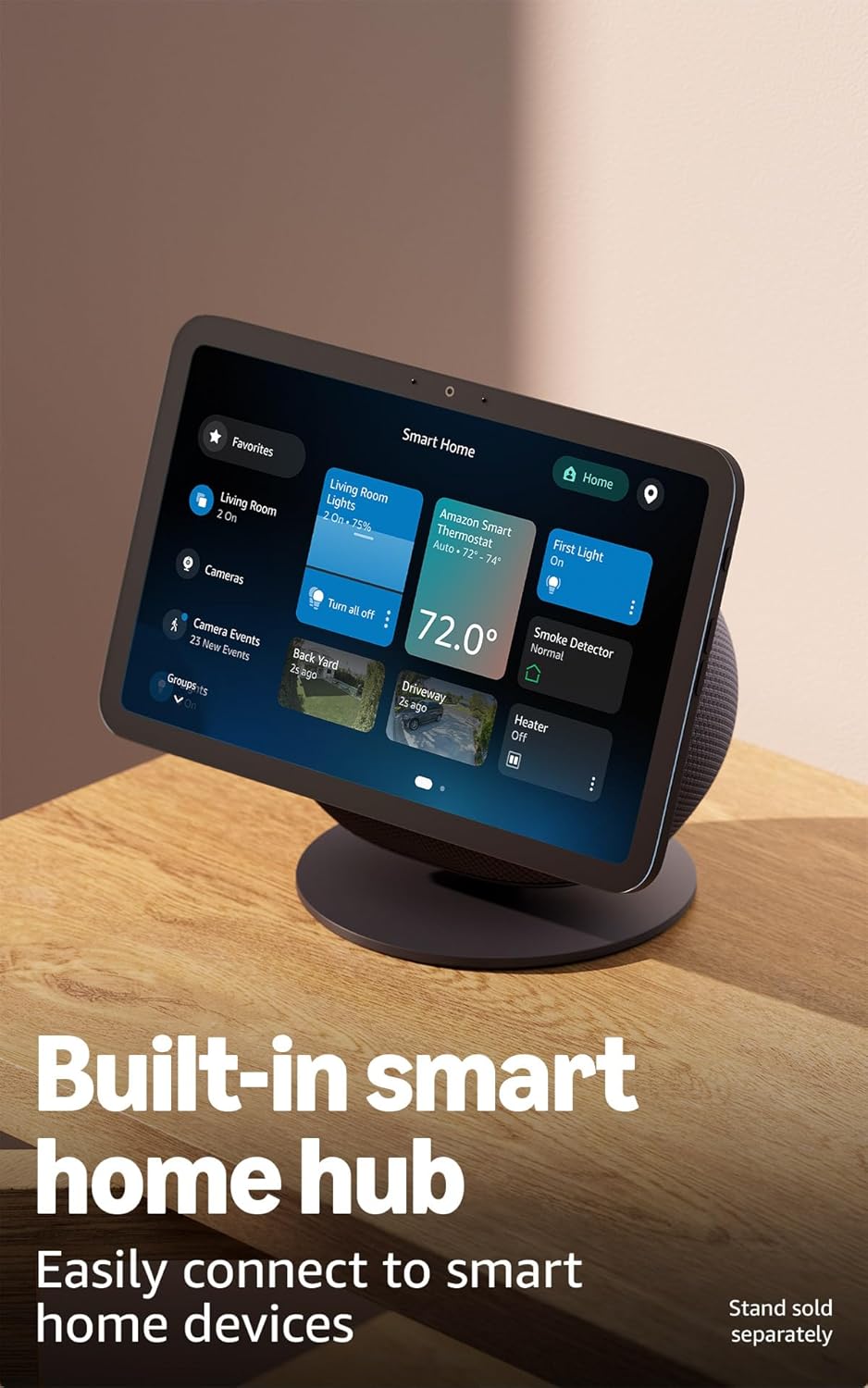
Descripció de la imatge: An Amazon Echo Show 8 is shown on an optional stand, displaying a smart home control interface. The screen shows various smart home devices like lights, thermostats, and cameras, demonstrating its function as a central smart home hub.
5.5 Video Calls
Engage in crystal-clear video calls with a centered, auto-framing 13 MP camera, 3.3x zoom, and noise reduction technology. Use the live view feature to check on your home while away.
5.6 Photo Memories
Transform your home screen into a digital photo frame. Alexa+ allows you to find specific photos or curate a personal slideshow.
5.7 Privacy Controls
The Echo Show 8 is designed with multiple layers of privacy controls. These include wake word technology, a physical microphones & camera enable/disable button, dedicated camera controls on-device and in-app, and the ability to review and delete voice recordings. Visit the Alexa Privacy Hub for more information.
6. Manteniment
6.1 Neteja
To clean your Echo Show 8, gently wipe the screen and exterior surfaces with a soft, lint-free cloth. Avoid using abrasive cleaners or sprays directly on the device.
6.2 Actualitzacions de programari
Your Echo Show 8 will receive automatic software security updates to ensure optimal performance and security. Ensure your device is connected to Wi-Fi to receive these updates.
7. Solució De Problemes
If you encounter issues with your Echo Show 8, try the following:
- Sense energia: Assegureu-vos que l'adaptador de corrent estigui connectat correctament tant al dispositiu com a una presa de corrent que funcioni.
- Problemes de connectivitat Wi-Fi: Check your router and modem. Restart your Echo Show 8 by unplugging it for a few seconds and plugging it back in. Verify your Wi-Fi password in the Alexa app.
- Alexa no respon: Ensure the microphone is enabled (check the privacy button). Speak clearly and ensure you are within range of the device.
- La pantalla no respon: Restart the device. If the issue persists, perform a factory reset (refer to the Alexa app for instructions).
For further assistance, visit Amazon's customer support weblloc.
8. Especificacions
| Característica | Detall |
|---|---|
| Mida | 8.2" x 5" x 5.9" (208 mm x 127 mm x 150 mm) |
| Pes | 37 oz (1049 grams) |
| Mostra | 8.7” HD touchscreen with 800 x 1340 resolution |
| Càmera | 13 MP with auto framing |
| Àudio | 1 X 2.8” Woofer and 2 full-range drivers |
| Connectivitat Wi-Fi | Wi-Fi 6E (802.1ax) supported. Tri-band, Wi-Fi (SISO). Supports 802.11a/b/g/n/ac Wi-Fi networks. |
| Smart Home Hub | Zigbee + Matter + Thread Border Router |
| Connectivitat Bluetooth | A2DP for audio streaming, AVRCP for voice control of mobile devices. |
| Processador | AZ3 Pro with AI Accelerator |
| Sensors | Ambient Temperature Sensor, Ambient Light Sensor, Presence Detection, Camera |
| Omnisense Technology | Custom technology for ambient AI, visual ID, proximity/presence detection, temperature sensing, adaptive brightness/color. |
| Llengua | Alexa speaks English and Spanish |
9. Característiques d'accessibilitat
The Echo Show 8 includes various accessibility features. To enable them, go to Settings → Accessibility on your device:
- Toca per a Alexa: Access Alexa via touch through on-screen tiles or a keyboard.
- Escolta adaptativa: Provides more time to finish speaking before Alexa responds.
- Tarifa de parla preferida: Controla la velocitat de parla d'Alexa.
- Alexa Captioning, Call Captioning, Closed Captioning: Provide text captions for supported content.
- Show and Tell: Helps identify products for users who are blind or visually impaired.
- veuView Lector de pantalla: Enables access for users who are blind or visually impaired.
- Lupa de pantalla: Zoom in/out and pan around the screen.
- Notify When Nearby: Plays notification sounds when detected near your Echo device.
- Kindle Read Aloud: Alexa reads Kindle books aloud.
- Real Time Text: Type live text in a video call.
- Additional settings for Color Inversion, Color Correction, Request Sound, and more.
10. Garantia i Suport
Your Echo Show 8 includes a 1-year limited warranty and service. Optional 1-year, 2-year, and 3-year extended warranties are available for U.S. customers, sold separately. Use of Echo Show 8 is subject to the terms found aquí.
For customer support, visit the Amazon support weblloc web o contacteu amb el servei d'atenció al client d'Amazon.


