Introducció
This manual provides comprehensive instructions for the setup, operation, maintenance, and troubleshooting of your BPXX D463B Bluetooth Thermal Label Printer. Please read this manual thoroughly before using the printer to ensure proper function and longevity of the device.
Informació de seguretat
- Use only the original power adapter provided with the printer.
- No exposeu la impressora a l'aigua ni a una humitat excessiva.
- Eviteu col·locar la impressora sota la llum solar directa o a prop de fonts de calor.
- Keep the printer away from dust and debris to prevent internal damage.
- No intenteu desmuntar ni reparar la impressora vosaltres mateixos. Poseu-vos en contacte amb el servei d'atenció al client per obtenir ajuda.
- Ensure proper ventilation around the printer during operation.
Contingut del paquet
Verifiqueu que tots els elements que s'enumeren a continuació s'inclouen al vostre paquet:
- BPXX D463B USB & Bluetooth Printer
- Cable USB
- Adaptador d'alimentació
- Cable d'alimentació
- U Disk (USB flash drive with drivers and guide)
- Adaptador OTG
- Labels (sampel roll)
- Guia d'inici ràpid

Image: Contents of the BPXX D463B Thermal Label Printer package.
Producte acabatview
The BPXX D463B is a compact and efficient thermal label printer designed for various labeling needs, including shipping labels, product labels, and more. It features both Bluetooth and USB connectivity for versatile use across different operating systems.

Imatge: Frontal view of the BPXX D463B Thermal Label Printer in operation.
Característiques principals:
- Impressió d'alta qualitat: 203dpi resolution for clear images, text, and barcodes.
- Connectivitat dual: Supports Bluetooth for iOS, Android, and Windows, and USB for Windows, Mac OS, Linux, and ChromeOS.
- Àmplia compatibilitat: Works with major e-commerce and shipping platforms like Amazon, Shopify, eBay, UPS, USPS, FedEx, and more.
- Velocitat d'impressió ràpida: Up to 152mm/s (72 sheets of 4x6 labels per minute).
- Detecció automàtica d'etiquetes: Automatically identifies label size for ease of use.
- Capçal d'impressió durador: Features an aluminum alloy print head with smart temperature control for prolonged service life.
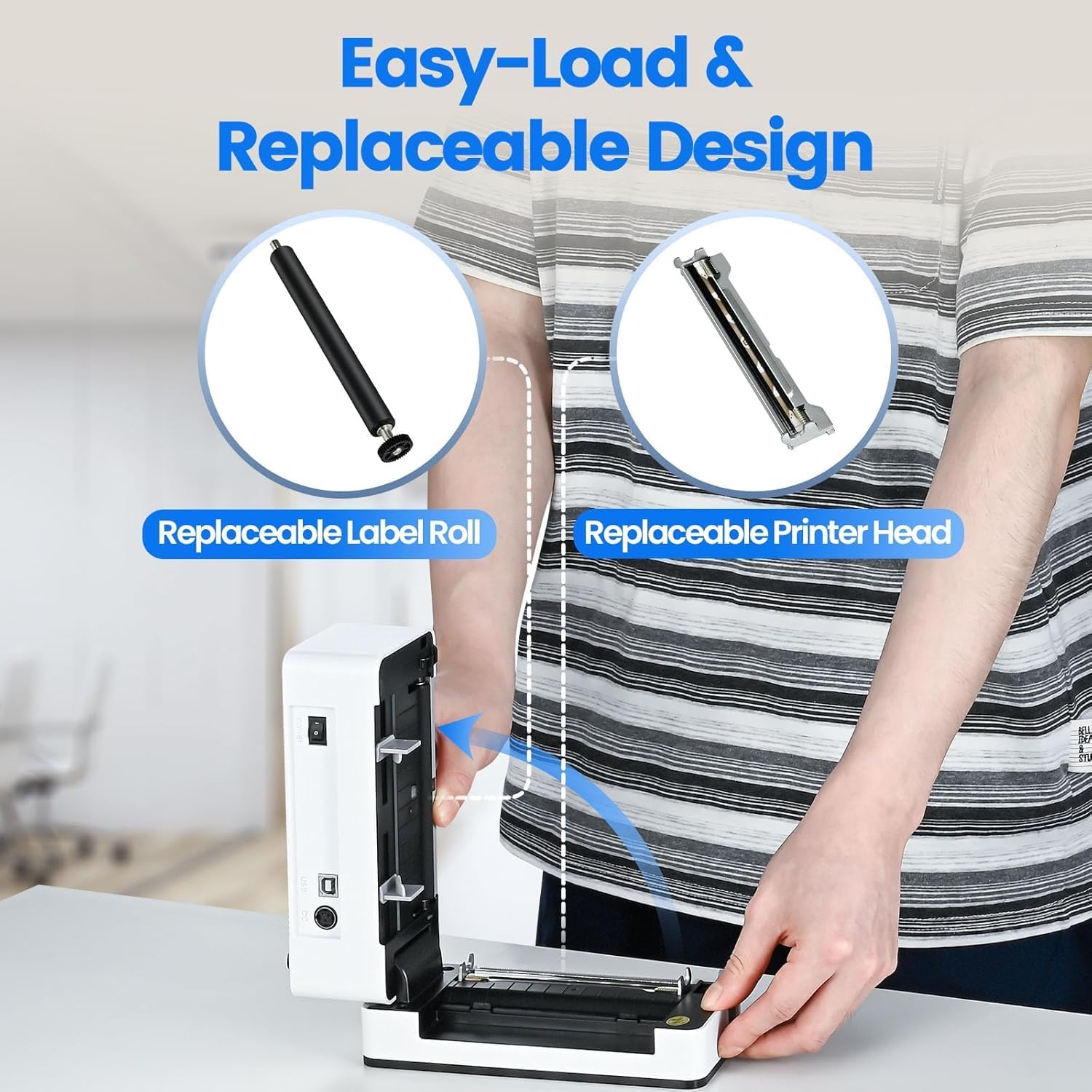
Image: The printer's aluminum alloy print head, designed for durability and extended service life.
Configuració
1. Carregant etiquetes
- Obriu la coberta superior de la impressora.
- Insert the thermal labels into the label compartment, ensuring the printable side is facing up.
- Ajusteu les guies d'etiquetes perquè s'adaptin perfectament a l'amplada de les etiquetes.
- Close the top cover. The printer will automatically detect the label size and feed a few labels to calibrate.

Image: Illustration of the easy-load label mechanism.
2. Connexió al vostre dispositiu
The D463B printer offers both Bluetooth and USB connectivity.

Image: Connectivity options for the BPXX D463B printer.
Bluetooth Connection (iOS, Android, Windows):
- Ensure the printer is powered on. The indicator light should be blue.
- Download the "4Barcode" APP from your device's app store (iOS/Android) or install the driver for Windows from the provided U Disk.
- Activa el Bluetooth al teu dispositiu mòbil o ordinador.
- Open the "4Barcode" APP or the printer driver software.
- Cerca available Bluetooth devices and select "D463B" or a similar name.
- Pair the device. Once paired, you can begin printing wirelessly.
USB Connection (Windows, Mac OS, Linux, ChromeOS):
- Connect one end of the USB cable to the printer and the other end to your computer.
- Insert the provided U Disk into your computer.
- Follow the instructions on the U Disk to install the appropriate printer drivers for your operating system. A detailed installation guide video is included on the U Disk.
- Once drivers are installed, the printer will be recognized by your computer and ready for use.
Funcionament de la impressora
Procés d'impressió
After successful setup and connection, you can print labels from various applications and platforms.

Image: Demonstrating the printer's high-speed and high-definition printing capabilities.
- Open the document or label file you wish to print (e.g., a shipping label PDF).
- Select the print option within your application.
- Choose the "BPXX D463B" printer from the list of available printers.
- Ensure the correct label size is selected in the print settings (e.g., 4x6 inches). The printer supports various label sizes up to 4.1 inches in width.
- Confirm print settings and initiate printing.

Image: The printer's maximum 4.1-inch label width capability and auto-detection feature.
Compatibilitat amb la plataforma
The BPXX D463B is compatible with a wide range of e-commerce and shipping platforms, streamlining your workflow:
- Amazon
- Shopify
- eBay
- Shopee
- UPS
- USPS
- Shippo
- FedEx
- Etsy
- Estació de vaixell
- PayPal
- I molts més.

Image: The printer's compatibility with major e-commerce and shipping platforms.
Manteniment
Neteja de la impressora
Regular cleaning ensures optimal print quality and extends the life of your printer.
- Turn off the printer and unplug it from the power source before cleaning.
- Utilitzeu un drap suau i sense pelusa dampened with isopropyl alcohol to clean the print head. Allow it to dry completely before use.
- Wipe down the exterior of the printer with a dry, soft cloth.
- Remove any dust or label debris from the label compartment.
Substitució de components
The BPXX D463B is designed for easy replacement of key components to maximize its lifespan.
Image: Easy-load and replaceable design for label roll and printer head.
Replacing the Label Roll:
Follow the "Loading Labels" instructions in the Setup section to replace an empty label roll.
Replacing the Printer Head:
While the aluminum alloy print head is designed for durability, it is replaceable if needed. Refer to the detailed instructions provided on the U Disk or contact customer support for guidance on replacing the print head.
Resolució de problemes
| Problema | Causa possible | Solució |
|---|---|---|
| La impressora no s'encén. | Cable d'alimentació no connectat; problema amb la presa de corrent. | Assegureu-vos que el cable d'alimentació estigui ben connectat. Proveu una altra presa de corrent. |
| No es pot connectar per Bluetooth. | Bluetooth not enabled; incorrect app/driver; printer not discoverable. | Ensure Bluetooth is on. Use the "4Barcode" APP. Restart printer and device. |
| Poor print quality (faded, unclear). | Print head dirty; incorrect label type; low-quality labels. | Clean the print head. Ensure you are using thermal labels. Try new labels. |
| Labels not feeding correctly. | Labels improperly loaded; label guides not adjusted. | Reload labels, ensuring they are straight and guides are snug. |
| L'ordinador no reconeix la impressora (USB). | Drivers not installed; faulty USB cable/port. | Install drivers from the U Disk. Try a different USB cable or port. |
Especificacions
| Característica | Detall |
|---|---|
| Nom del model | D463B |
| Tecnologia d'impressió | Tèrmica |
| Tecnologia de connectivitat | Bluetooth, USB |
| Resolució d'impressió | 203 DPI (punts per polzada) |
| Velocitat màxima d'impressió (monocrom) | 152mm/s (72 sheets 4x6 labels/min) |
| Max Label Width | 4.1 polzades |
| Compatible Label Sizes | 4"x6", 3"x2", 3"x1", 2"x1", 2-5/16" x 4" inches |
| Dispositius compatibles | Laptops, PCs, Tablets, Smartphones |
| Sistema operatiu compatible | iOS, Android, Windows, Mac OS, Linux, ChromeOS |
| Dimensions del producte | 3.35 "P x 3.35" W x 7.28" H |
| Pes de l'article | 3.12 lliures |
| Font d'alimentació | Adaptador de CA (inclòs) |

Image: The compact size of the BPXX D463B printer.
Garantia
The BPXX D463B Thermal Label Printer comes with a garantia d'un any from the date of purchase. This warranty covers manufacturing defects and malfunctions under normal use. It does not cover damage caused by misuse, accidents, unauthorized repairs, or natural disasters.
Conserveu el vostre comprovant de compra per a reclamacions de garantia.
Atenció al client
For any questions, technical assistance, or warranty claims, please contact BPXX customer support through the following channels:
- Correu electrònic: Refer to the contact information provided in your product packaging or on the official BPXX weblloc.
- Assistència en línia: Visit the BPXX official weblloc web per a preguntes freqüents, controladors i recursos d'assistència.
When contacting support, please have your printer model (D463B) and purchase information ready.


