1. Introducció
This manual provides essential information for the proper setup, operation, and maintenance of your Azeyou 10.1-inch Android 14 Tablet, model AT1016U5. Please read this manual thoroughly before using your device to ensure optimal performance and safety.

Imatge 1.1: Davant i darrere view of the Azeyou 10.1-inch Android 14 Tablet.
2. Informació de seguretat
Per evitar danys al dispositiu o lesions a tu mateix o a altres persones, observa les precaucions següents:
- No exposeu la tauleta a temperatures extremes, llum solar directa ni humitat elevada.
- Avoid dropping or subjecting the tablet to strong impacts.
- Use only the charger and accessories provided or approved by Azeyou.
- Mantingueu la tauleta allunyada de l'aigua i altres líquids.
- Do not attempt to disassemble or repair the tablet yourself. Contact customer support for assistance.
- Desfeu-vos de la tauleta i la bateria de manera responsable d'acord amb la normativa local.
3. Contingut del paquet
Verifiqueu que tots els elements siguin presents al paquet:
- 1x Azeyou Android 14 Tablet
- 1x TYPE C Cable
- 1x Tablet Adaptor
- 1 x manual d'usuari

Image 3.1: Contents included in the Azeyou Tablet package.
4. Producte acabatview
Familiarize yourself with the physical components and controls of your Azeyou Tablet.
4.1. Physical Layout

Image 4.1: Diagram showing the location of ports and buttons on the Azeyou Tablet.
- Botó d'encesa/bloqueig: Press to turn on/off the tablet or to lock/unlock the screen.
- Botons de volum: Ajusteu el volum d'àudio.
- Restableix el forat: Use a thin pin to reset the device if it becomes unresponsive.
- Port USB tipus C: Per a càrrega i transferència de dades.
- Ranura per a targetes Micro SD: Insert a Micro SD card for expandable storage (up to 1TB, not included).
- Càmera: Front (5MP) and Rear (8MP) cameras for photos and video calls.
- Ponents: Dual multimedia box speakers for audio output.
4.2. Característiques clau
- Sistema operatiu: Android 14
- Processador: 2.0 GHz Octa-Core Processor (Allwinner A523)
- Visualització: 10.1-inch IPS Touch Screen, 1280x800 resolution
- Memòria: 8GB RAM (4GB physical + 4GB virtual)
- Emmagatzematge: 128GB ROM, expandable up to 1TB via TF card
- Bateria: Polímer de liti de 6000 mAh
- Connectivitat: Wi-Fi 6 (802.11a/b/g/n/ac), Bluetooth 5.0
- Càmeres: 5MP frontal, 8MP posterior
- Addicionals: GMS certified, Widevine L1 support

Image 4.2: Visual representation of the tablet's core features including OS, memory, cameras, and connectivity.
5. Configuració
5.1. Carregant la bateria
Before first use, fully charge the tablet. Connect the provided USB Type-C cable to the tablet's charging port and the other end to the tablet adaptor. Plug the adaptor into a power outlet. The charging indicator will show the charging status. A full charge typically takes approximately 1.5 hours.
5.2. Encès / apagat
- Per encendre: Press and hold the Power/Lock button until the Azeyou logo appears on the screen.
- Per apagar: Press and hold the Power/Lock button until the power options menu appears. Select "Power off" and confirm.
- Per reiniciar: From the power options menu, select "Restart."
5.3. Configuració inicial
Quan l'encengueu per primera vegada, seguiu les instruccions que apareixen a la pantalla per configurar la tauleta:
- Seleccioneu el vostre idioma.
- Connecteu-vos a una xarxa Wi-Fi.
- Sign in with your Google account or create a new one. This is necessary to download apps from the Google Play Store.
- Review i acceptar els termes i condicions.
- Configura el bloqueig de pantalla (PIN, patró o contrasenya) per seguretat.
5.4. Inserció d'una targeta Micro SD
To expand storage, insert a Micro SD card (not included) into the Micro SD card slot. Gently push the card until it clicks into place. Ensure the tablet is powered off before inserting or removing the card.
6. Instruccions de funcionament
6.1. Navegació per Android 14
Your tablet runs on Android 14, offering enhanced privacy controls and a user-friendly interface. Use touch gestures to navigate:
- Toca: Seleccioneu un element.
- Llisca: Desplaçar-se per pantalles o llistes.
- Pessigar: Apropar o allunyar les imatges i web pàgines.
- Premsa llarga: Accedir a menús contextuals o moure icones.
6.2. Connectivitat Wi-Fi i Bluetooth
Access the Quick Settings panel by swiping down from the top of the screen to enable or disable Wi-Fi and Bluetooth. For detailed settings, go to Configuració > Xarxa i Internet or Configuració > Dispositius connectats.
6.3. Installing Applications
The Google Play Store is pre-installed. Tap the Play Store icon to browse and download applications. A Google account is required for this process.
6.4. Ús de la càmera
Open the Camera app to take photos or record videos. The tablet features a 5MP front camera and an 8MP rear camera. Tap the screen to focus and press the shutter button to capture.

Imatge 6.1: Ex.amples of camera usage and dual camera setup on the Azeyou Tablet.
6.5. Display and Eye Protection
The 10.1-inch IPS display offers a 1280x800 resolution. It includes low blue light technology to reduce eye strain. Adjust display settings under Configuració > Pantalla.

Image 6.2: The 10.1-inch IPS display of the Azeyou Tablet.
6.6. Gestió de la bateria
The 6000mAh battery provides approximately 6 hours of mixed usage. To optimize battery life, reduce screen brightness, disable Wi-Fi/Bluetooth when not in use, and close unused applications.

Image 6.3: Battery capacity and estimated usage times for the Azeyou Tablet.
7. Manteniment
7.1. Neteja de la tauleta
Use a soft, lint-free cloth to clean the screen and body of the tablet. Do not use abrasive cleaners or solvents, as they may damage the surfaces.
7.2. Actualitzacions de programari
Comproveu periòdicament si hi ha actualitzacions del sistema per assegurar-vos que la tauleta tingui les funcions i els pegats de seguretat més recents. Aneu a Configuració > Sistema > Actualització del sistema.
7.3. Gestió de l'emmagatzematge
Netegeu regularment innecessaris files and uninstall unused apps to maintain optimal performance. You can manage storage under Configuració > Emmagatzematge.
8. Solució De Problemes
Si teniu problemes amb la tauleta, consulteu les solucions habituals següents:
| Problema | Solució |
|---|---|
| La tauleta no s'encén | Ensure the battery is charged. Connect the charger and wait a few minutes before attempting to power on again. If unresponsive, use a thin pin to press the Reset pinhole. |
| La pantalla no respon | Restart the tablet by holding the Power/Lock button. If unresponsive, use the Reset pinhole. |
| No es pot connectar a la Wi-Fi | Ensure Wi-Fi is enabled in settings. Check if the router is working correctly. Try forgetting the network and reconnecting. |
| Apps are crashing or slow | Close background applications. Clear app cache (Settings > Apps > [App Name] > Storage & cache). Ensure sufficient storage space. Restart the tablet. |
| La bateria s'esgota ràpidament | Reduce screen brightness. Disable Wi-Fi, Bluetooth, and GPS when not in use. Close unused apps. Check battery usage in Settings > Battery. |
If the problem persists, please contact Azeyou customer support for further assistance.
9. Especificacions
Detailed technical specifications for the Azeyou 10.1-inch Android 14 Tablet (Model AT1016U5).
| Característica | Especificació |
|---|---|
| Número de model | AT1016U5 |
| Sistema operatiu | Android 14 |
| Processador | Octa-Core (Allwinner A523), 2 GHz |
| RAM | 8 GB (4 GB físic + 4 GB virtual) |
| Emmagatzematge intern | 128 GB |
| Emmagatzematge ampliable | Up to 1 TB via Micro SD card (not included) |
| Mida de la pantalla | 10.1 polzades |
| Resolució de pantalla | IPS de 1280 x 800 |
| Càmera posterior | 8 MP |
| Càmera frontal | 5 MP |
| Capacitat de la bateria | Polímer de liti de 6000 mAh |
| Durada mitjana de la bateria | 6 Hours (mixed usage) |
| Connectivitat sense fil | Wi-Fi 6 (802.11a/b/g/n/ac) |
| Bluetooth | Bluetooth 5.0 |
| Dimensions (LxWxH) | 9.5 x 6.3 x 0.32 polzades |
| Pes de l'article | 1.68 lliures |
| Color | Gris |
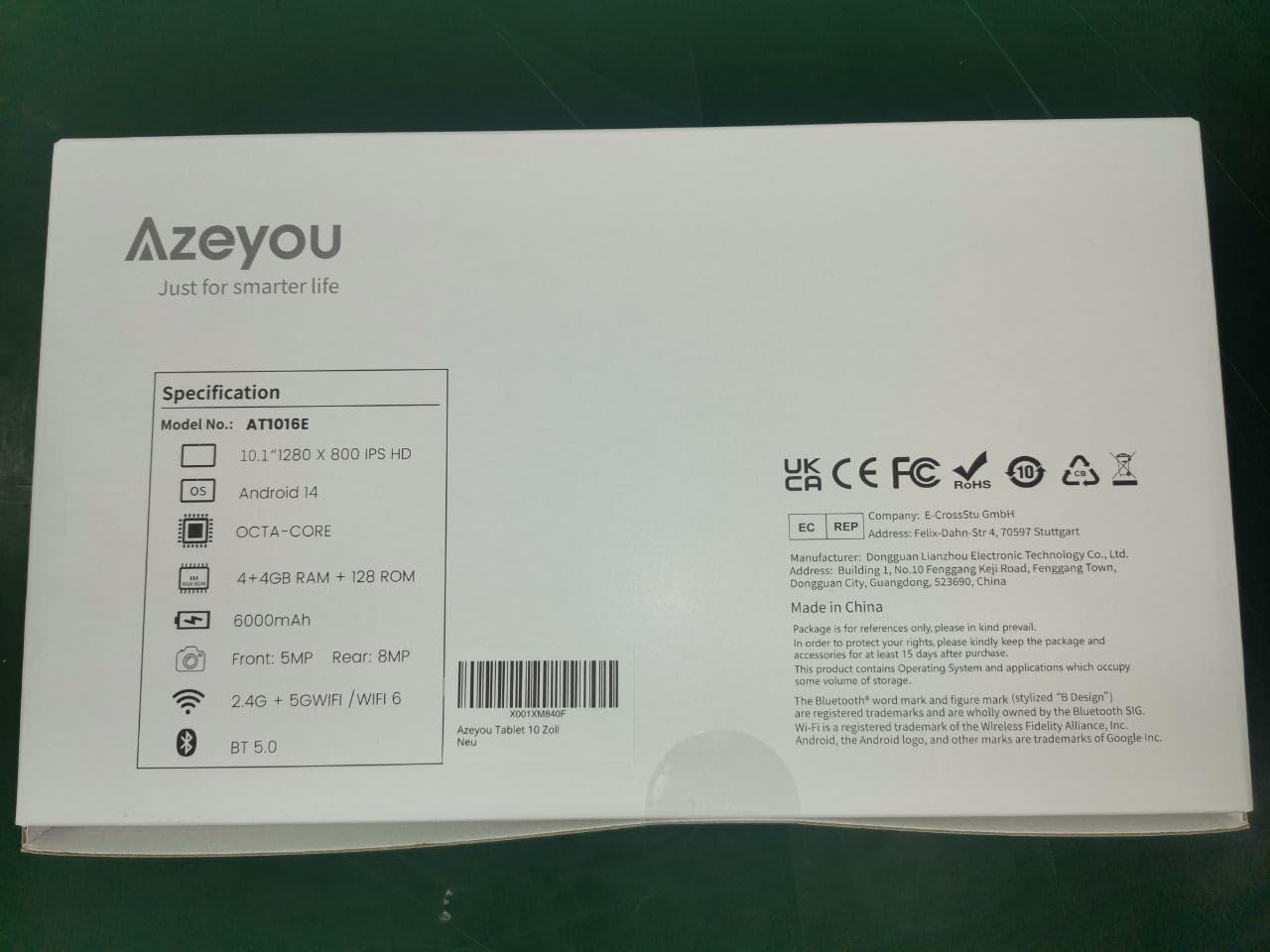
Image 9.1: Back of the product packaging displaying key specifications.
10. Garantia i Suport
Your Azeyou Tablet is covered by a manufacturer's warranty. For specific warranty terms and conditions, please refer to the documentation included with your purchase or visit the official Azeyou website. For technical support, troubleshooting assistance, or warranty claims, please contact Azeyou customer service.
Podeu trobar més informació i suport a Azeyou Brand Store.