Introducció
This manual provides instructions for the Disney Spiderman 3D Digital Alarm Clock with Nightlight, Model SPD3621. This device features an LED display for time and date, an alarm function, and a comforting nightlight. Please read these instructions carefully before use to ensure proper operation and to maximize the product's lifespan.
Contingut del paquet
- 1 x Spiderman 3D Digital Alarm Clock with Nightlight (Model SPD3621)
- 1 x Manual d'instruccions (aquest document)
Nota: Les piles no estan incloses i s'han de comprar per separat.
Informació de seguretat
- Mantingueu el dispositiu allunyat de l'aigua i la humitat.
- No exposar a temperatures extremes ni a la llum solar directa.
- Use only the recommended battery type and ensure correct polarity during installation.
- Traieu les bateries si el dispositiu no s'utilitzarà durant un període prolongat.
- No barregeu piles velles i noves, o diferents tipus de piles.
- Aquest producte no és una joguina. Es recomana la supervisió d'un adult per a nens petits.
Configuració
- Instal·lació de la bateria: Locate the battery compartment on the underside of the alarm clock. Open the compartment cover. Insert the required batteries (e.g., 3 x AAA, specific type not provided in data) ensuring correct polarity (+/-). Close the battery compartment cover securely.
- Engegada inicial: Once batteries are installed, the LED display should illuminate, showing a default time.
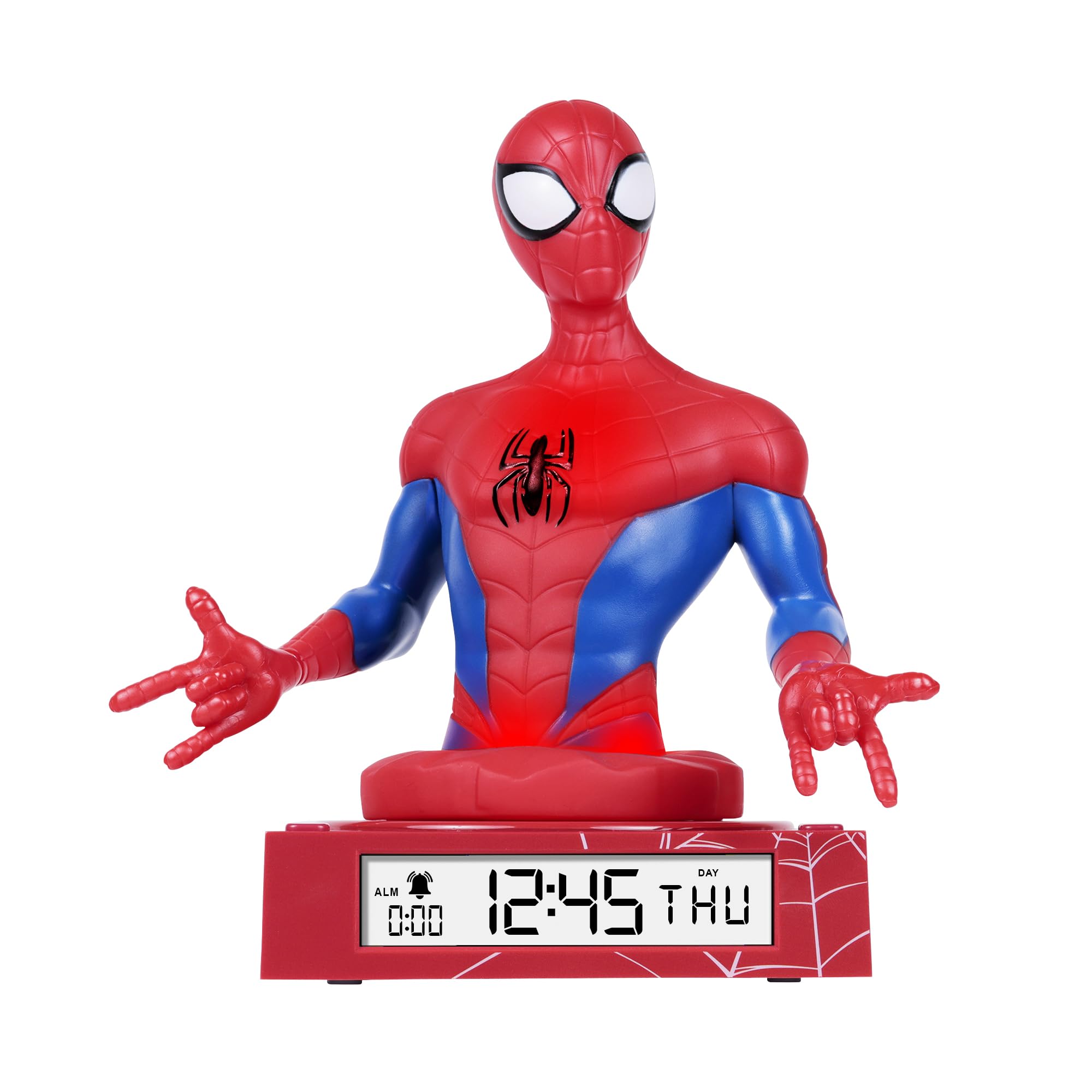
Figure 1: Spiderman 3D Digital Alarm Clock. The image displays the red and blue Spiderman figure on a red base, with the digital time '12:45 THU' visible on the LED display. The base also shows a spiderweb patró.
Instruccions de funcionament
The alarm clock features several buttons, typically located on the back or bottom of the unit, for setting time, date, and alarm functions. Refer to the labels on your specific unit for exact button identification.
Configuració de l'hora i la data
- Enter Time/Date Setting Mode: Manteniu premut el botó SET button (or similar, e.g., MODE) for a few seconds until the time display starts flashing.
- Ajustar horari: Utilitza el UP i ABAIX buttons (or similar, e.g., HOUR/MINUTE) to adjust the hour. Press SET de nou per confirmar i passar als minuts.
- Ajusta els minuts: Utilitza el UP i ABAIX botons per ajustar els minuts. Premeu SET again to confirm and move to date settings (Year, Month, Day).
- Ajustar data: Follow the same procedure using UP/ABAIX i SET buttons to set the Year, Month, and Day.
- Sortir del mode de configuració: Després de configurar el dia, premeu SET one last time, or wait a few seconds for the display to stop flashing automatically.
Configuració de l'Alarma
- Entra al mode de configuració de l'alarma: Premeu el botó CONJUNT D'ALARMES button (or similar, e.g., ALM) once. The alarm time will be displayed, and the hour digits may flash.
- Adjust Alarm Hours: Utilitza el UP i ABAIX buttons to set the desired alarm hour. Press CONJUNT D'ALARMES to confirm and move to minutes.
- Adjust Alarm Minutes: Utilitza el UP i ABAIX buttons to set the desired alarm minutes. Press CONJUNT D'ALARMES per confirmar.
- Activa / desactiva l'alarma: After setting the alarm time, there may be a separate switch or button (e.g., ALARM ON/OFF) to enable or disable the alarm. A bell icon on the display usually indicates the alarm is active.
- Funció de posposar: Quan soni l'alarma, premeu la tecla DORMITAR button (if available, often a large button on top) will temporarily silence the alarm for a few minutes.
- Atura l'alarma: Per aturar l'alarma completament, premeu qualsevol altre botó (per exemple, ALARMA DESACTIVADA or SET). The alarm will reset for the next day.
Ús de la llum nocturna
The Spiderman figure on the alarm clock functions as a nightlight. There is typically a dedicated button or switch to control this feature.
- Turn On/Off Nightlight: Premeu el botó LLUM DE NIT button (or similar, e.g., LIGHT) to turn the nightlight on or off.
- The nightlight provides a soft glow, helping children feel secure in the dark.
Manteniment
- Neteja: Wipe the surface of the alarm clock with a soft, dry cloth. Do not use abrasive cleaners or solvents, as these may damage the finish.
- Substitució de la bateria: When the display dims or the functions become erratic, it is time to replace the batteries. Follow the battery installation steps in the "Setup" section.
Resolució de problemes
| Problema | Causa possible | Solució |
|---|---|---|
| La pantalla està en blanc o tènue. | Les piles estan baixes o instal·lades incorrectament. | Substituïu les piles per unes de noves, assegurant la polaritat correcta. |
| L'alarma no sona. | L'alarma no està activada o està configurada incorrectament. | Ensure the alarm is set and activated (check for bell icon on display). Verify alarm time. |
| Nightlight is not working. | Nightlight function is off or batteries are low. | Press the NIGHTLIGHT button to turn it on. Replace batteries if necessary. |
| L'hora és incorrecta. | Time was not set correctly or batteries were removed. | Reset the time and date following the operating instructions. |
Especificacions
- Marca: Disney
- Número de model: SPD3621
- Tipus de visualització: LED digital
- Característiques especials: Alarm, 3D Spiderman Design, Nightlight Mode
- Font d'alimentació: Funciona amb piles (piles no incloses)
- Dimensions: Approximately 20 cm (L) x 17 cm (H)
- Material: Plàstic
- Color: Vermell
Garantia i Suport
This product comes with a one-year warranty from the date of purchase. This warranty covers manufacturing defects under normal use. It does not cover damage caused by misuse, accidents, unauthorized modifications, or normal wear and tear.
For warranty claims or technical support, please contact the retailer where the product was purchased. Please retain your proof of purchase for warranty validation.


