1. Introducció
The SriHome NVS010 WiFi Surveillance Kit is a comprehensive security system designed to provide reliable monitoring for your property. This kit includes 5MP IP cameras and a 10.1-inch monitor, ensuring clear and detailed surveillance. Key features include night vision, motion detection, and remote viewing via WiFi, offering continuous and convenient security.
Característiques principals:
- Multi-Camera Surveillance: Manage up to 8 wireless 5-megapixel cameras simultaneously on the integrated monitor.
- Emmagatzematge local: Supports an internal 2.5-inch hard drive up to 16TB for recording and playback.
- Connectivitat flexible: Connect the system to an external monitor via HDMI, VGA, or MIPI.
- Àudio bidireccional: Communicate with individuals near the cameras using the integrated microphone and speaker.
- Emmagatzematge al núvol: Utilize the Srihome Cloud platform for remote image access and system configuration.
- Disseny versàtil: Customizable with the option to use your own LCD monitor.
2. Contingut del paquet
Si us plau, verifiqueu que tots els articles que s'enumeren a continuació s'inclouen al vostre paquet. Si falta algun article o hi ha algun malmès, poseu-vos en contacte amb l'atenció al client.

Image: Components included in the SriHome NVS010 Surveillance Kit package.
- 1 x 8CH WiFi NVR (with 10.1-inch monitor)
- 4/6/8 x WiFi Cameras (quantity may vary based on kit purchased)
- 1 x Guia ràpida
- 1 x NVR Power Adapter
- 4/6/8 x Camera Power Adapters (quantity may vary based on kit purchased)
- 1 cable LAN
- 1 x ratolí USB
- 1 x HDD Screw Set
- 4/6/8 x Mounting Screws (quantity may vary based on kit purchased)
- 1 x Pin de restabliment
3. Configuració
3.1 NVR (Network Video Recorder) Setup
The NVR unit features a built-in 10.1-inch touch LCD display for direct viewing and control. It also includes various ports for external connections.
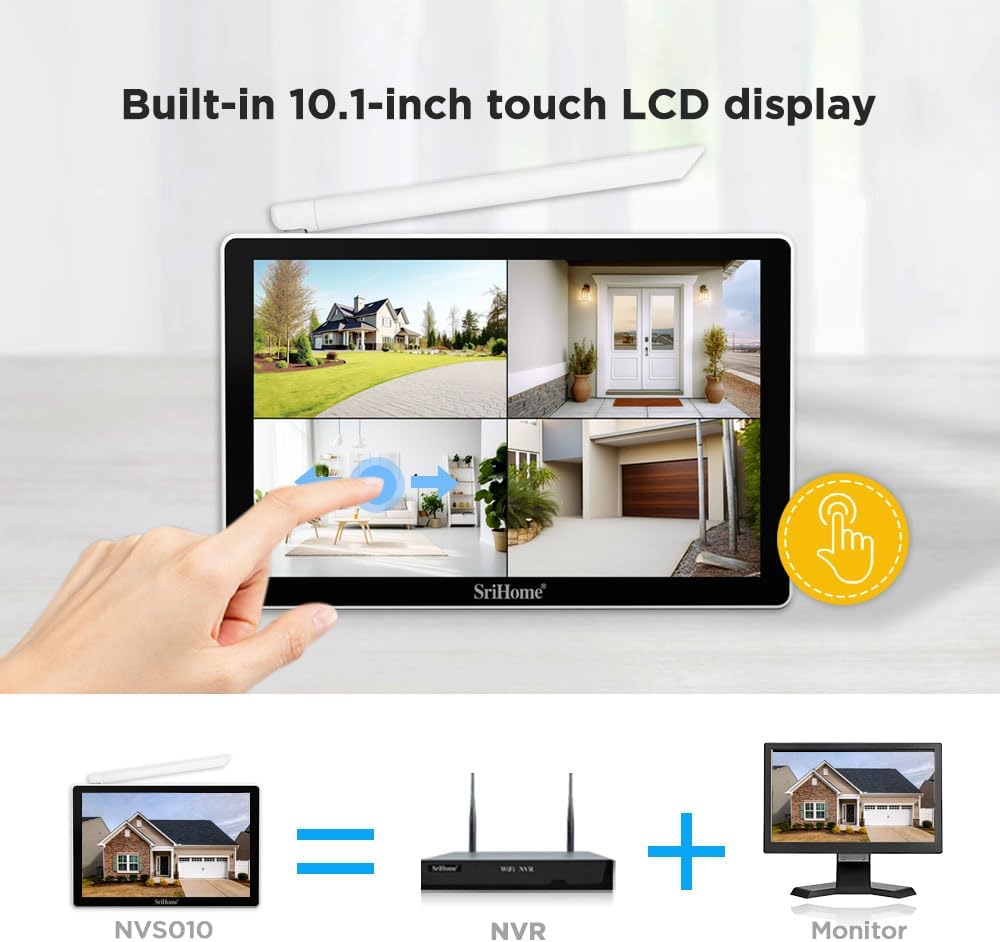
Image: The NVR unit with its integrated 10.1-inch touch display and the option to connect to an external monitor.

Imatge: Detallada view of the NVR ports including Audio Output, HDMI, VGA, LAN, USB, and 12V Power.
- Connexió d'alimentació: Connect the NVR power adapter to the 12V Power Port and plug it into an electrical outlet.
- Instal·lació del disc dur (opcional): If you wish to use local storage, install a 2.5-inch HDD (up to 16TB) into the designated slot on the NVR. Use the provided HDD screws to secure it.
- External Monitor (Optional): For a larger display, connect an external monitor to the NVR using an HDMI or VGA cable.
- Connexió de xarxa: For remote access and updates, connect the NVR to your router using the provided LAN cable.
- Ratolí USB: Connect the USB mouse to a USB port on the NVR for easier navigation and control.
3.2 Instal·lació de la càmera
The cameras are designed for outdoor use with IP66 waterproof and dustproof rating.

Image: The camera's IP66 waterproof rating ensures durability in various weather conditions, from sunny to snowy.
- Lloc de muntatge: Choose strategic locations for your cameras, ensuring good coverage and a stable mounting surface. Use the provided screws and anchors.
- Connexió d'alimentació: Connect each camera to its respective power adapter and plug it into an electrical outlet.
- Connexió sense fil: The cameras will automatically attempt to connect to the NVR wirelessly. Ensure the NVR is powered on and within range.
- Extending WiFi Distance: If a camera has a poor signal, consider using the wireless bridge function to extend the WiFi range. In open environments, the WiFi connection can reach up to 60 meters. In environments with partitions, the range is typically 30-40 meters.

Image: Illustration of how the wireless bridge function extends the WiFi signal range for cameras, showing varying distances through walls and in open spaces.
4. Instruccions de funcionament
4.1 Viu View i la reproducció
Once the NVR and cameras are powered on and connected, you can view viu footage on the 10.1-inch monitor or an external display. Use the USB mouse to navigate the NVR interface for live view, playback, and system settings.
4.2 Pan & Tilt Rotation
Some camera models support Pan & Tilt rotation, allowing you to adjust the camera's viewangle remot.

Image: Demonstrates the Pan (345°) and Tilt (90°) rotation capabilities of the camera, controllable via a smartphone app.
4.3 Modes de visió nocturna
The cameras offer multiple night vision modes for optimal surveillance in low-light conditions.

Image: Comparison of Day Vision, Infrared Night Vision (black and white), and Full Color Night Vision, which activates when a human figure alarm is triggered at night.
- Day Vision: Color estàndard view durant les hores de llum.
- Visió nocturna per infrarojos: Automatically switches to black and white mode in low light, using infrared LEDs.
- Visió nocturna a tot color: When a human figure alarm is triggered at night, the white light on the camera will turn on, providing a full-color night view.
4.4 Àudio bidireccional
Utilize the built-in microphone and speaker on the cameras to communicate with visitors or deter intruders.
4.5 Remot Viewing (App Download)
Access your surveillance system remotely using the SriHome app on your smartphone or tablet. The app allows multi-user viewing.

Image: Instructions for downloading the SriHome app using QR codes for Android and iOS, and an illustration of multiple users accessing the system.
- Download the SriHome app from the Google Play Store for Android devices or the Apple App Store per a dispositius iOS.
- Follow the in-app instructions to add your NVR and cameras.
4.6 Emmagatzematge al núvol
The system supports cloud storage via the Srihome Cloud platform. Refer to the app or NVR settings for configuration details.
5. Manteniment
Un manteniment regular garanteix un rendiment òptim i una llarga durada del vostre sistema de vigilància.
- Neteja: Gently wipe camera lenses and the NVR screen with a soft, dry cloth. Avoid abrasive cleaners.
- Actualitzacions de firmware: Periodically check for firmware updates for the NVR and cameras through the SriHome app or NVR settings to ensure the latest features and security patches.
- Inspecció del cable: Inspect all power and network cables for any signs of wear or damage.
- Gestió del disc dur: If using local storage, regularly check the hard drive status and ensure sufficient space. The NVR supports up to 16TB.
Image: Reference table for NVR kit hard disk recording time based on HDD capacity (500GB, 1TB) and NVR channel count (4CH, 8CH).
6. Solució De Problemes
Si teniu problemes, consulteu els passos habituals següents per a la resolució de problemes:
- Sense imatge a la pantalla: Ensure the NVR is powered on and connected correctly. If using an external monitor, check HDMI/VGA cable connections and monitor input selection.
- Cameras Not Connecting: Verify cameras are powered on and within WiFi range of the NVR. If signal is weak, consider repositioning or using the wireless bridge function.
- Problemes d'accés remot: Ensure the NVR is connected to the internet via LAN cable. Check your router settings and firewall. Verify the SriHome app is updated and correctly configured.
- Problemes de gravació: Check if a hard drive is installed and properly formatted. Ensure there is sufficient storage space.
- Mala visió nocturna: Ensure camera lenses are clean and free from obstructions. Check if infrared LEDs are functioning.
For more complex issues, consult the full user manual available on the manufacturer's weblloc o contacteu amb el servei d'atenció al client.
7. Especificacions
| Característica | Especificació |
|---|---|
| Marca | OBA (SriHome) |
| Número de model | NVS010 SriHome |
| Dimensions del producte | 25 x 25 x 20 cm; 3.27 quilograms |
| Font d'alimentació | Cable elèctric |
| Tecnologia de connectivitat | Sense fil |
| Resolució de gravació de vídeo | 2592x1944 (5MP) |
| Característiques especials | Two-way audio, Motion Detection, Night Vision |
| Nombre de canals | 4 (admet fins a 8 càmeres) |
| Capacitat d'emmagatzematge de memòria | 16 TB (HDD not included) |
| Components inclosos | Complete Kit (NVR, Cameras, Adapters, Cables, Mouse, Screws) |
| Dispositius compatibles | Càmeres sense fils |
8. Garantia i Suport
For warranty information, please refer to the documentation provided with your purchase or contact the retailer. The manufacturer, OBA (SriHome), typically offers support for their products.
- Model de producte: NVS010 SriHome
- Fabricant: OBA
- Recursos en línia: Visit the official SriHome website for additional support, FAQs, and updated manuals.
- Atenció al client: If you require technical assistance or have questions regarding your product, please contact the seller or manufacturer's customer support channels.


