Benvingut
Thank you for choosing the BYTECH BICONIC True Wireless Earbuds. This manual provides essential information on how to set up, operate, maintain, and troubleshoot your new earbuds. Please read this manual thoroughly before use to ensure optimal performance and longevity of your device.
Instruccions importants de seguretat
- No exposeu els auriculars ni l'estoig de càrrega a temperatures extremes, humitat o líquids.
- Eviteu deixar caure, colpejar o desmuntar el dispositiu.
- Do not use abrasive cleaners or harsh chemicals to clean the earbuds or case.
- Escolteu a nivells de volum moderats per evitar danys auditius. L'exposició prolongada a sons forts pot causar una pèrdua auditiva irreversible.
- Mantenir fora de l'abast dels nens i mascotes.
- Dispose of the device responsibly according to local regulations. Do not dispose of with household waste.
Què s'inclou
Si us plau, comproveu el contingut del paquet per assegurar-vos que hi hagi tots els elements:
- BYTECH BICONIC True Wireless Earbuds (Left and Right)
- Estoig de càrrega
- Cable de càrrega
- Manual d'usuari
Producte acabatview
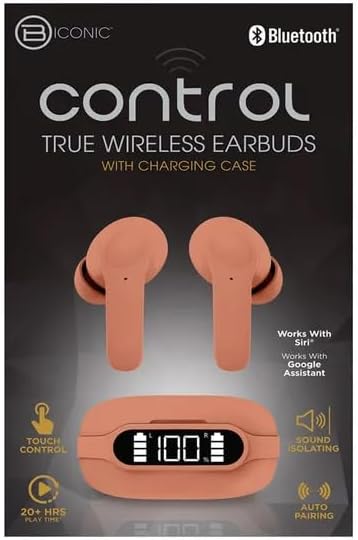
Familiarize yourself with the components of your BYTECH BICONIC True Wireless Earbuds.

Primers passos
Càrrega dels auriculars i la funda
The BYTECH BICONIC earbuds come with a rechargeable battery in both the earbuds and the charging case. Ensure both are fully charged before first use.
- Col·loca els auriculars a l'estoig de càrrega, assegurant-te que estiguin correctament col·locats a les seves ranures respectives (E per a l'esquerra, R per a la dreta).
- Connect the provided charging cable to the charging port on the case and the other end to a USB power source (e.g., computer USB port, wall adapter).
- The digital display on the charging case will show the battery level. Allow sufficient time for a full charge.
- Un cop estigui completament carregat, desconnecteu el cable de càrrega.
Emparellament Bluetooth
Follow these steps to pair your earbuds with your Bluetooth-enabled device:
- Assegureu-vos que els auriculars estiguin carregats i dins de l'estoig de càrrega.
- Open the charging case. The earbuds will automatically enter pairing mode, and an indicator light on the earbuds will flash.
- On your device (smartphone, tablet, etc.), go to the Bluetooth settings and turn Bluetooth on.
- Cerca available devices. You should see "BYTECH BICONIC" or a similar name appear in the list.
- Select "BYTECH BICONIC" to connect. Once connected, a voice prompt will confirm the successful pairing, and the indicator lights on the earbuds will stop flashing.
- Els auriculars es tornaran a connectar automàticament a l'últim dispositiu emparellat quan es treguin de l'estoig, sempre que el Bluetooth estigui activat al dispositiu.
Instruccions de funcionament
Controls tàctils
The BYTECH BICONIC earbuds feature intuitive touch controls for easy management of your audio and calls.
| Acció | Funció |
|---|---|
| Toc únic (auricular esquerre/dret) | Reproduir / Pausar música, Respondre / Finalitzar trucada |
| Doble toc (auricular dret) | Pista següent |
| Doble toc (auricular esquerre) | Pista anterior |
| Triple toc (auricular esquerre/dret) | Activa l'assistent de veu (Siri/Assistent de Google) |
| Premda llarga (auricular esquerre/dret) | Rebutja la trucada |
Encès i apagat
- Encès: Els auriculars s'encendran automàticament quan es treguin de la funda de càrrega.
- Apagar: Torneu a col·locar els auriculars a l'estoig de càrrega i tanqueu la tapa. S'apagaran automàticament i començaran a carregar-se.
Manteniment i cura
Proper care will extend the life of your BYTECH BICONIC True Wireless Earbuds.
- Neteja: Use a soft, dry, lint-free cloth to clean the earbuds and charging case. Do not use liquids or aerosol cleaners.
- Emmagatzematge: Quan no els utilitzeu, guardeu sempre els auriculars a la seva funda de càrrega per protegir-los i mantenir-los carregats.
- Eviteu condicions extremes: Do not expose the device to extreme heat, cold, or direct sunlight.
- Resistència a l'aigua: These earbuds are not waterproof. Avoid contact with water or excessive moisture.
Resolució de problemes
If you encounter any issues with your earbuds, refer to the following common solutions:
| Problema | Solució |
|---|---|
| Els auriculars no s'aparellen | Assegura't que els auriculars estiguin carregats. Desactiva i activa el Bluetooth al dispositiu. Oblida't del dispositiu a la configuració del Bluetooth i torna a emparellar-lo. |
| Només funciona un auricular | Place both earbuds back into the charging case, close the lid, wait a few seconds, then take them out again. Ensure both are charged. |
| Sense so | Check volume levels on both your device and the earbuds. Ensure earbuds are properly connected. Try playing different audio. |
| La funda de càrrega no es carrega | Ensure the charging cable is securely connected to both the case and the power source. Try a different USB port or power adapter. |
Especificacions tècniques
Detailed specifications for your BYTECH BICONIC True Wireless Earbuds:
| Característica | Detall |
|---|---|
| Número de model | BC-AU-BE-144-TN |
| Tecnologia de connectivitat | Sense fil (Bluetooth) |
| Factor de forma | Intraurals (Intraurals) |
| Color | Cafè |
| Característiques especials | Rechargeable Battery, Touch Control, Sound Isolating, Auto Pairing |
| Components inclosos | Cable |
| Temps de joc estimat | Més de 20 hores (amb estoig de càrrega) |
Informació sobre la garantia i assistència al client
BYTECH products are designed and manufactured to the highest quality standards. For information regarding warranty coverage, please refer to the warranty card included with your purchase or visit the official BYTECH weblloc.
If you require further assistance or have questions not covered in this manual, please contact BYTECH customer support through their official channels. Please have your model number (BC-AU-BE-144-TN) and purchase details ready when contacting support.


