1. Producte acabatview
The XTRONS QLB149 is a 14.9-inch Android 14 car stereo designed to upgrade the in-car entertainment system for specific BMW models. It features a 2K IPS touch screen, global 4G LTE connectivity, wireless CarPlay, and Android Auto support, while retaining original vehicle functions.

Image 1.1: The XTRONS QLB149 unit showcasing its 14.9-inch 2K IPS screen, Octa-Core processor, 4GB RAM, 64GB ROM, Global 4G LTE, and support for 360 camera.
Característiques principals:
- 14.9-inch 2K IPS Screen: Fully-laminated, ultra-slim design with a 2560x720 resolution for vibrant colors and sharp clarity.
- 4G LTE global: Supports Micro-SIM cards for mobile broadband connection with download speeds up to 300Mbps.
- CarPlay sense fil i Android Auto: Seamless integration with iPhone (wireless Bluetooth) and Android phones (wireless Bluetooth or wired USB) for GPS, calls, music, and voice assistants.
- Android 14 with Octa-Core Processor: Equipped with 4GB RAM and 64GB ROM for responsive performance and ample storage for applications.
- iDrive System Retention: Maintains full functionality of the original iDrive system for comprehensive control and navigation.
2. Contingut del paquet
Verifiqueu que tots els components siguin presents al paquet abans de continuar amb la instal·lació.
- 1 x Arnès de cablejat ISO
- 1 x cable USB
- 1 x Mini micròfon
- 1 x Antena GPS
- 1 x antena 4G
- 1 ranura per a targeta SIM 4G
- 1 minialtaveu
- 1 x Manual d'usuari
- 1 x cable d'àudio
- 1 x Instrucció d'instal·lació

Image 2.1: All accessories included with the XTRONS QLB149 unit, such as wiring harnesses, antennas, and cables.
3. Configuració i instal·lació
3.1 Compatibilitat del vehicle
This unit is specifically designed for BMW X5 F15 and X6 F16 models manufactured between 2014 and 2017, and is ONLY compatible with vehicles equipped with the NBT system.
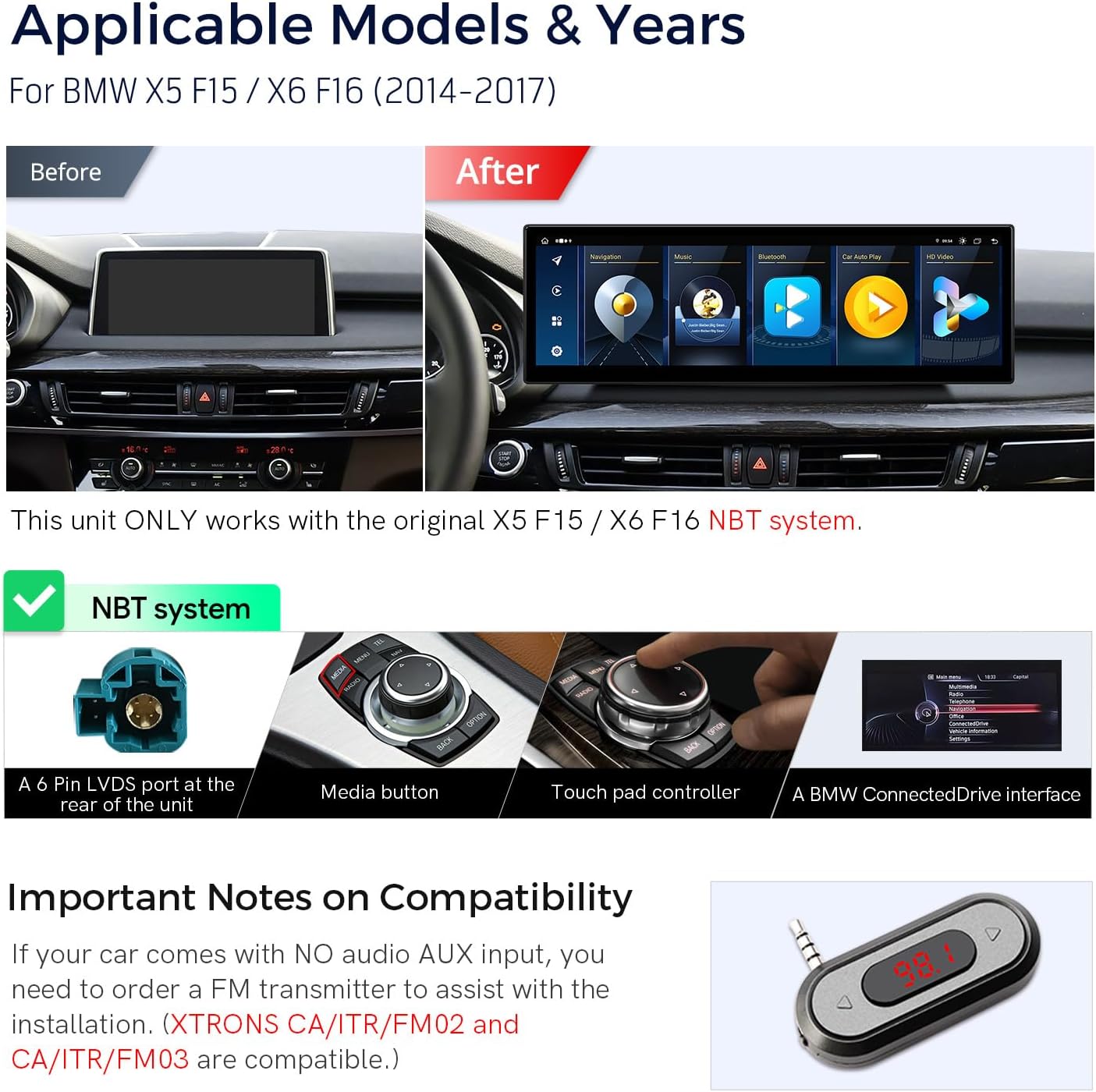
Image 3.1: Visual comparison of the dashboard before and after installing the XTRONS unit, confirming compatibility with BMW X5 F15 / X6 F16 NBT systems.
3.2 How to Check Your Original System
It is crucial to verify your car's original system (NBT, CIC, CCC, or NBT EVO) before installation. Refer to the following visual guide:

Image 3.2: Detailed guide for identifying your BMW's original system type (NBT, CIC, CCC, NBT EVO) by checking the LVDS port, iDrive controller buttons, and software interface.
3.3 Important Notes on Audio Compatibility
If your vehicle does not have an audio AUX input, an FM transmitter may be required for audio functionality. XTRONS CA/ITR/FM02 and CA/ITR/FM03 are compatible options. Ensure AUX is enabled in your car's settings to utilize the head unit's audio output.

Image 3.3: Information on using an FM transmitter if the vehicle lacks an AUX audio input.
3.4 Diagrama del cablejat
Refer to the following diagram for proper connection of the wiring harness and included components.

Image 3.4: Wiring diagram illustrating connections for LVDS, ISO harness, USB, microphone, antennas, and other inputs/outputs.
3.5 Guia d'instal·lació
Follow the provided installation instructions carefully. Professional installation is recommended.

Image 3.5: General installation guide showing the placement of the unit, GPS, and fiber optic connections.
4. Instruccions de funcionament
4.1 Interfície d'usuari i pantalla
The unit features a 14.9-inch 2K IPS touch screen with a 32:9 aspect ratio, supporting multi-task display and Picture-in-Picture (PIP) functionality. The user interface is designed for BMW enthusiasts, offering stylish themes and customization options.

Image 4.1: The main interface of the XTRONS unit, showing navigation, music, Bluetooth, Car Auto Play, and HD Video options.

Image 4.2: Visual representation of the screen's capabilities, including multi-tasking, Picture-in-Picture, and IPS touch functionality.
4.2 Connectivitat
The unit offers multiple connectivity options for seamless integration and internet access.
- 4G LTE global: Insert a Micro-SIM card (not included) into the dedicated slot to access 4G mobile broadband. Note: This supports internet data only, not phone calls.
- Wi-Fi de doble banda: Connect to Wi-Fi networks (2.4GHz and 5GHz) for internet access.
- Bluetooth 5.0: Supports hands-free calls, phone book sync, Bluetooth music streaming, and call history display.
- USB: Two built-in USB inputs are available for media playback and wired Android Auto connections.

Imatge 4.3: acabatview of internet access options, including Global 4G LTE via Micro-SIM and dual-band Wi-Fi.
4.3 CarPlay sense fil i Android Auto
Connect your smartphone wirelessly for an intuitive in-car experience.
- CarPlay sense fil: Compatible with iPhone via Bluetooth for navigation, calls, music, and Siri.
- Android Auto amb/sense fil: Connect Android phones via Bluetooth wirelessly or using a USB cable for similar functionalities and Google Assistant.
- Replica de pantalla: Wirelessly display your smartphone screen on the unit.

Image 4.4: Illustration of wireless smartphone integration features, including CarPlay, Android Auto, and voice control.
Video 4.1: Demonstration of the CarPlay function on the XTRONS QLB 14.9 Series unit, showing app navigation and responsiveness.
4.4 Navegació
The unit supports highly accurate GPS navigation with compatibility for GPS, BDS, and GLONASS systems. You can use pre-installed navigation apps or download your preferred mapping applications from the Android app store.
4.5 Original Car Functions Retained
The XTRONS unit seamlessly integrates with your BMW's existing systems, ensuring that original functionalities are preserved.
- iDrive System: Full control of the original iDrive system is retained.
- AmpSistema més viu: Original fiber optic sound system is retained.
- Original Radio & CD Player: Access to your car's original radio and CD player functions.
- Bluetooth: Es manté la funcionalitat original de Bluetooth.
- Pantalla de la càmera de marxa enrere: Supports the original backup camera display.
- Control del volant: Original steering wheel controls remain functional for audio and system navigation.
- Pantalla d'informació original del cotxe: Vehicle information such as speed, engine speed, remaining fuel, temperature, parking brake status, and seat belt reminders are displayed.
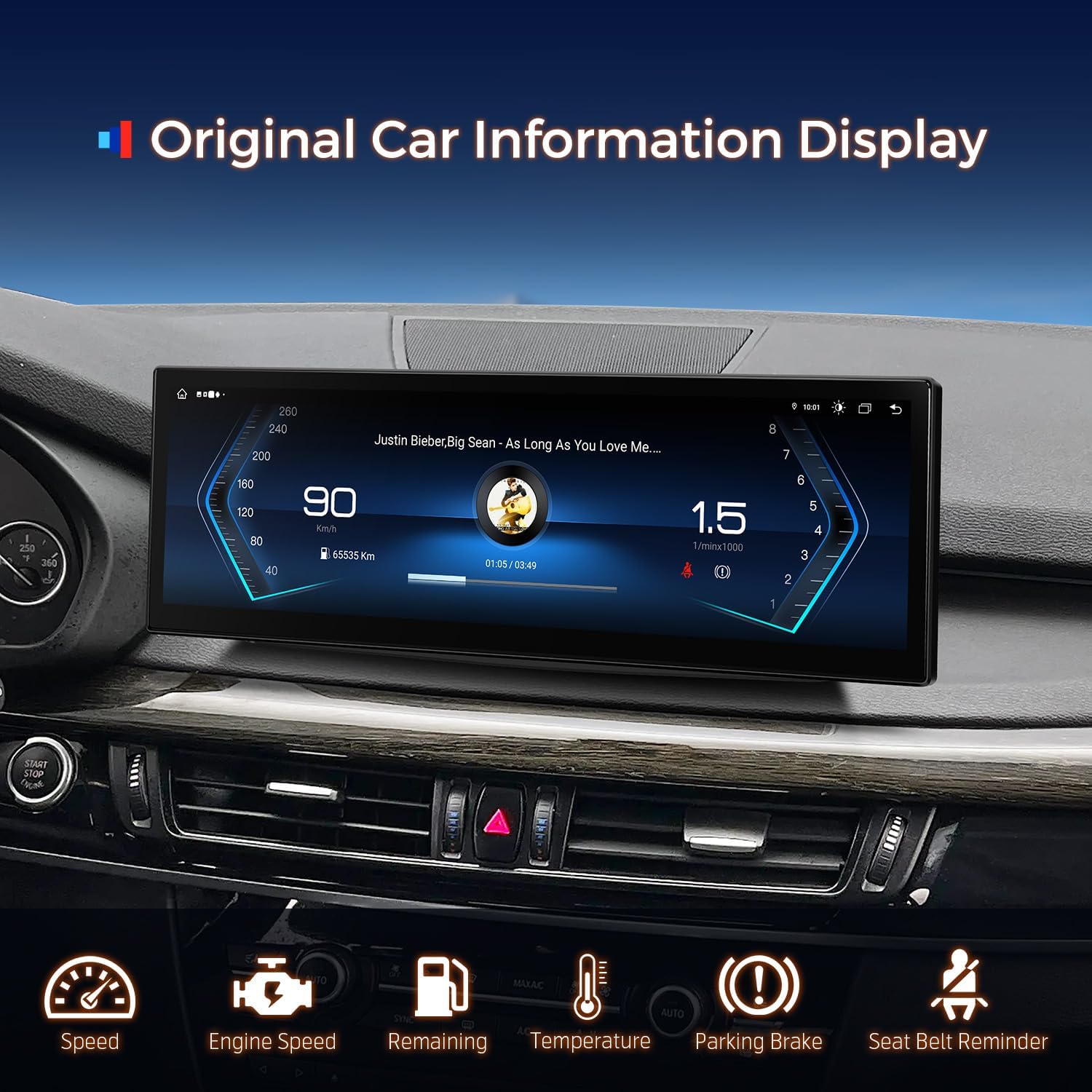
Image 4.5: The unit displaying original car information, such as speed, engine RPM, fuel level, and temperature.
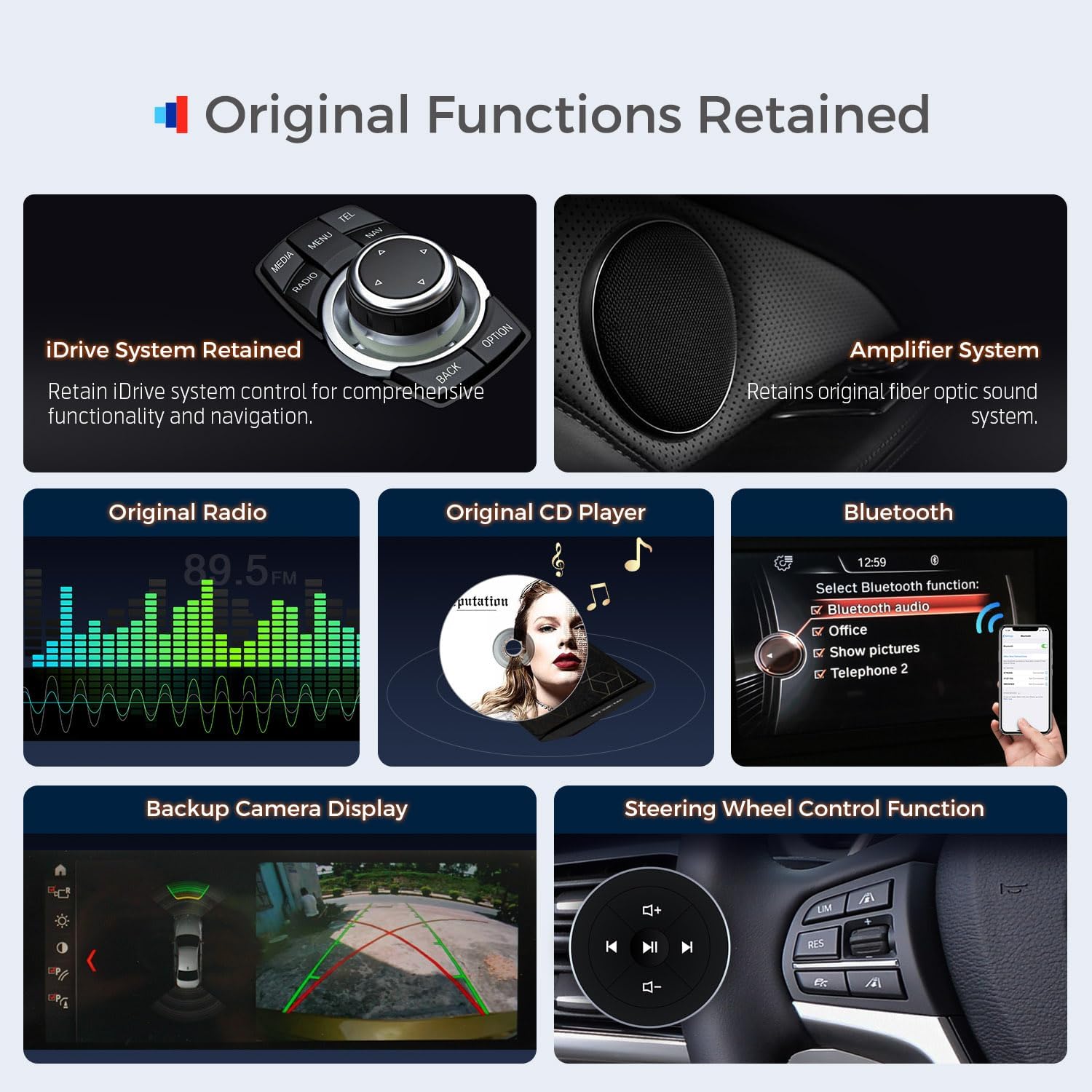
Image 4.6: Visual guide to the retained original functions, including iDrive system, amplifier, radio, CD player, Bluetooth, backup camera, and steering wheel controls.
5. Especificacions
| Característica | Detall |
|---|---|
| Model | QLB149 |
| Sistema operatiu | Android 14 |
| Processador | Octa-Core |
| RAM | 4 GB |
| ROM | 64 GB |
| Mida de la pantalla | 14.9 polzades |
| Tipus de visualització | 2K IPS Touch Screen |
| Connectivitat | Global 4G LTE, Bluetooth 5.0, USB, Wi-Fi (2.4GHz/5GHz) |
| Navegació | GPS, BDS, GLONASS (Worldwide Map Type) |
| Característiques especials | Wireless CarPlay, Wireless/Wired Android Auto, Screen Mirroring, Voice Command (Microphone, Touchscreen) |
| Tipus de muntatge | Muntatge al quadre de comandament |
| Dimensions del producte | 14.9 x 14.9 x 14.9 inches (Unit dimensions: 372mm x 122mm) |
| Pes de l'article | 5.94 lliures |
6. Manteniment
To ensure optimal performance and longevity of your XTRONS car stereo, follow these general maintenance guidelines:
- Neteja de pantalla: Feu servir un drap suau i sense borrissol per netejar suaument la pantalla. Per a taques difícils, fregueu lleugeramentampNetegeu el drap amb aigua o un netejador de pantalles. Eviteu productes químics agressius o materials abrasius.
- Actualitzacions de programari: Periodically check for and install available software updates to ensure the system runs efficiently and securely.
- Condicions ambientals: Eviteu exposar la unitat a temperatures extremes o a la llum solar directa durant períodes prolongats quan el vehicle estigui aparcat.
- Connexions de cable: Ensure all cables are securely connected and free from damage. Avoid pulling on cables forcefully.
7. Solució De Problemes
If you encounter issues with your XTRONS car stereo, consider the following basic troubleshooting steps:
- Sense energia: Check all power connections and ensure the vehicle's ignition is on. Verify fuses if necessary.
- Sense so: Confirm that the volume is not muted or set too low. Check audio cable connections and ensure the correct audio input source is selected (e.g., AUX). If using an FM transmitter, ensure it is correctly tuned.
- CarPlay/Android Auto no es connecta: Ensure Bluetooth is enabled on both the unit and your smartphone. For wired Android Auto, try a different USB cable. Restart both the unit and your phone.
- Problemes amb el senyal GPS: Assegureu-vos que l'antena GPS estigui instal·lada correctament i que tingui una vista clara view del cel.
- La pantalla tàctil no respon: Restart the unit. If the issue persists, a factory reset might be necessary (refer to the full user manual for instructions).
- Retard/Bloqueig del sistema: Close unnecessary applications. Clear cache or perform a system restart.
For more complex issues, refer to the detailed user manual included in your package or contact customer support.
8. Informació de la garantia
The XTRONS QLB149 car stereo comes with a 1 any de garantia del fabricant. Please retain your proof of purchase for warranty claims. For detailed terms and conditions, refer to the warranty documentation provided with your product.
9. Atenció al client
For any questions, technical assistance, or support regarding your XTRONS product, please contact the manufacturer directly. You can typically find contact information on the XTRONS official website or through the seller's page where the product was purchased.

Image 9.1: Guide on how to locate the 'Ask a question' feature on the seller's page for direct support.
You may also visit the official XTRONS store for additional resources and product information: Botiga XTRONS


