Introducció
Thank you for choosing the TREBLAB C7-Pro Wireless Bluetooth Headset. This manual provides detailed instructions for setting up, operating, and maintaining your headset to ensure optimal performance and longevity. Designed for clear communication and extended comfort, the C7-Pro is ideal for professional use, home office, calls, and gaming.
Què s'inclou
- TREBLAB C7-Pro Headphones
- Suport de càrrega
- USB / Type-C Charging Cable
- Manual d'usuari
- Guia d'inici ràpid
- Targeta de garantia
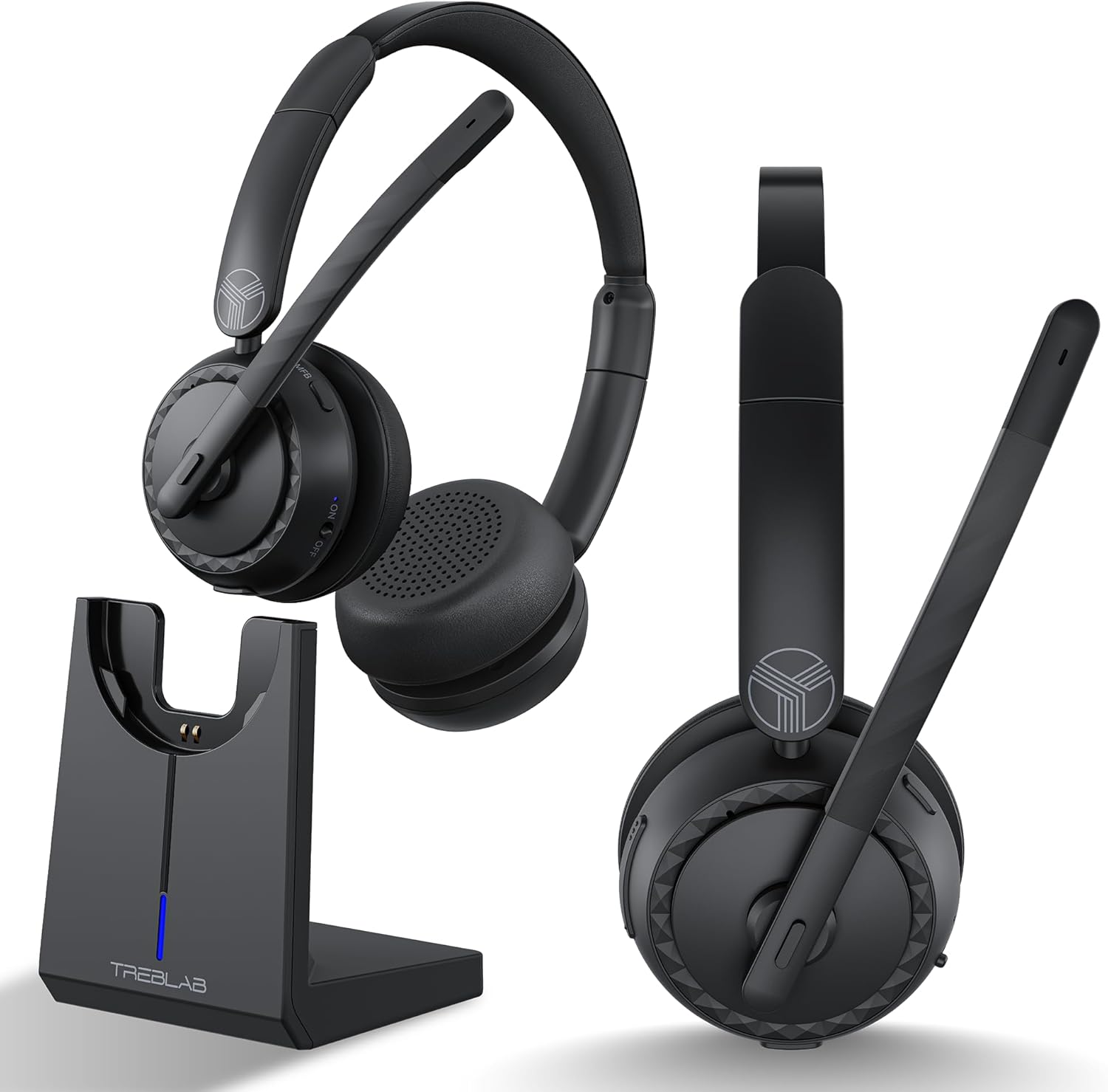
Producte acabatview
Headset Components and Features
The TREBLAB C7-Pro headset is designed for comfort and clear audio. It features plush memory foam cushions, an adjustable headband, and a flexible microphone boom with noise-cancelling capabilities.


Configuració
Càrrega dels auriculars
Before first use, fully charge your TREBLAB C7-Pro headset. The included magnetic charging stand provides a convenient way to charge and store your headset.
- Connect the USB Type-C charging cable to the charging stand and a power source (e.g., computer USB port, wall adapter).
- Place the TREBLAB C7-Pro headset onto the magnetic charging stand. Ensure the charging contacts align.
- The LED indicator on the stand will show charging status. A full charge takes approximately 2.5 hours.

Encès/Apagat
Per engegar: premeu i manteniu premut el botó d'engegada fins que l'indicador LED s'encengui.
Per apagar: premeu i manteniu premut el botó d'engegada fins que l'indicador LED s'apagui.
Emparellament Bluetooth
The TREBLAB C7-Pro uses Bluetooth 5.3 for stable wireless connectivity.
- Assegureu-vos que els auriculars estan apagats.
- Premeu i manteniu premut el botó d'engegada durant aproximadament 5 segons fins que l'indicador LED parpellegi en blau i vermell, cosa que indica el mode d'emparellament.
- On your device (smartphone, laptop, PC), enable Bluetooth and search for available devices.
- Select "TREBLAB C7-Pro" from the list of devices.
- Un cop connectat, l'indicador LED dels auriculars parpellejarà lentament en blau.

Instruccions de funcionament
Gestió de trucades
- Respondre/Finalitzar la trucada: Premeu el botó multifunció (MFB) una vegada.
- Rebutja la trucada: Manteniu premut el MFB durant 2 segons.
- Silenciar/activar el micròfon: Premeu el botó Silenciar al braç del micròfon.
Reproducció de música
- Reproduir/pausa: Premeu el MFB una vegada.
- Pista següent: Premeu i manteniu premut el botó de pujar el volum.
- Pista anterior: Manteniu premut el botó de baixar el volum.
Control de volum
- Augmenta el volum: Premeu el botó Pujar volum.
- Disminueix el volum: Premeu el botó per baixar el volum.
Mode de joc
The TREBLAB C7-Pro features a 65ms low-latency Gaming Mode for synchronized audio and visuals. To activate/deactivate Gaming Mode, please refer to the Quick Start Guide for specific button combinations.
Compatibilitat
The TREBLAB C7-Pro headset is widely compatible with various platforms and devices, including Zoom, Microsoft Teams, Skype, macOS, Windows, Android, and Apple devices.

Manteniment
Neteja
Regularly clean your headset to maintain hygiene and performance.
- Use a soft, dry, lint-free cloth to wipe the ear cushions and headband.
- Per a la brutícia persistent, lleugerament dampRenta el drap amb aigua. Evita utilitzar productes químics agressius o materials abrasius.
- Ensure no liquid enters the speaker grilles or microphone opening.
Emmagatzematge
When not in use, store the headset on its charging stand or in a cool, dry place away from direct sunlight and extreme temperatures.
Resolució de problemes
| Problema | Causa possible | Solució |
|---|---|---|
| Els auriculars no s'encén. | Bateria baixa. | Carregueu completament els auriculars. |
| No es pot emparellar amb el dispositiu. | Headset not in pairing mode; Device Bluetooth off; Too far from device. | Ensure headset is in pairing mode (flashing blue/red); Turn on Bluetooth on your device; Move headset closer to device (within 35 ft). |
| No hi ha so o hi ha mala qualitat de so. | Volum massa baix; Sortida d'àudio incorrecta seleccionada; Interferències. | Increase volume on headset and device; Select TREBLAB C7-Pro as audio output; Move away from other wireless devices. |
| El micròfon no funciona. | Microphone muted; Incorrect input device selected. | Unmute microphone; Select TREBLAB C7-Pro as audio input device in your system settings. |
Especificacions
| Característica | Detall |
|---|---|
| Nom del model | C7-Pro |
| Tecnologia de connectivitat | Sense fil (Bluetooth 5.3) |
| Interval Bluetooth | 10 metres (35 peus) |
| Mida del controlador d'àudio | 40 mil·límetres |
| Durada de la bateria | Fins a 45 hores |
| Temps de càrrega | 2.5 hores |
| Latència d'àudio | 65 mil·lisegons (mode de joc) |
| Sensibilitat del micròfon | -38 dB |
| Nivell de resistència a l'aigua | Resistent a l'aigua IPX4 |
| Pes de l'article | 185 grams (6.5 unces) |
| Material | Plàstic |
| Dispositius compatibles | Cellphones, Gaming Consoles, Telephones, Laptops, Desktops |
| Usos recomanats | Office Meetings, Calling, Gaming |
Garantia i Suport
For warranty information and technical support, please refer to the included Warranty Card or visit the official TREBLAB website. You can also contact TREBLAB customer service for assistance.
Official TREBLAB Store: TREBLAB Amazon Store


